How to Check Phone Is Original or Refurbished: 10 Proven Checks (2026)
Smartphones & Gadgets 13 min read By Harshvardhan Singh
In this articleTable of contents11
Last updated: 10 October 2026
Buying a phone during a festive sale, from a local shop or from an OLX seller is exciting, but there is always one doubt: is this phone really new and genuine? In India, refurbished phones are sometimes sold as "sealed pack", and fake clones of popular models still circulate. This guide shows you how to check phone is original or refurbished step by step. You will learn to verify the IMEI with *#06#, use the government's Sanchar Saathi KYM service, inspect the box and bill, and run brand-specific checks for Samsung, Xiaomi and iPhone.
Quick answer: To check if a phone is original or refurbished, dial *#06# to get the IMEI, match it with the box, bill and Settings, then verify it on Sanchar Saathi KYM (SMS "KYM
" to 14422). On iPhone, a model number starting with "F" means Apple-refurbished. Also check warranty start date, battery health and parts history.
Original vs refurbished vs fake: what is the difference?
These three words get mixed up a lot, so let us define them first.
- Original (new): A brand-new phone made by the brand, sold for the first time, with full manufacturer warranty starting from your purchase or activation date.
- Refurbished: A genuine phone that was returned, repaired or used, then cleaned, tested and resold. Brand-certified refurbished phones (for example, Apple Certified Refurbished in some countries) are legitimate products. The problem is when a refurbished phone is sold to you as new at the full new price.
- Fake or clone: A copy made to look like a popular model. It may run a modified Android skin designed to mimic iOS or One UI, and often has a duplicate or invalid IMEI.
- Grey market / imported: A genuine phone meant for another country. It may not carry an Indian warranty and might lack support for some Indian network bands.
Refurbished is not bad by itself. It is fine if you know what you are paying for, get a proper warranty and a lower price. This guide helps you make sure you are not being misled.
How to check phone is original or refurbished: 10 checks
Work through these checks in order. The first five take less than five minutes and need no apps.
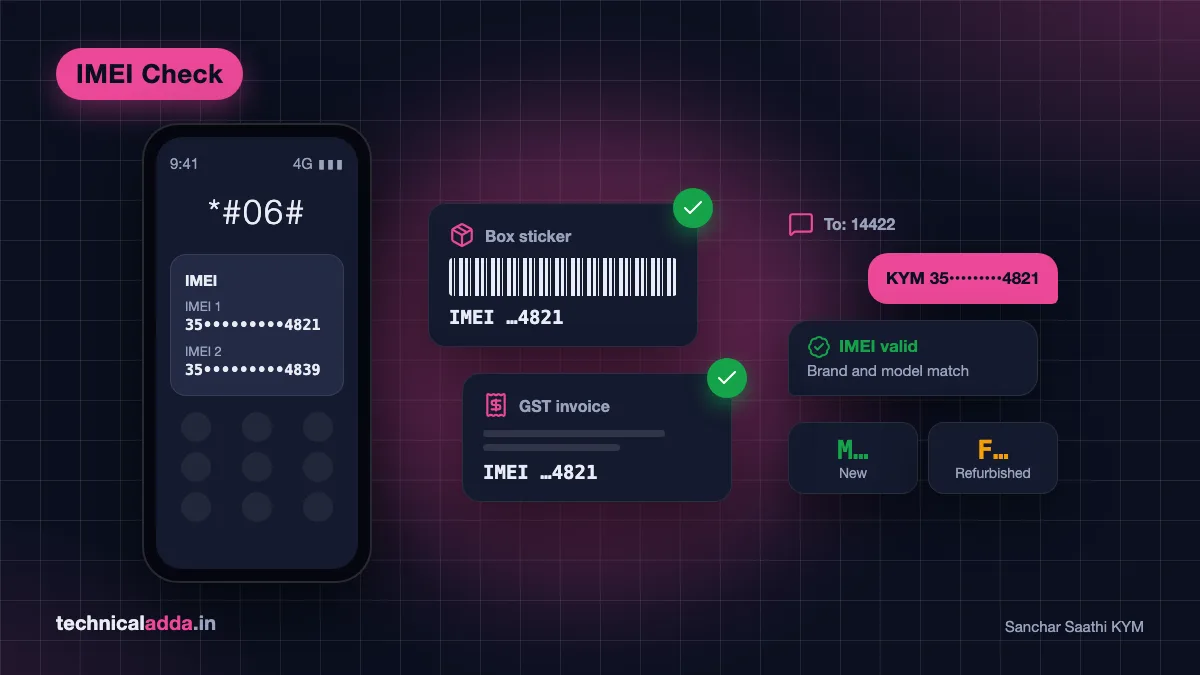
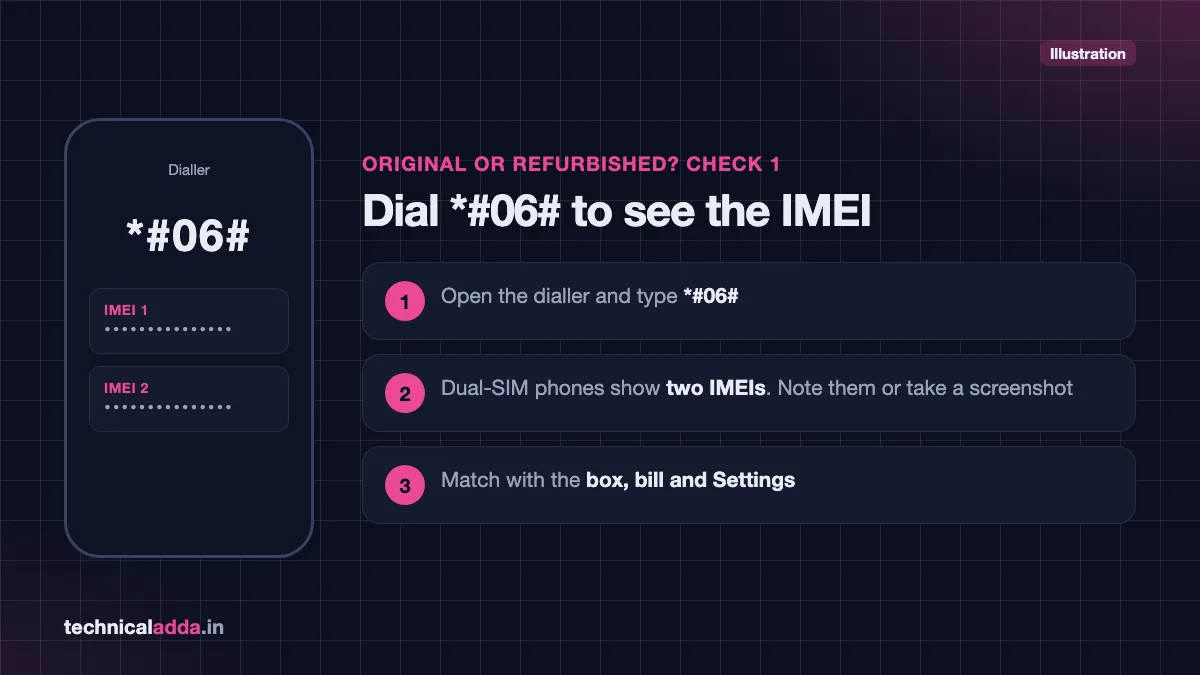
- *Dial #06#. This universal code shows the phone's IMEI number(s). Dual-SIM phones show two IMEIs. Note them down or take a screenshot.
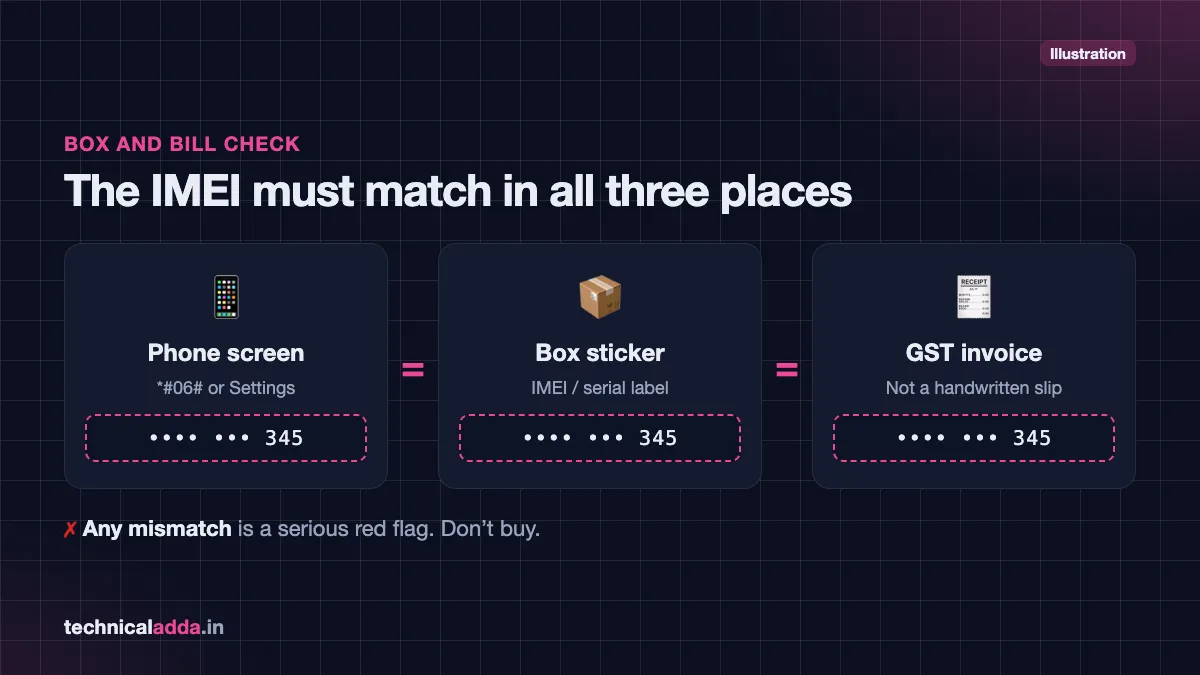
- Match IMEI in three places. The IMEI on screen should match the IMEI printed on the box sticker and on the bill/invoice. On iPhone, also check Settings > General > About. Any mismatch is a serious red flag.
- Verify the IMEI with Sanchar Saathi KYM. Send an SMS or use the portal/app to confirm the handset's brand and model match what you are holding (details below).
- Check the warranty status on the brand's website. Enter the IMEI or serial number on the official warranty check page. A "new" phone should show warranty that has not started or starts from your purchase date. If warranty started months ago, the phone was activated before.
- Inspect the box, seal and accessories. Check print quality, spelling, seals and whether accessories match the brand's official box contents.
- Look at the phone's physical condition. Check for fine scratches on the frame, worn charging port, slightly loose buttons, screen with uneven gaps or a different tint. These are signs of prior use or repair.
- Check battery health. A brand-new phone should show battery health close to 100%. Low battery health points to a used phone.
- Check for replaced parts. iPhone shows parts and service history. On Android, the brand service centre can check repair records.
- Run a hardware test. Use the brand's built-in diagnostic tools (Samsung Members, Xiaomi CIT menu) to test the screen, sensors, speakers and cameras.
- Check software authenticity. Look for genuine brand software, the correct Android or iOS version and official app store access. Clone phones often show odd fonts, laggy animations and fake "About phone" details.
Check IMEI on Sanchar Saathi KYM
The Department of Telecommunications (DoT) runs the Sanchar Saathi portal. Its Know Your Mobile (KYM) service tells you whether a handset's IMEI is genuine and whether it has been blacklisted, for example after being reported lost or stolen through CEIR.
You can use KYM in three ways.
Method 1: SMS (works on any phone)
- Open your messaging app.
- Type
KYM <15-digit IMEI>— for example,KYM 123456789012345. - Send it to 14422.
- You will receive an SMS with the IMEI status and, for valid IMEIs, the brand and model linked to it.
Method 2: Sanchar Saathi website
- Visit the official Sanchar Saathi KYM page (opens in new tab).
- Enter your mobile number and the OTP you receive.
- Enter the 15-digit IMEI and submit.
- Read the status and device details shown.
Method 3: Sanchar Saathi app
The Sanchar Saathi mobile app is available on Google Play and the Apple App Store. It offers KYM along with other services like blocking a lost phone and checking mobile connections in your name. Download it only from the official app stores.
How to read the KYM result
| KYM result | What it means | Should you buy? |
|---|---|---|
| Valid, brand/model matches your phone | IMEI is genuine and registered | Yes, continue other checks |
| Valid, but brand/model does not match | IMEI may be copied from another phone | No – likely fake or tampered |
| Blacklisted | Reported lost/stolen or blocked | No – it may stop working on Indian networks |
| Duplicate | Same IMEI used by multiple devices | No – likely counterfeit |
| Invalid / not found | IMEI not in database | Avoid unless the brand confirms it |
The exact wording of the KYM reply can differ from the labels above. As a rule, do not buy a handset if the reply shows it as blacklisted, duplicate or invalid, or if the brand and model do not match the phone in your hand. The Sanchar Saathi portal also notes that phones with invalid or all-zero IMEIs are not allowed on Indian telecom networks.
Box and bill checks
Many refurbished phones are re-boxed in good-looking but non-original packaging. Spend two minutes on these checks before you pay.
Box checks
- IMEI sticker: The IMEI and serial number on the box sticker must match *#06#. Look at the sticker closely; a re-printed sticker may have blurry text or sit slightly crooked over an older sticker.
- Seal: Brands use specific seal designs. A torn, re-glued or generic transparent wrap is suspicious.
- Print quality: Look for spelling mistakes, blurred logos or wrong model names.
- Manufacturing date: The box usually shows a month and year of manufacture. A "new" phone made two years ago is not automatically fake, but ask why it was unsold.
- Contents: Compare the accessories with what the brand lists on its official site for that model. Many phones no longer include a charger, so a "free charger" can sometimes be a sign the box was repacked.
- Importer details: Phones sold officially in India mention the importer or manufacturer's Indian address and a customer care number.
Bill / invoice checks
- Insist on a GST tax invoice, not a handwritten slip or estimate.
- The invoice should show the IMEI, model, colour, storage, price and the seller's GSTIN.
- For online orders, download the invoice from your Amazon, Flipkart or brand store account and match the IMEI.
- For second-hand phones, ask for the original purchase bill in the seller's name. A genuine owner usually has it in their email or e-commerce account.
Settings checks for Samsung, Xiaomi and iPhone
Every brand hides useful information in its settings. Here is what to check on the three most popular brands in India.
Samsung
- About phone: Go to Settings > About phone and confirm model number, IMEI and serial number match the box.
- Status information: Settings > About phone > Status information shows IMEI and other details.
- Diagnostics: Open the Samsung Members app > Support > Phone diagnostics and run all tests (touch screen, sensors, speakers, cameras, battery).
- Battery status: Samsung Members diagnostics also shows a battery status rating. A new phone should show "Normal" or "Good".
- Hidden test menu: Many Samsung phones open a hardware test screen when you dial
*#0*#, where you can test display colours and touch. Samsung does not officially document this code, so it may not open on every model or software version; if it does not work, use Phone diagnostics in the Samsung Members app instead. - Warranty: Check your phone's warranty status in Samsung Members or on Samsung India's support site.
Xiaomi, Redmi and POCO
- About phone: Settings > About phone shows the model and HyperOS version. Tap Detailed info and specs for full details.
- CIT hardware test: Go to Settings > About phone > Detailed info and specs and tap Kernel version five times, or dial
*#*#6484#*#*, to open the CIT test menu on most HyperOS phones. Test each component one by one. - Warranty check: Sign in to the Xiaomi Service+ app, add the phone under My Devices and check its warranty details, or contact Xiaomi India support through the official mi.com/in website.
- Mi Account: A second-hand Xiaomi phone must be removed from the previous owner's Mi Account. If it asks for someone else's account after a reset, do not buy it.
iPhone
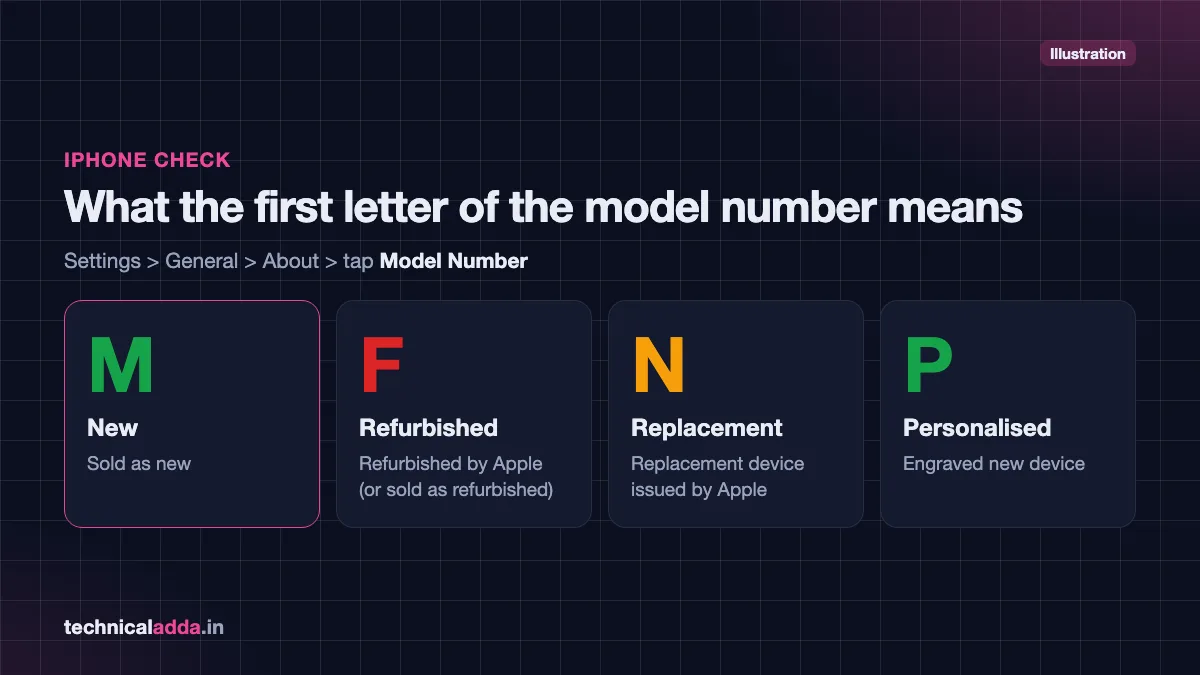
- Model number letter: Go to Settings > General > About and tap the Model Number to see the part number (it starts with a letter).
- M = sold as new
- F = refurbished by Apple (or sold as refurbished)
- N = replacement device issued by Apple
- P = personalised (engraved) new device
- Parts and Service History: On iOS 15.2 or later, Apple's iPhone Parts and Service History (opens in new tab) page explains that Settings > General > About shows this section only if the iPhone has been repaired. Parts can show as Genuine Apple Part, Unknown Part or Unverified. "Unknown" can mean a non-genuine replacement.
- Battery health: Settings > Battery > Battery Health (Battery Health & Charging on iPhone 14 and older) shows maximum capacity. A new iPhone should be at or very close to 100%. On iPhone 15 and newer, the same Battery Health screen also shows cycle count, manufacture date and date of first use.
- Coverage check: Enter the serial number at Apple's Check Coverage (opens in new tab) page. A new iPhone should show a purchase date that matches your bill, or ask you to validate the purchase date.
- Activation Lock: For second-hand iPhones, make sure Find My is turned off and the seller has signed out of their Apple ID. An iPhone locked to someone else's Apple ID is unusable.
Warning signs at a glance
Use this quick table while standing at the shop counter.
| Check | Original / new | Refurbished or suspicious |
|---|---|---|
| *#06# IMEI vs box vs bill | All match | Any mismatch |
| Sanchar Saathi KYM | Valid, correct brand and model | Blacklisted, duplicate, wrong model |
| Warranty status | Not started or starts on purchase date | Started months earlier |
| Battery health | ~100% / Good | Noticeably low, service message |
| iPhone model letter | M (or P) | F or N |
| iPhone parts history | Section not shown | Unknown part / Unverified |
| Frame and port | Spotless | Fine scratches, worn port |
| Seal and box | Clean brand seal, sharp print | Re-glued, blurry print |
| Price | Close to market price | Much lower than every official store |
Buying tips: new and second-hand phones
When buying a new phone
- Buy from the brand's official store, authorised retailers or directly from Amazon/Flipkart with the brand or a highly rated seller. Avoid unknown sellers offering the same phone far below the market price.
- Record a short unboxing video for online orders, showing the sealed box, label and IMEI. It helps if you need to raise a return.
- Check warranty status and KYM on the same day you receive the phone.
- Keep the GST invoice safe; you need it for warranty claims.
If you are still choosing a model, our list of the best phone under ₹20,000 covers current options from authorised sellers.
When buying a second-hand phone
- Meet in a public place, preferably at a mobile shop where you can test the SIM and charging.
- Check KYM before paying. A blacklisted phone may stop working on Indian networks.
- Insert your SIM and make a call, test mobile data, Wi-Fi, Bluetooth, camera, speakers, mic, fingerprint and face unlock.
- Ask for the original bill, box and charger.
- Make sure Google account (FRP) or Apple ID lock is removed. Do a factory reset in front of the seller.
- Pay through UPI or bank transfer so there is a record, and get a simple sale receipt with the IMEI and seller's ID details.
- After buying, scan the phone for unknown apps; our guide on how to check if your phone is hacked explains what to look for.
Watch for unusual heating
A refurbished phone with a cheap replacement battery may heat up quickly or drain fast. If your phone heats even when idle, read our phone heating problem solution guide and get the battery checked at an authorised service centre.
What to do if you were sold a fake or refurbished phone
- Stop using it as your main phone and keep the box, bill and packaging.
- Contact the seller in writing (email, chat or WhatsApp) with photos and the KYM/warranty screenshots.
- Raise a return or complaint on the e-commerce platform within its return window.
- Contact the brand's customer care with the IMEI and invoice. They can confirm the device history.
- File a consumer complaint with the National Consumer Helpline (opens in new tab) by calling 1915 or through its online portal if the seller does not resolve it.
- If it involved fraud or a stolen device, report it on the National Cyber Crime Reporting Portal or call 1930. Our guide on how to report cyber fraud online in India walks you through it.
If your own phone is ever lost or stolen, you can block it through the CEIR service on Sanchar Saathi, which also makes it harder for thieves to resell it.
Key takeaways
- Dial *#06# and match the IMEI with the box, bill and Settings – any mismatch is a red flag.
- Verify the IMEI on Sanchar Saathi KYM by SMS (
KYM <IMEI>to 14422), website or app. - On iPhone, a model number starting with "F" means refurbished and "N" means replacement.
- Warranty start date and battery health quickly reveal a previously used phone.
- Always get a GST invoice and buy from authorised sellers for new phones.
- For second-hand phones, check KYM, account locks and hardware before paying.
Conclusion
Knowing how to check phone is original or refurbished protects your money and your data. Start with *#06#, match the IMEI everywhere, verify it on Sanchar Saathi KYM, then check warranty, battery health and brand-specific settings. These checks take about 10 minutes and can save you thousands of rupees. Shopping for a new handset? Read our guide to the best phone under ₹20,000 next, or explore more buying tips in Smartphones & Gadgets.
FAQ
Frequently Asked Questions
How can I check if my phone is original or refurbished by IMEI?
Dial *#06# to see the IMEI, then send "KYM" followed by the 15-digit IMEI to 14422, or check it on the Sanchar Saathi KYM portal. The reply shows the IMEI status and brand/model. Also enter the IMEI on the brand's warranty page. If warranty started before your purchase date, the phone was likely used or refurbished.
What is *#06# used for?
*#06# is a universal code that displays your phone's IMEI number on screen. It works on almost all Android phones and iPhones from the dialler. Dual-SIM phones show two IMEIs. Use it to match the IMEI with the box and bill, to verify the phone on Sanchar Saathi, and to report a lost phone.
Is Sanchar Saathi KYM free to use?
Sanchar Saathi is a government portal run by the Department of Telecommunications, and its KYM check through the website and app is free. The SMS method uses 14422; the portal does not list a fee for it, but any SMS charge depends on your operator and plan. Most prepaid and postpaid plans in India include free SMS, so it usually costs nothing.
How do I know if my iPhone is refurbished?
Go to Settings > General > About and look at the model number. If it starts with "F", the iPhone was sold as refurbished; "M" means new and "N" means a replacement unit. Also check Parts and Service History, battery health and the purchase date on Apple's Check Coverage page to confirm the phone's history.
Can a refurbished phone show a valid IMEI?
Yes. A genuinely refurbished phone is a real device, so its IMEI will show as valid on Sanchar Saathi. That is why IMEI alone cannot prove a phone is new. Combine the IMEI check with warranty start date, battery health, physical condition and, on iPhone, the model number letter to know whether it was used before.
What happens if I buy a phone with a blacklisted IMEI?
A blacklisted IMEI usually means the phone was reported lost or stolen. Indian networks can block such phones, so it may not work with any SIM. You could also face questions from police if the device is traced. Always run a KYM check before buying a second-hand phone and avoid any phone that shows as blacklisted.
Are refurbished phones safe to buy?
Refurbished phones are safe when bought from the brand or a reputable refurbisher with a clear warranty, return policy and proper GST invoice. The risk comes from unknown sellers who sell refurbished phones as new or use low-quality replacement parts. Check battery health, parts history and warranty before buying, and pay a fair refurbished price.
How can I check a Samsung phone is original?
Match the IMEI from *#06# with the box and Settings > About phone, verify it on Sanchar Saathi KYM, and check warranty status in the Samsung Members app. Run Phone diagnostics in Samsung Members to test hardware and battery status. Genuine Samsung phones also run One UI with access to the Galaxy Store and official updates.
Can I check a phone's warranty using IMEI?
Yes. Most brands, including Samsung, Xiaomi, OnePlus, Vivo and Realme, offer a warranty check on their official India support websites or apps using the IMEI or serial number. Apple uses the serial number on its Check Coverage page. A new phone should show warranty that has not started or starts from your purchase date.
What should I do if Amazon or Flipkart sent me a refurbished phone?
Do not keep using it as new. Take screenshots of the warranty status, battery health and KYM result, keep the unboxing video if you have one, and raise a return or replacement request within the return window. If the seller refuses, escalate through the platform's customer care and, if needed, the National Consumer Helpline.