Phone Heating Problem Solution: 15 Fixes for Android and iPhone (2026)
Smartphones & Gadgets 15 min read By Harshvardhan Singh
In this articleTable of contents11
Last updated: 10 October 2026
Your phone gets hot in the pocket, burns your palm during a BGMI match, or turns into a hand-warmer every time you charge it. Sounds familiar? You are not alone. Indian summers, long 5G sessions and cheap chargers make this one of the most common smartphone complaints. This guide gives you a complete phone heating problem solution for Android and iPhone. You will learn why phones overheat, how to fix heating while charging, gaming, on 5G and in summer, which settings to change, and how to tell normal warmth from a dangerous battery problem.
Quick answer: To fix a phone heating problem, remove the case while charging, use the original charger, close background apps, lower screen brightness, switch from 5G to 4G in weak-signal areas, update the software and avoid gaming while charging. If the phone is hot even when idle, swells, or smells of burning, stop using it and visit an authorised service centre.
Why does my phone heat up?
Every phone produces heat. The processor (chipset), the battery, the modem that talks to the mobile tower and the display all turn electricity into work, and some of that energy becomes heat. Phones have no fan, so heat has to escape through the frame and the back glass. When heat is produced faster than it can escape, the phone feels hot.
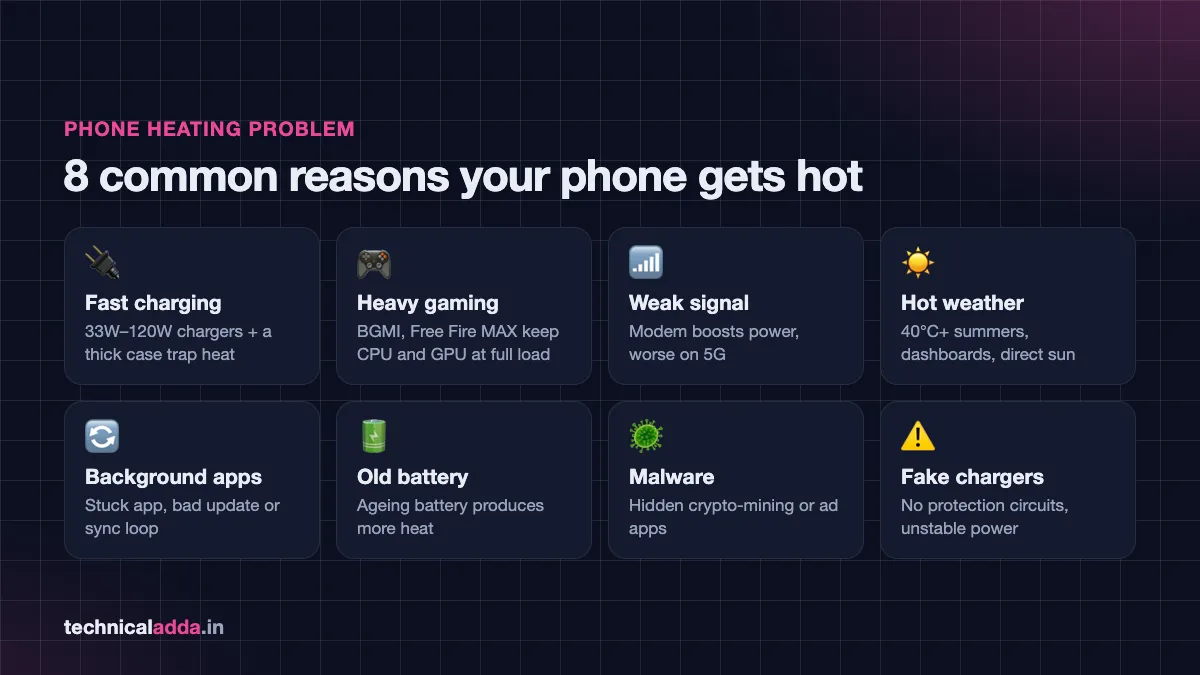
Here are the most common causes we see in India:
- Charging, especially fast charging. A 33W–120W charger pushes a lot of current into the battery. Some heat is normal, but a thick case or a soft bed traps it.
- Heavy gaming and video. Games like BGMI, Free Fire MAX and Call of Duty Mobile keep the CPU and GPU at full load for long periods.
- Weak network signal. When signal is poor, the modem increases its power to stay connected. This is common in basements, lifts, trains and rural areas, and it is worse on 5G.
- Hot weather. In May–June, outdoor temperatures in many Indian cities cross 40°C. A phone left on a car dashboard or in direct sun can get hot without any use at all.
- Background apps and bugs. A stuck app, a bad update or a sync loop (for example, Google Photos uploading thousands of pictures) can keep the processor busy while the screen is off.
- Old or damaged battery. As a lithium-ion battery ages, its internal resistance increases and it produces more heat while charging and discharging.
- Malware. Hidden apps that mine crypto or show background ads can keep the phone working all the time. If you suspect this, read our guide on how to check if your phone is hacked.
- Fake or uncertified chargers and cables. Cheap chargers without proper protection circuits can supply unstable power and overheat both the charger and the phone.
Normal warm vs dangerously hot
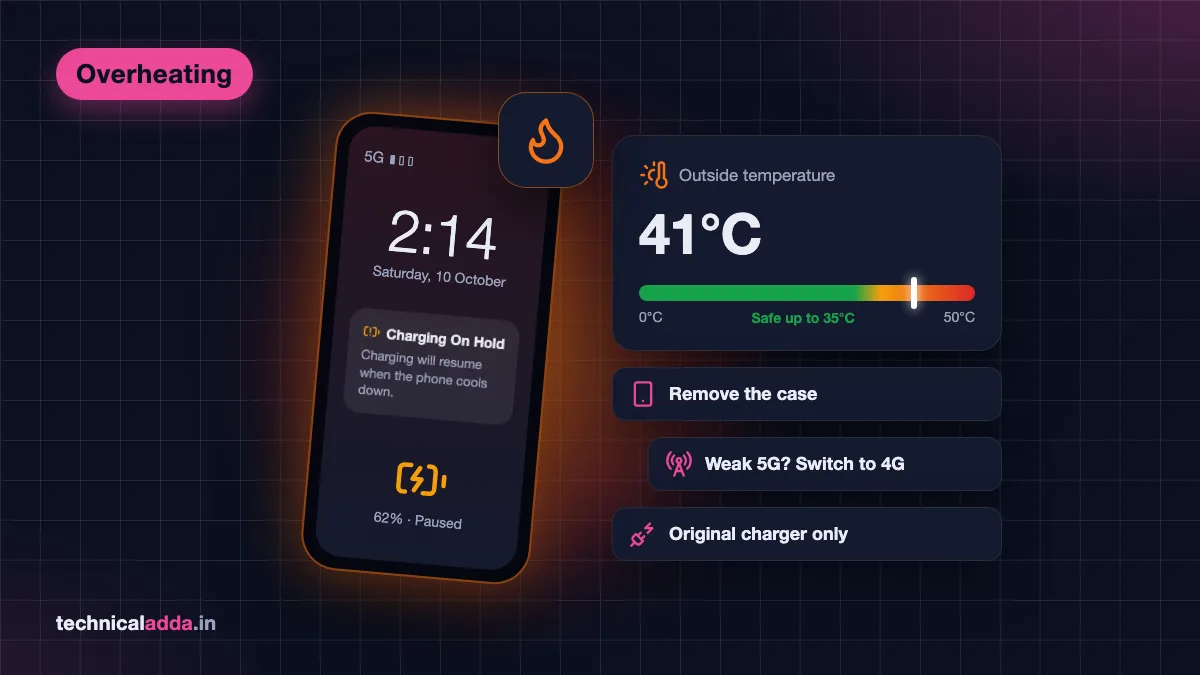
Not every warm phone is a problem. Apple's support page on iPhone temperature limits (opens in new tab) says iPhones are designed to be used where the ambient (surrounding) temperature is between 0°C and 35°C, and that the phone can feel warm during setup, wireless charging, gaming, camera use and video streaming. Android phones from Samsung, Xiaomi, Vivo and others follow similar design ranges.
Use this table to judge your situation:
| What you notice | Is it normal? | What to do |
|---|---|---|
| Warm while fast charging, cools down within 10–15 minutes after | Normal | Remove case, charge on a hard surface |
| Warm after 30+ minutes of gaming | Normal | Take breaks, lower graphics settings |
| Hot in the pocket with screen off, no charging | Not normal | Check battery usage for a rogue app, restart |
| Warning on screen like "Phone needs to cool down" or "Charging on hold" | Protective shutdown | Stop use, move to shade, let it cool |
| Too hot to hold comfortably even when idle | Not normal | Back up data, visit service centre |
| Back panel bulging, screen lifting, burning smell, hissing | Dangerous | Stop charging and using it immediately |
Phone heating problem solution: 15 fixes that work
Try these fixes in order. The first few solve most cases in minutes.
- Restart the phone. A restart clears stuck processes and is the fastest fix for sudden heating after an update.
- Remove the back cover while charging or gaming. Thick silicone, leather and rugged cases trap heat. Even 10 minutes without a case can bring the temperature down noticeably.
- Use the original or a certified charger. Use the brand charger or a reputable one with BIS certification. Avoid ₹99 roadside chargers and thin cables.
- Do not charge on a bed, pillow or sofa. Soft surfaces block heat. Charge on a table, away from direct sunlight.
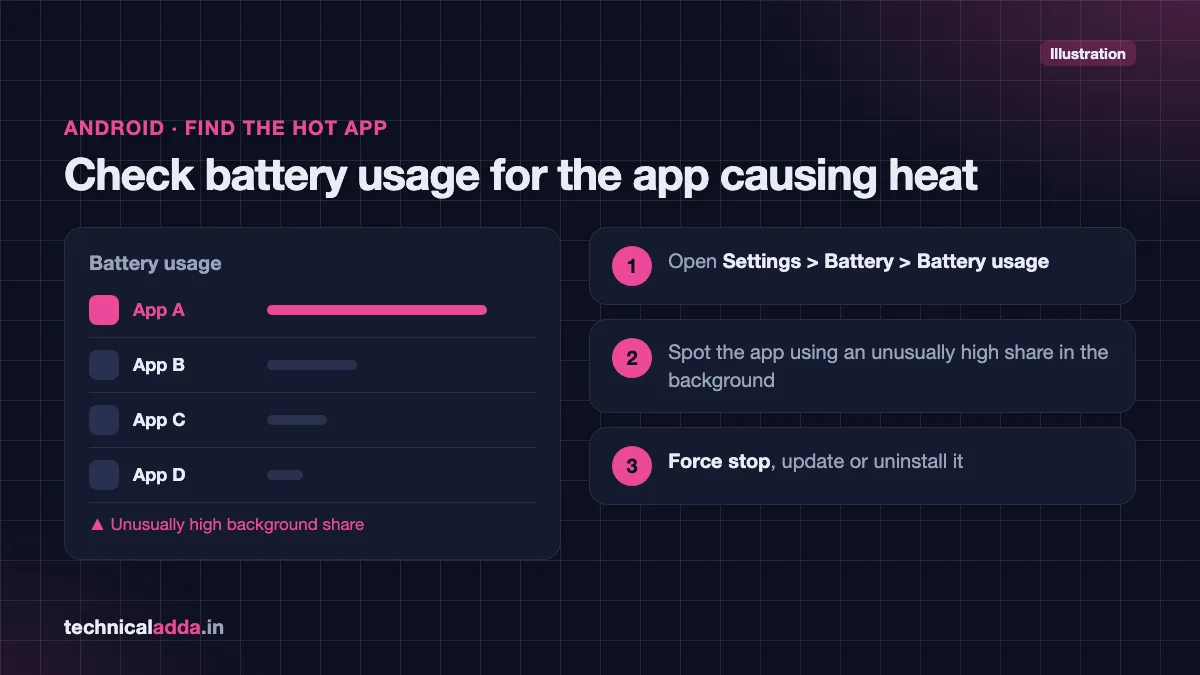
- Find the app that is draining battery. On Android, go to Settings > Battery > Battery usage. On iPhone, go to Settings > Battery. If one app is using an unusually high share of battery in the background, force stop it, update it or uninstall it.
- Update system software and apps. Brands often fix heating bugs through updates. Go to Settings > Software update (Android) or Settings > General > Software Update (iPhone).
- Lower screen brightness and use auto-brightness. Running the screen at maximum brightness in sunlight is a major heat source.
- Turn off features you are not using. Bluetooth, GPS (Location), hotspot and NFC all use some power. Mobile hotspot in particular makes phones hot quickly.
- Switch to 4G in weak-signal areas. If your 5G signal shows only one or two bars, the modem works harder. Switch to 4G/LTE temporarily (steps below).
- Reduce refresh rate. A 120Hz or 144Hz display uses more power than 60Hz. Set it to "Standard" or "Adaptive" if you do not need ultra-smooth scrolling.
- Pause heavy cloud sync. Large photo and video backups keep the processor and network busy. Let them run on Wi-Fi while charging overnight, or pause them during the day.
- Clear storage. A nearly full phone can slow down and work harder. Delete unused apps, large videos and forwarded WhatsApp media. Our guide to free up Google storage also helps if your cloud backup is stuck.
- Use battery saver mode. It limits background activity and reduces peak performance, which directly lowers heat.
- Remove suspicious apps. Uninstall apps you did not knowingly install, especially "cleaner", "booster" or "free recharge" apps from outside the Play Store.
- Factory reset as a last resort. If heating started after an update and nothing else helps, back up your data and reset. If heating continues after a reset, it is likely a hardware or battery fault.
Fixes by scenario: charging, gaming, summer and 5G
Heating usually has one clear trigger. Match your situation below for a targeted fix.
Phone heating while charging
Charging heat comes from two places: the charging circuit and the battery itself. Fast charging produces more heat in the first 20–30 minutes, when the battery is low and accepts high current.
- Remove the case and keep the phone on a hard, flat surface.
- Do not game, stream or video-call while charging. This creates heat from the processor and the battery at the same time.
- Use the charger that came in the box or the brand's own charger. If your phone did not come with one, buy the brand's recommended wattage.
- Turn on your phone's battery protection or optimised charging feature (see the settings sections below). Stopping at 80–85% reduces both heat and long-term battery wear.
- Avoid wireless charging in hot rooms. Wireless charging is less efficient than wired and generally produces more heat.
- If the charger, cable or phone port feels very hot, or you see burn marks, stop using that charger immediately.
Phone heating while gaming
Gaming is the toughest workload for a phone. The chipset runs at high clock speeds for a long time, and the display is usually at high brightness and refresh rate.
- Lower graphics quality and frame rate in game settings. For example, in BGMI, choosing "Smooth" graphics with a lower frame rate reduces load compared to the highest settings.
- Turn on your phone's game mode (Game Booster on Samsung, Game Turbo on Xiaomi/Redmi/POCO, Game Space on OnePlus/Realme/Oppo). Many of these modes block notifications and manage performance.
- Take a 5–10 minute break every 45–60 minutes.
- Play on Wi-Fi instead of mobile data where possible.
- Remove the case during long sessions or use a breathable case.
- Consider a clip-on phone cooler if you play for hours daily (covered below).
Phone heating in summer
In Indian summers, the surrounding temperature itself is the problem. Your phone cannot cool itself below the air around it.
- Never leave the phone on a car dashboard, bike handlebar mount in direct sun, or on a window sill.
- When using Google Maps on a bike or scooter, use a mount with shade and lower the brightness.
- Do not put the phone in a fridge or freezer to cool it. Sudden cooling can cause moisture (condensation) inside the phone and damage it.
- Let a hot phone cool naturally in the shade or under a fan, with the case removed.
- Avoid charging right after you come in from the sun. Wait 10–15 minutes first.
Phone heating on 5G
5G networks in India from Jio and Airtel are fast, but a weak 5G signal can make the modem work harder and produce more heat. If you are indoors, in a basement or travelling, and the phone keeps jumping between 5G and 4G, the heat increases further.
- If 5G signal is weak, switch to 4G/LTE until you reach better coverage.
- Use Wi-Fi at home and in the office instead of mobile data.
- Turn off mobile data when you do not need it, for example while sleeping.
- Keep your carrier settings and phone software updated, as modem firmware improvements arrive through updates.
Android settings to stop overheating
Android menus differ by brand. Names below are common examples; your phone may label them slightly differently.
Switch from 5G to 4G on Android
- Open Settings > Network & internet (or Connections on Samsung, Mobile network on Xiaomi).
- Tap SIMs or Mobile networks and select your SIM.
- Tap Preferred network type.
- Choose 4G/LTE (or LTE/3G/2G (auto connect)) instead of 5G.
Turn on battery protection (Samsung)
Samsung's official Galaxy battery protection guide (opens in new tab) explains the options on One UI 6.1 and later:
- Go to Settings > Battery > Battery protection.
- Turn it on and choose a mode.
- Maximum stops charging at 80%. Basic stops at 100% and resumes at 95%. Adaptive uses Maximum while you sleep and switches to Basic before you usually wake up.
Older Samsung phones (below One UI 6.1) have a single option that limits charging to 85%.
Other useful Android settings
- Adaptive battery / Adaptive charging (Pixel and many stock-Android phones): Settings > Battery.
- Refresh rate: Settings > Display > Refresh rate (or Motion smoothness on Samsung). Choose Standard/60Hz or Adaptive.
- Background app limits: On Xiaomi, Vivo, Oppo and Realme, open Settings > Apps > [app] > Battery and set it to Restricted or Battery saver for apps that do not need to run in the background.
- Developer options: Avoid changing performance settings here unless you know what they do.
Older guides mention the Samsung dialler code *#0228# for battery details, but Samsung does not officially document it and it does not work reliably on newer One UI versions. To see battery temperature, use a third-party battery app from the Play Store. For overall battery health, open the Samsung Members app and run Phone diagnostics.
iPhone settings to stop overheating
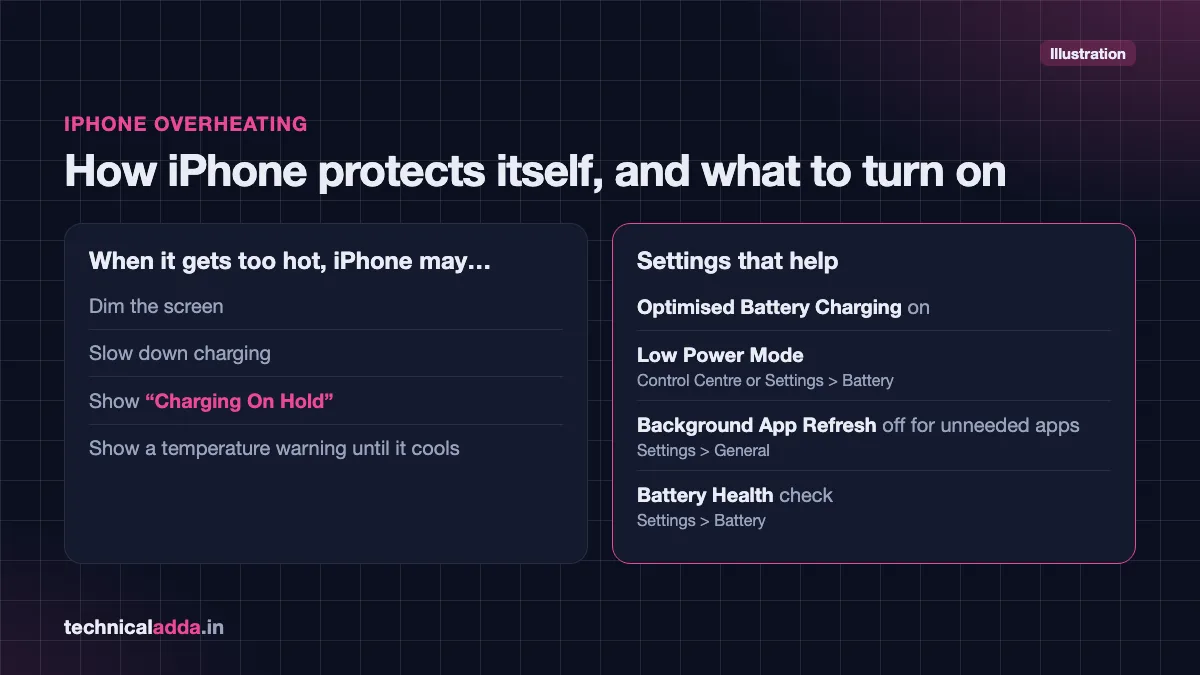
iPhones protect themselves automatically. If an iPhone gets too hot, it may dim the screen, slow down charging, show "Charging On Hold", or display a temperature warning asking you to let it cool before use.
Switch from 5G to LTE on iPhone
- Open Settings > Mobile Service (shown as Mobile Data on some iOS versions).
- Tap Mobile Data Options > Voice & Data.
- Choose LTE or 5G Auto. 5G Auto uses 5G only when it will not noticeably reduce battery life.
Charging settings on iPhone
- Go to Settings > Battery > Charging (or Battery Health & Charging on iPhone 14 and older).
- On iPhone 15 and newer, use the Charge Limit slider to stop charging at 80%, 85%, 90%, 95% or 100%. Optimised Battery Charging is available when the limit is set to 100%. On iPhone 14 and older, turn on Optimised Battery Charging.
Other iPhone tips
- Turn on Low Power Mode from Control Centre or Settings > Battery.
- Turn off Background App Refresh for apps that do not need it: Settings > General > Background App Refresh.
- Check Settings > Battery for any app with unusually high background activity.
- Check battery health at Settings > Battery > Battery Health. If maximum capacity is low or the phone shows a service message, a battery replacement at an Apple Authorised Service Provider may fix both heating and drain.
Do phone coolers and breathable cases help?
Software fixes solve most heating problems. Accessories help mainly in two situations: long gaming sessions and charging in hot rooms.
Phone coolers for gaming
Clip-on and magnetic phone coolers use a small fan, often combined with a semiconductor (Peltier) cooling plate, to pull heat away from the back of the phone. Many budget models in India attach magnetically to MagSafe-style iPhones and come with a magnetic sticker for Android phones.
What to check before buying:
- Magnetic vs clip-on: Magnetic is easier for iPhones and phones with a magnetic ring. Clip-on fits most phones.
- Power source: Most coolers need a USB-C cable from a power bank or charger. A budget power bank can run one during travel.
- Noise and condensation: Strong semiconductor coolers can cause condensation in humid weather. Use them for gaming sessions, not all day.
- Brand and returns: Prefer a seller with an easy return policy and good recent reviews.
Branded options also exist; for example, OnePlus launched its 27W magnetic phone cooler in India in June 2025 at ₹2,499. Check the OnePlus India store for its current price and availability. Budget magnetic coolers from lesser-known brands are listed at roughly ₹700 to ₹1,300 on Flipkart as of October 2026; prices change often, so check the live listing.
Breathable or heat-dissipation cases
If you must use a case, choose a thinner one with a breathable or honeycomb inner pattern rather than a thick rubber or leather case. These cases do not cool the phone actively, but they trap less heat than thick covers.
What does not help
- Putting the phone in the fridge or freezer.
- "Phone cooler" or "CPU cooler" apps. They cannot lower temperature and often show ads in the background, which can actually add load.
- Wrapping the phone in a wet cloth. Water damage is a much bigger problem than heat.
When phone heating is dangerous
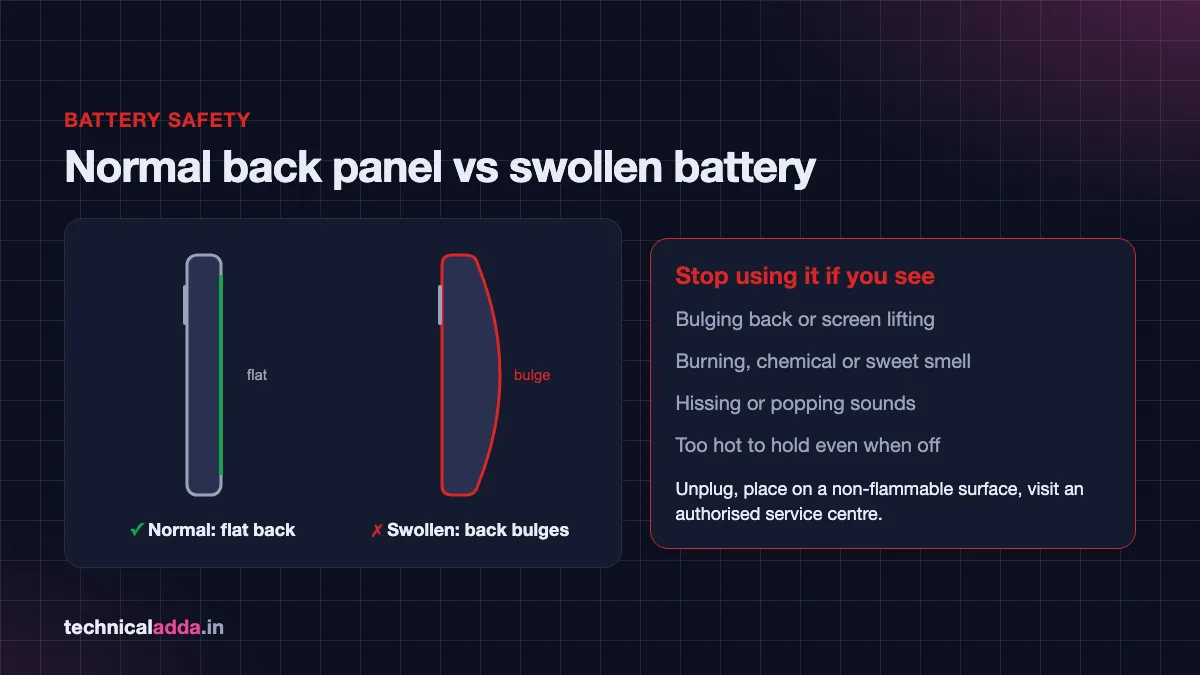
Lithium-ion batteries are safe when they are healthy, but damaged or swollen batteries can catch fire. Stop using and charging your phone immediately if you notice:
- The back panel is bulging or the screen is lifting from the frame.
- A burning, chemical or sweet smell.
- Hissing or popping sounds.
- Smoke or sparks from the port.
- The phone becomes too hot to hold even when switched off.
- Heating after a fall or after water exposure.
What to do:
- Unplug the charger and switch the phone off if it is safe to touch.
- Place it on a non-flammable surface, such as a tiled floor, away from beds, curtains and paper.
- Do not press, puncture or try to open a swollen battery.
- Take it to the brand's authorised service centre. Do not get a local "duplicate" battery fitted; poor-quality replacement batteries are a common cause of repeat heating.
If you bought the phone second-hand and it heats unusually, it may have a non-original battery or parts. Our guide on how to check if a phone is original or refurbished shows how to spot replaced parts.
When your phone is several years old and heats up even after a battery replacement, it may be time to upgrade. See our list of the best phone under ₹20,000 for current options with efficient chipsets.
Key takeaways
- Some warmth while charging, gaming or streaming is normal; heat while idle is not.
- The quickest phone heating problem solution: restart, remove the case, use the original charger and close heavy apps.
- Switch to 4G in weak 5G areas and use Wi-Fi at home to reduce modem heat.
- Turn on battery protection (Samsung), adaptive charging (Android) or Optimised Battery Charging (iPhone).
- Coolers help heavy gamers; breathable cases help everyone who uses a case.
- A swollen battery, burning smell or hissing sound means stop using the phone and visit a service centre.
Conclusion
Most overheating is caused by heavy use, poor charging habits, weak 5G signal or hot weather, and all of these can be fixed with a few setting changes and better habits. Start with the quick checklist above, apply the scenario-based fixes, and use a cooler or breathable case only if you game heavily. That combination is the most reliable phone heating problem solution for both Android and iPhone. If your phone still heats while idle, treat it as a battery or hardware issue and visit a service centre. Next, learn how to check if your phone is hacked to rule out hidden apps, or browse more guides in our Smartphones & Gadgets section.
FAQ
Frequently Asked Questions
Why is my phone heating up so much suddenly?
Sudden phone heating usually comes from a stuck app, a recent software update, heavy cloud backup or a weak network signal. Restart the phone first, then check Settings > Battery for any app using unusual background power. If heating started right after an update, install any newer patch. If the phone is hot while idle for days, get the battery checked.
Is it safe to use my phone while it is charging?
Light use like messaging is generally fine, but heavy gaming, video calls or streaming while charging produce heat from both the battery and processor at the same time. That raises temperature and speeds up battery wear. For the best phone heating problem solution while charging, let the phone charge undisturbed on a hard surface without a case.
Does 5G make my phone heat more?
5G can make a phone warmer, especially when the 5G signal is weak and the modem increases power to stay connected. Switching between 5G and 4G repeatedly also adds heat. If you are indoors or in a poor-coverage area, switch to 4G/LTE in network settings and use Wi-Fi where available. In strong 5G areas, the difference is usually small.
Can a phone cooler damage my phone?
A good phone cooler does not damage the phone when used for gaming sessions. Very strong semiconductor coolers can cause condensation on the back panel in humid weather, which is why continuous all-day use is not recommended. Buy from a reputable seller, use the recommended power supply, and remove the cooler once your gaming session ends.
Should I put my hot phone in the fridge?
No. Putting a hot phone in a fridge or freezer can cause moisture to form inside it, which may damage the circuit board and void your warranty. Instead, switch off heavy apps, remove the case and leave the phone in a shaded place under a fan. It will cool safely within 10–20 minutes in most cases.
What temperature is too hot for a phone?
Phones are designed to work best when the surrounding temperature is between 0°C and 35°C, according to Apple's guidance for iPhones; Android phones use similar ranges. Internally, phones reduce performance and pause charging when the battery gets too hot. If the phone is too hot to hold comfortably, or shows a temperature warning, stop using it until it cools.
Do fast chargers cause phone heating?
Fast chargers do produce more heat than slow chargers, mainly in the first part of the charge when the battery is low. Phones are designed to manage this by slowing the charge as the battery fills. Use the original or certified charger, avoid thick cases while charging, and do not use the phone heavily during fast charging to keep temperatures in check.
Can a virus cause phone heating?
Yes. Malware that runs hidden tasks, such as mining cryptocurrency or loading ads in the background, keeps the processor busy and can heat the phone even with the screen off. Check battery usage for unknown apps, uninstall anything suspicious, run Google Play Protect, and avoid installing APK files from WhatsApp links or unknown websites.
Why does my iPhone say "Charging On Hold"?
"Charging On Hold" appears when your iPhone is too hot or too cold to charge safely. The phone pauses charging to protect the battery and resumes automatically once its temperature returns to normal. Move it to a cooler place, remove the case and avoid using it while charging. It is a safety feature, not a fault.
When should I replace my phone battery for heating?
Consider a battery replacement if your phone heats during light use, drains very quickly, shuts down unexpectedly or shows low battery health (for example, below about 80% maximum capacity on iPhone). Always replace it at an authorised service centre. A bulging battery needs immediate replacement and must not be charged again.
Where to buy
-
Check price on Amazon (opens in new tab)
Phone coolers for gaming
-
Check price on Meesho (opens in new tab)
Phone coolers for gaming
-
Check price on Amazon (opens in new tab)
Breathable or heat-dissipation cases
-
Check price on Meesho (opens in new tab)
Breathable or heat-dissipation cases