What Is Vibe Coding? Meaning, Tools, Risks and a Beginner Walkthrough (2026)
AI Coding 13 min read By Sanjeev Pratap Singh
In this articleTable of contents13
Last updated: 10 October 2026
If you have scrolled through tech Twitter, LinkedIn or YouTube in the last year, you have surely seen the phrase "vibe coding". So what is vibe coding, and is it real programming or just hype? Many students and working professionals in India are asking the same thing, especially when they see non-coders shipping apps over a weekend.
In this guide, you will learn where the term came from, how vibe coding actually works, which tools people use, what can go wrong, and who should (and should not) rely on it. At the end, there is a short walkthrough so you can build your first small app today.
Quick answer: Vibe coding is a way of building software where you describe what you want in plain language and let an AI tool write, run and fix the code, often without reading every line yourself. The term was coined by AI researcher Andrej Karpathy in February 2025. It is great for prototypes and personal tools, but risky for apps that handle money or user data.
What is vibe coding? The simple meaning
Vibe coding means building software by talking to an AI instead of typing code line by line. You explain your idea in normal English (or even Hinglish), the AI writes the code, you look at the result, and then you ask for changes until it "feels right".
The key word is vibe. In pure vibe coding, you judge the app by how it looks and behaves, not by checking the code. If something breaks, you paste the error back to the AI and ask it to fix it.
Think of it like ordering food from a cook who never says no. You say "make it spicier" or "less oil", and the cook adjusts. You don't need to know the recipe. But you also don't fully know what went into the dish.
What vibe coding is not
- It is not the same as using AI autocomplete while you write code yourself.
- It is not a guarantee that the app is secure, fast or correct.
- It is not only for beginners. Experienced developers also vibe code quick prototypes and throwaway scripts.
Where did the term "vibe coding" come from?
The term was coined by Andrej Karpathy, a well-known AI researcher who was a founding member of OpenAI and earlier led AI work for Tesla Autopilot. On 2 February 2025, he posted on X about a new kind of coding where you "fully give in to the vibes" and forget that the code even exists.
He described talking to the AI, accepting its changes without reading the differences, and copy-pasting error messages back to it. He also made it clear this was fine for "throwaway weekend projects", not serious production software. That caveat often gets lost when people share the term.
The phrase spread very quickly. By late 2025, Collins Dictionary named "vibe coding" its Word of the Year for 2025, describing it as turning natural language into computer code using AI (source: All India Radio News (opens in new tab)).
Why it became popular so fast
- AI models got much better at code. Modern models can write full working apps, not just small functions.
- App builders removed setup. Tools like Lovable and Bolt run everything in the browser, so you don't install anything.
- Social media loved the demos. "I built this SaaS in 2 hours without coding" posts went viral.
- Cost dropped. Many tools have free tiers, which matters a lot for Indian students.
How vibe coding works, step by step
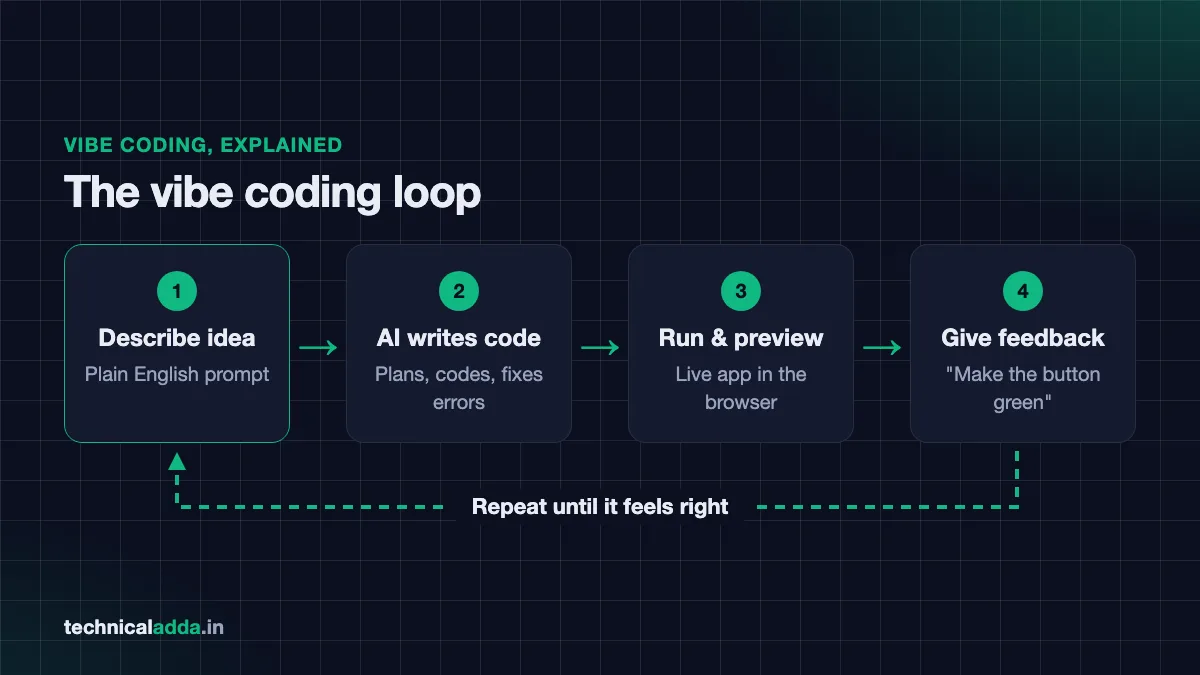
Under the hood, a vibe coding tool is an AI model connected to a code editor, a terminal and a preview window. Here is what usually happens:
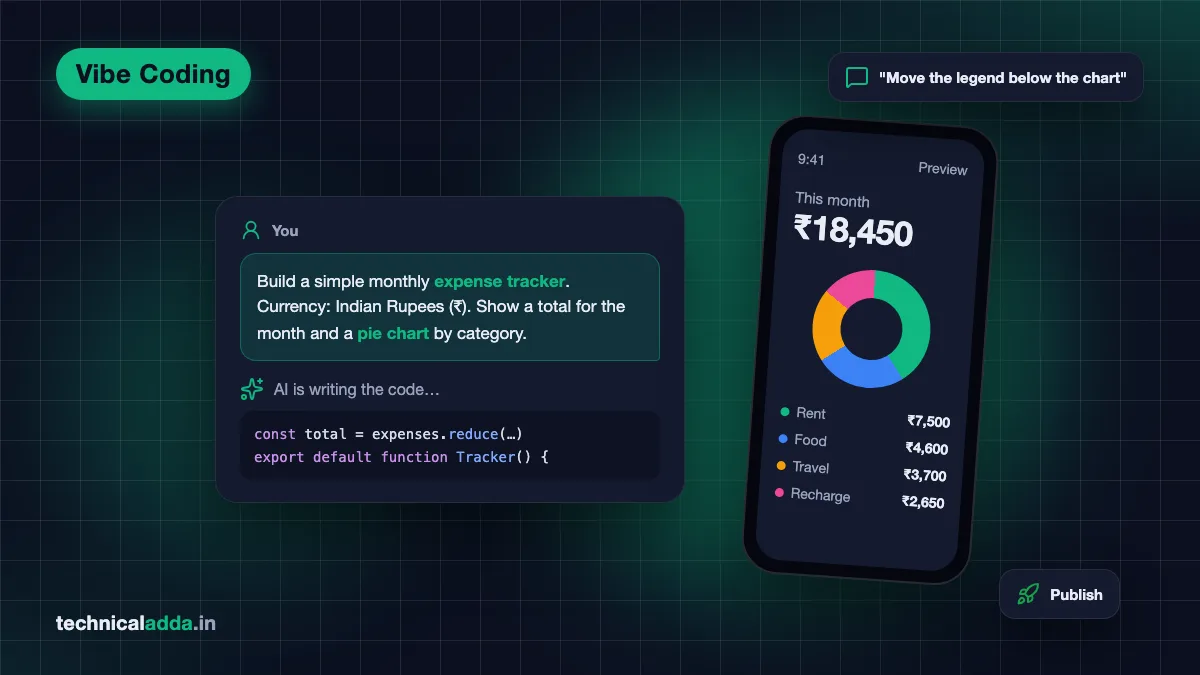
- You write a prompt. Example: "Make a simple expense tracker where I can add expenses in rupees and see a monthly total."
- The AI plans the app. Many tools now show a plan first (pages, database tables, buttons).
- The AI writes the code. Usually React or Next.js for the front end, and a database like Supabase or the tool's own cloud for the back end.
- The tool runs the app. You see a live preview in the browser.
- You test and react. "The total is wrong", "make the button green", "add a Hindi option".
- The AI edits and re-runs. This loop repeats until you are happy.
- You publish. Most app builders give you a free link; paid plans allow a custom domain.
The "agent" part
In 2026, most tools work as AI agents. An agent doesn't just suggest code. It can create files, install packages, run commands, read errors and fix them on its own before showing you the result. This is why vibe coding feels so smooth compared to copy-pasting from ChatGPT in 2023.
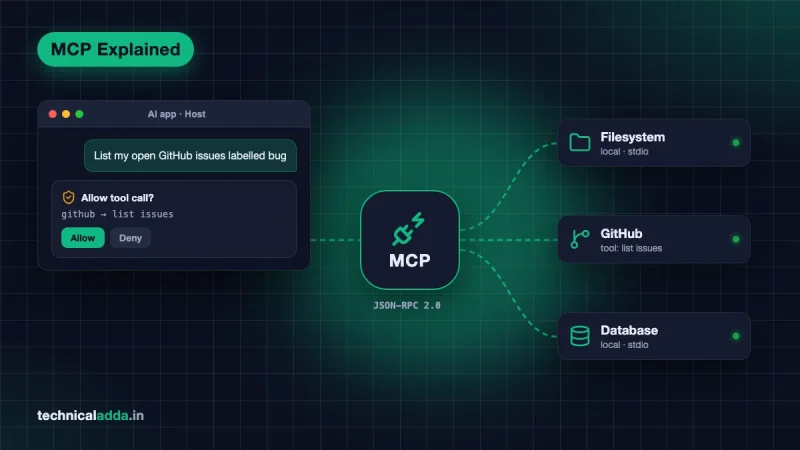
Some of these agents can also connect to outside tools such as GitHub, databases or design files using a standard called MCP. If you are curious about that, read our guide on what an MCP server is and how it connects AI to your tools.
Vibe coding vs traditional coding vs AI-assisted coding
Not all AI coding is vibe coding. Here is a clear comparison.
| Point | Traditional coding | AI-assisted coding | Vibe coding |
|---|---|---|---|
| Who writes the code | You | You + AI suggestions | Mostly AI |
| Do you read every line? | Yes | Yes, you review | Usually no |
| Skill needed | High | Medium to high | Low to start |
| Speed for a prototype | Slow | Faster | Fastest |
| Best for | Production systems | Daily dev work | Ideas, demos, personal tools |
| Typical tools | VS Code, IntelliJ | GitHub Copilot, Cursor | Lovable, Bolt, Cursor Agent, Claude Code |
| Main risk | Takes time | Over-trusting suggestions | Hidden bugs and security gaps |
A simple rule: if you review, test and understand the AI's code, it is AI-assisted coding. If you mostly accept and move on, it is vibe coding. Many developers switch between both depending on the task.
Popular vibe coding tools in 2026
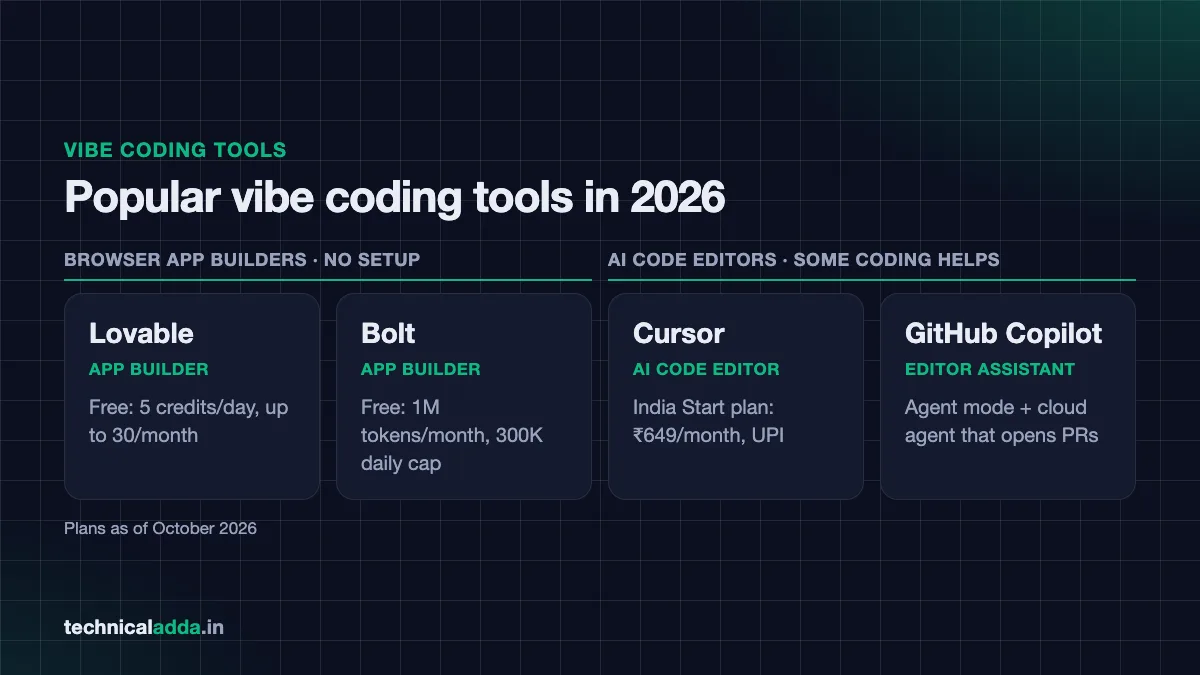
There are two main types of vibe coding tools: browser app builders for non-coders, and AI code editors for people who know some coding.
Browser-based app builders (no setup)
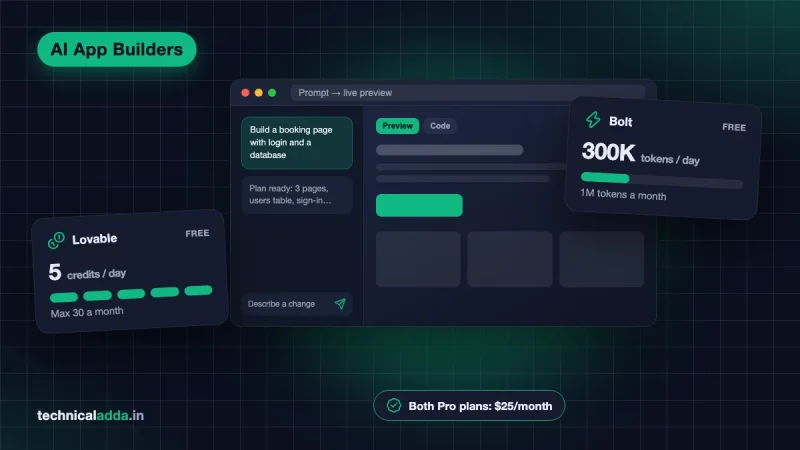
- Lovable – Builds full-stack web apps from chat. Comes with Lovable Cloud (database, login, file storage) built in. Free plan gives 5 daily build credits, up to 30 a month, as per Lovable's plan documentation (opens in new tab).
- Bolt (bolt.new) – Similar idea, by StackBlitz. Free plan offers 1 million tokens a month with a 300K daily cap, plus hosting.
- Replit, v0 and others – Also popular for quick apps. As of October 2026, v0's free plan has a limit of 7 messages a day, and Replit's paid plans start with Core at $20/month. Free limits change often, so check replit.com/pricing (opens in new tab) and v0.app/pricing (opens in new tab) before you commit.
We compared the first two in detail in Lovable vs Bolt: which AI app builder is better.
AI code editors and agents (some coding helps)
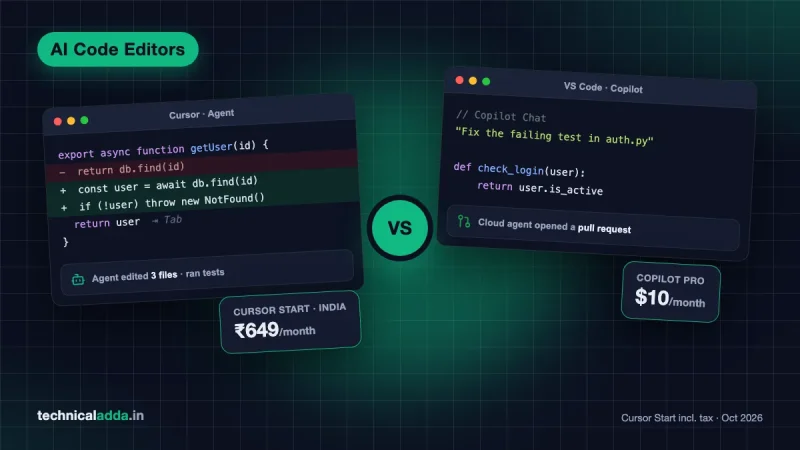
- Cursor – A code editor built around AI, with an Agent that can edit many files at once. India has a special Cursor Start plan at ₹649/month (launched July 2026, UPI supported).
- GitHub Copilot – Works inside VS Code and other editors, with an agent mode and a cloud agent that can open pull requests.
- Claude Code – A terminal-based coding agent from Anthropic. We will cover it in our upcoming Claude Code tutorial.
Unsure which editor fits you? See our detailed Cursor vs GitHub Copilot comparison.
Benefits of vibe coding
- Ideas become apps in hours. You can test a business idea before spending money on developers.
- Low entry barrier. Shopkeepers, teachers, designers and students can build small tools for their own needs.
- Great learning aid. When you see working code for your own idea, it's easier to understand how apps are structured.
- Faster prototypes for developers. Even senior engineers vibe code UI mock-ups and internal dashboards.
- Cheap to start. Free tiers are enough to build and share a small project.
Risks and limits you must know
Vibe coding is powerful, but it has real problems. Ignoring them can cost you money, data or reputation.
1. Security holes
AI models often pick the easy way, not the safe way. In its July 2025 GenAI Code Security Report, Veracode tested more than 100 AI models on 80 coding tasks and found that the models chose an insecure option 45% of the time when a secure option was available (Veracode press release (opens in new tab)). Common issues include exposed API keys, missing database permission rules and weak login checks.
2. Code you don't understand
If you never read the code, you cannot fix it when the AI gets stuck. Many vibe coders hit a wall where every "fix" breaks something else. This is often called the "doom loop".
3. Hidden running costs
Credits and tokens run out fast during long debugging sessions. A free plan may last only a day or two of heavy use. Paid plans start around $20–25 a month (roughly ₹1,900–2,400) before GST.
4. Hard to scale
An app that works for 10 friends may fail with 10,000 users. Performance, database design and backups need human thinking.
5. Legal and data concerns
If your app collects names, phone numbers or payments from Indian users, you have responsibilities under India's Digital Personal Data Protection (DPDP) Act, 2023. The DPDP Rules were notified in November 2025 with a phased rollout, and as of October 2026 most obligations for apps and businesses (notice, consent, security safeguards and breach reporting) apply from May 2027. MeitY has consulted on bringing some deadlines forward, so check meity.gov.in (opens in new tab) for the latest dates. Don't launch such apps without a proper review.
Who should use vibe coding (and who should not)
| You are… | Should you vibe code? | How to use it well |
|---|---|---|
| A student learning to code | Yes, but carefully | Use it to see examples, then rewrite parts yourself |
| A non-tech founder | Yes, for prototypes | Validate the idea, then hire a developer to review before launch |
| A working developer | Yes, for speed | Use for UI, scripts and tests; review everything going to production |
| A small business owner | Yes, for internal tools | Keep it internal; avoid storing sensitive customer data |
| Building banking, health or payment apps | No (not alone) | Use AI-assisted coding with full code review and security testing |
If you want to build a career in this space, vibe coding alone isn't enough. Pair it with real fundamentals listed in our guide to AI skills to learn in 2026.
Mini walkthrough: build your first app with vibe coding
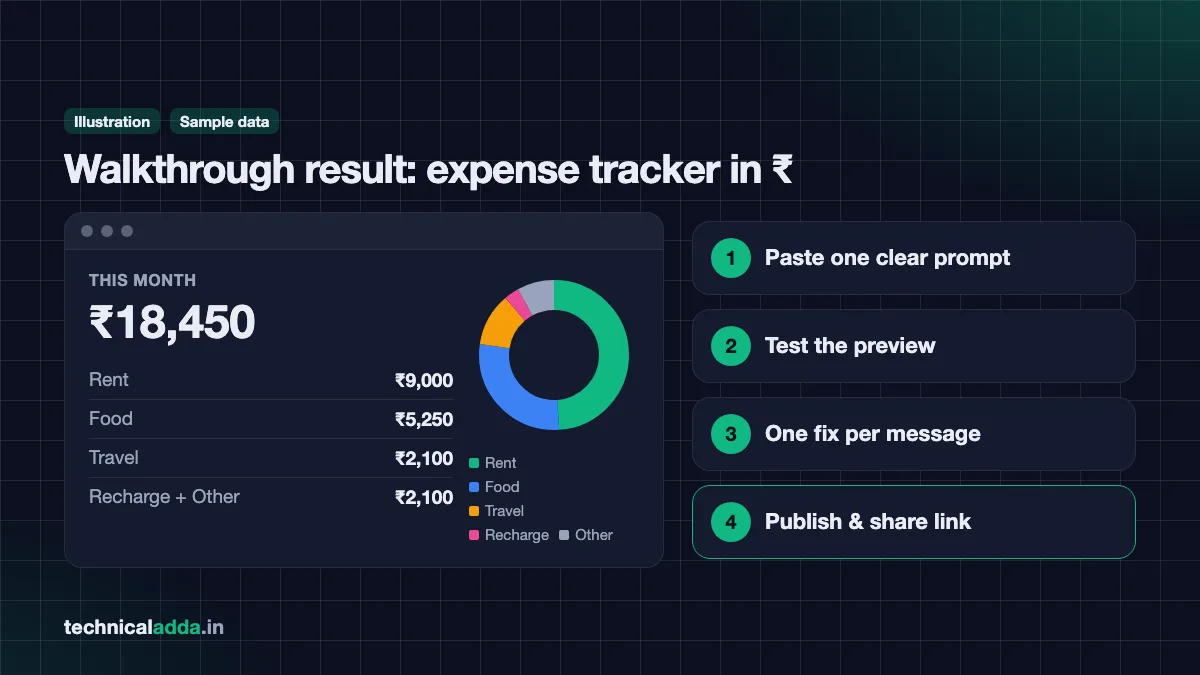
Let's build a simple "Monthly Expense Tracker in ₹" using a free browser app builder. You don't need to install anything. The steps are similar in Lovable and Bolt.
Step 1: Sign up for a free account
Open Lovable or Bolt in Chrome and sign up with Google or GitHub. No credit card is needed on the free plans.
Step 2: Write a clear first prompt
Paste something like this:
Build a simple monthly expense tracker web app.
- Currency: Indian Rupees (₹), use Indian number format (1,00,000).
- Fields: date, category (Food, Travel, Rent, Recharge, Other), amount, note.
- Show a total for the current month and a small pie chart by category.
- Mobile-friendly, clean design, light and dark mode.
- Store data in the browser for now (no login).
Clear prompts save credits. Mention currency, layout and what not to build yet.
Step 3: Review the plan and the preview
The tool will show a plan or start building straight away. Wait for the preview to load, then test: add three expenses and check if the total is correct.
Step 4: Give small, specific feedback
Instead of "make it better", say:
- "The pie chart labels overlap on mobile. Move the legend below the chart."
- "Add a filter to see last month's expenses."
- "Add a button to export expenses as CSV."
One change per message works best. It also makes undoing easier.
Step 5: Fix errors the vibe coding way
If you see an error, copy the exact message and paste it with: "I got this error when I clicked Save. Please fix it and explain the cause in one line." Asking for the cause helps you learn.
Step 6: Publish and share
Click Publish (or Deploy). You'll get a public link you can send on WhatsApp to friends for feedback.
Step 7: Do a basic safety check
Before sharing widely, ask the AI: "List any security risks in this app, such as exposed keys or unprotected data." Fix what it finds. If you later add login or a database, repeat this check.
Tips to vibe code better and safer
- Start small. Build one feature, test it, then add the next.
- Use version history. Most tools let you restore an older version. Save a "working" point before big changes.
- Connect GitHub early. Your code stays safe even if you leave the tool.
- Never paste secret keys into chat. Use the tool's secrets or environment variable settings.
- Ask the AI to explain. "Explain this file like I'm a beginner" turns vibe coding into a learning session.
- Test on a real phone. Most Indian users will open your app on Android with a Jio or Airtel connection, so check speed on mobile data.
- Get a human review before handling payments or personal data.
- Learn the basics in parallel. Even a little HTML, JavaScript and SQL makes you a far better vibe coder.
For a list of tools you can use without paying, keep an eye on our upcoming roundup of the best free AI coding tools.
Key takeaways
- Vibe coding means building apps by describing them to AI and judging results by behaviour, not by reading code.
- Andrej Karpathy coined the term in February 2025, and Collins named it Word of the Year 2025.
- Lovable and Bolt suit non-coders; Cursor, GitHub Copilot and Claude Code suit people with some coding knowledge.
- It is excellent for prototypes, learning and internal tools.
- Security, hidden costs and maintainability are the biggest risks, so review anything that handles money or personal data.
Conclusion
So, what is vibe coding? It is a new, faster way to turn ideas into working software by talking to AI. It is a gift for students, founders and small businesses who want to test ideas quickly. But it is not magic. The best results come when you combine the speed of vibe coding with basic coding knowledge and a habit of checking security.
Ready to pick your tool? Start with our head-to-head guide on Cursor vs GitHub Copilot, or browse more guides in our AI Coding section.
FAQ
Frequently Asked Questions
What is vibe coding in simple words?
Vibe coding is building software by telling an AI what you want in plain language and letting it write the code. You check whether the app works and looks right, then ask for changes. You usually don't read the code line by line. It is fast and beginner-friendly, but the code still needs review if the app will handle real users or data.
Who invented the term vibe coding?
AI researcher Andrej Karpathy coined the term "vibe coding" in a post on X on 2 February 2025. He described a style of coding where you "give in to the vibes", accept AI changes without reading them, and paste errors back to the AI. He said it suited throwaway weekend projects. Collins Dictionary later named it Word of the Year 2025.
Is vibe coding real programming?
Vibe coding produces real, working code, but the person is acting more like a product manager than a programmer. The AI does the actual programming. It becomes closer to real programming when you read, test and understand the generated code. For learning and prototypes it is useful, but professional software still needs programming knowledge for debugging, security and scaling.
Can I do vibe coding without knowing any coding?
Yes, you can build simple apps through vibe coding with zero coding knowledge using browser tools like Lovable or Bolt. You only need to describe your idea clearly. However, when bugs appear or the AI gets stuck, basic knowledge of HTML, JavaScript and databases helps a lot. Learning the basics alongside vibe coding is the smartest approach.
Is vibe coding safe for building apps?
Vibe coding is safe for personal tools, demos and prototypes, but risky for apps handling payments, passwords or personal data. Research by Veracode in 2025 found AI models chose insecure coding options 45% of the time in its tests. Before launching publicly, ask the AI for a security review, and get an experienced developer to check the code.
Which is the best tool for vibe coding in 2026?
The best vibe coding tool depends on your skill level. Non-coders usually prefer browser app builders like Lovable or Bolt because they handle hosting and databases. People who know some coding often prefer Cursor, GitHub Copilot or Claude Code, which give more control. Try the free plans of two tools with the same small project and pick the one that suits you.
Is vibe coding free?
Vibe coding can be started for free, since Lovable, Bolt, Cursor and GitHub Copilot all offer free plans with limits. For example, Lovable's free plan gives 5 build credits a day up to 30 a month. Heavy use needs a paid plan, usually around $20–25 a month. In India, Cursor also offers a ₹649 monthly Start plan payable by UPI.
Will vibe coding replace software developers?
Vibe coding is unlikely to fully replace software developers soon. It replaces some repetitive coding work, but someone still has to design systems, review security, fix complex bugs and maintain apps for years. Developers who use AI tools well are becoming more productive. The bigger risk is for people who refuse to learn these tools at all.
Can I earn money with vibe coding in India?
Yes, some people earn by building landing pages, small business tools and MVPs for clients using vibe coding. However, clients expect working, secure and maintainable products, so you should understand the code you deliver. Freelancing platforms and local businesses are common starting points. Always be honest with clients about how the app was built and its limits.
What is the difference between vibe coding and no-code tools?
No-code tools like drag-and-drop website builders let you build without seeing code at all, and you are limited to their features. Vibe coding generates real code from your prompts, so it is more flexible and you can usually export the code to GitHub. The trade-off is that vibe-coded apps can contain bugs and security issues that need fixing.
Where to buy
-
Visit official site (opens in new tab)
Lovable
-
Visit official site (opens in new tab)
Bolt
-
Visit official site (opens in new tab)
Cursor
-
Visit official site (opens in new tab)
GitHub Copilot