Zoho Mail Free with Own Domain: Step-by-Step Setup (MX, SPF, DKIM for GoDaddy, Hostinger, BigRock, Cloudflare)
Web Hosting & Servers 13 min read By Xavio Thomas
In this articleTable of contents12
Last updated: 10 October 2026
An email like [email protected] looks far more trustworthy than [email protected], especially when you send quotations, invoices or job applications. The good news: you can get Zoho Mail free with own domain for up to five users, with no monthly bill. The catch is that the setup involves DNS records (TXT, MX, SPF and DKIM), and one wrong record means emails bounce or land in spam. This guide explains the Forever Free plan limits, walks you through every step with exact records for GoDaddy, Hostinger, BigRock and Cloudflare, and tells you honestly when you should upgrade or pick Google Workspace instead.
Quick answer: Zoho Mail's Forever Free plan lets you host email for one domain with up to 5 users and 5 GB per user, using the web and Zoho Mail apps (no IMAP/POP). Sign up for the free plan, verify your domain with a TXT record, create users, then add Zoho's MX, SPF and DKIM records in your domain's DNS.
Zoho Mail free plan: what you get
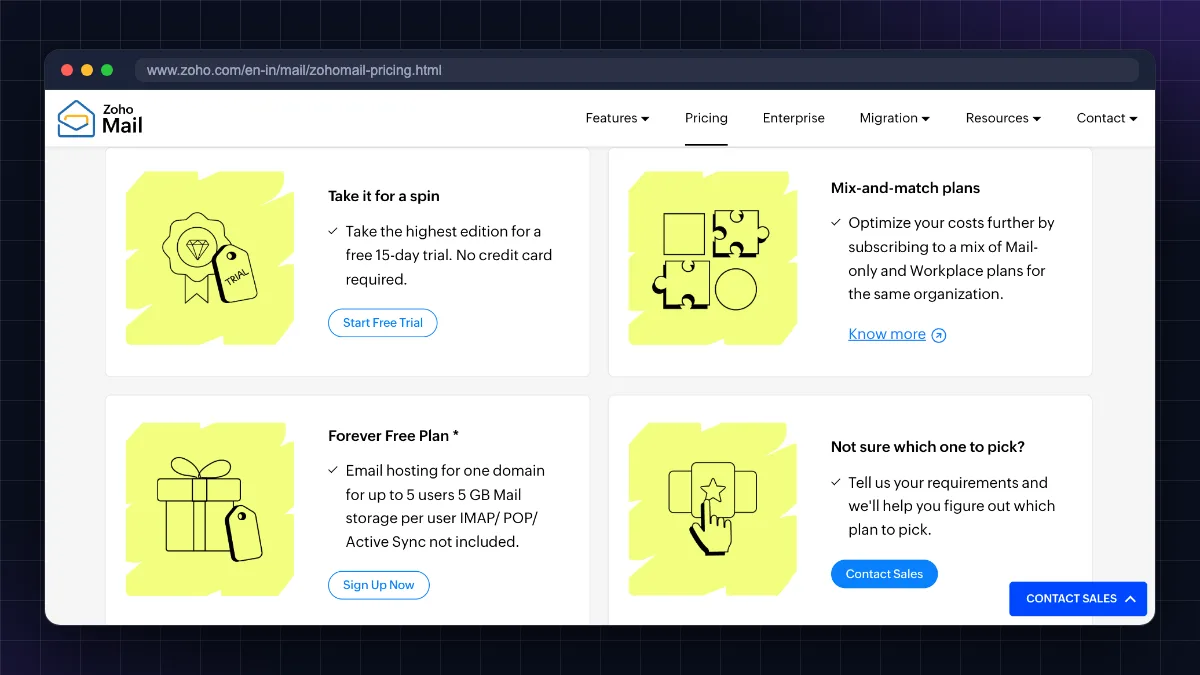
Zoho, an Indian company headquartered in Chennai, offers a Forever Free Plan for business email. According to the official Zoho Mail pricing page (opens in new tab), as of October 2026 it includes:
| Feature | Forever Free plan (Oct 2026) |
|---|---|
| Users | Up to 5 |
| Domains | 1 domain |
| Storage | 5 GB per user |
| Access | Web (mail.zoho.in / mail.zoho.com) and Zoho Mail mobile apps |
| IMAP / POP / ActiveSync | Not included |
| Attachment size | Not listed on the pricing page (paid plans allow 30–40 MB) |
| Ads | None |
| Availability | "Only in select data centres" per Zoho |
What this means in practice:
- Perfect for: freelancers, small shops, YouTubers, consultants, college clubs and startups with up to 5 people.
- Not included: you cannot add your Zoho address to Gmail, Outlook desktop or the iPhone Mail app, because those need IMAP/POP/ActiveSync. You must use Zoho's own apps.
- Only one domain. If you own
brand.inandbrand.com, the free plan covers only one of them.
Before you start: checklist
- A domain name you own. If you do not have one yet, compare costs in our domain name price in India guide, or follow how to buy a domain name.
- Login to your domain's DNS panel. This is usually where you bought the domain (GoDaddy, Hostinger, BigRock), unless you changed nameservers to Cloudflare or your web host.
- Check where your DNS is managed. If your nameservers point to Cloudflare or a hosting company, you add records there, not at the registrar.
- Note any existing email. If the domain already receives email (for example, through cPanel or Hostinger email), changing MX records will move delivery to Zoho. Migrate old mail first.
- A mobile number for Zoho account verification.
How to set up Zoho Mail free with own domain
Step 1: Sign up for the Forever Free plan
- Open the Zoho Mail pricing page (opens in new tab).
- Scroll down below the paid plans to Forever Free Plan and click Sign Up Now. (Many people search "zoho mail free plan not showing" because this option sits below the main plans; it is also not offered in every data centre.)
- Enter your name, email, mobile number and password, then verify the OTP.
- When asked about a domain, choose Sign up with a domain I already own and enter your domain (e.g.
yourbrand.in).
Step 2: Verify that you own the domain
Zoho asks you to prove ownership. You get three methods: TXT, CNAME or HTML. TXT is the simplest.
- Zoho shows a value in the format
zoho-verification=zb12345678.zmverify.zoho.in(the code is unique to your domain, and the ending matches your data centre, e.g..zoho.inor.zoho.com). - In your DNS panel, add a TXT record:
- Host/Name:
@(or leave blank if your panel does not accept@) - Value: the exact text Zoho gives you
- TTL: default (1 hour or Auto)
- Host/Name:
- Wait for DNS to update (Zoho suggests allowing an hour or two, though it is often faster), then click Verify TXT record in Zoho.
Step 3: Create your mailbox and users
- Create your first address, e.g.
[email protected]. This becomes the super admin. - Go to Admin Console > Users > Add to create up to 4 more users, e.g.
sales@,support@. - For shared addresses like
info@, create Groups or Email aliases instead of paying for (or using up) extra users.
Step 4: Add MX records (where emails are delivered)
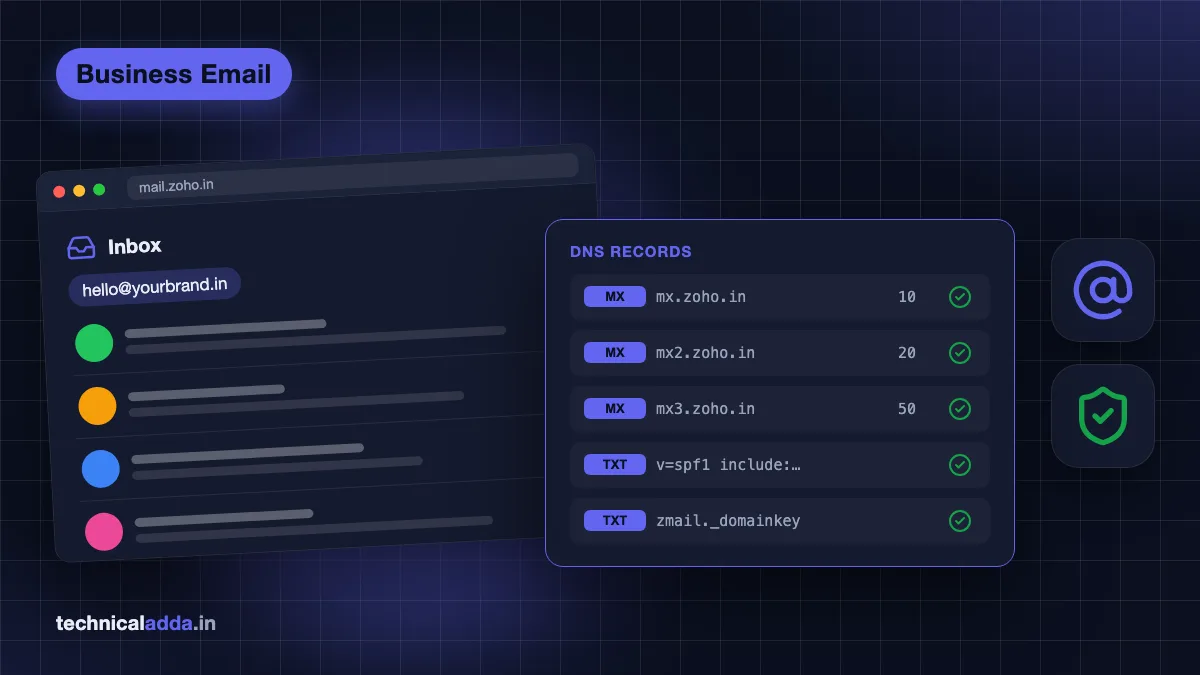
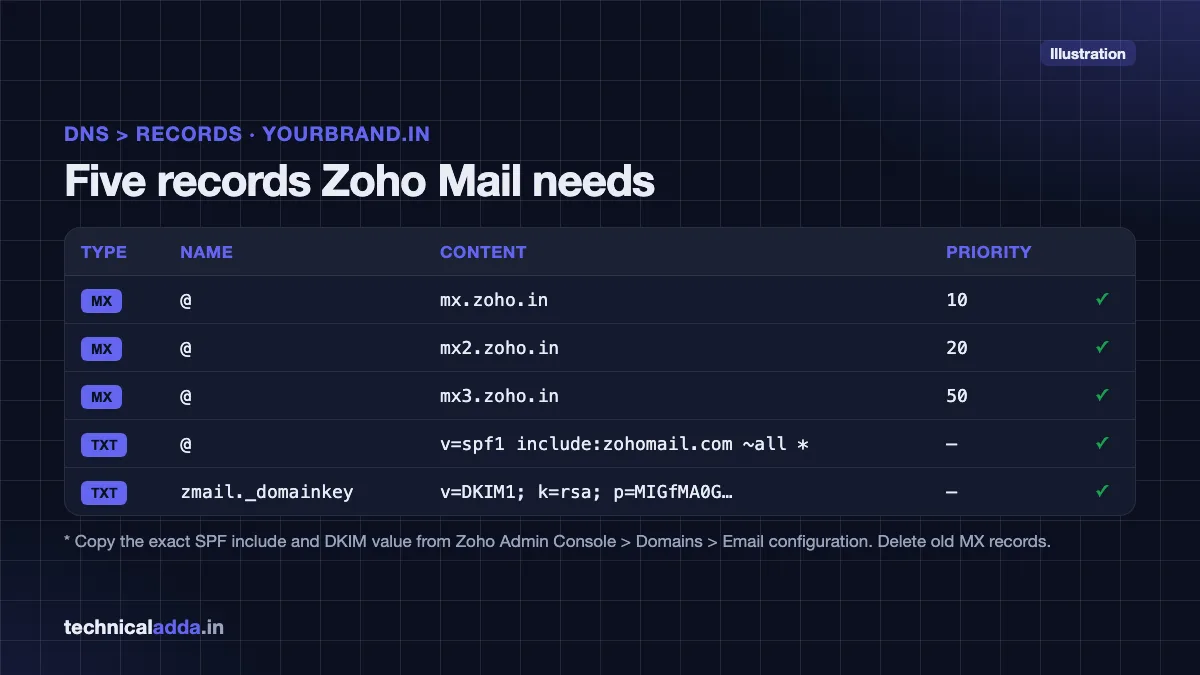
MX records tell the world to deliver your domain's emails to Zoho. The values depend on your Zoho data centre. Indian accounts are often on the India DC (zoho.in); others use zoho.com. Always copy the values shown in Admin Console > Domains > your domain > Email configuration.
| Type | Host | Value (India DC) | Value (US DC) | Priority |
|---|---|---|---|---|
| MX | @ | mx.zoho.in | mx.zoho.com | 10 |
| MX | @ | mx2.zoho.in | mx2.zoho.com | 20 |
| MX | @ | mx3.zoho.in | mx3.zoho.com | 50 |
Delete any other MX records (for example, your hosting provider's default mx1.hostinger.com or GoDaddy's email MX). Old MX records with lower priority numbers will steal your email.
Step 5: Add SPF (who is allowed to send)
Add one TXT record at the root:
- Zoho's published example (US DC):
v=spf1 include:zohomail.com ~all - India DC and other data centres: use the include value shown in your Admin Console, which may be a regional
.indomain
Zoho's SPF configuration guide (opens in new tab) lists include:zohomail.com. Accounts on other data centres, including India, may be shown a regional value, so copy the exact include from Admin Console > Domains > your domain > Email configuration. A domain must have only one SPF record. If another service also sends email as your domain, merge them into one record, e.g. v=spf1 include:zohomail.com include:_spf.otherservice.com ~all (swap in your own Zoho include and the value the other service gives you).
Step 6: Add DKIM (digital signature)
- In Admin Console > Domains > your domain > Email configuration > DKIM, click Add selector.
- Enter a selector name, e.g.
zmail, and click Generate. - Zoho shows a TXT record with host
zmail._domainkeyand a long value starting withv=DKIM1; k=rsa; p=.... - Add it in your DNS panel exactly as shown, wait, then click Verify in Zoho.
Step 7: Test
Send a mail from Gmail to your new address and reply back. Then check your domain at a free tool like MXToolbox to confirm MX, SPF and DKIM pass.
Add DNS records in GoDaddy, Hostinger, BigRock and Cloudflare
The records are the same everywhere; only the menus differ. Menu names change occasionally, so look for "DNS", "Manage DNS" or "DNS Zone".
GoDaddy
- Log in and go to My Products > Domains, then click your domain and open DNS (Manage DNS).
- Click Add New Record, select type (TXT or MX), set Name to
@, paste the value, set priority for MX, and Save. - Delete GoDaddy's default MX records if present (for example, those for GoDaddy/Microsoft email).
Hostinger (hPanel)
- Go to Domains > your domain > DNS / Nameservers.
- Under Manage DNS records, choose type, enter
@as Name, add the value (and priority for MX), and click Add Record. - Remove Hostinger's default
mx1.hostinger.com/mx2.hostinger.comrecords if you are not using Hostinger email.
BigRock
- Log in, go to Manage Orders > List/Search Orders, click the domain, then DNS Management > Manage DNS.
- Use the MX Records and TXT Records tabs. Leave the host blank for the root domain if the form does not accept
@, add the value and priority, and save.
Cloudflare
- Open your site in the Cloudflare dashboard and go to DNS > Records > Add record.
- Choose TXT or MX, enter
@as Name, paste the value (and priority for MX), and save. - MX and TXT records are never proxied, so there is no orange cloud to worry about. Make sure there are no old MX records left.
| Record | GoDaddy | Hostinger | BigRock | Cloudflare |
|---|---|---|---|---|
| Root host value | @ | @ | blank or @ | @ |
| Where | Domain > DNS | Domains > DNS / Nameservers | DNS Management > Manage DNS | DNS > Records |
| Typical propagation | Minutes to a few hours | Minutes to a few hours | Up to a few hours | Usually minutes |
| Remove old MX? | Yes | Yes (Hostinger mail MX) | Yes | Yes |
SPF, DKIM and DMARC: stop your emails going to spam
Since 2024, Gmail and Yahoo require proper authentication for bulk senders, and even small senders get better delivery with it. Think of it this way:
- SPF says which servers may send email for your domain.
- DKIM signs every email so receivers know it was not changed.
- DMARC tells receivers what to do if SPF/DKIM fail, and sends you reports.
Add a basic DMARC record after SPF and DKIM work:
| Type | Host | Value |
|---|---|---|
| TXT | _dmarc |
v=DMARC1; p=none; rua=mailto:[email protected] |
Start with p=none (monitor only). After a few weeks of clean reports, move to p=quarantine. Do not jump straight to p=reject unless you are sure every service that sends as your domain is in SPF and signs with DKIM.
Also protect the mailbox itself: use a strong unique password (see our strong password examples) and turn on two-factor authentication in Zoho Accounts.
Use Zoho Mail on your phone
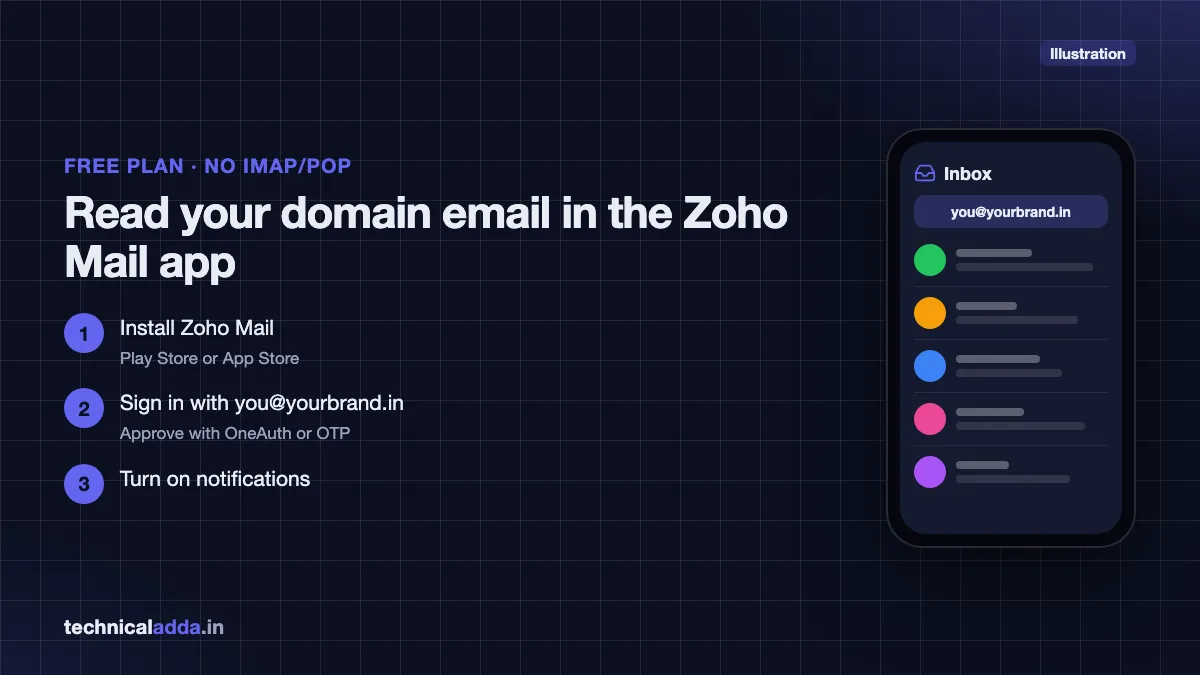
Because the free plan has no IMAP/POP, use Zoho's own apps:
- Install Zoho Mail from the Play Store or App Store.
- Sign in with your new address and password, then approve the sign-in (Zoho OneAuth app or OTP).
- Turn on notifications.
You can also open webmail at mail.zoho.in (India DC) or mail.zoho.com. If you really need Gmail app, Outlook or Apple Mail, you need a paid plan with IMAP/ActiveSync.
Common problems and fixes
- "Domain verification failed." DNS has not updated yet, or the TXT record was added with the domain name in the host field (e.g.
yourbrand.in.yourbrand.in). Use@or blank, wait 30 minutes, retry. - Emails not arriving. An old MX record still exists, or your nameservers point elsewhere (e.g. Cloudflare) and you edited the registrar's DNS instead.
- Emails going to spam. SPF or DKIM missing, two SPF records, or DKIM not verified in Zoho.
- Free plan option missing. On the pricing page (opens in new tab) it sits below the paid plans, marked "Available only in select data centers". Zoho does not list which ones, so if the sign-up flow for your region only offers a paid plan or 15-day trial, the free plan is not available to you.
- Website contact form emails fail. Your web host sends mail from its own server. Add the host to your SPF record, or use SMTP from Zoho (paid plans).
When to upgrade from the free plan
Upgrade when you hit one of these:
- You need more than 5 users or 5 GB per mailbox.
- You want email in Gmail app, Outlook or Apple Mail (IMAP/POP/ActiveSync).
- You need multiple domains, email retention, eDiscovery or larger attachments.
- You want to send emails from your website or CRM through Zoho's SMTP.
Zoho's paid options, as of October 2026, are Mail Lite at ₹59/user/month for 5 GB or ₹75/user/month for 10 GB, Mail Premium at ₹199/user/month (50 GB per user plus retention), and Workplace bundles that add Zoho WorkDrive, Cliq and Meeting: Workplace Standard is ₹99/user/month billed annually (₹129 billed monthly). Mail Lite and Mail Premium are billed annually only. Prices are from Zoho's India pricing page (opens in new tab) and exclude GST (18%). Zoho does not list payment methods on that page, so check the options shown at checkout.
Who should not upgrade: a solo freelancer who checks email in a browser or the Zoho app. The free plan is enough.
Zoho Mail vs Google Workspace
Google Workspace is the main alternative. It costs money from day one but gives you the Gmail interface and Google Drive.
| Factor | Zoho Mail Forever Free | Zoho Mail Lite (paid) | Google Workspace Business Starter |
|---|---|---|---|
| Price (Oct 2026) | ₹0 | ₹59/user/month (5 GB) or ₹75 (10 GB), billed annually, + GST | ₹270/user/month with annual commitment on Google's India page, excl. tax |
| Users | Up to 5 | Pay per user | Pay per user |
| Storage | 5 GB/user | 5 GB or 10 GB/user | 30 GB pooled per user |
| IMAP / Outlook / Gmail app | No | Yes | Yes (Gmail interface) |
| Extras | Calendar, contacts | Calendar, tasks, notes | Drive, Docs, Meet, Calendar |
| Best for | Freelancers, tiny teams | Budget small businesses | Teams already on Google tools |
Our full breakdown of Google Workspace price in India covers Workspace plans and discounts. If you choose Google,.
Hosting email alternative: many shared hosting plans include email accounts. If you are buying hosting anyway, compare plans in our best web hosting in India list or read the Hostinger review. Hosting email is usually fine for low volume but has weaker spam filtering and deliverability than Zoho or Google. You can also buy a domain from or and point it to Zoho.
Key takeaways
- Zoho Mail's Forever Free plan gives 1 domain, up to 5 users and 5 GB per user, with no IMAP/POP (as of October 2026).
- Setup = sign up for the free plan, verify domain by TXT, create users, add MX, SPF and DKIM.
- Use the MX/SPF values your Zoho console shows (zoho.in for India DC, zoho.com for US DC) and delete old MX records.
- Keep exactly one SPF record, add DKIM, then start DMARC at
p=none. - Upgrade when you need Outlook/Gmail app access, more storage, more users or multiple domains.
- Google Workspace costs more but suits teams that already rely on Gmail, Drive and Meet.
Conclusion
Getting Zoho Mail free with own domain is one of the best zero-cost upgrades for a small business or freelancer in India. Sign up for the Forever Free plan, verify the domain with a TXT record, add Zoho's MX, SPF and DKIM records in GoDaddy, Hostinger, BigRock or Cloudflare, and start DMARC in monitor mode. Upgrade only when you outgrow five users, 5 GB or need Outlook access.
Still deciding on a domain? Read our domain name price in India comparison next. For more email and hosting guides, visit the Web Hosting & Servers section.
FAQ
Frequently Asked Questions
Is Zoho Mail really free with my own domain?
Yes. Zoho Mail's Forever Free plan lets you use one custom domain with up to five users and 5 GB storage per user at no cost, as of October 2026. You access email through the Zoho website and mobile apps. The free plan is available only in select data centres, so the option may not appear for every signup.
How many users can I add in the Zoho Mail free plan?
The Zoho Mail Forever Free plan allows up to five users on one domain. Each user gets 5 GB of mail storage. To create shared addresses like info@ or support@ without using up user slots, set up email aliases or groups that deliver to existing mailboxes. More than five users requires a paid Zoho plan.
Why is the Zoho Mail free plan not showing?
The Forever Free plan sits below the paid plans on Zoho's pricing page, so many people miss it. Zoho also says it is available only in select data centres, so depending on your region you might be offered only a paid trial. Scroll to the bottom of the pricing page and click Sign Up Now under Forever Free Plan.
Can I use Zoho Mail free in Gmail or Outlook?
No. The free plan does not include IMAP, POP or ActiveSync, which Gmail app, Outlook and Apple Mail need to connect to another mailbox. You must use Zoho's webmail or Zoho Mail mobile apps. If you need Outlook or the Gmail app, upgrade to a paid plan like Mail Lite, which includes IMAP and POP access.
What are the Zoho Mail MX records for India?
For accounts on Zoho's India data centre, the MX records are usually mx.zoho.in with priority 10, mx2.zoho.in with priority 20 and mx3.zoho.in with priority 50. Accounts on the US data centre use mx.zoho.com, mx2.zoho.com and mx3.zoho.com. Always copy the values shown in your own Zoho Admin Console, because they depend on your data centre.
How long does Zoho Mail domain verification take?
Domain verification usually works within 5 to 30 minutes after you add the TXT record, but DNS changes can take up to a few hours, and rarely up to 48 hours. If verification fails, check that the host is set to @ or left blank and that the full value is pasted exactly. Then wait and click Verify again.
Why are my Zoho Mail emails going to spam?
Emails usually go to spam when SPF or DKIM is missing or wrong. Make sure your domain has exactly one SPF record that includes Zoho, add the DKIM TXT record from Zoho's admin console and verify it, then add a DMARC record starting with p=none. Also avoid sending bulk promotional mail from a new mailbox.
Is Zoho Mail better than Google Workspace?
Zoho Mail is better for budget users because it has a free plan and cheaper paid plans, and it has no ads. Google Workspace is better if your team already uses Gmail, Google Drive, Docs and Meet, and wants more storage. Both support custom domains, SPF and DKIM, and both work well for small Indian businesses.
Can I use Zoho Mail free plan for business?
Yes. The Forever Free plan is designed for small businesses, freelancers and startups with up to five users and one domain. It has no ads and supports SPF, DKIM and DMARC for good delivery. Limits include 5 GB storage per user, no IMAP or POP, and fewer admin features, so growing businesses usually upgrade later.
Do I lose my emails if I upgrade from Zoho Mail free to paid?
No. Upgrading from the Forever Free plan to a paid plan like Mail Lite or Mail Premium keeps all your existing users, mailboxes and emails. You simply get more storage and features such as IMAP, POP and ActiveSync. You do not need to change your DNS records when upgrading within Zoho.
Where to buy
-
Visit official site (opens in new tab)
Zoho Mail
-
Visit official site (opens in new tab)
Google Workspace
-
Visit official site (opens in new tab)
Hosting email alternative:
-
Visit official site (opens in new tab)
Hosting email alternative: