How to Block Lost Phone with IMEI in India (Sanchar Saathi CEIR Step-by-Step)
Digital India & UPI 11 min read By Richa Singh
In this articleTable of contents12
Last updated: 10 October 2026
Losing a phone in India today is not just about the handset. Your UPI apps, bank OTPs, WhatsApp, photos and Aadhaar-linked services are all on it. If you are wondering how to block lost phone with IMEI, the Government of India's Sanchar Saathi portal (CEIR module) lets you block the phone on every Indian mobile network, so it becomes useless to the thief, and it also helps police trace it. This guide explains what you need before you start, the exact blocking steps, how to check status, how to unblock the phone when you get it back, and what else you must do in the first hour to protect your money and accounts.
Quick answer: To block a lost phone with IMEI in India, file a police complaint (FIR or lost report), get a duplicate SIM for your number, then go to sancharsaathi.gov.in > Citizen Centric Services > Block Your Lost/Stolen Mobile Handset. Enter the IMEI, device and loss details, upload the complaint and ID proof, verify by OTP and save the Request ID.
What is CEIR and how IMEI blocking works
Every mobile phone has a unique 15-digit IMEI (International Mobile Equipment Identity) number. Dual-SIM phones have two IMEIs, one for each SIM slot.
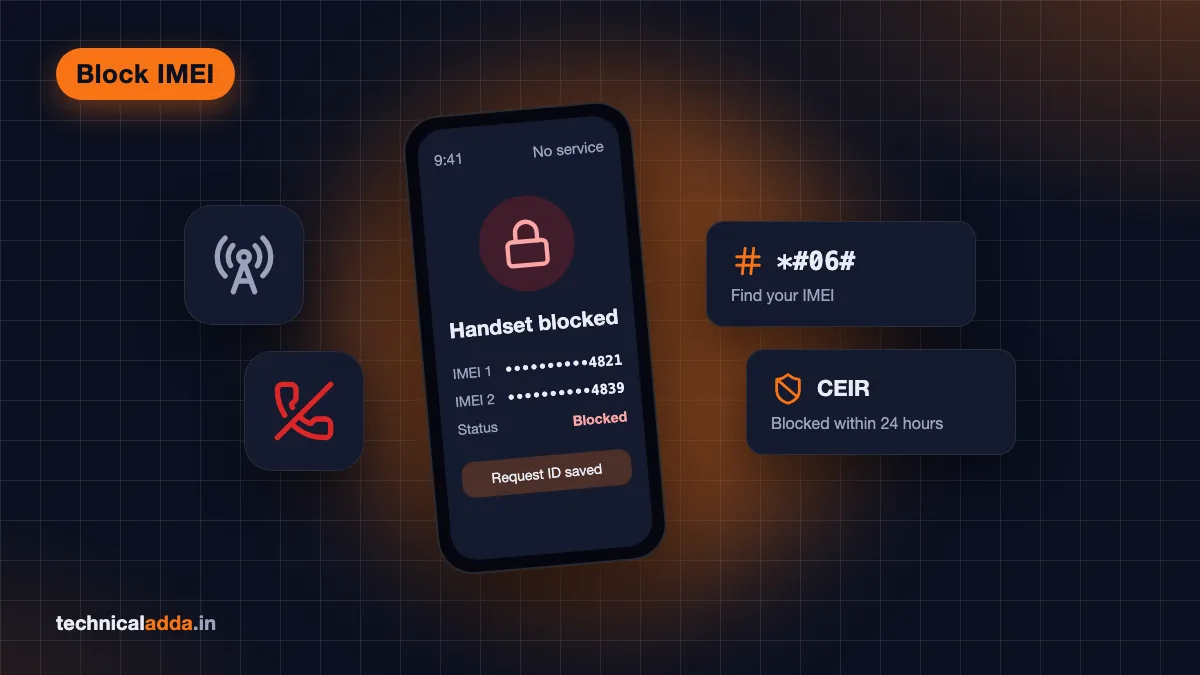
CEIR (Central Equipment Identity Register) is a national database run by the Department of Telecommunications (DoT). When you report a phone as lost or stolen, its IMEI is added to a blocked list that all Indian telecom operators (Jio, Airtel, Vi, BSNL) check. A blocked phone cannot make calls, send SMS or use mobile data on any Indian network, even with a new SIM.
CEIR is now part of the Sanchar Saathi citizen portal at sancharsaathi.gov.in (opens in new tab). Sanchar Saathi also has an official mobile app on the Google Play Store and Apple App Store. According to the official Sanchar Saathi FAQ, you can block a lost phone, check the request status and unblock a found phone through the app as well as the website. This guide uses the website flow; the app asks for the same details and documents.
Blocking does not stop the police from tracing the phone. If someone inserts a SIM into the blocked phone, the system can alert the police so they can try to recover it.
Do this first: the first-hour checklist
Before blocking the IMEI, protect your money and accounts. Speed matters more than anything else here.
- Try to locate, lock or erase the phone.
- Android: go to Google's Find Hub (formerly Find My Device) at
google.com/android/findand sign in. Use Secure device to lock it with a message and alternate number, or Factory reset device as a last resort. - iPhone: go to
icloud.com/find, select the phone and turn on Mark As Lost (Lost Mode).
- Android: go to Google's Find Hub (formerly Find My Device) at
- Block your SIM. Call your operator from another phone (Jio, Airtel, Vi or BSNL customer care) and ask them to block the SIM. This stops OTPs reaching the thief. Then request a duplicate SIM with the same number; you will need it for OTP during CEIR blocking.
- Block UPI and banking. Call your bank's helpline to block UPI and net banking access on that device. If money has already been taken, call 1930 (National Cyber Crime Helpline) immediately and file a complaint on cybercrime.gov.in (opens in new tab). Our guide on how to report cyber fraud online in India explains the full process.
- Change key passwords. Change your Google/Apple ID, email and social media passwords from another device. Log out of the lost phone from your Google account's Security > Your devices page. Use strong, unique passwords (see examples).
- WhatsApp: Re-register WhatsApp on your duplicate SIM. This logs out the lost phone.
How to find the IMEI number of a lost phone
You need the IMEI to block the phone. Here is where to find it when the phone itself is gone:
| Where to look | How |
|---|---|
| Phone box | Printed on the sticker on the box |
| Purchase invoice | Most invoices from shops, Flipkart and Amazon list the IMEI |
| Google account (Android) | Find Hub app: select the device and tap Settings. On the web, go to android.com/find and select Settings next to the device to see the IMEI (devices without a SIM slot, such as the Pixel Tablet, have no IMEI) |
| Apple account (iPhone) | Sign in at account.apple.com > Devices, select the iPhone to see IMEI |
| Warranty card or insurance papers | Usually list the IMEI |
| Old screenshots | If you ever dialled *#06#, check your gallery or cloud backup |
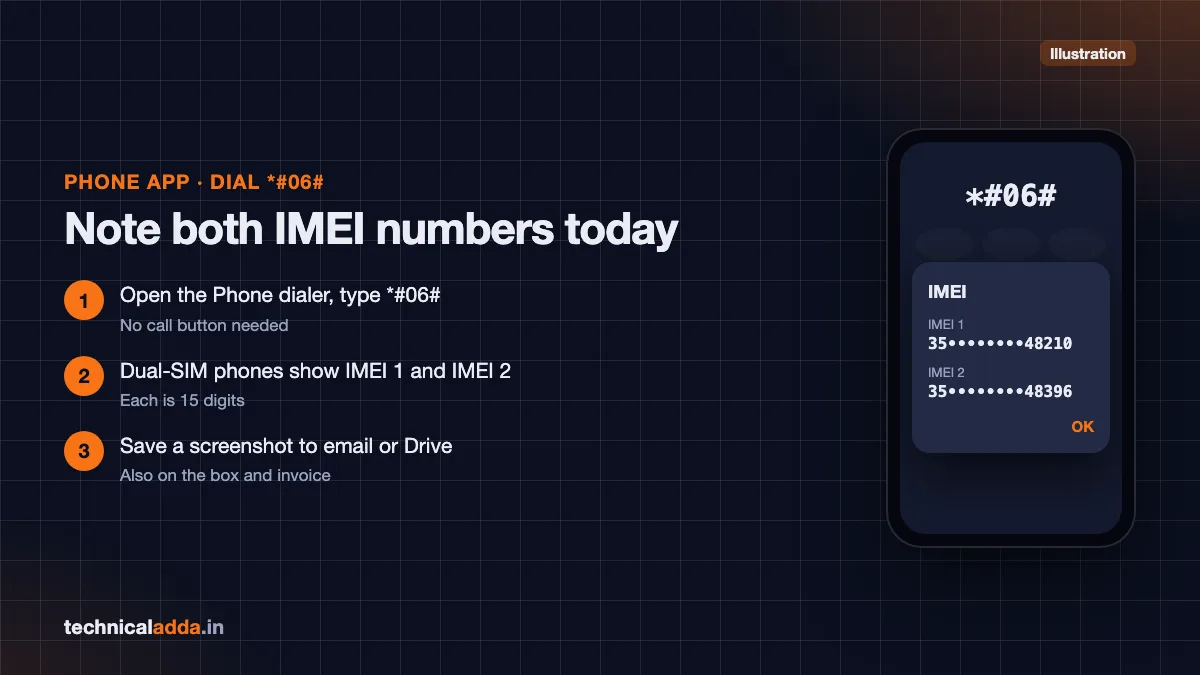
If you still have the phone in hand (for example, to note the IMEI for future safety), dial *#06# and the IMEI(s) will appear on screen. On Android you can also see it in Settings > About phone; on iPhone, Settings > General > About.
Tip: Save a screenshot of your IMEI in your email or Google Drive today, so you are not searching for it after a theft.
Police report: is it required and what are the alternatives
The CEIR blocking form asks for police complaint details: the complaint/FIR number, police station, and a copy of the complaint. Official guidance and user manuals list a police report (FIR or lost report) as a required document along with ID proof.
You do not always need to visit a police station in person:
- Online lost-article report: Many state police departments let you file a lost report online through their website or citizen app (for example, Delhi Police's Lost Report service, which sends a digitally signed report to your phone and email, and the Report Lost Article option in Uttar Pradesh Police's UPCOP app). Service names and rules differ by state, so check your state police website or citizen app. You get a report number and a downloadable copy, which you can upload to CEIR.
- e-FIR for theft: If the phone was stolen (not just lost), some states let you register an e-FIR online (for example, Delhi Police's theft e-FIR and the Register e-FIR option in UP's UPCOP app). Which cases qualify for an e-FIR varies by state, so check your state police portal; if there is no online option, file the FIR at the police station.
- Police station: If your state has no online option, visit the nearest police station and ask for a written complaint copy with the complaint number.
Without any police complaint number, you will not be able to complete the CEIR form. If you only want to protect your data quickly, start with remote lock/erase and SIM blocking (first-hour checklist above) while you get the report.
How to block lost phone with IMEI on Sanchar Saathi (step by step)
Keep these ready:
- Police complaint number and a copy (PDF/JPG)
- IMEI number(s)
- Phone brand and model
- Purchase invoice (recommended)
- ID proof (Aadhaar, PAN, driving licence, passport or voter ID)
- A working mobile number for OTP, usually the duplicate SIM of your lost number (as per TRAI rules, SMS on a re-issued SIM starts 24 hours after activation, so get the duplicate SIM early)
Steps
- Open sancharsaathi.gov.in (opens in new tab) and go to Citizen Centric Services.
- Click Block Your Lost/Stolen Mobile Handset. This opens the CEIR section.
- Choose Block lost / stolen mobile handset.
- Device information: enter the lost mobile number(s), IMEI 1 (and IMEI 2 for dual-SIM phones), device brand and model, and upload the purchase invoice if you have it.
- Lost information: enter the place, date, state and district where the phone was lost, the police station, the police complaint number, and upload the complaint copy.
- Mobile owner information: enter your name, address, ID proof type and number, and upload the ID proof. Add your email address.
- Enter the mobile number for OTP, click Get OTP, and enter the code.
- Tick the declaration and click Submit.
- Save the Request ID shown on screen and sent by SMS. You need it to check status and to unblock the phone later.
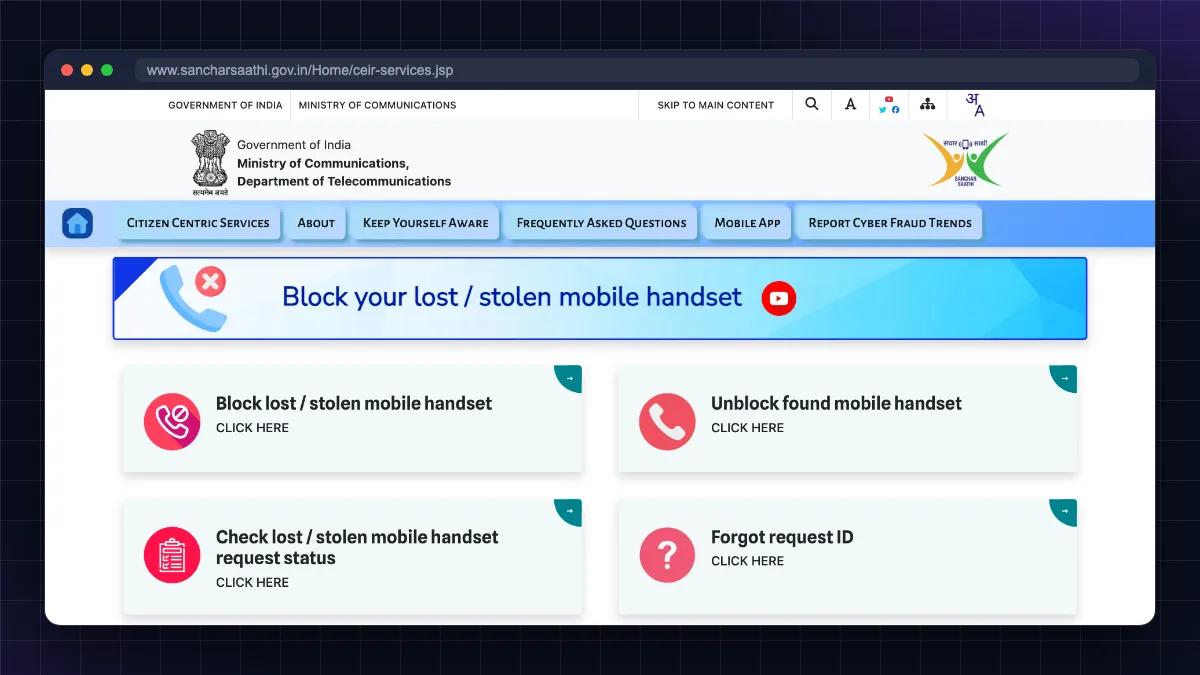
According to the official Sanchar Saathi FAQ, a reported handset is blocked on Indian telecom networks within 24 hours. If anyone later uses the phone, you get an SMS, and the traceability report is also shared with the police station where you filed the complaint.
Check your CEIR request status
- Go to the same Block Your Lost/Stolen Mobile Handset section.
- Click Check lost / stolen mobile handset request status. (Lost the Request ID? Use Forgot request ID on the same page.)
- Enter your Request ID and the captcha, then submit.
You will see one of these statuses:
| Status | Meaning | What to do |
|---|---|---|
| Under process | Request received, being verified | Wait; check again after a day |
| Blocked | IMEI is blocked on all Indian networks | Keep the Request ID safe |
| Rejected | Details did not match or documents unclear | Re-submit with correct IMEI, complaint number and clear documents |
The most common reasons for rejection are a wrong IMEI digit, a mismatch between the complaint and form details, or an unreadable upload.
How to unblock your phone when it is found
If the police recover your phone or you find it yourself:
- First inform the local police that the phone has been found (the official FAQ requires this before unblocking).
- Open Block Your Lost/Stolen Mobile Handset on Sanchar Saathi and click Unblock found mobile handset.
- Enter the Request ID, your mobile number and the reason for unblocking (for example, "found" or "recovered by police").
- Enter the OTP, complete the captcha and submit.
- You get an acknowledgement. Once processed, the IMEI is unblocked and you are informed by SMS or email.
Important: If the blocking request was registered through the State Police (for example, the police filed it for you), you have to approach the State Police to register the unblocking request.
After unblocking, restart the phone with your SIM inside and check that calls and data work.
What CEIR blocking does and does not do
| CEIR blocking does | CEIR blocking does not |
|---|---|
| Stops the phone from working on Jio, Airtel, Vi and BSNL in India | Erase your photos, chats or data |
| Helps police trace the phone if a SIM is used | Stop Wi-Fi use on the phone |
| Reduces resale value of stolen phones | Block your UPI, bank or WhatsApp accounts |
| Works for both lost and stolen phones | Work outside India's mobile networks |
This is why the first-hour checklist matters: CEIR protects the hardware, but your data and money need separate action (remote erase, SIM block, bank call, password changes).
If you suspect someone accessed your accounts through the stolen phone, go through our checklist on how to check if your phone is hacked once you have a new device. Also keep important ID documents safe in DigiLocker; you can download Aadhaar from DigiLocker again on the new phone.
Buying a second-hand phone? Check the IMEI first
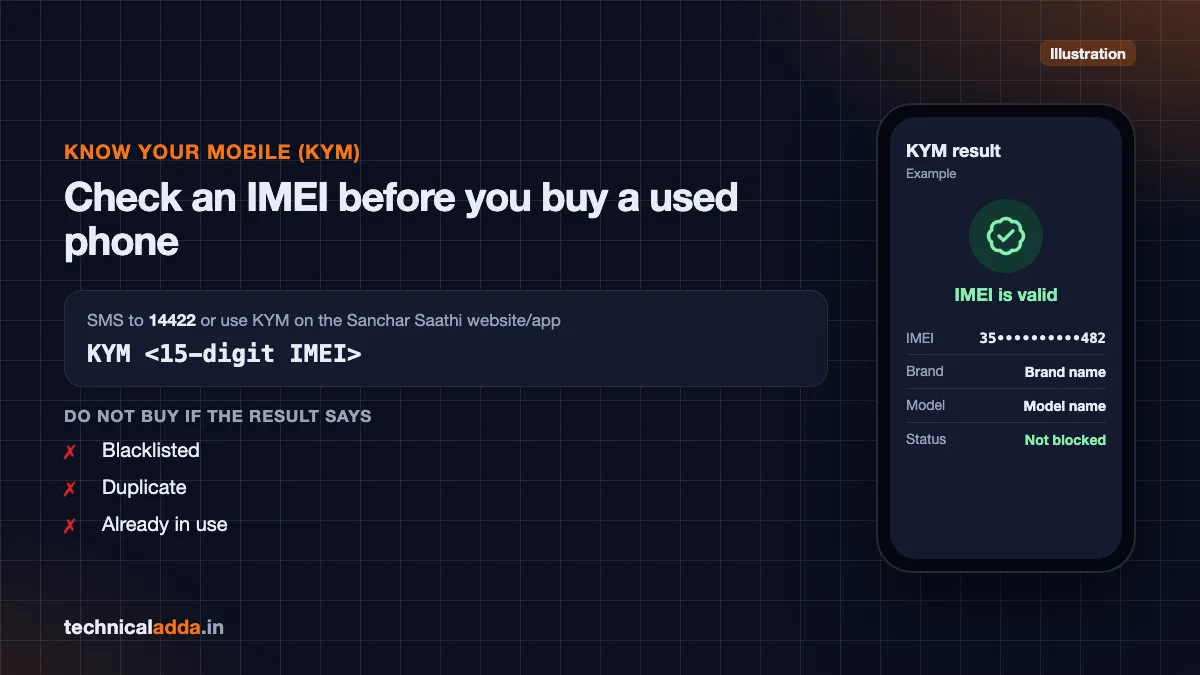
Sanchar Saathi's Know Your Mobile (KYM) service tells you whether an IMEI is blocked, duplicate or already in use. Before buying a used phone:
- Dial
*#06#on the phone you are buying and note the IMEI. - SMS
KYM <15-digit IMEI>to 14422, or use the KYM option on the Sanchar Saathi website or app. - If the result says blacklisted, duplicate or already in use, do not buy it.
Also check whether it is genuine and not refurbished using our guide to check if a phone is original or refurbished.
Key takeaways
- You can block a lost or stolen phone's IMEI on all Indian networks through Sanchar Saathi's CEIR section.
- Keep ready: police complaint number and copy, IMEI, ID proof, invoice and a duplicate SIM for OTP.
- Many states allow online lost reports, and some allow e-FIRs, so you may not need to visit a police station.
- Save the Request ID; you need it to check status and to unblock the phone when found.
- CEIR blocks the handset, not your data: also lock/erase the phone remotely, block the SIM and call your bank.
- Use KYM (SMS
KYM <IMEI>to 14422) before buying any second-hand phone.
Conclusion
Knowing how to block lost phone with IMEI turns a stressful situation into a clear checklist. In the first hour, lock or erase the phone, block your SIM and call your bank. Then file a police or online lost report, get a duplicate SIM, and submit the CEIR request on Sanchar Saathi. Save the Request ID, and use Unblock found mobile handset if the phone comes back.
If money was lost along with the phone, follow our guide to report cyber fraud online in India right away. For more government digital services, browse the Digital India & UPI section.
FAQ
Frequently Asked Questions
How do I block my lost phone with IMEI number in India?
Go to sancharsaathi.gov.in, open Citizen Centric Services and click Block Your Lost/Stolen Mobile Handset. Choose Block lost / stolen mobile handset, enter the IMEI, device details, loss details and police complaint number, upload the complaint copy and ID proof, then verify with OTP. Save the Request ID for status checks and unblocking.
Is an FIR compulsory to block a lost phone on CEIR?
The CEIR form asks for a police complaint number and a copy of the complaint, so you need some police report. It does not always have to be a full FIR at a police station. Many states let you file an online lost-article report or e-FIR, which gives you a number and copy that you can upload.
Can I block my lost phone without the IMEI number?
You need the IMEI to block a phone on CEIR. If you do not have it, check the phone box, purchase invoice, warranty card, your Apple account device list, or the device Settings in Google's Find Hub (app or android.com/find). Online stores like Amazon and Flipkart also often show the IMEI on the invoice in your order history.
How long does CEIR take to block a phone?
The official Sanchar Saathi FAQ says a reported handset is blocked on Indian telecom networks within 24 hours. You can check progress anytime using your Request ID on the request status page of the Block Your Lost/Stolen Mobile Handset section. If the request is rejected, correct the details and submit again.
How do I check my CEIR request status?
Open the Block Your Lost/Stolen Mobile Handset section on sancharsaathi.gov.in and click Check lost / stolen mobile handset request status. Enter the Request ID you received during blocking and the captcha. The status will show as Under process, Blocked or Rejected. Rejections usually happen because of a wrong IMEI or mismatched complaint details.
How do I unblock my phone after finding it?
On sancharsaathi.gov.in, open Block Your Lost/Stolen Mobile Handset and choose Unblock found mobile handset after informing the local police that it is found. Enter your Request ID, mobile number and the reason, verify with OTP and submit. If the State Police registered the block for you, ask them to register the unblock. You will get an SMS or email once the IMEI is unblocked.
Does blocking the IMEI help police find my phone?
Yes. Blocking does not stop tracing. If anyone puts a SIM into the blocked phone, CEIR can generate an alert that helps police locate the device. Many states regularly report phones recovered through CEIR. Recovery is not guaranteed, though, so also lock or erase your data remotely using Google Find Hub or Apple's Find My.
Can a blocked phone still use Wi-Fi?
Yes. CEIR blocks the phone on Indian mobile networks, so it cannot make calls, send SMS or use mobile data. However, the phone can still connect to Wi-Fi. That is why you should also lock or erase it remotely, sign out of your accounts from another device, and change your important passwords.
Should I block my SIM as well as the IMEI?
Yes. Blocking the IMEI stops the handset, but your SIM could be put into another phone to receive OTPs. Call your telecom operator to block the SIM immediately, then get a duplicate SIM with the same number. You also need that number working to receive the OTP during CEIR blocking.
What is the CEIR helpline number?
For help with Sanchar Saathi and CEIR, use the contact details on sancharsaathi.gov.in, which may change over time. For lost or stolen phone money fraud, call the National Cyber Crime Helpline at 1930 or report on cybercrime.gov.in. For SIM blocking, call your telecom operator's customer care from another phone.