How to Use UPI Lite: Limits, Setup in PhonePe, GPay, Paytm and BHIM (2026 Guide)
Digital India & UPI 13 min read By David Johnson
In this articleTable of contents12
Last updated: 10 October 2026
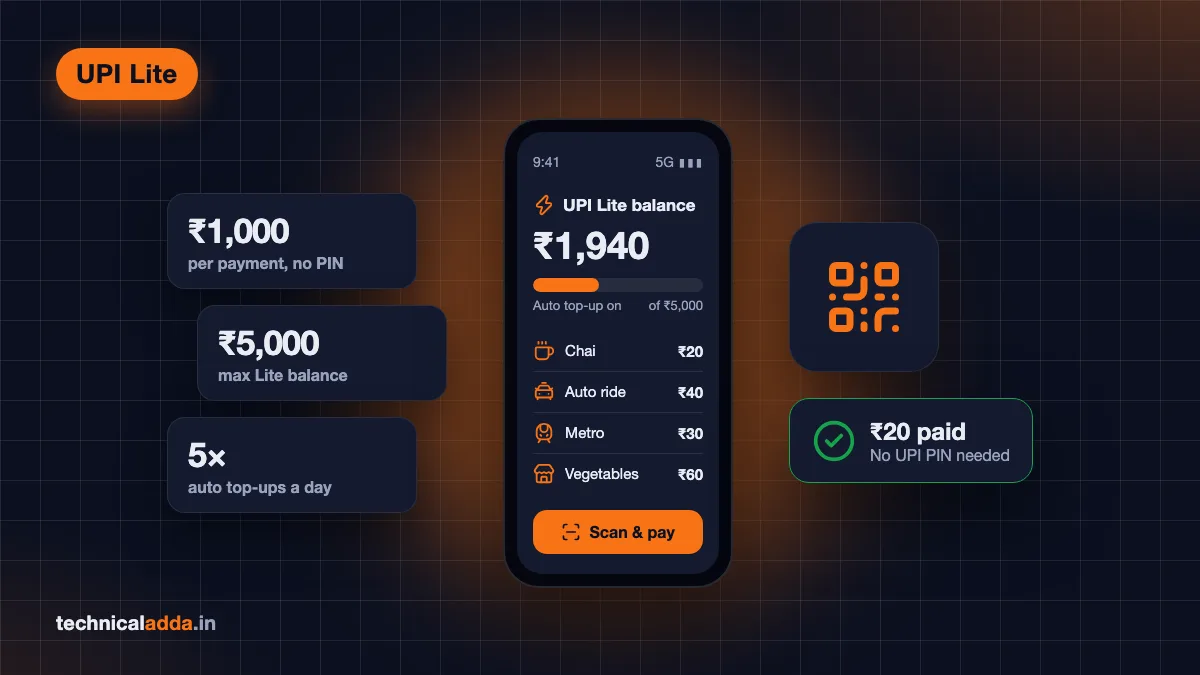
Paying ₹20 for chai or ₹40 for an auto ride should not need a 6-digit PIN every single time. That is the idea behind UPI Lite, a small on-device balance that lets you make quick, PIN-free payments. It also keeps dozens of tiny entries out of your bank passbook and works even when your bank's servers are slow. In this guide you will learn how to use UPI Lite step by step: what it is, the current limits set by RBI, how to enable it in PhonePe, Google Pay, Paytm and BHIM, how auto top-up works, how to withdraw or disable it, and when regular UPI is the better choice.
Quick answer: To use UPI Lite, open a UPI app like Google Pay, PhonePe, Paytm or BHIM, find "UPI Lite" in your profile or home screen, add money (up to ₹5,000) from a supported bank with your UPI PIN, and pay. Payments up to ₹1,000 each go through without a PIN. You can turn on auto top-up and disable it anytime.
What is UPI Lite?
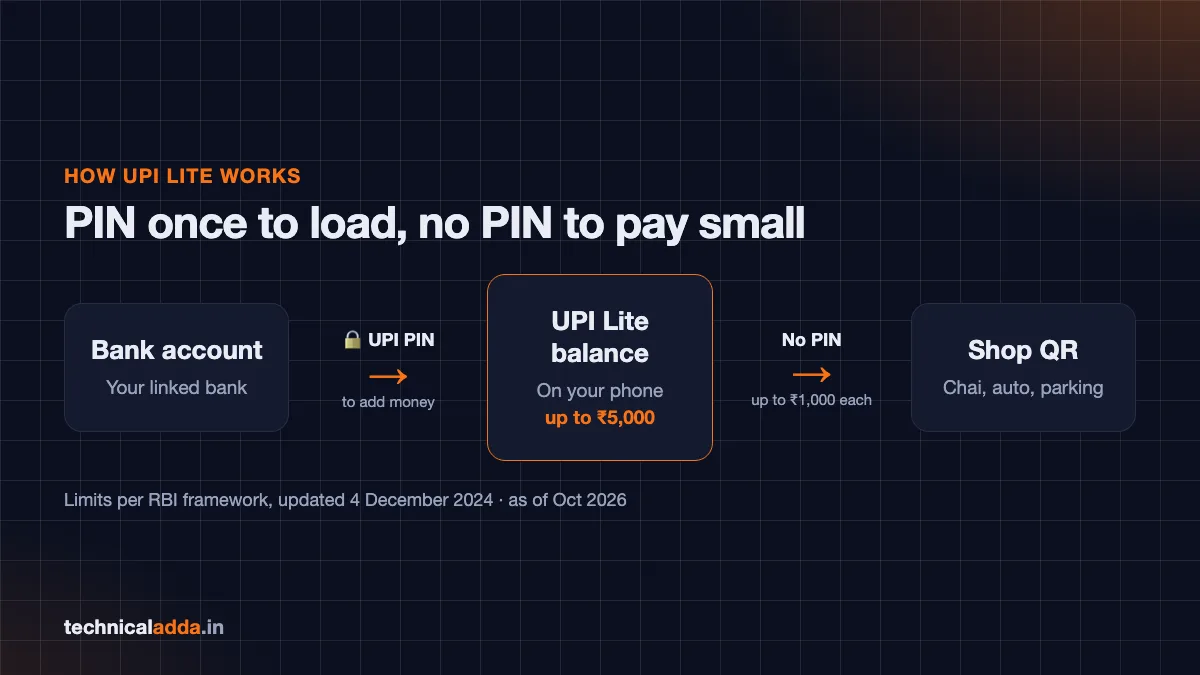
UPI Lite is an on-device wallet for small-value UPI payments, introduced by NPCI in 2022. Think of it as a small "pocket" of money that sits on top of your bank account inside your UPI app.
How it works in simple words:
- You move a small amount (say ₹2,000) from your bank account into UPI Lite. This step needs your UPI PIN.
- When you pay a shop or a friend, the money is deducted from that UPI Lite balance, not directly from your bank in real time.
- Payments within the per-transaction limit do not need a UPI PIN.
- Your bank passbook shows the top-up, not every ₹10 or ₹50 payment.
Why it exists:
- Speed: Small payments go through faster because they do not wait on your bank's core banking system each time.
- Less failure: Peak-hour bank server issues affect UPI Lite payments less. If you often face failed payments, our guide on UPI transaction failed but money debited explains your rights.
- Clean passbook: Fewer tiny entries in your bank statement.
- Convenience: No PIN for chai, parking, metro recharge and similar small spends.
UPI Lite is not a separate KYC wallet like a Paytm Wallet. Google Pay's help page notes that you do not need any additional KYC to set it up because it is linked to your existing bank account.
UPI Lite limits in 2026
The limits were raised by RBI in December 2024 through its updated framework for small-value digital payments in offline mode (opens in new tab), and NPCI implemented them through its circulars in early 2025.
| Limit | Current value | Source |
|---|---|---|
| Maximum per transaction | ₹1,000 | RBI framework, updated 4 December 2024 |
| Maximum UPI Lite balance at any time | ₹5,000 | RBI framework, updated 4 December 2024 |
| UPI PIN needed for payment | No (within limit) | RBI / NPCI |
| UPI PIN needed to add money | Yes (online, with additional factor of authentication) | RBI framework |
| Auto top-ups per day | Up to 5 | NPCI circular on auto top-up (2024) |
| Total spend per day | Varies by app and bank | See note below |
About the daily limit: There is no single daily spending cap that every app shows. As of October 2026, Google Pay's help page (opens in new tab) mentions multiple transactions up to a total of ₹5,000 in a day, while ICICI Bank's UPI FAQ (opens in new tab) lists cumulative UPI Lite usage of ₹10,000 per day. Check the limit shown inside your app or on your bank's help page.
Older limits you may still see online: ₹200 per transaction (2022 launch), ₹500 per transaction and ₹2,000 balance (2023). These are outdated.
How to use UPI Lite: setup in each app
Before you start, make sure:
- Your bank supports UPI Lite. Not every bank does. Your app will show only supported banks.
- Your UPI app is updated to the latest version.
- You know your UPI PIN for that bank account.
Menu names change often after app updates. The steps below match the general flow in each app; if a label looks different, search "UPI Lite" in the app's search bar.
Google Pay
According to the Google Pay help page (opens in new tab):
- Open Google Pay and tap your profile picture (top right).
- Tap UPI Lite.
- Choose the bank account (only supported banks appear).
- Enter the amount to add (up to ₹5,000).
- Tap Add / Continue and enter your UPI PIN.
- Your UPI Lite balance now shows in your profile and at checkout.
To set up auto top-up (Autopay) in Google Pay, tap the UPI Lite option, enter an amount, tap Add, choose Continue with Autopay and enter your UPI PIN.
PhonePe
- Open PhonePe and tap your profile picture (top left).
- Under Payment Methods, look for UPI Lite (sometimes shown as "PIN-free payments").
- Tap Activate and choose a supported bank account.
- Enter the amount to add and tap Add Money.
- Enter your UPI PIN to confirm.
PhonePe's help page also lets you start from the UPI Lite option on the home screen. Button names can change with app updates.
Paytm
- Open Paytm and tap your profile icon (top left).
- Go to UPI & Payment Settings.
- Tap UPI Lite and choose a supported bank account.
- Enter the amount and tap Add Money to UPI Lite.
- Confirm with your UPI PIN.
Some Paytm versions also show a UPI Lite option in Balance & History. Menu names change with app updates, so if you cannot find it, search for UPI Lite in the app's help section.
BHIM
- Open the BHIM app.
- Find the UPI Lite banner or option on the home screen and tap Enable.
- Accept the terms.
- Choose the bank account and amount, then tap Enable UPI Lite.
- Enter your UPI PIN.
Newer BHIM versions have a refreshed design, so the UPI Lite option and button names may look different. If you do not see it on the home screen, check the app's profile or settings menu.
Comparison: where to find UPI Lite
| App | Where to find it | Auto top-up | Notes |
|---|---|---|---|
| Google Pay | Profile picture → UPI Lite | Yes ("Continue with Autopay") | Official steps on Google help page |
| PhonePe | Profile → Payment Methods → UPI Lite | Yes (NPCI mandate) | Label may say "PIN-free" |
| Paytm | Profile → UPI & Payment Settings → UPI Lite | Yes (NPCI mandate) | May also appear in Balance & History |
| BHIM | Home screen UPI Lite option | Yes (NPCI mandate) | NPCI's own app |
How to pay with UPI Lite
Once your balance is loaded, paying is simple:
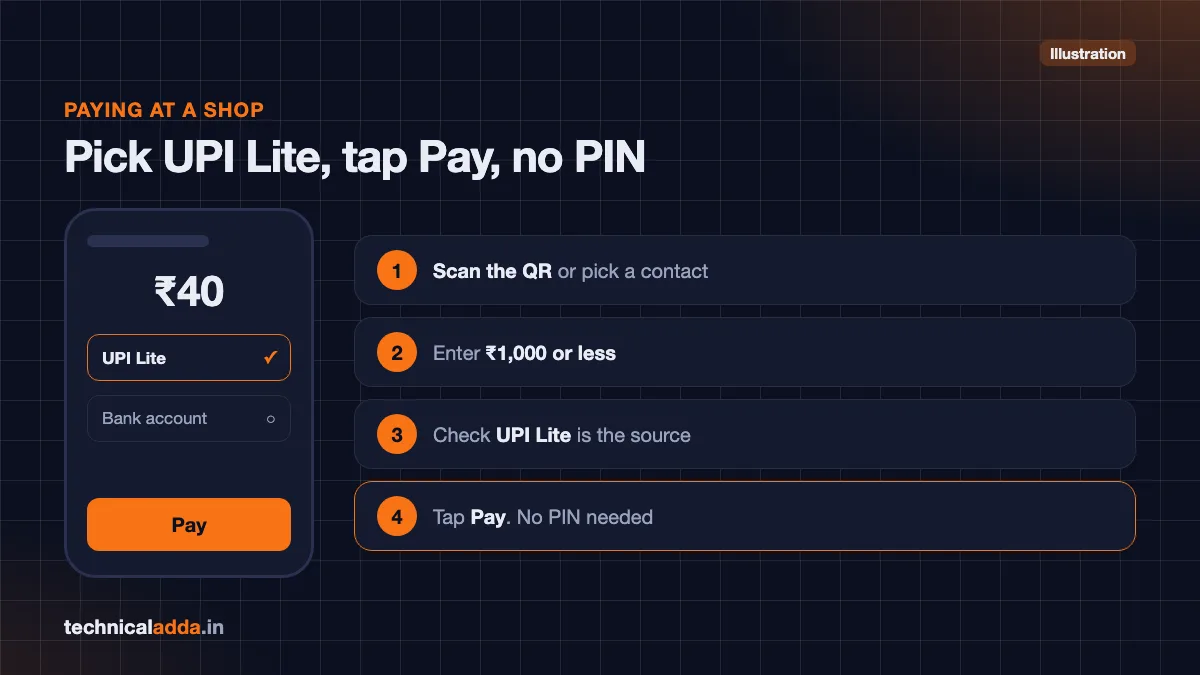
- Scan the QR code or choose a contact/UPI ID as usual.
- Enter an amount of ₹1,000 or less.
- On the payment screen, make sure UPI Lite is selected as the payment source (most apps select it automatically for small amounts if balance is enough).
- Tap Pay. No PIN is needed.
If the amount is more than ₹1,000 or more than your UPI Lite balance, the app will ask you to pay from your bank account with a UPI PIN instead.
Where UPI Lite does not work
As per Google Pay's help page, UPI Lite cannot be used for:
- Collect requests (when someone sends you a payment request)
- UPI Autopay mandates (subscriptions, EMIs)
- UPI International payments
Some merchants and apps may also not accept UPI Lite at checkout.
Receiving money
UPI Lite is meant for paying, not receiving. When someone sends you money, it goes to your bank account as usual, and you can then top up UPI Lite from there.
UPI Lite auto top-up explained
Manually adding money every few days defeats the purpose. That is why NPCI introduced auto top-up, which UPI apps had to enable by 31 October 2024.
How it works:
- You set a threshold (for example, ₹200).
- You set a top-up amount (for example, ₹1,000).
- When your UPI Lite balance drops below the threshold, the app automatically adds the top-up amount from your linked bank account.
- You approve this once by creating a mandate with your UPI PIN.
Rules you should know:
- Maximum 5 auto top-ups per day per UPI Lite account, as per NPCI's circular.
- The balance can never exceed ₹5,000, even with auto top-up.
- You can cancel the auto top-up mandate anytime from the app's Autopay or UPI Lite settings.
Who should use auto top-up? People who use UPI Lite daily for small spends like tea, metro, parking or vegetables. If you use it rarely, a manual top-up gives you more control over how much sits in the wallet.
How to withdraw money or disable UPI Lite
Your UPI Lite money is not locked forever. There are two ways to get it back.
Option 1: Transfer out (keep UPI Lite active)
NPCI asked banks and UPI apps in February 2025 to offer a "Transfer out" facility, which lets you move UPI Lite balance back to the bank account it came from without closing UPI Lite. Apps were given until 31 March 2025 to add it. The button name differs by app, so look for an option such as Transfer to bank or Withdraw inside the UPI Lite screen. If your app does not show one, disabling UPI Lite (Option 2) also returns the balance to your bank.
Option 2: Disable / delete UPI Lite
- Open the UPI Lite screen in your app.
- Tap the three-dot menu or Settings.
- Choose Disable / Delete UPI Lite.
- Confirm.
The remaining balance is credited back to your linked bank account. Google Pay's help page confirms that when you deregister, the money is credited back to your bank account.
Dormant UPI Lite accounts
As per an NPCI addendum dated 27 February 2025, banks must refund balances in UPI Lite accounts that have had no transactions for six months back to the source bank account.
Changing phones
UPI Lite is linked to your device. Google Pay says your balance remains intact if you use the same phone number on a new device, but you may need to set up again. If you are selling or resetting your phone, it is safer to withdraw or disable UPI Lite first. If you are buying a used phone, also read how to check if a phone is original or refurbished.
UPI Lite vs UPI: which one to use
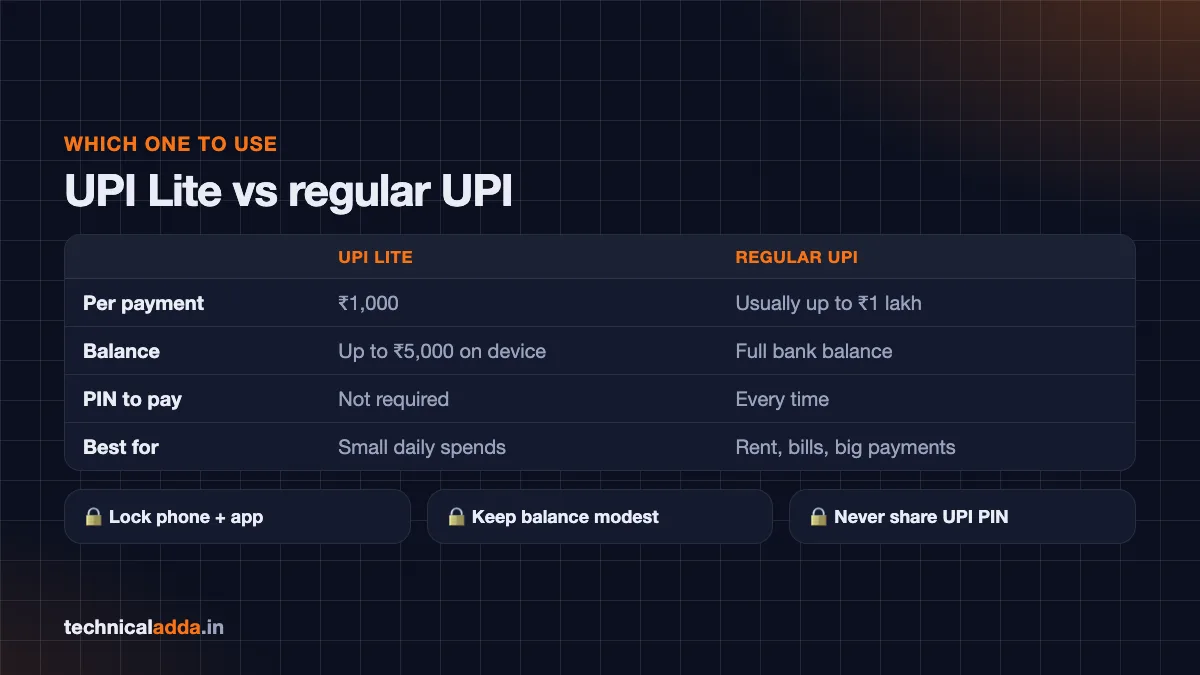
| Feature | UPI Lite | Regular UPI |
|---|---|---|
| Best for | Small daily payments | All payments, including large ones |
| Per transaction limit | ₹1,000 | Usually up to ₹1 lakh (higher for some categories) |
| Balance | Up to ₹5,000 on device | Your full bank balance |
| UPI PIN for payment | Not required | Required every time |
| Shows in bank passbook | Only top-ups | Every transaction |
| Speed during bank server load | Generally faster | Depends on bank |
| Collect requests / Autopay | Not supported | Supported |
| Risk if phone is stolen and unlocked | Up to your Lite balance | Needs PIN, so lower unless PIN is known |
| Receiving money | Goes to bank account | Goes to bank account |
Simple rule: Use UPI Lite for everyday small spends under ₹1,000. Use regular UPI for rent, bills, online shopping, transfers to family and anything above ₹1,000.
Is UPI Lite safe?
UPI Lite follows RBI's framework for small-value payments, and the money stays in the banking system. Still, the PIN-free design changes your risk a little:
- Phone theft is the main risk. If someone takes your unlocked phone, they could spend your UPI Lite balance without a PIN. That is why the balance is capped at ₹5,000.
- Lock your phone and your apps. Use a screen lock and the app's own fingerprint/face lock.
- Keep the balance modest. If you only spend ₹300 a day, there is no need to keep ₹5,000 in UPI Lite.
- Watch for fake "payment received" screenshots. UPI Lite makes paying quick, and scammers exploit quick payments at shops. Learn how to identify a fake UPI payment screenshot.
- Never share your UPI PIN. No one needs your PIN to send you money.
If your phone is lost, disable UPI Lite from your bank or app support, block your SIM, and use the Sanchar Saathi portal to block the phone's IMEI. For suspected fraud, call 1930 or report on cybercrime.gov.in (opens in new tab). Our guide to report cyber fraud online in India walks you through the process.
Common problems and fixes
"UPI Lite option not showing."
- Update the app.
- Your bank may not support UPI Lite yet. Switch the linked account to a supported bank.
- Google Pay notes that some users need an "okicici" UPI ID enabled for UPI Lite; if activation fails, contact Google Pay support.
"Payment failed from UPI Lite but balance reduced."
- Wait a few hours; the app usually reverses it to your Lite balance or bank.
- Check your UPI Lite transaction history inside the app.
- Raise a dispute from the transaction's help option.
"Cannot add money."
- Check if your balance is already near ₹5,000.
- Make sure you entered the correct UPI PIN.
- Your bank server may be down; try later.
"Auto top-up not working."
- You may have hit the 5-per-day limit.
- The mandate may have been cancelled or your bank balance may be low.
"Where is my UPI Lite statement?"
Your UPI Lite payments appear in the UPI app's transaction history. Your bank statement shows the top-ups and withdrawals rather than each small payment. When UPI Lite launched, PhonePe said (opens in new tab) banks would send a daily SMS listing the day's UPI Lite transactions, but alert formats vary by bank.
Key takeaways
- UPI Lite lets you pay up to ₹1,000 per transaction without a UPI PIN.
- The UPI Lite balance can be up to ₹5,000 at any time; adding money needs your UPI PIN.
- You can enable it in Google Pay, PhonePe, Paytm and BHIM if your bank supports it.
- Auto top-up refills the balance automatically, up to 5 times a day, and can be cancelled anytime.
- You can withdraw or disable UPI Lite anytime; the balance goes back to your bank.
- Use UPI Lite for small daily spends and regular UPI for everything else.
Conclusion
Now you know how to use UPI Lite: enable it in your UPI app, add up to ₹5,000 with your PIN, and pay up to ₹1,000 at a time without entering a PIN. Turn on auto top-up if you use it daily, keep your phone locked, and switch to regular UPI for bigger payments.
Small payments are only part of the story. If a UPI payment ever gets stuck, read our guide on what to do when a UPI transaction fails but money is debited. Explore more UPI guides in our Digital India section.
FAQ
Frequently Asked Questions
What is the UPI Lite limit in 2026?
UPI Lite allows payments of up to ₹1,000 per transaction, and the UPI Lite balance can be up to ₹5,000 at any point in time. These limits come from RBI's framework updated on 4 December 2024. Adding money needs your UPI PIN, while payments within the limit do not. Daily spending caps can vary by app, so check your app.
Does UPI Lite need a UPI PIN?
No, payments of up to ₹1,000 from your UPI Lite balance do not need a UPI PIN. You only need the PIN when you add money to UPI Lite from your bank account or set up auto top-up. For payments above ₹1,000, the app will switch to regular UPI and ask for your PIN.
How do I activate UPI Lite in Google Pay?
Open Google Pay, tap your profile picture, and select UPI Lite. Choose a supported bank account, enter the amount you want to add (up to ₹5,000), and confirm with your UPI PIN. Your UPI Lite balance then appears in your profile and is used automatically for eligible small payments.
Can I withdraw money from UPI Lite to my bank account?
Yes. NPCI directed banks and apps in 2025 to provide a "Transfer out" option to move UPI Lite balance back to the source bank account. You can also disable UPI Lite, and the remaining balance will be credited back to your linked bank account. Exact menu names differ by app.
What is UPI Lite auto top-up?
UPI Lite auto top-up automatically adds a fixed amount from your bank account to your UPI Lite balance when it falls below a level you choose. You approve it once with your UPI PIN. NPCI rules allow up to five auto top-ups per day, and you can cancel the mandate anytime from your app.
Is UPI Lite safe to use?
UPI Lite is generally safe because it follows RBI's small-value payment framework and caps the balance at ₹5,000. The main risk is someone using your unlocked phone to spend the balance without a PIN. Use a screen lock and app lock, keep only what you need in the Lite balance, and never share your UPI PIN.
Which banks support UPI Lite?
Many major banks support UPI Lite, but the list keeps changing, and not every bank is supported on every app. The easiest way to check is to open the UPI Lite option in your app; it shows only supported banks. Google Pay's help page also advises checking the app for the current list.
Can I receive money in UPI Lite?
UPI Lite is designed mainly for making small payments. When someone sends you money through UPI, it is normally credited to your bank account, not your UPI Lite balance. You can then top up UPI Lite from that bank account. Check your app's UPI Lite section for any newer receiving features.
What happens to UPI Lite balance if I lose my phone?
Your UPI Lite money stays linked to your bank account. Contact your UPI app or bank to disable UPI Lite, block your SIM with your telecom operator, and block the phone's IMEI on Sanchar Saathi. When UPI Lite is disabled, the balance is returned to your linked bank account. Report any fraud on 1930.
Is UPI Lite different from UPI Lite X?
Yes. UPI Lite is an on-device balance for PIN-free small payments that needs internet. UPI Lite X is a related NPCI feature designed for offline payments, typically using NFC between phones, and needs a supported phone and app. Support depends on your app, bank and phone, so check the UPI Lite section of your app to see whether UPI Lite X is offered.