How to Identify Fake UPI Payment Screenshot: 10 Checks Every Shopkeeper Should Know (2026)
Cyber Safety 12 min read By Richa Singh
In this articleTable of contents11
Last updated: 10 October 2026
A customer picks up goods, shows you a phone screen with a big green tick and "₹2,500 Paid", and walks away. Hours later, you check your account and the money never arrived. Fake UPI payment screenshots and "prank" payment apps have become a common way to cheat shopkeepers, online sellers, delivery agents and even people selling second-hand items on OLX or Facebook. This guide explains how to identify fake UPI payment screenshot tricks, the 10 checks that actually work, why a soundbox or bank SMS beats any screenshot, and exactly what to do and whom to call if you have already been cheated.
Quick answer: You cannot reliably identify a fake UPI payment screenshot by looking at it, because fake apps copy real screens perfectly. The only safe check is to confirm the money in your own UPI or bank app, your bank's SMS, or your payment soundbox before handing over goods. If cheated, call 1930 or report at cybercrime.gov.in.
How the fake UPI payment scam works
The scam depends on one simple thing: you trust the customer's screen instead of your own.
A typical case looks like this:
- The fraudster comes to a busy shop, often during rush hour.
- They buy something, say a mobile accessory or jewellery, and "scan" your QR code.
- They show you a screen that says "Payment Successful" with your shop's name, the right amount and a transaction ID.
- Sometimes the phone even plays a success sound.
- You are busy, the screen looks real, and you hand over the goods.
- The money never reaches your bank.
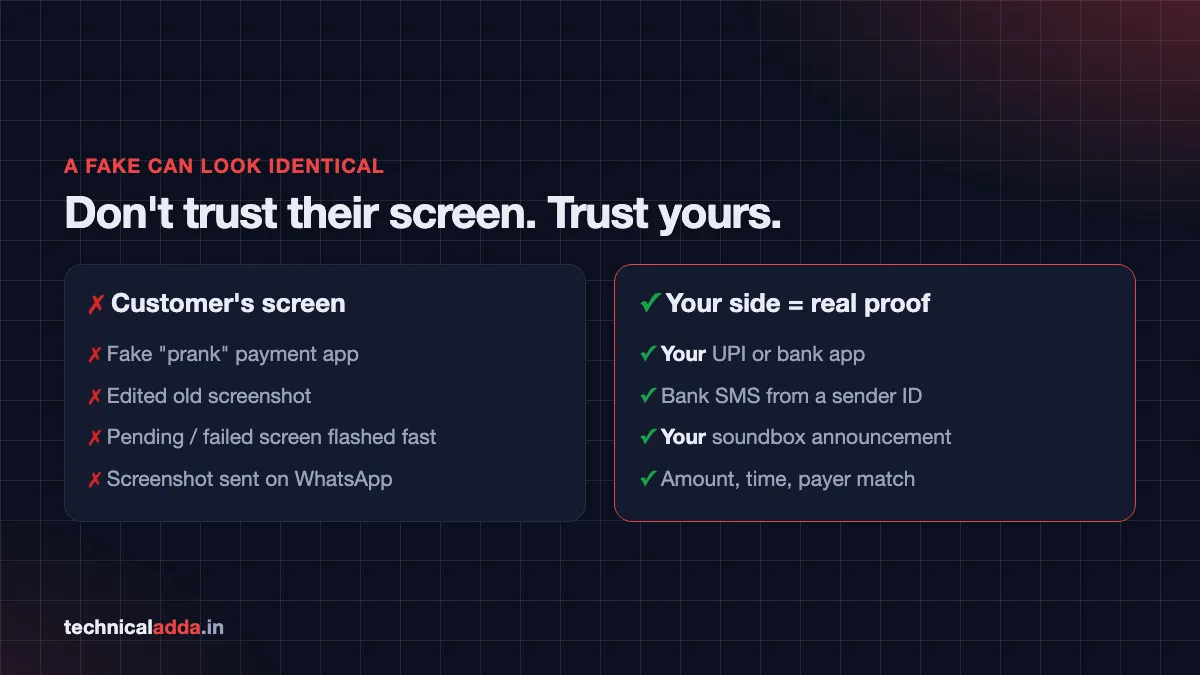
The screen they show you is either a fake payment app, an edited screenshot, or a real "pending" or "failed" screen shown quickly so you do not notice.
News reports from Delhi, Maharashtra and Kerala have described cases where jewellers, mobile shops and small traders lost goods this way. In one September 2026 report from Muvattupuzha, Kerala, a fraudster reportedly flashed a fake UPI screenshot and left with jewellery worth ₹16,000 (opens in new tab), after which local traders warned each other.
Common fake payment tricks in India
Knowing the trick helps you stop it. These are the patterns seen most often.
1. Fake or "prank" payment apps
Apps and websites that generate a payment success screen with any name, amount and date. They copy the look of Google Pay, PhonePe or Paytm, sometimes with animation and sound. Such apps are sometimes found outside official app stores as APKs, and some slip into stores labelled as "prank" or "fun" apps.
2. Edited screenshots
An old genuine screenshot edited to change the amount, name, date or time. Free image editors make this easy.
3. The "pending" screen trick
The customer actually starts a payment, but it is pending or failed. They show the screen quickly, hoping you see only the amount and logo.
4. Overpayment and "refund" trick
Common with online sellers and rental owners. The fraudster says, "I sent ₹5,000 instead of ₹500 by mistake, please return ₹4,500." They send a fake screenshot or a fake SMS, and you send real money back.
5. Collect request disguised as payment
Instead of paying you, the fraudster sends a collect request (a request for money). The notification may look like "Receive ₹2,000", but entering your UPI PIN actually sends money to them. Remember: you never need to enter your UPI PIN to receive money.
6. Fake SMS from a mobile number
A message that looks like a bank credit alert, but comes from a regular 10-digit mobile number instead of an official bank sender ID.
7. Recorded soundbox audio
A "payment received" voice proves nothing unless it comes from your soundbox or your phone. A customer can play a similar sound from their own phone or a fake app, so always confirm the credit in your own app.
| Trick | Who is targeted | How to beat it |
|---|---|---|
| Fake payment app | Shopkeepers, street vendors | Check your own app or soundbox |
| Edited screenshot | Online sellers, landlords | Match with your bank statement |
| Pending screen | Busy counters | Ask for the payment to show on your side |
| Overpayment "refund" | Online sellers, OLX users | Never refund before checking bank balance |
| Collect request | Individuals, sellers | Never enter PIN to receive |
| Fake SMS | Everyone | Check sender ID and bank app |
| Recorded audio | Shops with soundbox | Trust only your device's announcement |
How to identify fake UPI payment screenshot: 10 checks
These checks can raise a red flag quickly. But remember, a fake can pass all visual checks. Use them as warning signs, and always finish with the final check in your own app.
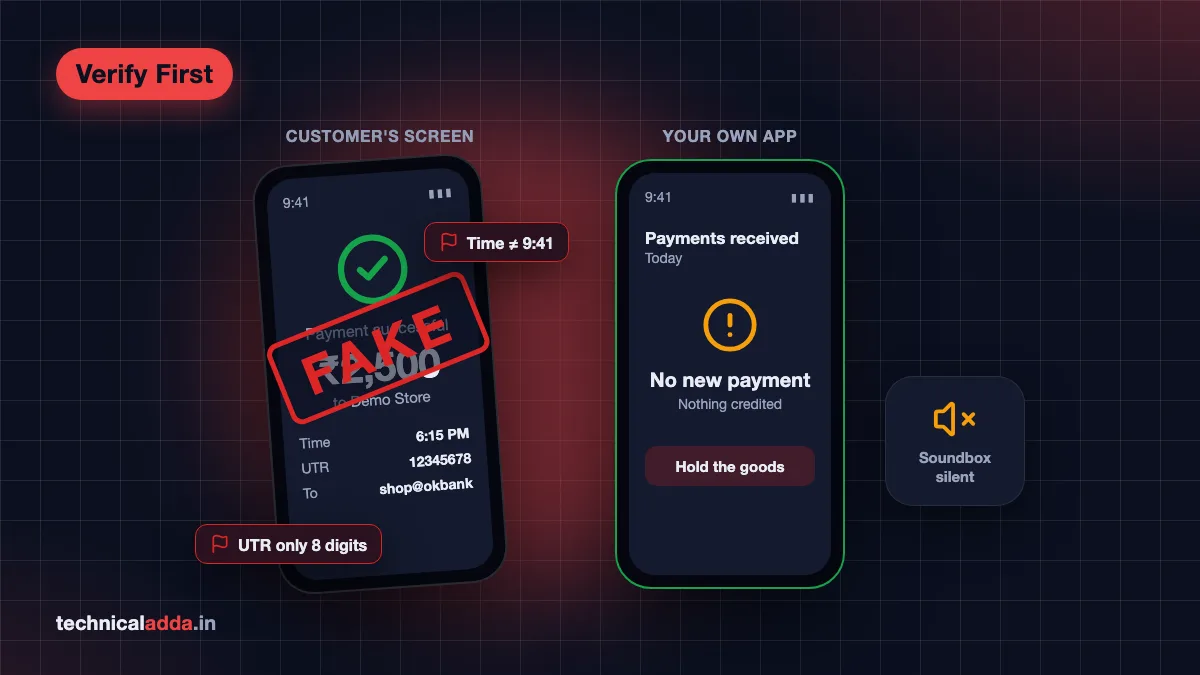
- Your own app shows nothing. Open your UPI app or bank app. If the payment is not there, it did not happen. This single check beats every other one.
- Wrong receiver name or UPI ID. Look carefully at the "Paid to" name and UPI ID. Fraudsters sometimes reuse a template with a slightly different name.
- Missing or odd UTR number. A UPI transaction has a 12-digit UTR/RRN number. Fake screens may show too few digits, letters in odd places or a repeated pattern.
- Time does not match. Compare the time on the payment screen with the phone's status bar time and the current time. Edited screenshots often show a different time.
- Fonts and alignment look off. Slight differences in font size, spacing, blurry text or misaligned amounts can be signs of editing.
- They will not let you touch or look closely. Genuine customers rarely mind. A fraudster may pull the phone back quickly.
- Screenshot instead of live screen. If someone sends you a screenshot on WhatsApp instead of paying while you watch your phone, be extra careful.
- Rush and pressure. "Bhaiya jaldi karo, payment ho gaya" during peak hours is a classic pressure tactic.
- Unusual payment app. If the app looks slightly different from the official app, or you do not recognise it, be alert.
- No soundbox announcement or bank SMS. If your soundbox is silent and no bank SMS has arrived, treat the payment as not received.
The golden rule: verify on your own phone
Every police advisory and bank warning on this scam comes down to one rule:
Never hand over goods or cash until the money shows up on your side: your bank app, your UPI app, your bank SMS or your soundbox.
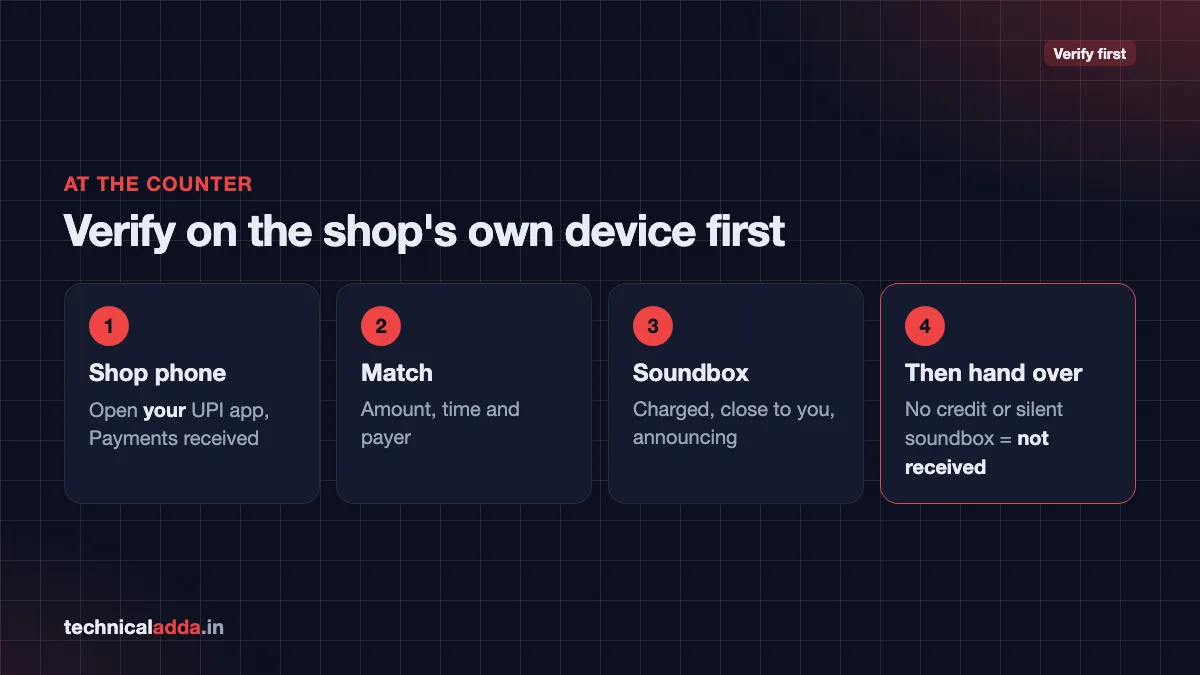
How to verify in under 10 seconds:
- Open your UPI app (Google Pay, PhonePe, Paytm, BHIM or your bank's app).
- Go to Transaction History or Payments received.
- Check that the amount, time and payer match.
- If needed, open your bank app and check the account balance or mini statement.
For bank SMS, check the sender:
- Genuine bank alerts come from an alphanumeric sender ID (letters, like the bank's short name), not a 10-digit mobile number.
- Under TRAI's February 2025 amendment to its commercial communication (TCCCPR) rules, telecom operators add a suffix to commercial SMS headers showing the message type: -S (service), -T (transactional), -P (promotional) or -G (government). These suffixes have been showing on phones since May 2025. A "credit alert" from a personal mobile number is a clear red flag.
- SMS can be delayed during network issues, so if the SMS is late, check the app instead of trusting the customer.
Scammers are also using AI tools to make convincing fake images. Our guide on how to detect AI generated images explains why visual checks alone are no longer enough.
Soundbox, bank SMS and app: which is most reliable?
| Method | Speed | Reliability | Limitations |
|---|---|---|---|
| Your UPI app / bank app | Fast | Highest | Needs internet; takes a few taps |
| Payment soundbox | Instant | High | Needs charging and network; can be confused by nearby audio |
| Bank SMS | Usually fast | High if sender is genuine | Can be delayed; fake SMS possible from mobile numbers |
| Customer's screen or screenshot | Instant | Not reliable | Can be faked completely |
Using a payment soundbox correctly
Soundboxes from Paytm, PhonePe, Google Pay and banks announce payments received on your QR in real time. To get the most from yours:
- Keep it charged and connected to network at all times.
- Place it close to you, so you can tell its voice apart from sounds played on a customer's phone.
- Set the volume high enough for a busy shop.
- Check the display (if your model has one) for the amount.
- If the soundbox is offline or silent, fall back to your app.
Tips for merchants and shop staff
- Train every staff member to verify payments on the shop's own device, not the customer's.
- Use a dedicated merchant QR linked to a soundbox, rather than a personal UPI ID.
- Keep one phone at the counter logged into the business UPI app for quick checks.
- Be extra careful with high-value items like jewellery, mobiles and electronics. For big amounts, wait for bank confirmation.
- Do not accept "I will send the screenshot on WhatsApp" as proof.
- Keep CCTV running near the counter. It helps police if fraud happens.
- Reconcile at the end of every day. Match sales with your UPI app's received payments. The earlier you spot a gap, the sooner you can report it.
- Tell neighbouring shops if someone tries the trick. Local trader groups often catch repeat offenders this way.
Tips for online sellers and individuals
If you sell things on OLX, Facebook Marketplace or Instagram, or rent out a room, the same rules apply.
- Never ship or hand over items based on a screenshot.
- Never "refund" an overpayment until you check your actual bank balance. Real overpayments can be returned later; fake ones cannot be recovered.
- Reject collect requests from buyers. Buyers pay you; you do not approve anything.
- Do not click links sent by "buyers" claiming you need to "accept the payment".
- Meet in public places for cash-on-delivery style deals, and verify payment before handing over the item.
- Block and report suspicious numbers. Our guide on how to block spam calls on Android shows you how.
If a payment you made is stuck (instead of a fake one received), that is a different problem. Read UPI transaction failed but money debited for the RBI refund timeline.
What to do if you are scammed
Act fast. The sooner you report, the better the chance of tracing the fraudster.
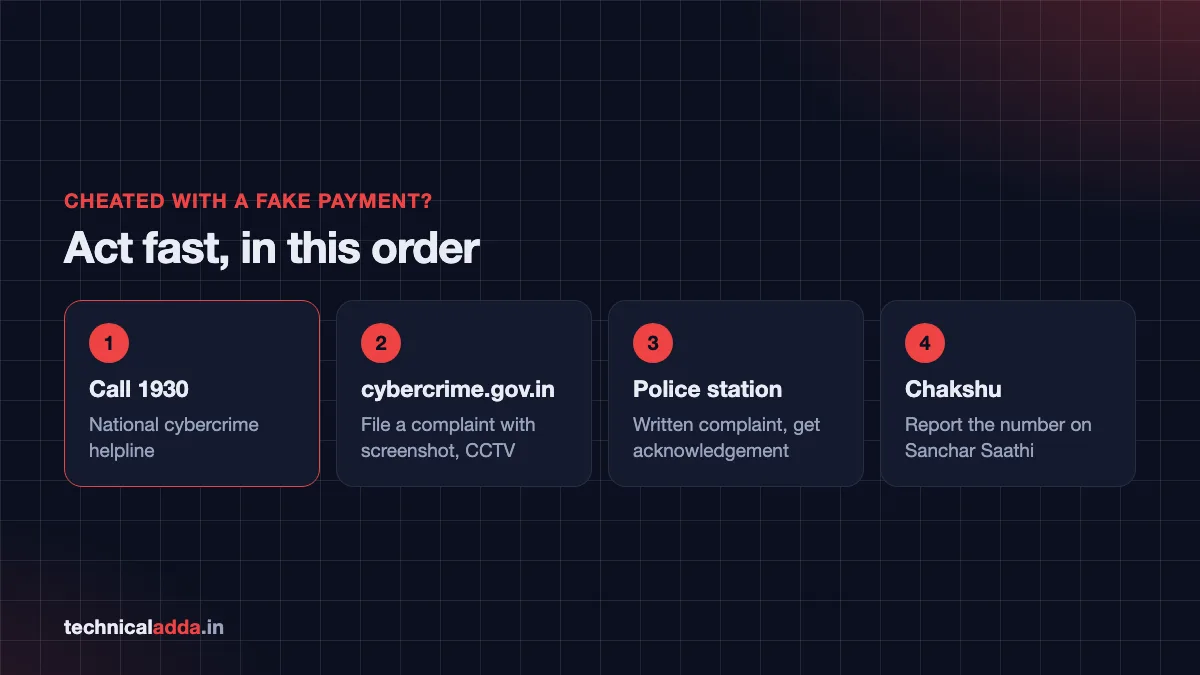
Step 1: Call 1930 immediately
1930 is the national cybercrime helpline run under the Indian Cyber Crime Coordination Centre (I4C). It connects to the Citizen Financial Cyber Fraud Reporting and Management System, which helps banks and police act quickly on financial fraud. As per a PIB release from March 2025 (opens in new tab), this system had helped save more than ₹4,386 crore in over 13.36 lakh complaints by then.
In a pure fake-screenshot case, you lost goods rather than money from your account, so fund freezing may not apply. Calling 1930 still helps register the incident.
Step 2: File a complaint on cybercrime.gov.in
Go to the National Cyber Crime Reporting Portal (opens in new tab) and choose the financial fraud or other cybercrime option. Keep ready:
- Date, time and place of the incident
- Fraudster's phone number, UPI ID (if any) and description
- Copy or photo of the fake screenshot they showed or sent
- CCTV footage, if available
- Your bank statement showing no credit
The portal also has a "Report and Check Suspect" feature to search known fraud identifiers like phone numbers and UPI IDs.
Step 3: Inform your local police station
For in-person cheating at a shop, file a written complaint at your nearest police station with CCTV footage and witness details. Ask for a copy or acknowledgement. Cheating is an offence under the Bharatiya Nyaya Sanhita.
Step 4: Report the number
- Report suspicious calls and messages on the Chakshu facility of the government's Sanchar Saathi portal (opens in new tab).
- Report the fraudster's account to the payment app's help section.
Step 5: Warn others
Share the incident (without personal data of innocent people) in your local traders' group so others stay alert.
For a complete walkthrough of the reporting process, see our guide on how to report cyber fraud online in India. Fraudsters also use fear-based tricks like fake police calls; learn about them in our explainer on the digital arrest scam.
Key takeaways
- A fake UPI payment screenshot can look exactly like a real one, so visual checks are only warning signs.
- The only reliable proof is the payment showing in your own UPI app, bank app, bank SMS or soundbox.
- Never enter your UPI PIN to receive money; collect requests disguised as payments are a common trick.
- Do not refund "overpayments" until you confirm the money in your actual bank balance.
- Keep your soundbox charged, close and connected, and reconcile payments daily.
- If cheated, call 1930, report on cybercrime.gov.in and file a police complaint quickly.
Conclusion
Learning how to identify fake UPI payment screenshot scams comes down to one habit: trust your own phone, not the customer's. Fake apps, edited images and pending screens can all look perfect, but they never show up in your bank account, your UPI app or your soundbox. Train your staff, verify every payment and report quickly on 1930 if something goes wrong.
Want to understand your rights when a genuine UPI payment gets stuck? Read our guide on UPI transaction failed but money debited, and find more safety guides in our Cyber Safety section.
FAQ
Frequently Asked Questions
How can I check if a UPI payment is real or fake?
The only reliable way to check a UPI payment is to look at your own UPI app or bank app and confirm the amount has been received. A bank SMS from an official sender ID or an announcement on your own soundbox also confirms it. Never rely on the customer's phone screen or a screenshot, because fake apps can copy real screens perfectly.
What is a fake UPI payment app?
A fake UPI payment app is a tool that creates a payment success screen showing any name, amount and transaction ID without actually sending money. It copies the look of real apps like Google Pay or PhonePe, sometimes with sound. Fraudsters use it to cheat shopkeepers and sellers into handing over goods without being paid.
Can a fake payment screenshot show a real UTR number?
Yes, a fake screenshot can show a UTR number that looks real, including a 12-digit format. The number may be made up or copied from an old transaction. That is why you should never verify a payment using the customer's screenshot. Check the payment in your own app or bank statement instead, where only real transactions appear.
Do I need to enter my UPI PIN to receive money?
No. You never need to enter your UPI PIN, scan a QR code or approve a request to receive money through UPI. If someone sends you a request and asks you to enter your PIN to "receive" a payment, it is a collect request that will send money from your account. Decline it immediately.
Is a payment soundbox safe against fake payments?
A soundbox is one of the safest quick checks because it announces only payments actually received on your QR code. It cannot be triggered by a screenshot. However, it must be charged, connected and placed near you, so you do not confuse it with audio played from a customer's phone. When in doubt, check your UPI app.
What should I do if someone sent me a fake payment screenshot?
Do not hand over goods or money. Check your UPI and bank app to confirm no payment arrived. If you have already been cheated, call the cybercrime helpline 1930, file a complaint on cybercrime.gov.in with the screenshot, phone number and CCTV footage, and inform your local police station. Report the number on Sanchar Saathi's Chakshu facility.
Can I get my money back after a fake UPI payment scam?
Recovery depends on the case. In a fake-screenshot scam, you usually lose goods, not money from your account, so there is nothing for banks to freeze. Police may recover goods or compensation if the fraudster is traced. If you also sent money, such as a fake "refund", call 1930 quickly so banks can try to freeze it.
How do I identify a fake bank SMS for UPI credit?
A genuine bank credit SMS comes from an alphanumeric sender ID, not a regular 10-digit mobile number. Since 2025, commercial SMS headers in India also carry suffixes like -S or -T indicating the message type. Even if the SMS looks real, open your bank or UPI app to confirm the credit before acting on it.
What is the overpayment refund scam on UPI?
In the overpayment scam, a fraudster claims they sent you more money than agreed, for example ₹5,000 instead of ₹500, and asks you to return the extra. They show a fake screenshot or SMS, but no money actually arrived. Always check your real bank balance first. If someone genuinely overpaid, the extra will be visible in your account.
Where can I report a UPI fraud in India?
You can report UPI fraud by calling the national cybercrime helpline 1930 or filing a complaint on the National Cyber Crime Reporting Portal at cybercrime.gov.in. Also report the transaction in your UPI app's help section, inform your bank, and file a complaint at the local police station. Suspicious calls and messages can be reported on Sanchar Saathi's Chakshu.