How to Detect AI Generated Images: 12 Clues and Free Tools (2026 Guide)
AI How-To & Prompts 12 min read By Richa Singh
In this articleTable of contents10
Last updated: 10 October 2026
A photo of a politician at a fake rally, a celebrity "endorsing" a stock tip, a flood image from the wrong year: AI-made pictures now spread on WhatsApp groups faster than anyone can check them. Learning how to detect AI generated images is now a basic digital-safety skill for every Indian smartphone user. In this guide you will learn the visual clues that still give AI images away, the free tools that read hidden watermarks and Content Credentials, how to do a reverse image search in under a minute, and what India's 2026 rules on synthetic content mean for you. No single method is perfect, so we will show you how to combine them.
Quick answer: To detect an AI generated image, first check visual clues like distorted hands, garbled text and odd lighting. Then upload it to the Gemini app or Google Lens and ask "Is this AI-generated?" to check for a SynthID watermark, inspect Content Credentials at the C2PA verify site, and run a reverse image search to find the original source.
Why AI images are hard to spot in 2026
Two or three years ago, AI images were easy to catch: six fingers, melted faces, nonsense text. Today's image generators from Google, OpenAI and others produce photos with correct hands, readable signboards and realistic skin. Many people can no longer tell the difference just by looking.
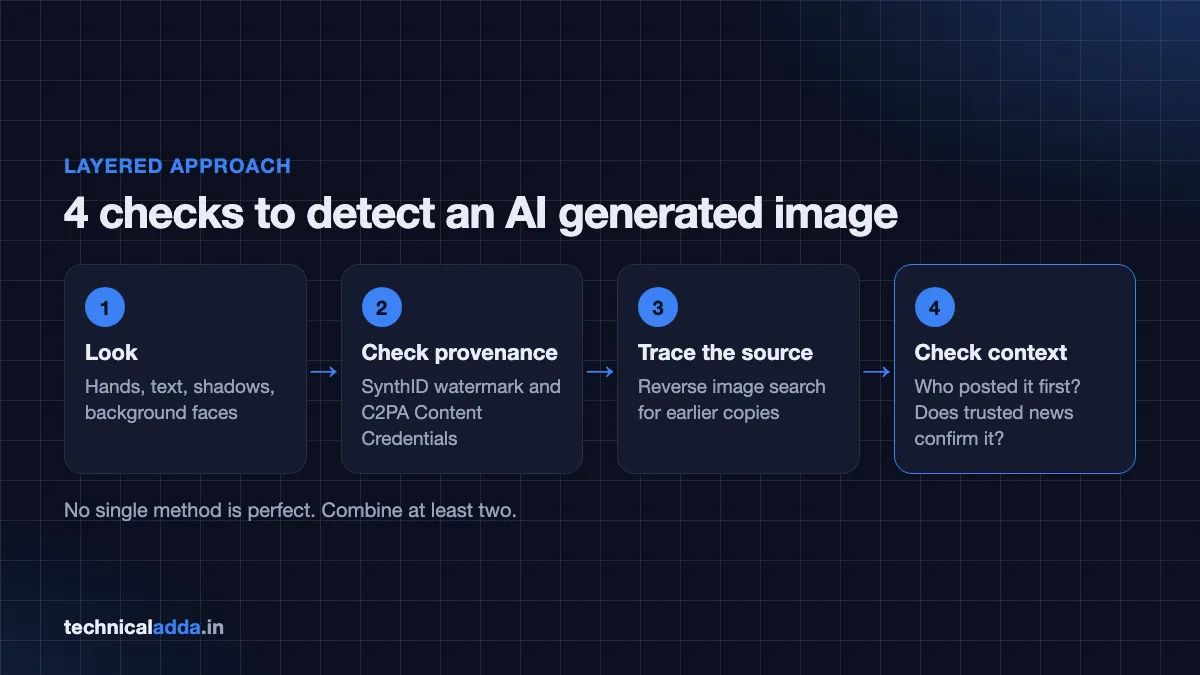
That is why experts now use a layered approach:
- Look for visual and logical clues.
- Check provenance: hidden watermarks (like Google's SynthID) and attached Content Credentials (the C2PA standard).
- Trace the source with reverse image search.
- Check the context: who posted it first, and does any trusted news source confirm it?
If you want to see what modern generators can do, our list of the best free AI image generators shows how easy it has become to create realistic pictures.
12 visual clues: how to detect AI generated images by eye
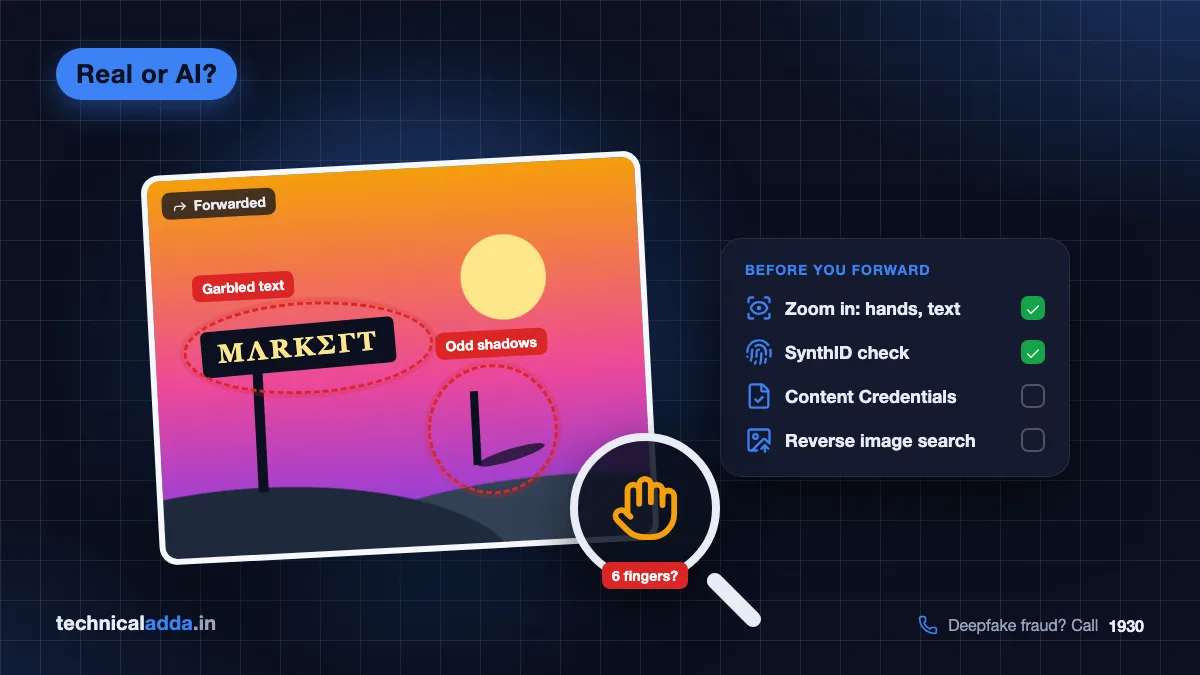
None of these clues proves anything alone. But two or three together should make you suspicious. Zoom in to at least 200% on a laptop, or pinch-zoom on your phone.
Body and face clues
- Hands and fingers: extra, missing or merged fingers; nails in odd places; hands that grip objects unnaturally. Newer models make fewer mistakes, but hands in complex poses still go wrong.
- Teeth and ears: too many teeth, a single blurred band of teeth, or earrings that do not match left and right.
- Eyes: pupils of different shapes, reflections in each eye that do not match, or eyes looking in slightly different directions.
- Too-perfect skin: a plastic, airbrushed glow with no pores, especially on "candid" news photos.
- Hair edges: strands that melt into the background or form strange loops.
Background and object clues
- Text and logos: blurred, misspelled or nonsense letters on signboards, number plates, T-shirts and banners. Look closely at Hindi and other Indian-script text too. Newer generators render text better than older ones, so clean lettering does not prove an image is real, but wrong matras, broken letters or nonsense words are a strong clue.
- Background people: faces in a crowd that are smudged, duplicated or missing features.
- Repeated patterns: identical bricks, leaves, windows or people copy-pasted across the image.
- Physics problems: objects floating, chair legs not touching the floor, a strap that goes into the body.
Lighting and logic clues
- Shadows and light: shadows falling in different directions, or a face lit from a side with no light source.
- Reflections: mirrors, water and glasses that do not reflect what is actually in the scene.
- Context mismatch: the wrong police uniform for that state, a train livery that does not exist, a monsoon flood image with dry roads in the background, or a politician in a city on a day they were elsewhere.
That last clue is often the most powerful in India. AI can make a perfect face, but it often gets local details wrong.
Free tools to check if an image is AI generated
1. Gemini app (SynthID check)
Google embeds an invisible watermark called SynthID in images made or edited with its AI tools. Since November 2025, you can check for it in the Gemini app (Google's announcement (opens in new tab)):
- Open the Gemini app or gemini.google.com.
- Upload the image.
- Ask: "Is this AI-generated?" or "Was this created with Google AI?"
- Read the answer. Gemini reports whether it found a SynthID watermark and adds its own reasoning.
Limit: it reliably detects only content carrying SynthID. Google said OpenAI, Kakao and ElevenLabs have committed to adopting SynthID, but images from many other generators will not carry it.
2. Google Lens and Circle to Search
At Google I/O on 19 May 2026, Google announced SynthID checks in more places. You can add an image to Google Lens, AI Mode or Circle to Search and ask whether it was made or edited with AI, with Gemini in Chrome to follow. As of October 2026, Google says these checks are built into Search, the Gemini app and Chrome, and on 7 October 2026 it opened its standalone SynthID Detector (opens in new tab) to everyone, globally in English (Google blog (opens in new tab)). New features can reach some devices and languages later, so you may not see every option on your phone yet.
On Android, long-press the home button or navigation bar, circle the image, and ask the question.
3. OpenAI Verify
On 19 May 2026, OpenAI said it is adding SynthID watermarks and C2PA Content Credentials to images from ChatGPT, Codex and its API, and released a research-preview tool called Verify at openai.com/verify (OpenAI announcement (opens in new tab)). Upload an image to check if it came from OpenAI's tools. If no signal is found, the tool does not claim the image is real.
4. Content Credentials (C2PA) verify site
Content Credentials are like a nutrition label attached to an image's file. They can record which camera or app created it and what edits were made, including AI generation. The standard behind them is called C2PA.
- Go to the Content Credentials verify tool (opens in new tab).
- Upload the image or paste its URL.
- If credentials exist, you will see who signed them, which tools were used, and whether AI was involved.
Google's Pixel 10 camera adds Content Credentials to photos, and Google said it is extending this to Pixel 8 and 9. Images made with some Google AI models also carry C2PA data. Many Adobe tools support it too.
Limit: social media apps and WhatsApp often strip this data when you upload or forward. No credentials does not mean an image is fake or real.
5. Third-party AI detectors
Several websites and browser extensions claim to detect AI images by analysing pixels. Their accuracy varies widely between generators and drops on compressed WhatsApp images. Use them only as one extra signal, never as final proof.
Tool comparison
| Method | What it checks | Cost | Works on WhatsApp-forwarded images? | Main limitation |
|---|---|---|---|---|
| Visual inspection | Hands, text, light, context | Free | Yes | Newer AI fools the eye |
| Gemini app (SynthID) | Google's invisible watermark | Free | Often, as Google says SynthID is designed to survive cropping, filters and lossy compression | Only finds SynthID-marked images |
| Lens / Circle to Search | SynthID + Google context | Free | Often, for SynthID-marked images | Rollout still expanding |
| OpenAI Verify | OpenAI's C2PA + SynthID signals | Free (preview) | Partly | Only OpenAI images |
| Content Credentials verify | C2PA metadata | Free | Rarely, metadata is often stripped | Few images carry credentials |
| Reverse image search | Earlier copies online | Free | Yes | New images may have no history |
| AI detector websites | Pixel patterns | Free / freemium | Weak | Unreliable, many false results |
How to use reverse image search
Reverse image search finds where else an image appears online. It is the fastest way to catch an old photo shared as "new", or an AI image that a fact-checker has already debunked.
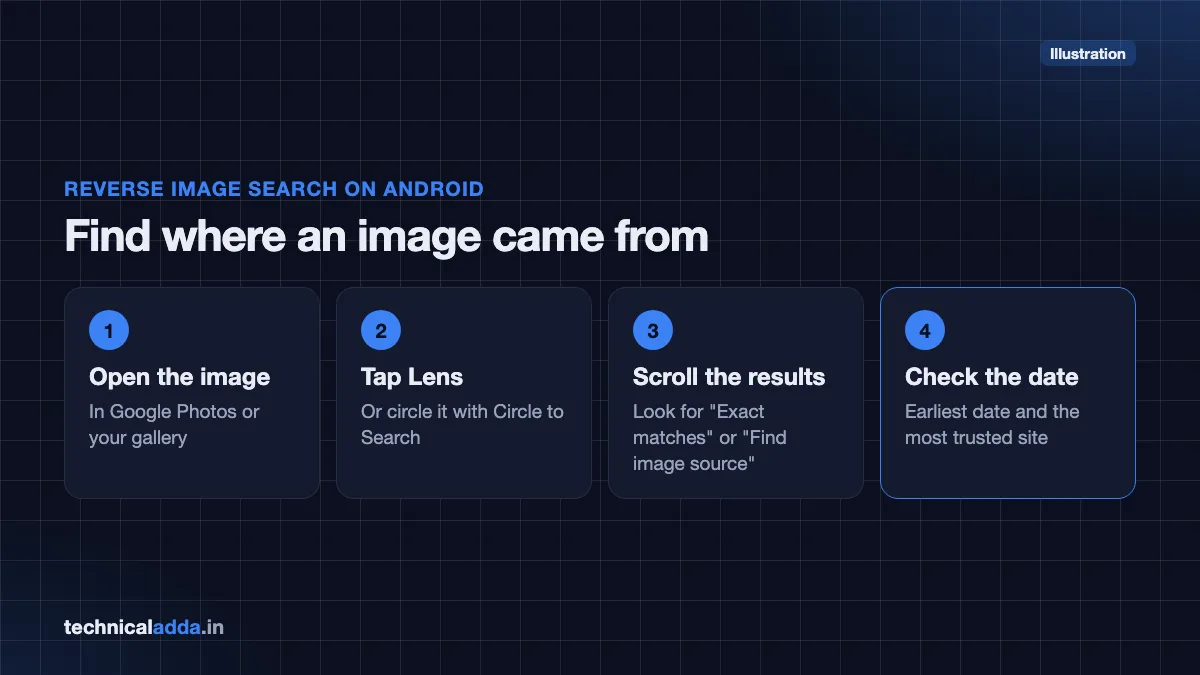
On an Android phone
- Open the image in Google Photos or your gallery.
- Tap the Lens icon, or use Circle to Search.
- Scroll the results for "Exact matches" or "Find image source".
- Check the earliest date and the most trusted site where it appears.
On a laptop
- Open Google Images (images.google.com) or Bing Visual Search.
- Click the camera icon and upload the image or paste its link.
- Also try TinEye, which lets you sort results by oldest first.
What to look for
- A fact-check article from a recognised Indian fact-checker or the PIB Fact Check unit.
- The original, larger, sharper version of the image, often with a watermark from an AI art account.
- An older date than the event it claims to show.
Step-by-step checklist before you forward an image
Use this 2-minute checklist for any shocking image on WhatsApp, Instagram, X or Facebook:
- Pause. Strong emotion (anger, fear, pride) is exactly what fake images aim for.
- Zoom in and check hands, text, background faces and shadows.
- Check the context. Does the uniform, vehicle, place and weather match the claim?
- Run a reverse image search with Google Lens.
- Ask Gemini or Lens "Is this AI-generated?" for a SynthID check.
- Check Content Credentials if you have the original file.
- Search the news. If a major event is real, trusted news outlets will report it.
- When unsure, do not forward. Say "unverified" if you must discuss it.
Deepfakes in India: rules, scams and where to report
India's 2026 rules on synthetic content
The Government of India amended the IT Rules, 2021 to cover AI-generated and deepfake content. According to MeitY, the amendment was notified as G.S.R. 120(E) dated 10 February 2026 and came into force on 20 February 2026. Key points from the amended rules:
- "Synthetically generated information" is defined as content created or altered by AI in a way that appears authentic.
- Platforms that allow creation or sharing of such content must label it clearly and, where technically feasible, embed metadata or identifiers that should not be removable.
- Large social media platforms must ask users to declare whether uploaded content is AI-generated.
- Platforms must remove certain unlawful content within three hours of a valid government or court order, down from 36 hours.
You can read the full amended rules on MeitY's website (opens in new tab).
What this means for you: you should increasingly see "AI-generated" labels on major platforms. But labels can be missing, especially on content forwarded across apps, so your own checks still matter.
Common deepfake scams in India
- Fake celebrity endorsements of trading apps, crypto schemes or "government" investment plans.
- Morphed photos used for blackmail and sextortion.
- Fake ID or document photos used in loan and rental fraud.
- Fake payment proofs, a close cousin of AI images. See our guide on how to identify a fake UPI payment screenshot.
- Video-call scams where fraudsters pose as police or officials, as explained in our digital arrest scam guide.
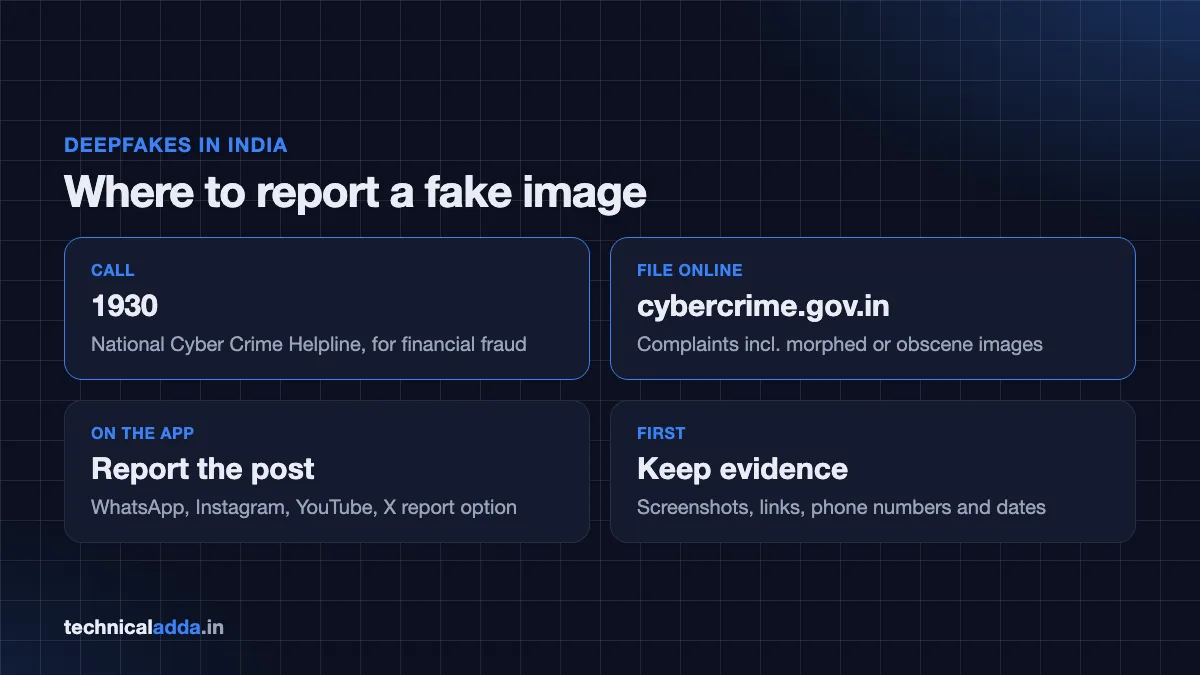
Where to report
- Call the National Cyber Crime Helpline 1930 for financial fraud.
- File a complaint at cybercrime.gov.in (opens in new tab), including for morphed or obscene images.
- Report the post directly on the platform (WhatsApp, Instagram, YouTube, X) using its report option.
- Our step-by-step guide on how to report cyber fraud online in India walks through the process.
Keep screenshots, links, phone numbers and dates as evidence before the content is deleted.
Limits of AI image detection
Be realistic about what any method can do:
- No tool is 100% accurate. Watermark checks only find watermarks; they cannot prove an image is real.
- Metadata is fragile. Screenshots, compression and many apps strip Content Credentials.
- Open-source generators running on personal computers may add no watermark at all.
- Real photos can look fake. Heavy beauty filters, HDR and phone "AI enhance" features can trigger false suspicion. Editing tools in phones may also add AI labels to genuine photos that were lightly edited.
- Context beats pixels. A real photo with a false caption ("this happened today in Delhi") is just as misleading as an AI image.
The best defence is a habit: check the source, combine at least two methods, and do not share what you cannot verify. If you suspect your phone itself has been compromised by a scam link, read our guide on how to check if your phone is hacked.
Key takeaways
- Learning how to detect AI generated images means combining visual clues, watermark checks, Content Credentials and reverse image search.
- Hands, text (especially Indian scripts), shadows and local context are still the best visual giveaways.
- The Gemini app, Google Lens and Circle to Search can check for Google's SynthID watermark; OpenAI's Verify checks OpenAI images.
- Missing watermarks or credentials do not prove an image is real.
- India's amended IT Rules (2026) require platforms to label synthetic content and act faster on unlawful deepfakes.
- Report deepfake fraud at cybercrime.gov.in or call 1930.
Conclusion
Knowing how to detect AI generated images protects you, your family WhatsApp group and your wallet. Start with the visual clues, confirm with SynthID and Content Credentials checks, trace the source with reverse image search, and never forward what you cannot verify.
Fake images often travel with payment fraud. Learn the next skill in our guide on how to identify a fake UPI payment screenshot, or explore more practical guides in AI How-To & Prompts.
FAQ
Frequently Asked Questions
How can I tell if an image is AI generated?
Look for visual clues such as distorted hands, garbled text, mismatched shadows and smudged background faces. Then use tools: ask the Gemini app or Google Lens whether the image is AI-generated, check Content Credentials on the C2PA verify site, and run a reverse image search. Combining two or more methods gives the most reliable result.
Is there a free AI image detector from Google?
Yes. Google's Gemini app can check whether an image carries SynthID, Google's invisible AI watermark. Upload the image and ask "Is this AI-generated?" Google announced in May 2026 that SynthID checks are also coming to Google Lens, Circle to Search, Search and Chrome. It works only on images that carry SynthID, mainly from Google and partner tools.
What is SynthID?
SynthID is an invisible digital watermark developed by Google DeepMind. It is embedded into images, video, audio and text created with Google's AI tools, and is designed to survive common edits like cropping or compression. Special detectors, not the human eye, read it. OpenAI announced in May 2026 that it is also adding SynthID to its images.
What are Content Credentials or C2PA?
Content Credentials are tamper-evident information attached to a media file, based on the C2PA open standard. They can show which camera, app or AI tool created an image and what edits were made. You can inspect them on the Content Credentials verify website. Many platforms strip this data on upload, so its absence proves nothing.
Can AI image detectors be wrong?
Yes, often. Pixel-based AI detector websites can label real photos as AI and miss AI images, especially after compression on WhatsApp. Watermark tools are more reliable but only detect their own watermarks. Treat any single tool's result as one clue, and confirm with reverse image search and trusted news sources before drawing conclusions.
How do I check if a WhatsApp image is fake?
Save the image, then open it in Google Lens or Circle to Search to run a reverse image search and ask whether it is AI-generated. Check the visual clues and the context, such as place, date and uniforms. Search for the claim on trusted news sites or PIB Fact Check. If you still cannot verify it, do not forward it.
Is it illegal to make deepfakes in India?
Creating or sharing deepfakes can be illegal in India depending on the content and intent, for example impersonation, fraud, defamation, obscenity or harm to a person's privacy, under laws such as the IT Act and criminal law. The 2026 IT Rules amendment also places labelling duties on platforms. This is general information, not legal advice.
Where can I report a deepfake photo of myself?
Report it at cybercrime.gov.in, the Government of India's National Cyber Crime Reporting Portal, and use the platform's own reporting tool to request removal. For financial fraud, call the 1930 helpline. Save the image, link, account name and date as evidence. You can also approach your local police station's cyber cell.
Do AI images have hidden watermarks?
Many do, but not all. Images from Google's AI tools carry SynthID, and OpenAI has said its images will carry SynthID and C2PA credentials. Some other generators add visible labels or metadata. However, open-source models run on personal computers may add no watermark at all, so a missing watermark does not mean an image is genuine.
Can a real photo be flagged as AI generated?
Yes. Heavily edited photos, beauty filters and phone "AI enhance" or object-removal features can make real photos look artificial or carry AI-edit labels. Pixel-based detectors may also give false positives. That is why checking the original source and context matters more than relying on any single "AI or not" verdict.