Oracle Cloud Free Tier: Get a Free VPS in India (Signup, Ampere VM, Out of Capacity Fix)
Web Hosting & Servers 15 min read By Sanjeev Pratap Singh
In this articleTable of contents13
Last updated: 10 October 2026
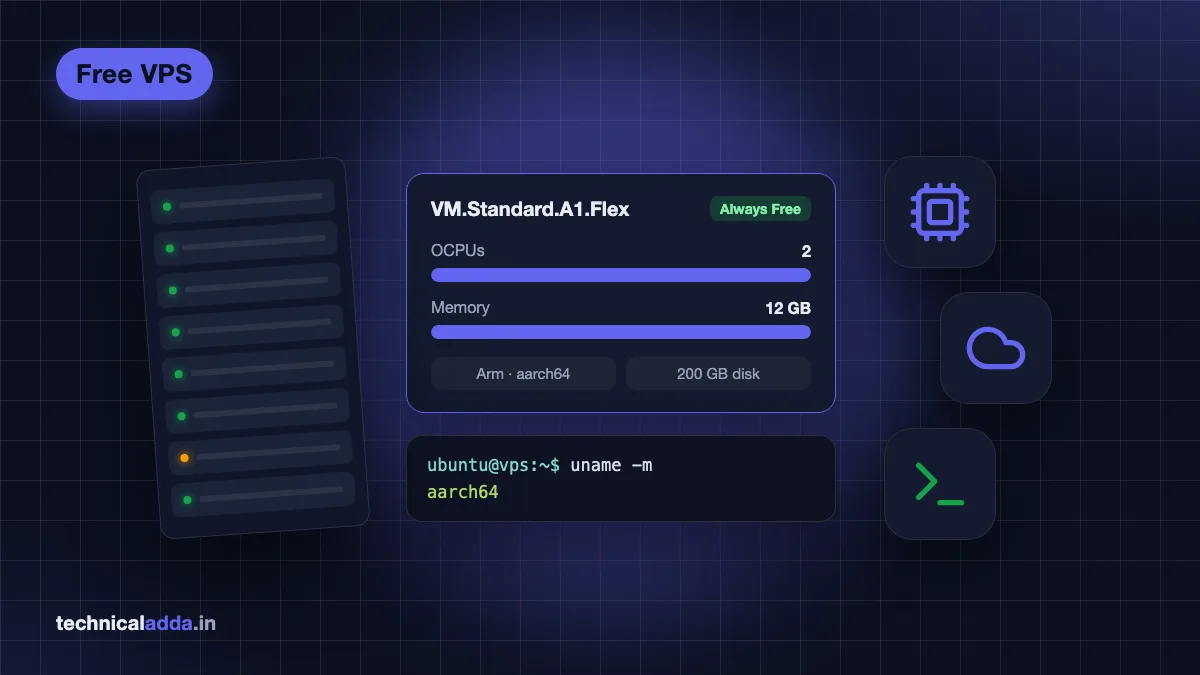
If you want a real Linux server without paying every month, the Oracle Cloud Free Tier is the most generous option available today. Its "Always Free" resources include an Arm-based Ampere A1 server with 2 CPU cores (OCPUs) and 12 GB RAM, enough to run a small website, a Telegram bot, n8n automations or a Minecraft server. But Indian users often get stuck at card verification, pick the wrong region, or hit the famous "Out of capacity" error. This guide explains exactly what is free, how to sign up from India, how to create your Ampere VM on Ubuntu 24.04, and how to make sure you never get a surprise bill.
Quick answer: Oracle Cloud Free Tier gives a 30-day, US$300 trial plus Always Free resources that never expire: Ampere A1 compute equal to 2 OCPUs and 12 GB RAM, two small AMD VMs, 200 GB block storage and 10 TB monthly outbound data. Sign up with a Visa/Mastercard credit card, choose Mumbai or Hyderabad as home region, and create your VM there.
What is Oracle Cloud Free Tier?
Oracle Cloud Infrastructure (OCI) is Oracle's public cloud, a competitor to AWS, Google Cloud and Azure. Its Free Tier has two parts:
- Free Trial: US$300 of cloud credits valid for up to 30 days. You can try almost any paid service with these credits.
- Always Free: a fixed set of resources that stay free for the life of the account, even after the trial ends.
After 30 days, your account stays active. Always Free resources keep running, while any paid resources you created with trial credits are reclaimed unless you upgrade the account. Oracle explains this on its official Free Tier documentation page (opens in new tab).
If you are new to servers, a VPS is simply a virtual computer in a data centre that you control over the internet. Our explainer on what VPS hosting is covers the basics.
Oracle Cloud Free Tier limits: what is Always Free
The table below summarises the most useful Always Free resources, as of October 2026, from Oracle's Always Free Resources reference (opens in new tab). Oracle can change these, so check the page before you plan a project.
| Resource | Always Free limit (Oct 2026) | What it means for you |
|---|---|---|
| Ampere A1 compute (Arm) | 1,500 OCPU hours + 9,000 GB hours per month, equal to 2 OCPUs and 12 GB RAM | One VM (2 OCPU / 12 GB) or two smaller ones (1 OCPU / 6 GB each) |
| AMD micro VMs | 2 × VM.Standard.E2.1.Micro (1/8 OCPU, 1 GB RAM each) | Tiny servers for bots, monitoring, VPN |
| Block Volume storage | 200 GB total (boot + block volumes), 5 backups | Each VM's boot disk counts against this |
| Object Storage | 20 GB combined (Standard, Infrequent, Archive) on Always Free-only accounts | Backups, static files |
| Outbound data transfer | 10 TB per month | Very generous for a small site |
| Load balancer | 1 Flexible LB at 10 Mbps | Basic HTTPS load balancing |
| Autonomous Database | 2 databases, 1 OCPU and 20 GB each | Oracle's managed database |
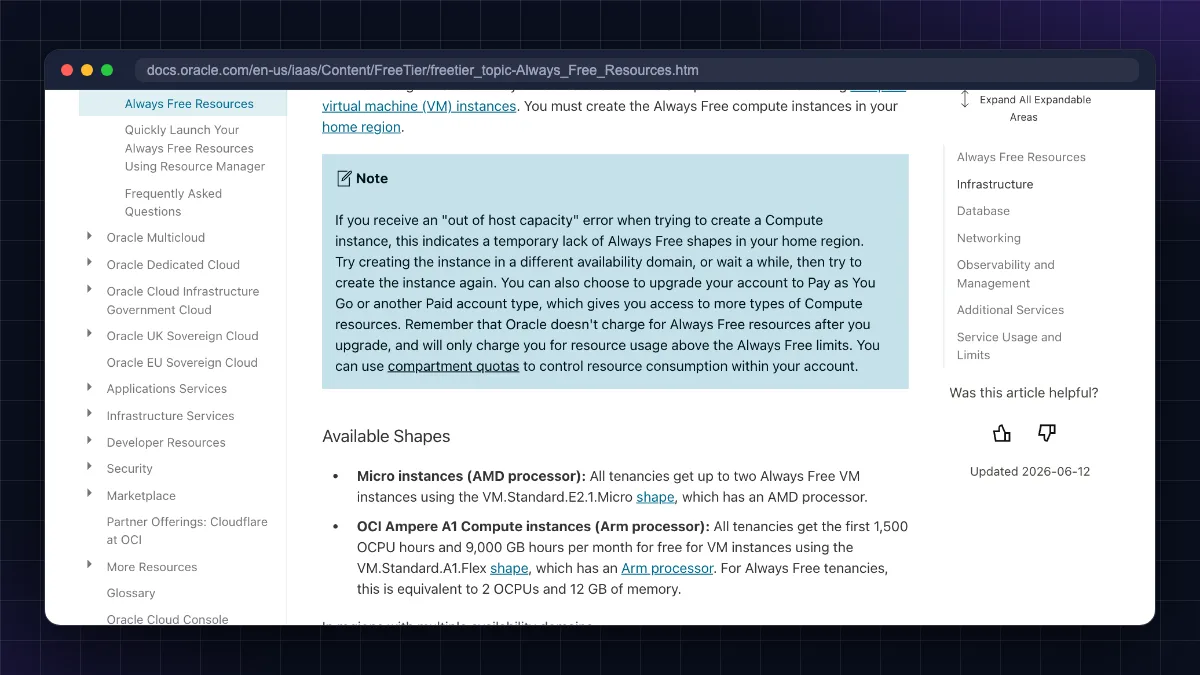
Note: older guides and videos say the A1 allowance is 4 OCPUs and 24 GB RAM. Oracle's documentation now lists 1,500 OCPU hours and 9,000 GB hours per month, equal to 2 OCPUs and 12 GB for Always Free tenancies. Plan with the current figure.
Important details people miss:
- Always Free compute must be created in your home region. You choose the home region at signup.
- Idle instances can be reclaimed. Oracle may reclaim an Always Free VM if, over 7 days, its 95th‑percentile CPU use is under 20%, network use is under 20%, and (for A1) memory use is under 20%.
- The boot volume counts towards the 200 GB. A default Ubuntu boot volume is about 47–50 GB, so four VMs (two A1 + two AMD micro) with default disks would already use most of it.
Oracle Cloud free tier in India: signup and card issues
Signup is where most Indian users get stuck. Here is what to expect.
What you need
- A valid email address and Indian mobile number.
- A credit card or a debit card that works like a credit card (Visa or Mastercard with international/online transactions enabled).
- Your real name and address, matching the card.
Oracle's FAQ says it accepts credit cards and debit cards that function like credit cards, but not debit cards that need a PIN, virtual cards, single-use cards or prepaid cards. There is no UPI option for signup verification.
Why Indian cards fail
- RuPay cards. Oracle's FAQ does not mention RuPay, but community reports from Indian users say RuPay cards (credit or debit) are usually declined at signup. Use a Visa or Mastercard if you have one.
- International transactions disabled. Turn on "International" and "Online/e-commerce" usage in your bank app (HDFC, SBI YONO, ICICI iMobile, Axis etc.) before signing up.
- Low per-transaction limit. Some banks block small foreign authorisations. Raise the limit temporarily.
- Name or address mismatch between the form and the card.
- Repeated attempts from the same device or network can trigger fraud checks. Wait a day before trying again.
Oracle places a small temporary authorisation hold to verify the card. Oracle's Free Tier FAQ (opens in new tab) says these holds are removed by your bank, typically within three to five days, and are not actual charges. Oracle does not publish the hold amount, so the figure your bank shows may vary.
Do not use someone else's card without their knowledge and consent. Oracle requires billing details to be accurate, and using another person's card can get the account closed.
"Oracle cloud free tier without credit card"
This is a very common search. In practice, most users need a card. Oracle's own docs say "most users need a mobile phone number and a credit card to create an account". Students at colleges that are members of Oracle Academy (opens in new tab) can get cloud access through its Cloud Program, which is arranged through the institution; ask your college's Oracle Academy contact whether a card is still needed. If you do not have a suitable card, a low-cost paid VPS is often simpler (see the comparison later).
Signup steps
- Go to the official Oracle Cloud Free Tier page (opens in new tab) and click Start for free.
- Enter country (India), name and email; verify the email.
- Set a password and Cloud Account Name (your tenancy name; keep it short and lowercase).
- Choose Home Region carefully (next section). This cannot be changed later.
- Enter address and mobile number; verify by OTP.
- Add card details and complete the bank's OTP/3‑D Secure step.
- Accept the agreement and wait. Account provisioning can take a few minutes to a few hours; you get a "Your account is ready" email.
Choosing your home region: Mumbai or Hyderabad
Oracle has two public regions in India:
| Region | Identifier | Availability domains | Best for |
|---|---|---|---|
| India West (Mumbai) | ap-mumbai-1 |
1 | West/North India users, lower latency to most ISPs |
| India South (Hyderabad) | ap-hyderabad-1 |
1 | South India users |
Both regions have a single availability domain (Oracle's own regions list confirms this), so you cannot "switch AD" inside them to dodge capacity limits. You can only change the fault domain.
How to choose:
- If your visitors are in India, pick an Indian region. Pages load faster for Jio/Airtel users than from Singapore or the US.
- If you mainly want Ampere A1 capacity and do not care about latency, some users choose larger regions with three availability domains (Ashburn, Phoenix, Frankfurt, London, Chicago). But those are far from India.
- Your home region is permanent. Always Free VMs must live in it.
How to create a free Ampere A1 VPS
Once your account is ready, log in to the OCI Console.
- Open the menu and go to Compute > Instances > Create instance.
- Name the instance, e.g.
my-free-vps. - Placement: keep the default availability domain (Indian regions have only one).
- Image: click Change image > Canonical Ubuntu and select Ubuntu 24.04 (the aarch64 build will be matched to the Arm shape). Oracle supports Oracle Linux and Ubuntu platform images on Ampere A1.
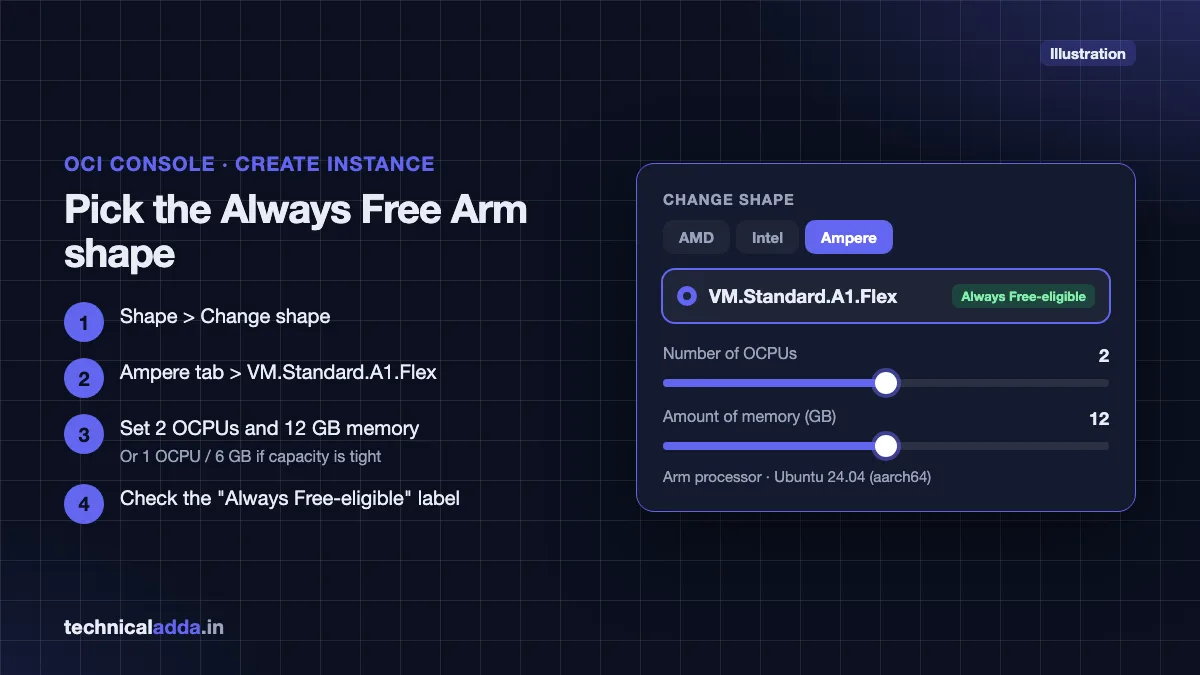
- Shape: click Change shape > Ampere > VM.Standard.A1.Flex. Set OCPUs and memory. Look for the "Always Free-eligible" label.
- One VM using the full allowance: 2 OCPUs, 12 GB RAM.
- Or start smaller (e.g. 1 OCPU, 6 GB) if capacity is tight.
- Networking: let Oracle create a new VCN and public subnet, and keep Assign a public IPv4 address selected.
- SSH keys: choose Generate a key pair for me and download the private key, or Upload public key if you already have one. You cannot download the private key later.
- Boot volume: leave default (about 47–50 GB) or set a custom size within your 200 GB total.
- Click Create. When the instance turns Running, copy its Public IP address.
Connect to your Oracle VPS with SSH
The default username on Oracle's Ubuntu images is ubuntu. Replace YOUR_IP and the key filename below with yours. For a deeper explanation, see our guide on how to connect to a VPS using SSH.
Mac and Linux
Restrict key permissions (SSH refuses keys readable by others):
chmod 400 ~/Downloads/ssh-key-oracle.key
Connect:
ssh -i ~/Downloads/ssh-key-oracle.key ubuntu@YOUR_IP
Windows (PowerShell)
Windows 10 and 11 include an OpenSSH client. First, remove inherited permissions so only your user can read the key:
icacls .\ssh-key-oracle.key /inheritance:r /grant:r "$($env:USERNAME):(R)"
Then connect:
ssh -i .\ssh-key-oracle.key ubuntu@YOUR_IP
If you prefer PuTTY, open PuTTYgen, load the .key file, save it as a .ppk, then in PuTTY set Connection > SSH > Auth > Credentials > Private key file and connect to ubuntu@YOUR_IP.
Android (Termux)
Install the SSH client in Termux:
pkg update && pkg install openssh
Copy the key into Termux's home folder (after running termux-setup-storage), fix permissions and connect:
cp ~/storage/downloads/ssh-key-oracle.key ~/ && chmod 400 ~/ssh-key-oracle.key && ssh -i ~/ssh-key-oracle.key ubuntu@YOUR_IP
First commands on the server
Update packages (always do this first):
sudo apt update && sudo apt upgrade -y
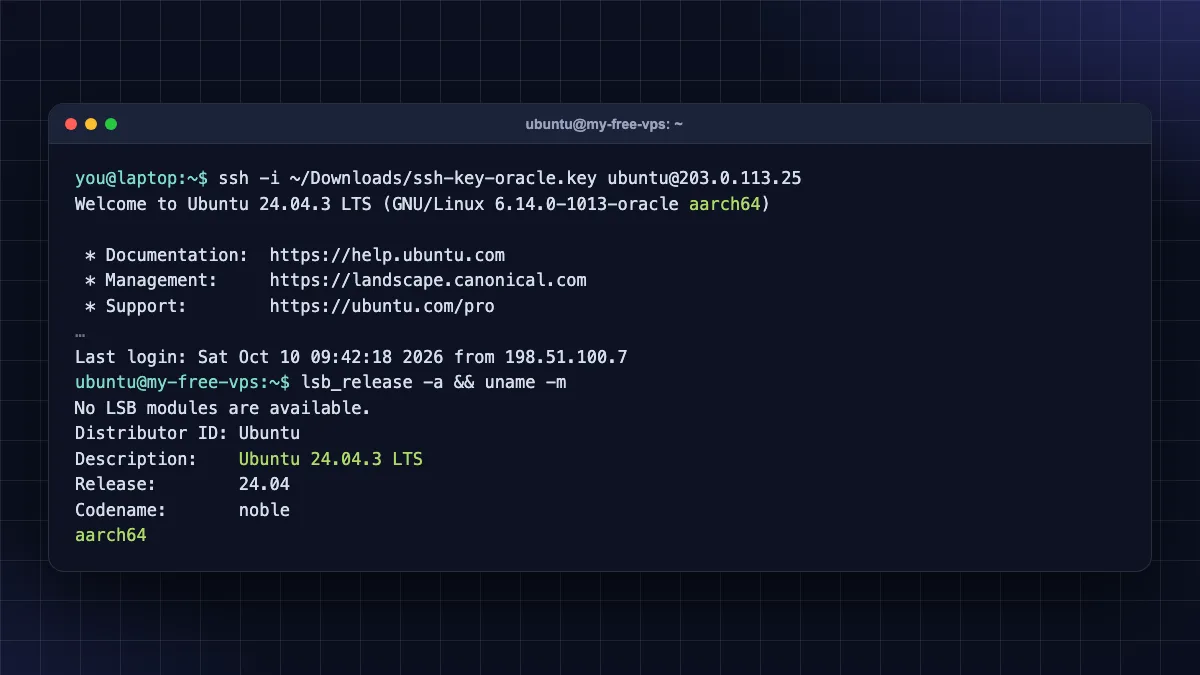
Check that you are on Ubuntu 24.04 and Arm (aarch64):
lsb_release -a && uname -m
Security warning: never share your private key, never enable password login for root, and keep the system updated. Follow our Ubuntu VPS initial server setup and how to secure a Linux VPS guides before hosting anything public.
Open ports 80 and 443 for a website
Oracle has two firewalls in front of your VM, and both must allow traffic:
- VCN Security List (cloud firewall). In the console, go to Networking > Virtual cloud networks > your VCN > Subnets > your subnet > Security > Security list > Add ingress rules. Add Source CIDR
0.0.0.0/0, IP protocol TCP, destination port80, and repeat for443. (Menu labels may vary slightly in the new console.) - iptables on the VM. Oracle's Ubuntu images ship with iptables rules that allow only SSH by default.
List current rules with line numbers, so you insert new ones above the final REJECT rule:
sudo iptables -L INPUT --line-numbers
Allow HTTP and HTTPS (change 6 to the line number of the REJECT rule shown above):
sudo iptables -I INPUT 6 -m state --state NEW -p tcp --dport 80 -j ACCEPT
sudo iptables -I INPUT 6 -m state --state NEW -p tcp --dport 443 -j ACCEPT
Save rules so they survive a reboot:
sudo netfilter-persistent save
These are the same commands Oracle uses in its official Free Tier Apache on Ubuntu tutorial (opens in new tab). Always check the line number first, because a rule added below the REJECT rule is ignored.
Do not install and enable UFW on top of these rules without understanding both; mixing them is a common way to lock yourself out.
From here you can install a web server, or follow our guides to install WordPress on a VPS and install n8n on a VPS. Note: some x86-only software will not run on Arm; most popular stacks (nginx, PHP, MySQL/MariaDB, Node.js, Docker) do support Arm64.
Fix "Out of capacity" errors
The error "Out of capacity for shape VM.Standard.A1.Flex" (or "Out of host capacity") is the biggest complaint about the Oracle Cloud Free Tier. Oracle's documentation says it means there is a temporary shortage of Always Free shapes in your home region.
What actually helps:
- Try again later. Oracle's docs say the error is temporary and suggest waiting and trying again. Capacity frees up as other users delete instances. (Community reports often mention better luck early morning or late night IST, but Oracle publishes no timing guidance.)
- Request a smaller shape first. Try 1–2 OCPUs and 6–12 GB RAM. You can resize later (stop the VM, edit shape) when capacity returns.
- Change the fault domain in the Placement section and retry.
- In regions with multiple availability domains, try another AD. (Not possible in Mumbai/Hyderabad, which have one.)
- Upgrade to Pay As You Go (PAYG). Oracle's docs say upgrading gives access to more types of Compute resources, and Always Free resources stay free; you pay only for usage above the free limits. Oracle does not promise more A1 capacity after upgrading, but many community reports say PAYG accounts get A1 instances more easily.
About retry scripts you will find on GitHub: they repeatedly call the API until an instance is created. They can work, but they hammer Oracle's API, may break Oracle's terms if abused, and need API keys stored on your machine. If you use one, keep the retry interval reasonable and protect the API key.
How to stay on the free tier (and avoid charges)
Upgrading to PAYG is optional, but if you do, these habits keep your bill at ₹0:
- Only create resources labelled "Always Free-eligible". If a shape or service does not show the label, it will cost money after upgrade.
- Stay within totals: 2 OCPUs and 12 GB RAM across all A1 VMs (1,500 OCPU hours and 9,000 GB hours a month), 200 GB total storage, 2 micro AMD VMs.
- Before your trial ends, delete any trial-only resources. Oracle warns that if you have more A1 resources than the Always Free limit when the trial ends, all A1 instances are disabled and deleted after 30 days unless you upgrade.
- Set a budget alert. In the console, go to Billing & Cost Management > Budgets > Create budget, set ₹1 (or a small amount), and add your email for alerts.
- Avoid idle reclamation. Use your VM for real work. Do not run fake CPU-burning scripts; they waste resources and may break the terms.
- Back up your data. Free resources come with no uptime guarantee. Keep copies of databases and configs off the server.
Oracle free VPS vs paid VPS: when to move
The Oracle Cloud Free Tier is excellent for learning and side projects. It is not ideal for a client website or business that needs support and predictable availability.
| Factor | Oracle Always Free | Budget paid VPS (e.g. Contabo, Hostinger) |
|---|---|---|
| Monthly cost | ₹0 | Low monthly fee + 18% GST |
| Signup | Strict card check, capacity issues | Easy; UPI/cards accepted on many providers |
| CPU type | Arm (Ampere A1) | Usually x86 (Intel/AMD) |
| Support | Community only on free accounts | Ticket/chat support |
| Risk | Idle reclamation, account review | Standard paid SLA |
| Best for | Learning, bots, personal projects | Business sites, client work |
If you need a reliable paid server, compare options in our best VPS hosting in India guide. Two popular choices:
- Contabo: very high RAM and storage for the price, with an Indian (Mumbai) location. Downsides: support is slower and setup fees apply on some plans. Read our Contabo VPS review, or.
- Hostinger VPS: beginner-friendly panel and UPI payment. Downsides: renewal prices are higher than the first-term offer. See our Hostinger review, or.
Who should not pay yet: students and hobbyists who are still learning Linux. Stay on Oracle (or the AWS Free Tier) until you have something that genuinely needs paid reliability. For simple websites, shared hosting is usually cheaper; see best web hosting in India, and budget for your domain name price in India.
Key takeaways
- Oracle Cloud Free Tier = 30-day US$300 trial + Always Free resources that do not expire.
- Always Free includes Ampere A1 equal to 2 OCPUs and 12 GB RAM, 200 GB storage and 10 TB outbound data per month (as of October 2026).
- Use a Visa/Mastercard credit card with international transactions enabled; PIN-only debit, prepaid and virtual cards are not accepted.
- Pick Mumbai or Hyderabad as home region for Indian visitors; you cannot change it later.
- For "Out of capacity", retry later, start with a smaller shape, or upgrade to PAYG while only using Always Free-eligible resources.
- Open ports in both the VCN Security List and the VM's iptables rules.
Conclusion
The Oracle Cloud Free Tier is the best free VPS you can get today: an Ampere A1 server with 2 OCPUs and 12 GB RAM, 200 GB storage and 10 TB monthly data, at ₹0. Use a proper credit card, choose your Indian home region carefully, start with a smaller shape if capacity is tight, open both firewalls, and keep everything "Always Free-eligible".
Your next step: secure the new server with our Ubuntu VPS initial server setup guide. For more hosting tutorials, visit the Web Hosting & Servers section.
FAQ
Frequently Asked Questions
Is Oracle Cloud Free Tier really free forever?
Yes, the Always Free resources have no time limit and stay free for the life of the account, as long as you follow Oracle's terms. The separate US$300 trial credit lasts only 30 days. Oracle can reclaim idle Always Free compute instances and can change its free offers, so check the official Always Free page from time to time.
What are the Oracle Cloud free tier limits?
As of October 2026, Always Free includes Ampere A1 compute equal to 2 OCPUs and 12 GB RAM, two AMD micro VMs with 1 GB RAM each, 200 GB total block storage, 20 GB object storage, 10 TB outbound data per month, one load balancer and two Autonomous Databases. All compute must be in your home region.
Can I use Oracle Cloud free tier in India?
Yes. Indian users can sign up and choose India West (Mumbai) or India South (Hyderabad) as the home region. You need a mobile number and a Visa or Mastercard credit card, or a debit card that works like a credit card, with international transactions enabled. Prepaid and virtual cards are not accepted, and community reports say RuPay cards are usually declined.
Does Oracle Cloud free tier need a credit card?
Most users need one. Oracle's documentation says most people need a mobile number and a credit card to create an account, and the card is not charged unless you upgrade. Oracle places a temporary authorisation hold that your bank removes, typically within three to five days. UPI is not accepted for signup verification.
How do I fix "Out of capacity for shape" in Oracle Cloud?
The error means there is temporarily no free Ampere capacity in your home region. Try again later, start with a smaller shape such as 1 OCPU and 6 GB RAM, change the fault domain, or try another availability domain where your region has more than one. Many users report that upgrading to Pay As You Go helps, though Oracle does not guarantee it.
Will I be charged after upgrading to Pay As You Go?
Not if you stay within Always Free limits. Oracle states that Always Free resources are not charged after upgrading and you pay only for usage above the free limits. The risk is accidentally creating paid resources, so use only shapes marked Always Free-eligible and set a budget alert under Billing and Cost Management.
Which is better for India, Mumbai or Hyderabad region?
Both are good for Indian visitors and both have one availability domain. Choose Mumbai if most users are in West or North India, and Hyderabad if they are in South India. Latency differences are small. Some users choose based on where Ampere A1 capacity is easier to get, which changes over time.
Why can't I open my website on the Oracle VPS IP?
Oracle blocks web traffic at two levels. You must add ingress rules for TCP ports 80 and 443 in the VCN Security List, and also allow those ports in the VM's iptables rules, which by default allow only SSH on Ubuntu images. Save the iptables rules with netfilter-persistent so they survive a reboot.
Can Oracle delete my free VPS?
Yes, in some cases. Oracle may reclaim Always Free compute instances that stay idle for 7 days, meaning CPU, network and (for A1) memory use stay under 20%. Instances can also be disabled if you exceed Always Free limits when your trial ends. Keep backups and use the server for real work.
Is Oracle free tier good for hosting WordPress?
Yes, for personal blogs, learning and low-traffic sites. A 2-OCPU, 12 GB Ampere VM comfortably runs WordPress with nginx, PHP and MariaDB on Arm. For a business or client website, a paid VPS or managed hosting is safer because it includes support, predictable capacity and no risk of idle reclamation.
Where to buy
-
Visit official site (opens in new tab)
Contabo:
-
Visit official site (opens in new tab)
Hostinger VPS: