Phone Storage Full? 20 Fixes for Android and iPhone (Even When It’s Full for No Reason)
Smartphones & Gadgets 14 min read By Harshvardhan Singh
In this articleTable of contents13
Last updated: 10 October 2026
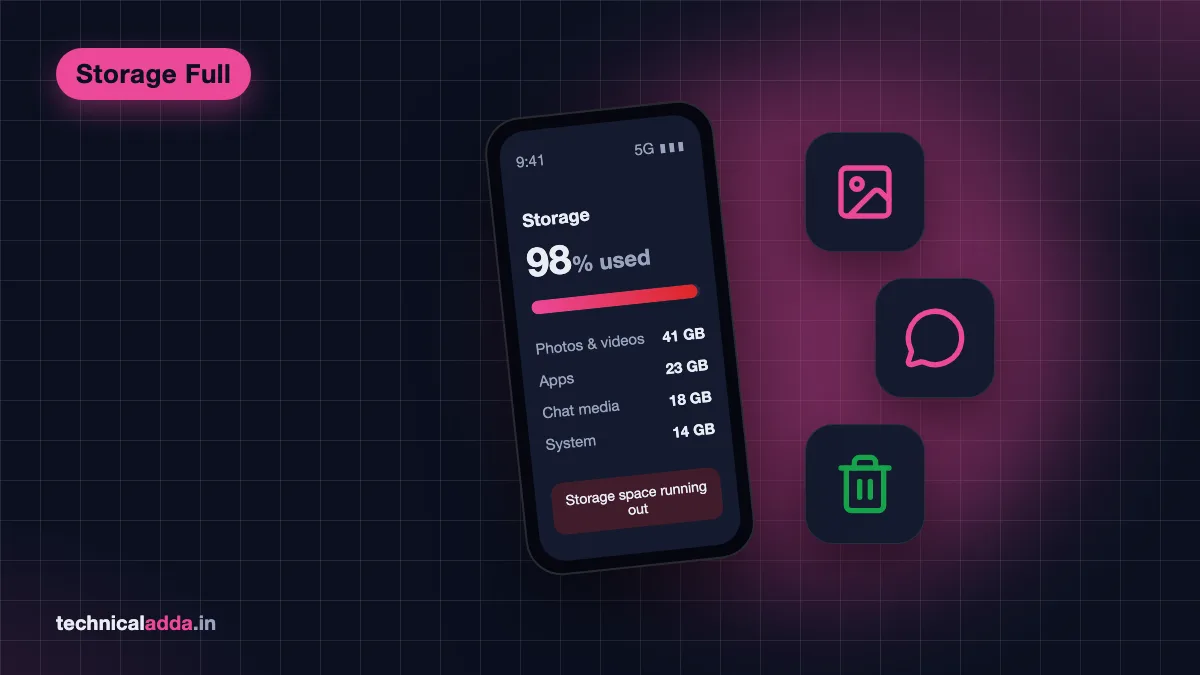
The "Storage space running out" warning always shows up at the worst moment: when you are trying to click a photo, update WhatsApp or install a UPI app. A phone storage full problem makes the phone slow, stops backups and can even block OTP messages from arriving. The good news is that most phones have several gigabytes of hidden junk that you can remove safely in 15 minutes. This guide shows you how to find what is filling your storage, fix "full for no reason" and "System" storage on Android and iPhone, clean WhatsApp and Google Photos the right way, and keep the problem from coming back.
Quick answer: If your phone storage is full, first open Settings > Storage (Android) or Settings > General > iPhone Storage to see what is using space. Then clear WhatsApp media through Manage storage, use Google Photos' "Free up space" after backup, delete large unused apps, clear app cache and empty the Trash/Recently Deleted folders. Restart the phone to clear temporary system files.
Why your phone storage is full
A phone's internal storage fills up from many small things, not one big file. In India, the usual suspects are:
- WhatsApp media. Good-morning images, forwarded videos and family group photos are saved automatically. Many people have 5–20 GB of WhatsApp data without knowing it.
- Camera photos and videos. A single minute of 4K video can take several hundred MB.
- App cache. Instagram, YouTube, Chrome, Facebook, Snapchat and games store temporary data to load faster. This keeps growing.
- Downloads folder. Old PDFs, APK files, college notes and bank statements pile up.
- Offline content. Downloaded Netflix, Prime Video, JioCinema/JioHotstar, YouTube and Spotify content lives on the phone.
- System and "Other" data. The operating system, updates, logs and caches.
- Trash folders. Deleted photos usually sit in a Trash or Recently Deleted album for about 30 days and still use space.
Knowing which of these is the problem on your phone saves time. That is why the first step is always to check.
Step 1: Check what is using your storage
On Android
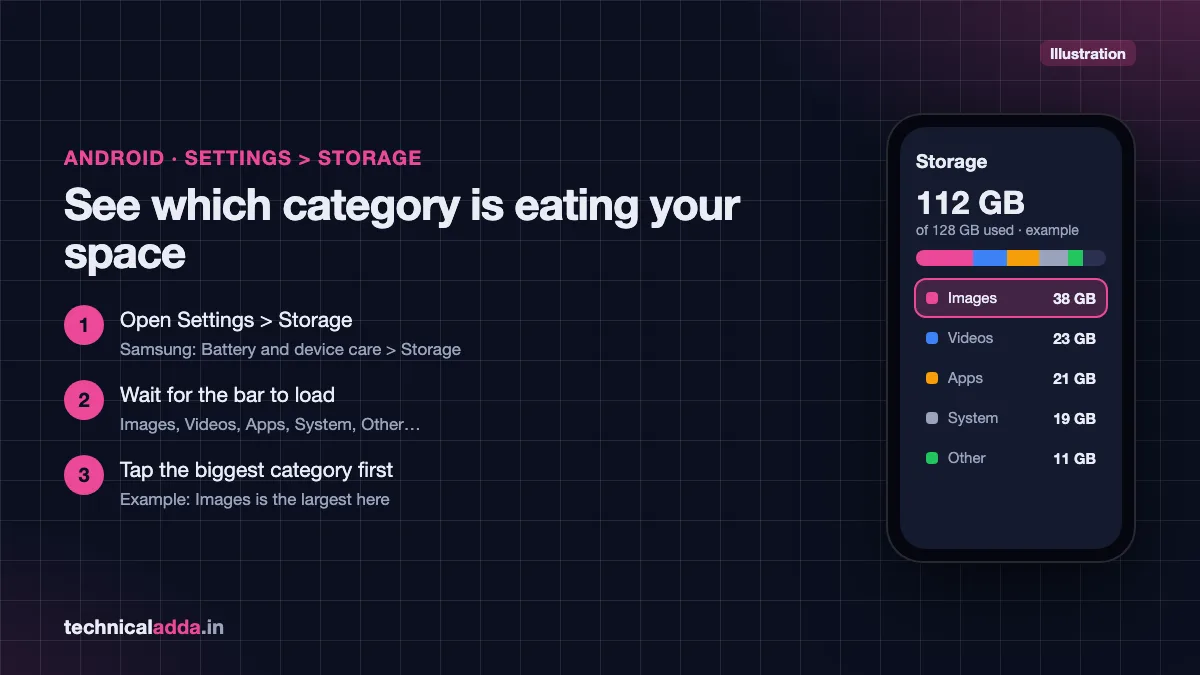
- Open Settings > Storage (on some phones, Settings > Battery and device care > Storage on Samsung, or Settings > About phone > Storage on Xiaomi/Redmi/POCO).
- Wait for the bar to load. You will see categories like Images, Videos, Audio, Documents, Apps, System and Other.
- Tap each category to see the biggest items.
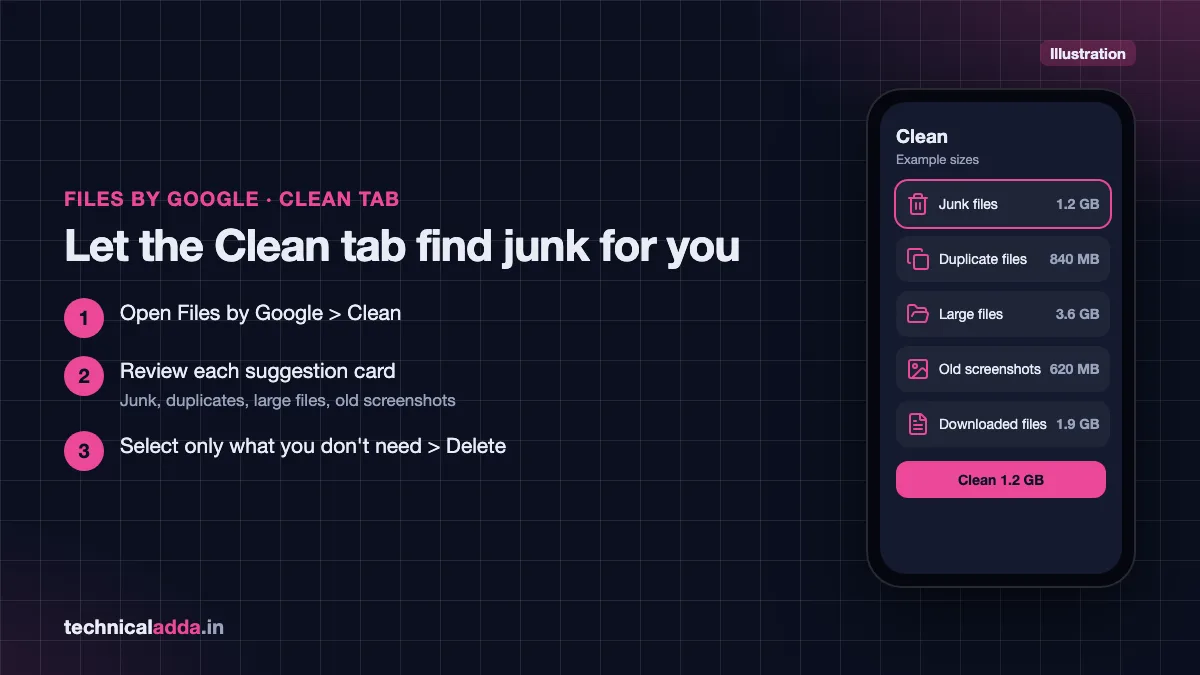
You can also install Files by Google, which shows a "Clean" tab with suggestions such as junk files, duplicate files, large files and old screenshots.
On iPhone
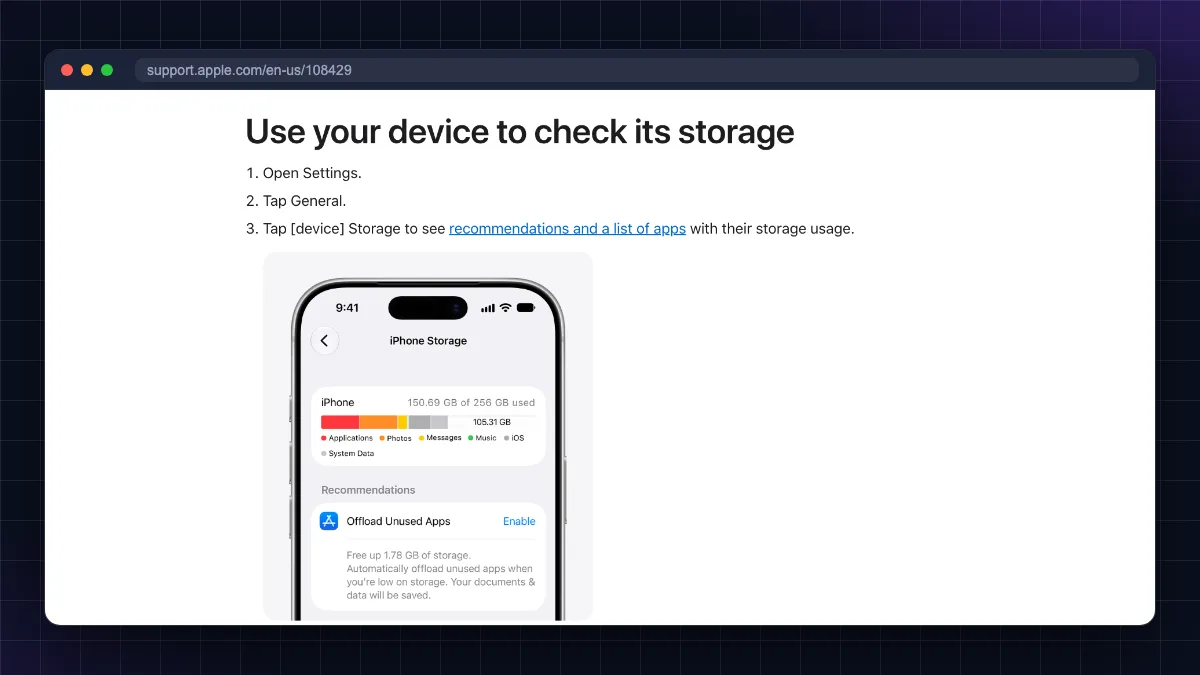
- Open Settings > General > iPhone Storage.
- Wait a minute for it to calculate.
- You will see a coloured bar (Apps, Photos, Media, Messages, iOS, System Data) and a list of apps sorted by size.
- Above the list, iOS shows Recommendations, such as offloading unused apps or reviewing large videos.
Apple explains this screen in its guide on how to check the storage on your iPhone and iPad (opens in new tab).
Phone storage full for no reason: hidden space hogs
"Phone storage full for no reason" is one of the most searched versions of this problem. You delete photos, yet storage still shows full. Here is what is usually going on.
| What you see | Most likely cause | Fix |
|---|---|---|
| Deleted photos but space did not come back | Photos are in Trash / Recently Deleted for 30 days | Empty Trash in Gallery/Google Photos or Recently Deleted on iPhone |
| "Other" or "System Data" is very large | Cache, logs, offline media, update files | Restart, clear app cache, delete offline downloads |
| Storage full but you have few files | WhatsApp, Telegram or Instagram cache | Use in-app storage tools, clear cache |
| Space drops after every update | Old update package not cleared yet | Restart; let the update finish; check for pending updates |
| Android shows huge "System" | OS size plus reserved space | Mostly normal; free space elsewhere |
| Storage full after transferring from old phone | Duplicate photos and chat backups copied twice | Use Files by Google "Duplicate files" |
Hidden space hogs to check
- Telegram cache. Telegram can quietly store gigabytes of channel media. In Telegram, go to Settings > Data and Storage > Storage Usage and clear cache.
- Instagram, Facebook and Snapchat cache. These can grow to 1–3 GB each.
- Chrome/Browser downloads and offline pages.
- Old voice notes in WhatsApp's media folder.
- Screen recordings and long videos you forgot about.
- Map downloads in Google Maps (Offline maps).
- Games that download extra data after install, such as BGMI or Free Fire MAX.
- Hidden folders such as
Android/mediaand.thumbnails.
Fix phone storage full on Android
Follow these steps in order. Each step is safe if you read what you are deleting.
1. Restart the phone
A restart clears temporary files and lets Android finish background cleanup. It sounds basic, but it often frees a few hundred MB.
2. Use Files by Google "Clean"
- Open Files by Google (pre-installed on many phones; free on the Play Store).
- Tap Clean.
- Review Junk files, Duplicate files, Large files, Old screenshots and Downloaded files.
- Select only what you do not need and tap Delete or Move to Trash.
3. Clear cache of the biggest apps
- Go to Settings > Apps (or Apps & notifications).
- Sort by size if your phone allows it.
- Tap a heavy app (Instagram, YouTube, Chrome, Facebook) > Storage & cache > Clear cache.
Do not tap "Clear storage" or "Clear data" unless you know what you are doing. That logs you out and can delete app data such as downloads and drafts.
4. Uninstall or archive apps you do not use
Many Android phones now support Archive (sometimes called "Auto-archive apps"). Archiving removes most of the app but keeps your data, so you can restore it later. Turn it on in the Play Store > tap your profile icon > Settings > General > Automatically archive apps. Apps are only archived when your phone runs low on space.
Uninstall bloatware and duplicate apps you never open, for example a second browser, an old game or a shopping app you used once.
5. Delete offline downloads
Open Netflix, Prime Video, JioHotstar, YouTube, Spotify and similar apps and delete downloaded content you have already watched or heard.
6. Empty the Trash
- Google Photos: Collections > Trash > Empty trash (or Library > Trash on older versions).
- Samsung Gallery: Menu > Trash > Empty.
- Files by Google: Menu > Trash > Delete.
7. Move files to a PC or pen drive
Connect the phone to a laptop with a USB cable, choose File transfer, and copy the DCIM (camera) and Download folders to your computer. On the go, a USB‑C OTG pen drive lets you move files without a laptop.
If your laptop itself is struggling for space, our guide on fixing a slow Windows 11 laptop helps you clean that too.
System storage full on Android: what you can and cannot do
Many people search "system storage full android" after seeing System take 15–30 GB. Here is the honest picture:
- "System" includes the Android OS itself, pre-installed apps, and space reserved for updates. You cannot delete it without rooting, and you should not try.
- The size is normal. A modern Android version plus brand skins like One UI, HyperOS or ColorOS can take 15 GB or more on a 128 GB phone.
- What you can do:
- Install pending system updates and restart; old update files are cleared afterwards.
- Uninstall updates of pre-installed apps you never use (Settings > Apps > app > three dots > Uninstall updates).
- Disable bloatware you cannot uninstall (Settings > Apps > app > Disable).
- Check Settings > Apps > Google Play services > Storage & cache. If your phone shows a Clear cache button there and the cache is unusually large, you can clear it; menu names vary by brand.
- "Other" or "Miscellaneous" files are usually app data and hidden folders. Files by Google and app-level cache clearing reduce them.
If your phone also gets hot when storage is full, that is common: a nearly full phone works harder during updates and indexing. See our phone heating problem solution guide for more.
Fix iPhone storage full
iPhones do not support memory cards, so storage management matters even more.
1. Follow iOS recommendations
In Settings > General > iPhone Storage, iOS shows suggestions at the top. The most useful one is Offload Unused Apps. Offloading removes the app but keeps its documents and data. When you reinstall, everything comes back.
2. Review large videos and attachments
- Open Photos and use the Media Types > Videos view to find long videos.
- In iPhone Storage > Messages, tap Review Large Attachments and delete old videos and GIFs.
3. Clear "Recently Deleted"
In the Photos app, go to Albums > Recently Deleted (you may need Face ID), tap Select > Delete All.
4. Reduce "System Data"
"System Data" (earlier called "Other") holds caches, logs, Siri voices and temporary files. It can grow to 10–20 GB. To shrink it:
- Restart the iPhone.
- Delete offline downloads in Netflix, Prime Video, Spotify and YouTube.
- In Safari, go to Settings > Apps > Safari > Clear History and Website Data (path may be Settings > Safari on older iOS).
- Delete and reinstall heavy apps such as Instagram or Facebook whose "Documents & Data" is huge.
- Update iOS; updates often clean up old system caches.
5. Optimise iPhone Storage for photos
If you use iCloud Photos, go to Settings > [your name] > iCloud > Photos and choose Optimise iPhone Storage. Full-size photos stay in iCloud and smaller versions stay on the phone. Note that free iCloud is only 5 GB, so most people need a paid iCloud+ plan for this. As of October 2026, Apple's iCloud+ price list (opens in new tab) shows India prices of ₹75/month for 50 GB, ₹219/month for 200 GB and ₹749/month for 2 TB.
Moving from Android to iPhone with a full phone? Clean up first, then use our Android to iPhone data transfer guide so you do not copy junk across.
Clean WhatsApp storage without losing important chats
For most Indian users, WhatsApp is the single biggest reason the phone storage is full. WhatsApp has a built-in tool for this.
Use Manage storage
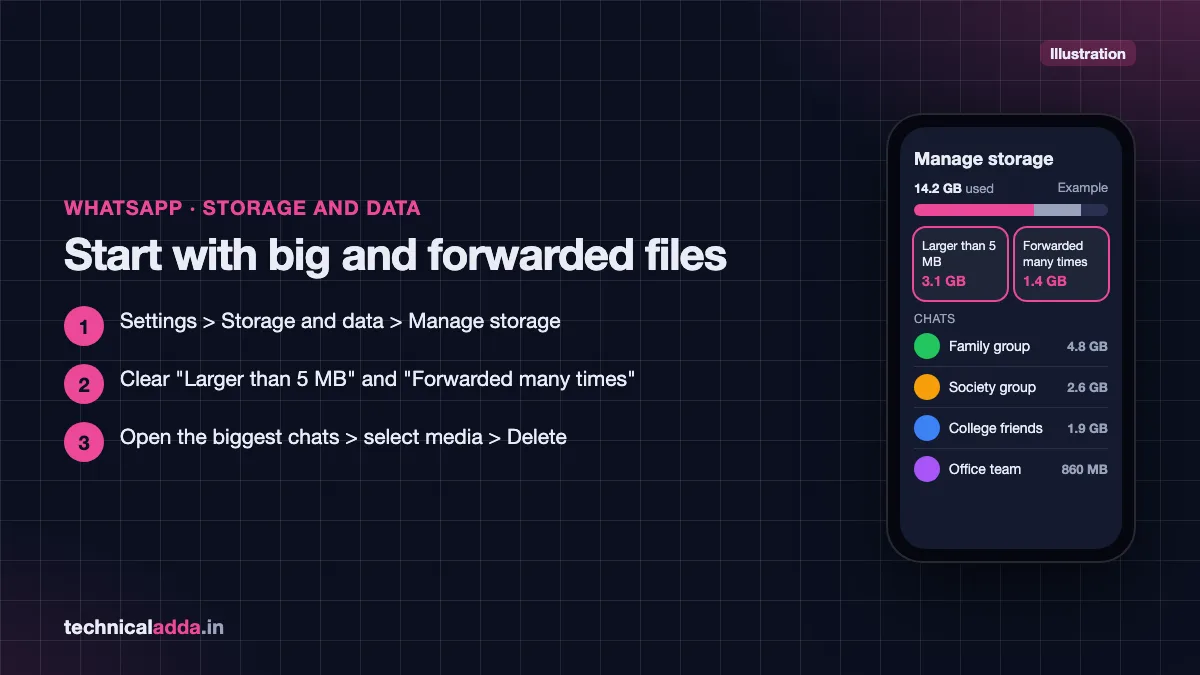
- Open WhatsApp > Settings > Storage and data > Manage storage.
- At the top you will see Larger than 5 MB and Forwarded many times sections. These are the safest places to start.
- Below, chats are listed by size. Tap a big group chat, select media you do not need (or Select all) and tap the Delete icon.
Stop auto-download
- Go to Settings > Storage and data > Media auto-download.
- Set When using mobile data to "No media" or only Photos.
- Set When connected on Wi-Fi to Photos only, if needed.
Turn off "Save to gallery"
- Android: Settings > Chats > Media visibility – turn it off.
- iPhone: Settings > Chats > Save to Photos – turn it off.
This stops every forwarded image from also appearing in your gallery (and Google Photos backup).
Use disappearing messages for noisy groups
For large family or society groups, you can turn on Disappearing messages in the chat settings (if you are allowed). Media will clear automatically after the chosen period.
Before deleting: make sure important chats are backed up to Google Drive (Android) or iCloud (iPhone). If you delete something by mistake, our guide on recovering deleted WhatsApp messages explains what can still be restored.
Use Google Photos and cloud storage the right way
Google Photos can free gigabytes in one tap, but only if your photos are backed up first.
Free up space with Google Photos (Android)
- Open Google Photos and confirm backup is complete (your profile photo shows "Backup complete").
- Tap your profile photo > Free up space on this device.
- Check how much space will be freed, then tap Free up [x] from device.
Google's help page on freeing up space on your device (opens in new tab) adds important warnings: this deletes the local copies, photos less than 30 days old may stay on the device, and you will not see those photos in your phone's own gallery or while offline.
Watch your Google account limit
Every Google account gets 15 GB free, shared by Gmail, Google Drive and Google Photos. If your Google storage is full, backups stop and you might think the phone is the problem. Our step-by-step guide on how to free up Google storage shows how to clean Gmail and Drive.
Google One paid plans increase this limit. As of October 2026, Google One's India plans page (opens in new tab) lists Lite (30 GB) at ₹59/month (₹589/year) and Basic (100 GB) at ₹130/month (₹1,300/year). Pay with UPI or card through the Play Store.
Should you pay for cloud storage?
| Option | Good for | Watch out for |
|---|---|---|
| Google Photos free (15 GB) | Light users, mostly WhatsApp photos | Fills quickly; shared with Gmail |
| Google One (paid) | Android users with many photos/videos | Monthly cost adds up |
| iCloud+ (paid) | iPhone users | 5 GB free is too small for most |
| Laptop/PC backup | Students, people with a laptop | Manual; needs discipline |
| microSD card (Android) | Phones with a card slot | Slower; not all phones have a slot |
| OTG pen drive | Quick offloading on the go | Easy to lose; keep a second copy |
Things you should NOT do
- Do not install "cleaner" or "booster" apps from unknown developers. Many show ads, collect data or delete the wrong things. Files by Google and the built-in Storage settings do the job. If your phone has started acting strangely after installing such apps, read how to check if your phone is hacked.
- Do not delete unknown folders in
Android/dataorAndroid/obbblindly. Games and apps keep their data there. - Do not "Clear data" of WhatsApp, banking or UPI apps. You may lose chats or need to re-register.
- Do not factory reset as a first step. It works, but only after a full backup, and only if nothing else helped.
- Do not keep the phone at 99% full. Phones need free space to install updates and run smoothly. Try to keep at least 10–15% free.
When to add a memory card or buy more storage
Sometimes the honest fix is more space, not more cleaning.
- If your Android phone has a microSD slot, a good card helps for photos, videos and music. Set the camera to save to SD card. Avoid moving apps to the card on slow cards.
- If you shoot a lot of video, a USB‑C OTG pen drive is a quick way to move clips off the phone weekly.
- If you have a 32 GB or 64 GB phone and use WhatsApp, Instagram and UPI apps daily, you will keep fighting storage. Your next phone should have at least 128 GB.
Recommended accessories (check compatibility with your phone first):
Who should not buy these: iPhone users (no card slot; an OTG drive works only with a Files-app-compatible drive), and anyone whose phone has no microSD slot. Buy branded cards only; fake high-capacity cards are common in local markets.
Key takeaways
- Always check Settings > Storage or iPhone Storage first, so you clean what is actually big.
- WhatsApp media, app cache, offline downloads and Trash folders are the most common "full for no reason" causes.
- Large "System" storage on Android is mostly normal; free space elsewhere instead of trying to delete it.
- Use Google Photos' "Free up space" only after backup is complete, and watch your 15 GB Google account limit.
- Avoid third-party cleaner apps and never "Clear data" of WhatsApp or UPI apps.
- Keep at least 10–15% storage free so the phone stays fast and can install updates.
Conclusion
A phone storage full warning is almost always fixable without buying a new phone. Check the storage breakdown, clean WhatsApp through Manage storage, empty Trash folders, clear app cache, delete offline downloads, and use Google Photos or iCloud carefully after backup. Repeat a quick cleanup once a month and keep at least 10–15% free.
Next, make sure your cloud space is not the real bottleneck: follow our guide to free up Google storage. For more phone tips, browse the Smartphones & Gadgets section.
FAQ
Frequently Asked Questions
Why is my phone storage full when I have nothing on it?
Your phone storage can look full even with few photos because of hidden data: app cache, WhatsApp media, offline downloads, Trash folders and system files. Open Settings > Storage on Android or iPhone Storage on iOS to see which category is large. Clearing cache, emptying Trash and using WhatsApp's Manage storage usually frees several gigabytes.
How do I clear system storage on Android?
You cannot delete the Android system itself, but you can reduce the space around it. Install pending updates and restart, uninstall updates of unused pre-installed apps, disable bloatware, and clear cache of large apps. A large System figure, often 15 GB or more, is normal on modern phones and is not a fault.
Does clearing cache delete my photos or chats?
No. Clearing an app's cache only removes temporary files that the app can download again, so your photos, chats and login stay safe. The app may load a little slower the first time afterwards. Do not confuse this with "Clear storage" or "Clear data", which resets the app and can delete saved data.
How do I fix iPhone storage full without deleting photos?
Turn on iCloud Photos with Optimise iPhone Storage, offload unused apps, delete offline downloads, review large Messages attachments and clear Safari data. You can also copy photos to a Windows PC or Mac and then remove them from the phone. Free iCloud is only 5 GB, so heavy photo users may need a paid iCloud+ plan.
What is System Data on iPhone and how do I reduce it?
System Data, earlier called Other, stores caches, logs, Siri voices, fonts and temporary files. It changes size on its own. To reduce it, restart the iPhone, clear Safari history and website data, delete offline media in streaming apps, reinstall apps with large Documents and Data, and keep iOS updated so old caches are removed.
Is it safe to use Google Photos "Free up space"?
Yes, if your backup is complete. Free up space deletes only photos and videos that are already backed up to your Google account, and the copies stay online. However, you will not see them in your phone's own gallery or while offline. Check that backup shows complete and that your Google storage is not full before using it.
How much free storage should a phone have?
Try to keep at least 10–15% of total storage free. On a 128 GB phone, that means roughly 13–19 GB. Phones need free space to install system updates, save temporary files and keep apps running smoothly. When storage goes above about 90%, many phones slow down, heat up during updates and may fail to save photos.
Why does WhatsApp take so much storage?
WhatsApp saves every photo, video, voice note and document you receive, including forwards in large groups. Over months, this can grow to many gigabytes. Use Settings > Storage and data > Manage storage to delete large and frequently forwarded files, turn off media auto-download, and turn off Media visibility so files stop copying to your gallery.
Do phone cleaner apps really work?
Most third-party cleaner and booster apps do nothing that Android's own Storage settings or Files by Google cannot do. Many show heavy ads, ask for unnecessary permissions or collect data. Some even slow the phone down by running in the background. Stick to Files by Google on Android and iPhone Storage recommendations on iOS.
Will a factory reset fix phone storage full?
A factory reset does remove all apps, cache and files, so storage becomes free, but it also erases everything on the phone. Use it only as a last resort after backing up photos, WhatsApp chats and important files. In most cases, cleaning WhatsApp media, cache, offline downloads and Trash frees enough space without a reset.
Where to buy
-
Check price on Amazon (opens in new tab)
Sandisk 128GB Microsd
-
Check price on Amazon (opens in new tab)
Sandisk Dual Drive USB C 128GB