How to Unlock PDF Password: 6 Safe Ways for Your Own Files (2026)
How-To & Troubleshooting 14 min read By David Johnson
In this articleTable of contents16
Last updated: 10 October 2026
Your bank sends a monthly statement, your employer mails a salary slip, and UIDAI gives you an e-Aadhaar. All three arrive as locked PDFs. Typing the password every single time gets tiring, especially when you need to upload the file for a loan, a visa or an ITR. This guide explains how to unlock PDF password on files you own, using Chrome, Adobe Acrobat, Mac Preview, iLovePDF/Smallpdf and your phone. You will also learn the common password formats for Aadhaar, tax and bank documents, the privacy risks of online tools, and why you should never try to break a password that is not yours.
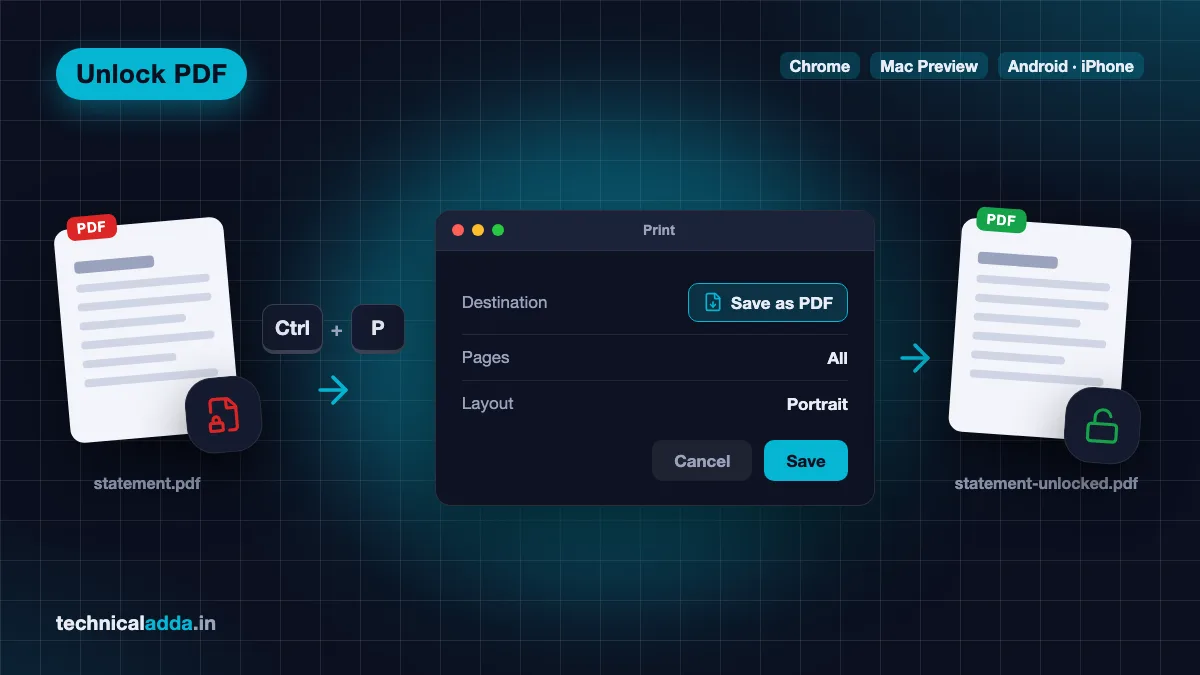
Quick answer: To unlock a PDF password on your own file, open it in Google Chrome, enter the password, press Ctrl+P (Cmd+P on Mac), choose "Save as PDF" and save. The new copy opens without a password. This works only when you already know the password. Adobe Acrobat Pro, Mac Preview and trusted apps offer the same result.
First, the honest rule: you need the password
Every method in this article works only when you already know the password and the file belongs to you (or you have the owner's permission). Unlocking here means "save a copy without the password", not "crack the password".
Why this matters:
- It is the owner's lock. Banks, UIDAI and employers add passwords so that a statement forwarded by mistake cannot be read by a stranger. Removing that lock on your own copy is fine. Removing it on someone else's file is not.
- It can be illegal. Accessing protected data without authorisation can attract action under the Information Technology Act, 2000. We are not giving legal advice here, but the safe line is simple: if it is not your file and nobody gave you the password, do not try.
- "Password cracker" sites are risky. Tools that promise to break any PDF password often bundle malware, steal the uploaded document or ask for payment and deliver nothing. Adobe itself advises against random PDF password remover tools on its official unlock guide (opens in new tab).
If you have forgotten the password of a bank or government document, the right fix is to check the original email or SMS (most mention the format) or simply download a fresh copy from the official portal.
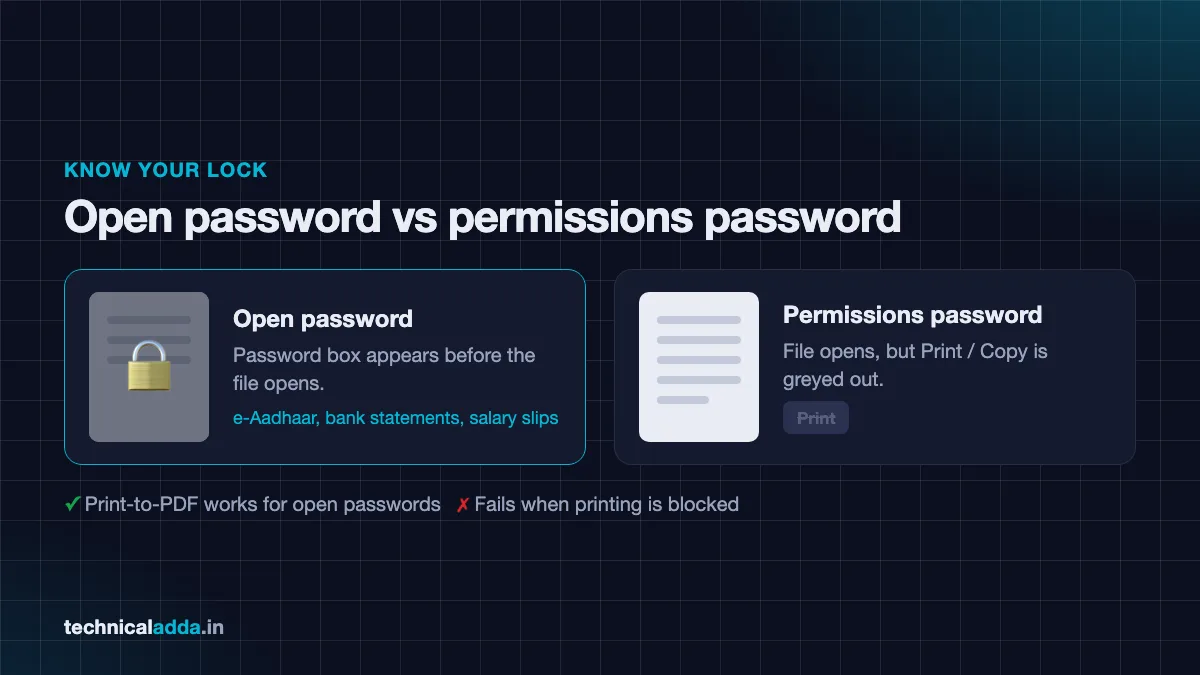
Open password vs permissions password
PDFs can carry two kinds of locks, and knowing which one you have saves a lot of confusion.
| Lock type | What it blocks | What you see | Typical example |
|---|---|---|---|
| Open (user) password | Opening and reading the file | A password box as soon as you open the PDF | e-Aadhaar, bank statements, salary slips |
| Permissions (owner) password | Printing, copying text or editing | File opens normally, but Print/Copy is greyed out | Some certificates, e-books, official forms |
Most Indian documents you receive by email use only an open password. That is good news, because the "print to PDF" trick in Chrome and Windows works perfectly for them.
Files with a permissions password that blocks printing are different. The print trick will fail, and you will need the permissions password plus a full editor such as Adobe Acrobat Pro.
Method 1: Unlock PDF password in Google Chrome
This is the fastest free method on any Windows laptop, Mac or Chromebook. The file never leaves your computer.
- Right-click the PDF and choose Open with → Google Chrome. You can also drag the file into a Chrome tab.
- Chrome asks for the password. Type it and press Enter.
- Press Ctrl + P (Windows) or Cmd + P (Mac).
- In Destination, choose Save as PDF (not your printer).
- Click Save, give the file a new name such as
statement-unlocked.pdf, and choose a folder. - Open the new file. It should open without asking for a password.
Things to know:
- The new copy is "printed", so clickable links, bookmarks and form fields may be lost. For statements and Aadhaar this rarely matters.
- If Save as PDF is missing or the print preview is blank, the file probably has a permissions lock that blocks printing. Use Method 2.
- Microsoft Edge works the same way, since it also has a built-in PDF viewer and "Save as PDF".
Method 2: Adobe Acrobat Pro
Adobe Acrobat Pro is the paid, "proper" way to remove security from a PDF. It keeps links, bookmarks and text quality intact, and it can also remove a permissions password if you know it.
According to Adobe's guide (opens in new tab), the steps are:
- Open the PDF in Acrobat Pro and enter the password.
- Go to Tools → Protect → Encrypt → Remove Security (menu names can vary slightly by version).
- If the file has only an open password, click OK to confirm.
- If it has a permissions password, type that password and click OK.
- Save the file.
Note: The free Acrobat Reader can open protected PDFs but cannot remove security. Adobe's own unlock PDF page (opens in new tab) says an Acrobat subscription or free trial is required to permanently remove password protection. Prices change, so check current Acrobat Pro pricing for India on Adobe's official site before you subscribe.
Method 3: Mac Preview
Every Mac already has a free tool for this. Preview can save a decrypted copy in a few clicks.
- Double-click the PDF to open it in Preview and enter the password.
- Click File → Export… (not "Export as PDF" on some versions, as the option may differ).
- In the dialog, click the Permissions button, make sure Require Password To Open Document is not selected, and click Apply. (Older macOS versions show an Encrypt checkbox here instead; untick it.)
- Give the file a new name and click Save.
Another option on Mac: press Cmd + P, click the PDF drop-down at the bottom left, and choose Save as PDF. This works like Chrome's print method.
These labels follow Apple's Preview user guide (opens in new tab) as of October 2026. Preview also has File → Edit Permissions for changing the password settings of an open PDF. If the exported copy still asks for a password, use the Cmd + P method instead.
Method 4: iLovePDF and Smallpdf (online)
Online tools are handy when you are on someone else's computer and cannot install anything. Both iLovePDF (opens in new tab) and Smallpdf have an "Unlock PDF" tool.
- Open the site and choose Unlock PDF.
- Upload your file.
- Enter the password when asked.
- Click Unlock and download the new file.
- If the site offers a Delete button on the download page, use it right away.
iLovePDF says on its own help page that uploaded files are removed from its servers within two hours and that it does not break passwords. Smallpdf says on its own site that files processed with its free tools are deleted after one hour, but files you share by link or send for e-signature, or save to a Smallpdf account, are kept longer. Check each site's current privacy policy before uploading.
Big caution: You are uploading the file to a company's server. For a bank statement, Aadhaar or salary slip, that means sharing your account number, address, salary and date of birth with a third party. Read the privacy warning section before you use any online tool.
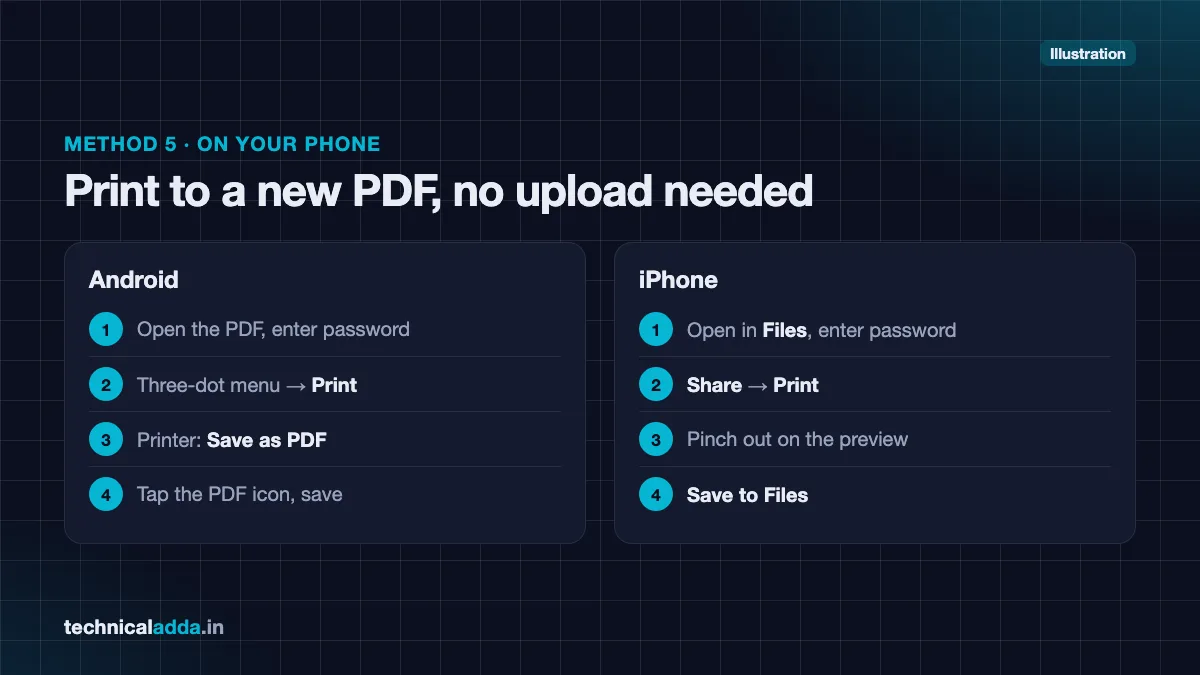
Method 5: Remove PDF password on mobile
Most people receive statements on their phones, so here is how to do it on Android and iPhone without uploading anything.
Android (Chrome or Files by Google)
- Open the PDF in Google Drive's PDF viewer or Files by Google and enter the password.
- Tap the three-dot menu → Print.
- Choose Save as PDF as the printer.
- Tap the PDF download icon, pick a folder and save.
Menu labels differ between app versions and phone brands such as Samsung, Xiaomi and Vivo. If you do not see Print in one app, open the same PDF in the other app (Google Drive or Files by Google) and look for it there.
iPhone (Files app)
- Open the PDF in the Files app and enter the password.
- Tap the Share icon → Print.
- On the print preview, pinch outward on the page thumbnail (or tap the share icon on the preview).
- Choose Save to Files and save the new copy.
The new file opens without a password because it is a fresh "printed" copy.
Method 6: Windows "Microsoft Print to PDF"
If you use the default Windows PDF viewer or any app that can print, this built-in printer does the same job as Chrome.
- Open the PDF in any reader and enter the password.
- Press Ctrl + P.
- Select Microsoft Print to PDF as the printer.
- Click Print, then choose a file name and folder.
This method also fails if printing is blocked by a permissions password.
Common PDF password formats in India
Most locked PDFs in India follow a predictable format, and the sender usually explains it in the email body. Here are the most common ones.
e-Aadhaar PDF password
As per the official UIDAI FAQ (opens in new tab), the e-Aadhaar password is the first four letters of your name in CAPITALS + your year of birth (YYYY).
- SURESH KUMAR, born 1990 →
SURE1990 - SAI KUMAR, born 1990 →
SAIK1990(spaces are skipped) - P. KUMAR, born 1990 →
P.KU1990(the dot counts) - RIA, born 1990 →
RIA1990(short names use the full name)
Use the name exactly as printed on Aadhaar, not a nickname. You can also store Aadhaar in DigiLocker so you rarely need the PDF at all. See our guide on how to download Aadhaar from DigiLocker.
Income tax documents
- Form 26AS (from TRACES): your date of birth in DDMMYYYY format, e.g.
15081990, as stated in the TRACES Form 26AS FAQ (opens in new tab). - AIS/TIS: your PAN in lowercase + date of birth in DDMMYYYY, e.g.
abcde1234f15081990, as stated on the Income Tax Department's AIS page (opens in new tab).
Bank statements and credit card statements
There is no single national format. Each bank sets its own, and formats differ even between savings account and credit card statements of the same bank. Common patterns include:
- First four letters of your name + date of birth (DDMM)
- Customer ID or CRN
- Part of your registered mobile number + date of birth
- Account number or part of it
Because public sources disagree on specific banks, always check the email that came with the statement. Banks usually print the password hint there. If it is missing, check the e-statement section of your bank's net banking or app, or its official help page.
Salary slips and Form 16
Employers and payroll software (Zoho Payroll, greytHR, Keka and others) set their own rules. Common formats are your PAN, date of birth or employee ID, sometimes combined. Ask HR if the email does not say.
Mutual fund CAS
For a Consolidated Account Statement from CAMS or KFintech, you usually choose the password yourself while requesting the statement. If you forgot it, just request a new CAS.
| Document | Usual password pattern | Where to confirm |
|---|---|---|
| e-Aadhaar | First 4 letters of name (CAPS) + birth year | UIDAI FAQ |
| Form 26AS | Date of birth DDMMYYYY | TRACES download screen |
| AIS / TIS | PAN (lowercase) + DOB DDMMYYYY | Income tax portal |
| Bank statement | Varies by bank | Statement email / bank website |
| Credit card statement | Varies by bank and card | Statement email |
| Salary slip / Form 16 | PAN, DOB or employee ID (employer-defined) | HR / payroll email |
| Mutual fund CAS | Password you set while requesting | CAMS / KFintech |
Which method should you use?
Pick based on your device and how sensitive the file is.
| Method | Cost | Works offline? | File leaves your device? | Removes permissions lock? | Best for |
|---|---|---|---|---|---|
| Chrome / Edge print | Free | Yes | No | No | Most users on laptop |
| Adobe Acrobat Pro | Paid | Yes | No | Yes (with password) | Office users, legal or editable files |
| Mac Preview | Free | Yes | No | Partly | Mac users |
| iLovePDF / Smallpdf | Free tier | No | Yes | Varies | Non-sensitive files on shared PCs |
| Android / iPhone print | Free | Yes | No | No | Phone-only users |
| Microsoft Print to PDF | Free | Yes | No | No | Windows without Chrome |
Our suggestion: For bank statements, Aadhaar and salary slips, use an offline method (Chrome, Preview, phone print or Acrobat). Keep online tools for things like a college notice or a brochure.
Privacy warning for online PDF unlockers
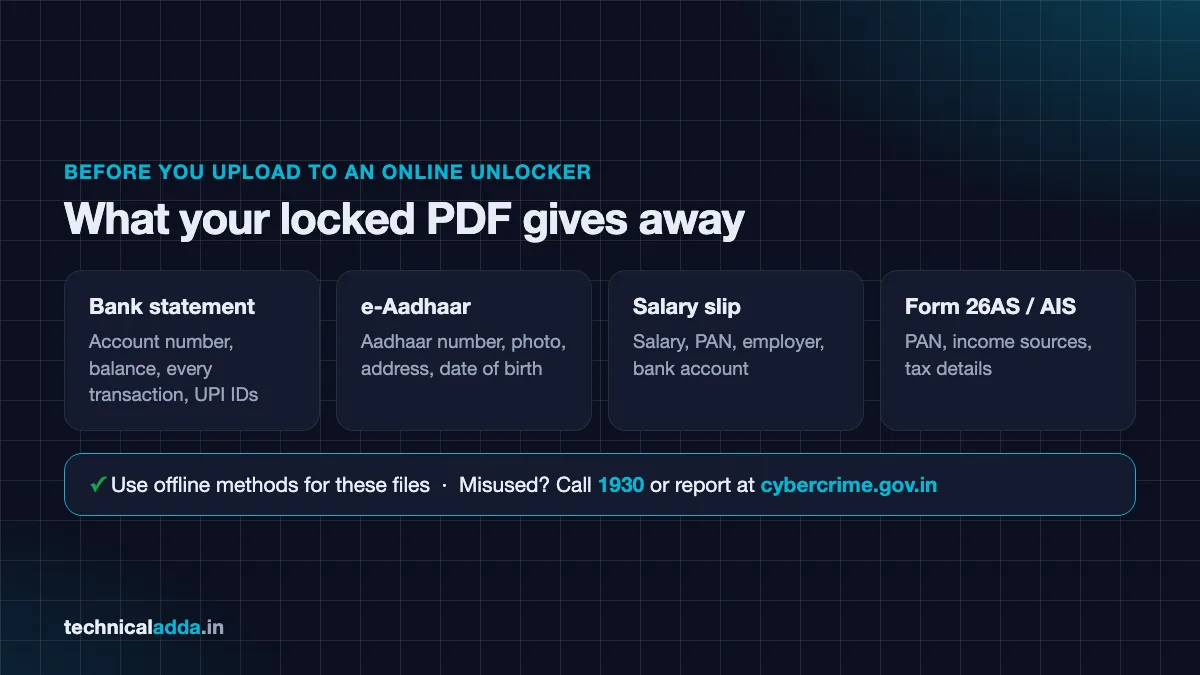
The reason these files are locked is that they contain sensitive data. Before you upload one to any website, think about what is inside:
- Bank statement: account number, balance, every transaction, UPI IDs of people you paid
- e-Aadhaar: Aadhaar number, photo, address, date of birth
- Salary slip: salary, PAN, employer, bank account
- Form 26AS / AIS: PAN, income sources, tax details
A leak of this data can feed identity theft, loan fraud or targeted phishing calls. Follow these rules:
- Prefer offline methods for any financial or identity document.
- Use only well-known tools with a published privacy policy and deletion timeline.
- Delete the file from the site right after download if a delete option exists.
- Avoid tools that ask you to install an extension or APK just to unlock one file.
- Never share the unlocked copy on WhatsApp groups or public cloud links.
- Delete old unlocked copies from Downloads when your work is done. If storage is the issue, our guide to free up Google storage helps you clean Drive and Gmail safely.
If you think a document has already leaked and someone is misusing it, report it at cybercrime.gov.in (opens in new tab) or call 1930. Our guide on how to report cyber fraud online in India explains the full process.
Should you keep the unlocked copy?
Unlocking is convenient, but an unlocked file is easier to misuse if your phone or laptop is lost. A few habits help:
- Keep the original locked file as your master copy.
- Use the unlocked copy only for the upload or task at hand, then delete it.
- If you must store unlocked copies, keep them in a folder protected by your device lock or in a secure app like DigiLocker (for government documents).
- If you suspect malware on your device, fix that first. See how to check if your phone is hacked.
Troubleshooting
"Save as PDF" is missing in Chrome.
The file probably blocks printing. Try Adobe Acrobat Pro with the permissions password, or ask the sender for an unrestricted copy.
The unlocked file is blank or blurry.
Some PDFs are scanned images. Printing them again can lower quality. In Chrome, open More settings and make sure Scale is set to Default or Fit to page.
The password is "wrong" even though it is correct.
- Check Caps Lock. Aadhaar needs capitals.
- Remove spaces you may have typed.
- Check the date format (DDMM vs DDMMYYYY vs YYYY).
- Make sure you are using the name exactly as printed on the document.
The file opens but text cannot be copied.
That is a permissions lock. Unlocking the open password does not remove it. You need Acrobat Pro and the owner password.
I forgot my own password.
Download a fresh copy from the official source (bank net banking, UIDAI, income tax portal). Do not use cracking tools.
I need to chat with the PDF content after unlocking.
Once unlocked, you can upload non-sensitive PDFs to tools like NotebookLM for summaries. Our NotebookLM tutorial covers this. Avoid uploading financial documents to AI tools.
Key takeaways
- You can unlock a PDF password only when you already know it; these methods save a copy without the lock.
- Chrome's Print → Save as PDF is the quickest free method on laptops, and the phone print menu does the same on mobile.
- Adobe Acrobat Pro is needed to remove permissions (print/copy) locks.
- e-Aadhaar password = first four letters of name in CAPITALS + year of birth, as per UIDAI.
- Bank and salary slip formats vary, so check the email that came with the file.
- Avoid uploading financial or identity PDFs to online tools; prefer offline methods.
Conclusion
Learning how to unlock PDF password on your own files saves time every month, whether it is an e-Aadhaar, a bank statement or a salary slip. For most people, Chrome's "Save as PDF" or the phone's print menu is all you need, and both keep your data offline. Use Adobe Acrobat Pro only when a permissions lock blocks printing, and treat online unlockers with caution for anything financial.
Keep your important documents safe in the first place. Next, read our step-by-step guide on how to download Aadhaar from DigiLocker so you always have a verified copy without hunting for passwords. More guides are in our How-To section.
FAQ
Frequently Asked Questions
How can I unlock a PDF password for free?
You can unlock a PDF password for free by opening it in Google Chrome, entering the password, pressing Ctrl+P, choosing "Save as PDF" and saving a new copy. The new file opens without a password. This works on Windows, Mac and Chromebook, and it requires that you already know the password. Mac Preview and phone print menus are other free options.
Can I remove a PDF password without knowing it?
No legitimate method removes an open password without knowing it. Tools that claim to "crack" PDF passwords are unreliable, often unsafe, and using them on files you do not own may be unlawful. If it is your own document, download a fresh copy from the bank, UIDAI or employer portal, or check the original email for the password hint.
What is the password of the e-Aadhaar PDF?
The e-Aadhaar PDF password is the first four letters of your name in capital letters followed by your year of birth in YYYY format, according to UIDAI. For example, SURESH KUMAR born in 1990 would use SURE1990. Spaces are skipped, dots count, and names shorter than four letters use the full name, such as RIA1990.
Is it safe to unlock a bank statement on iLovePDF or Smallpdf?
It is safer to avoid online tools for bank statements. Uploading sends your account number, balance and transactions to a third-party server. iLovePDF says it deletes files within two hours, but offline methods like Chrome print-to-PDF or Mac Preview keep the file on your device and do the same job for free.
How do I remove a PDF password on my Android phone?
Open the PDF in Google Drive's viewer or Files by Google, enter the password, then tap the three-dot menu and choose Print. Select "Save as PDF" as the printer and tap the download icon to save. The new copy opens without a password. Menu names can differ slightly between Samsung, Xiaomi, Vivo and other phone brands.
Why is "Save as PDF" not working for my locked PDF?
"Save as PDF" fails when the PDF has a permissions password that blocks printing. In that case the print preview may be blank or the print option greyed out. You will need the permissions (owner) password and a full editor like Adobe Acrobat Pro, or you can ask the sender to share an unrestricted copy of the file.
Does unlocking a PDF reduce its quality?
The print-to-PDF method creates a new copy, so links, bookmarks and form fields may be lost, and scanned pages can look slightly softer. Text-based documents like bank statements usually look identical. If you need the original structure intact, Adobe Acrobat Pro's "Remove Security" option keeps everything as it was while removing the password.
What is the password format for bank statement PDFs?
There is no single format. Each bank sets its own, often combining parts of your name, date of birth, customer ID, account number or mobile number. The format can also differ between savings and credit card statements. The most reliable source is the email that came with the statement, which usually explains the exact password format.
Is it legal to unlock a PDF password?
Removing a password from your own document, or one you have permission to open, is a normal everyday task. Trying to access someone else's protected file without authorisation is different and may attract action under the Information Technology Act, 2000. This article is for informational purposes; when in doubt, ask the document owner for permission.
Can I unlock a PDF password on iPhone?
Yes. Open the PDF in the Files app and enter the password. Tap Share, then Print, pinch outward on the preview to open it as a full PDF, and choose Save to Files. The saved copy opens without a password. This keeps the file on your iPhone, so it is safer than uploading it to a website.