Shared vs VPS Hosting: Under ₹100 vs ₹500 a Month, and When to Switch
Web Hosting & Servers 13 min read By Sanjeev Pratap Singh
In this articleTable of contents14
Last updated: 10 October 2026
You are about to buy hosting, or your current site feels slow, and every host is pushing you to "upgrade to VPS". Do you actually need it? This guide explains shared vs VPS hosting in plain language, then adds the two other options you will see: cloud hosting and dedicated servers. You will get a side-by-side comparison of price in rupees, performance, control, security and the skills each one needs, plus rule-of-thumb traffic levels for upgrading and clear picks for a blog, a business website and a web app. No jargon overload, and no pushing you into the most expensive plan.
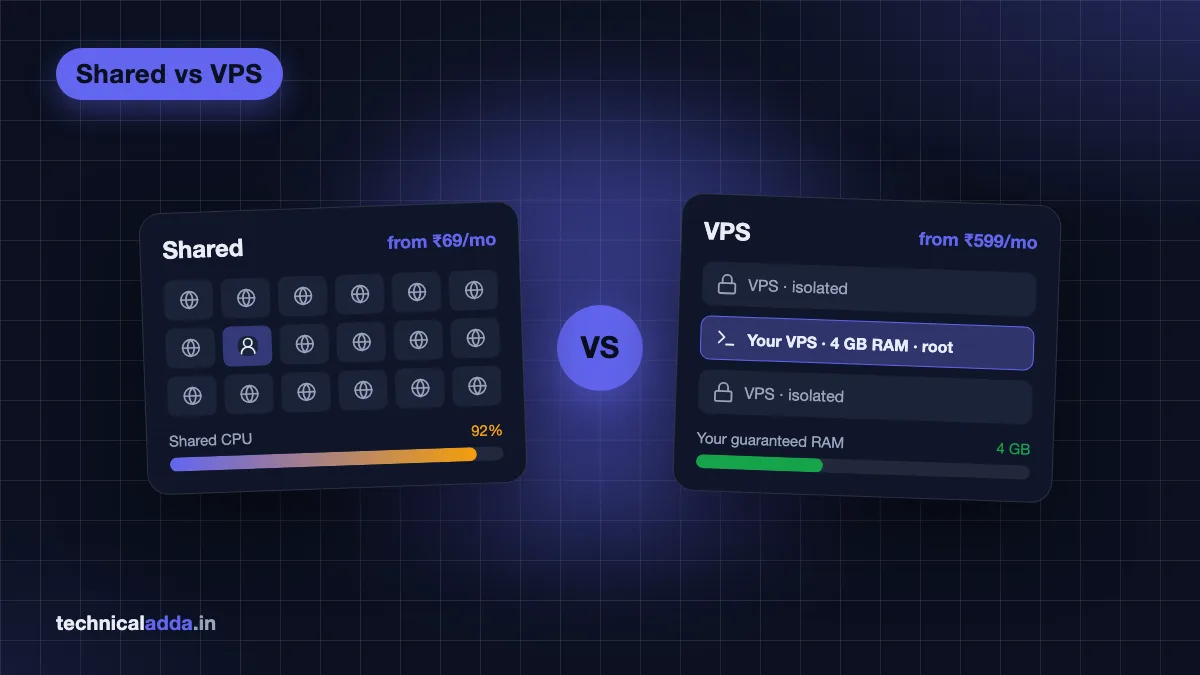
Quick answer: Shared hosting puts many websites on one server and shares its resources. It's cheap (from under ₹100/month on long terms) and fully managed, ideal for new blogs and small business sites. A VPS gives you a guaranteed slice of a server with root access. It's faster and more flexible (from about ₹500 to ₹1,000/month) but you manage it. Start shared; move to VPS when you hit limits.
Shared vs VPS hosting in one minute
Think of hosting like housing:
- Shared hosting is a PG or hostel room. Rent is low and the owner handles maintenance, but you share the kitchen and bathroom. If a neighbour throws a party, everyone feels it.
- VPS hosting is a flat in an apartment building. You share the building, but your flat has its own locked door, its own electricity meter and you can repaint it. Repairs inside are your job (unless you pay for a caretaker, that is "managed VPS").
- Cloud hosting is a serviced apartment chain. If your flat gets crowded, you can move into a bigger one quickly, and the building runs across several locations.
- Dedicated server is an independent house. The whole building is yours, at a matching price and with matching responsibility.
The main differences in shared vs VPS hosting are resource isolation (shared vs guaranteed), control (cPanel/hPanel vs full root access), who manages the server (the host vs you) and price.
What is shared hosting?
With shared hosting, hundreds of websites live on one physical server and share its CPU, RAM, disk and network. The host installs and maintains everything: operating system, web server (LiteSpeed, Apache or nginx), PHP, MySQL, email and security patches. You get a control panel such as cPanel or Hostinger's hPanel. If you are new to panels, read what is cPanel.
Pros
- Very cheap, especially on long promotional terms.
- No server knowledge needed; one-click WordPress.
- Email hosting, free SSL and daily/weekly backups usually included.
- Support handles server problems.
Cons
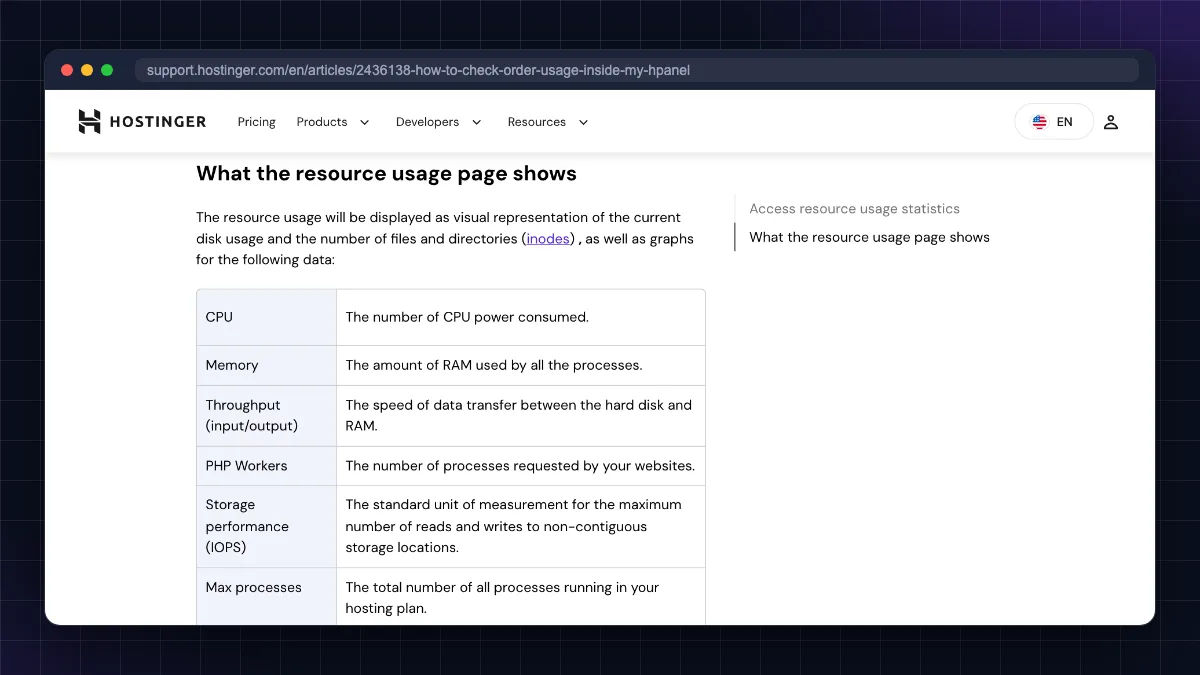
- Resource limits (CPU, RAM, "entry processes", inodes): exceed them and your site slows down or gets throttled.
- "Noisy neighbours": another busy site on the same server can affect you, although good hosts isolate accounts with tools like CloudLinux.
- No root access; you cannot install Node.js versions, Docker, Redis or custom software freely (some hosts offer limited Node.js support).
- Promo prices jump at renewal.
What is VPS hosting?
A VPS (virtual private server) uses virtualisation (KVM is common) to split one powerful physical server into several isolated virtual machines. Each VPS gets its own guaranteed RAM, vCPU cores and disk, its own operating system and root access. For a deeper explainer, see what is VPS hosting.
Pros
- Guaranteed resources: other customers cannot eat your RAM.
- Full control: choose Ubuntu or another OS, install any software (Docker, Node.js, Python, n8n, Redis, game servers).
- Better performance under load when configured well.
- Host many sites or apps on one server.
Cons
- Unmanaged by default: you handle updates, firewall, backups and security.
- A misconfigured VPS can be slower and less secure than good shared hosting.
- Usually no free email hosting; you add a separate email service.
- Higher price than shared.
What about cloud hosting and dedicated servers?
Cloud hosting
"Cloud hosting" means two different things in the market, so read the plan carefully:
- Managed cloud hosting (for example, Hostinger Cloud plans or Cloudways): a managed environment with more dedicated resources than shared hosting, a control panel and support. It feels like premium shared hosting with isolated resources.
- Cloud servers / IaaS (AWS EC2, Google Cloud, Azure, DigitalOcean droplets): VPS-like virtual machines that you can resize, clone and scale on demand, billed hourly or monthly, often with load balancers and managed databases around them.
Dedicated server
A dedicated server is a whole physical machine rented only to you. You get all the CPU cores, RAM and disks with no virtualisation overhead. It suits very high-traffic sites, large databases, strict compliance needs, or workloads that need predictable performance. Prices start in the thousands of rupees per month, and you (or a paid managed service) handle hardware monitoring, RAID, OS and security.
Shared vs VPS vs cloud vs dedicated: full comparison
Prices are typical Indian starting prices as of October 2026, excluding 18% GST. Promotional prices usually need 24 to 48 month terms and renew higher.
| Factor | Shared hosting | VPS hosting | Cloud hosting | Dedicated server |
|---|---|---|---|---|
| Starting price (₹/month) | ~₹69 to ₹250 (promo), renews ~₹289 to ₹649 | ~₹500 to ₹1,000 (unmanaged) | ~₹600 to ₹1,100 (managed) | ~₹5,500+ (Indian DC, renews ~₹6,500) |
| Resources | Shared, limited | Guaranteed vCPU/RAM | Isolated, easy to scale | Entire machine |
| Performance | Good for small sites | High if tuned | High, scalable | Highest, predictable |
| Control | Panel only, no root | Full root access | Panel or full (depends) | Full root and hardware choice |
| Security | Host manages; shared risk | You manage; isolated | Mostly managed; isolated | You manage; fully isolated |
| Skills needed | Beginner | Linux basics to intermediate | Beginner (managed) to advanced (IaaS) | Advanced (or pay for management) |
| Email included | Usually yes | Usually no | Varies | No |
| Scaling | Upgrade plan | Resize VPS (may reboot) | Fast, sometimes automatic | Buy new hardware |
| Best for | New blogs, small business sites | Growing sites, apps, multiple sites | Busy WordPress/WooCommerce, agencies | Large platforms, heavy databases |
Performance: is a VPS really faster than shared hosting?
Usually, but not automatically. On shared hosting, the server is tuned by experts and often uses fast web servers like LiteSpeed with built-in caching. A small, well-cached WordPress blog on good shared hosting can be very quick.
A VPS wins when:
- Your traffic grows and shared CPU or process limits start throttling you.
- You need more PHP workers for many visitors at once, such as during a sale or a viral post.
- You run dynamic sites like WooCommerce, membership sites or forums where pages cannot be fully cached.
- Your audience is in India and you choose a VPS in an Indian data centre (Mumbai, Bangalore, Delhi NCR, Chennai or Hyderabad), while your shared host is overseas.
A VPS loses when it has too little RAM, no caching and default settings. Before upgrading for "speed", check the basics: a lightweight theme, fewer plugins, a caching plugin, compressed images and a CDN.
Control, security and skills needed
Control. Shared hosting lets you manage files, databases, email and PHP version through a panel. A VPS gives root access: any OS, any software, custom nginx rules, cron jobs, background workers and containers.
Security. On shared hosting, the host patches the server, runs malware scanning and isolates accounts, but a compromised neighbour or server-wide issue can still affect you. On a VPS your environment is isolated, but security is your responsibility: SSH keys, a firewall, fail2ban, OS updates and backups. An unpatched VPS is a bigger risk than shared hosting.
Skills needed. For an unmanaged VPS you should be comfortable with:
- Connecting over SSH from Windows (PowerShell or PuTTY), Mac Terminal or Android (Termux).
- Basic Linux commands, editing config files and reading logs.
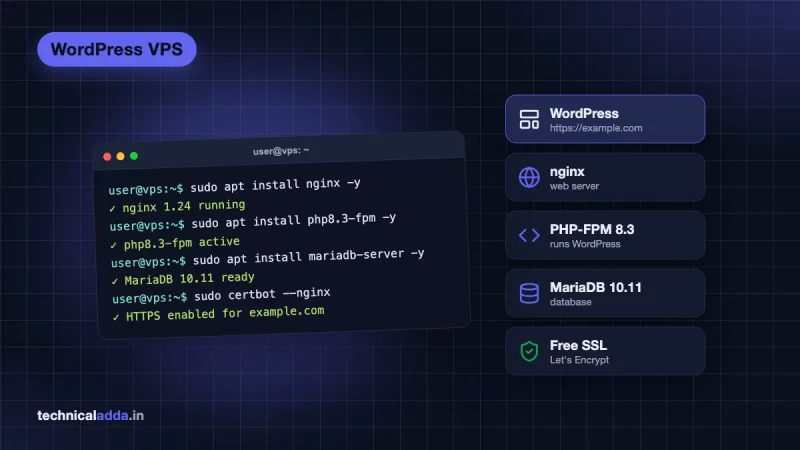
- Installing a web stack. Follow our guide to install WordPress on a VPS for a practical example.
- Setting up backups and updates.
If that list sounds stressful, choose shared hosting, managed cloud hosting or a managed VPS instead.
Price in India: what you really pay
Prices verified on official pages on 10 October 2026, excluding GST:
| Example plan | Type | Promo price | Renewal | Key specs |
|---|---|---|---|---|
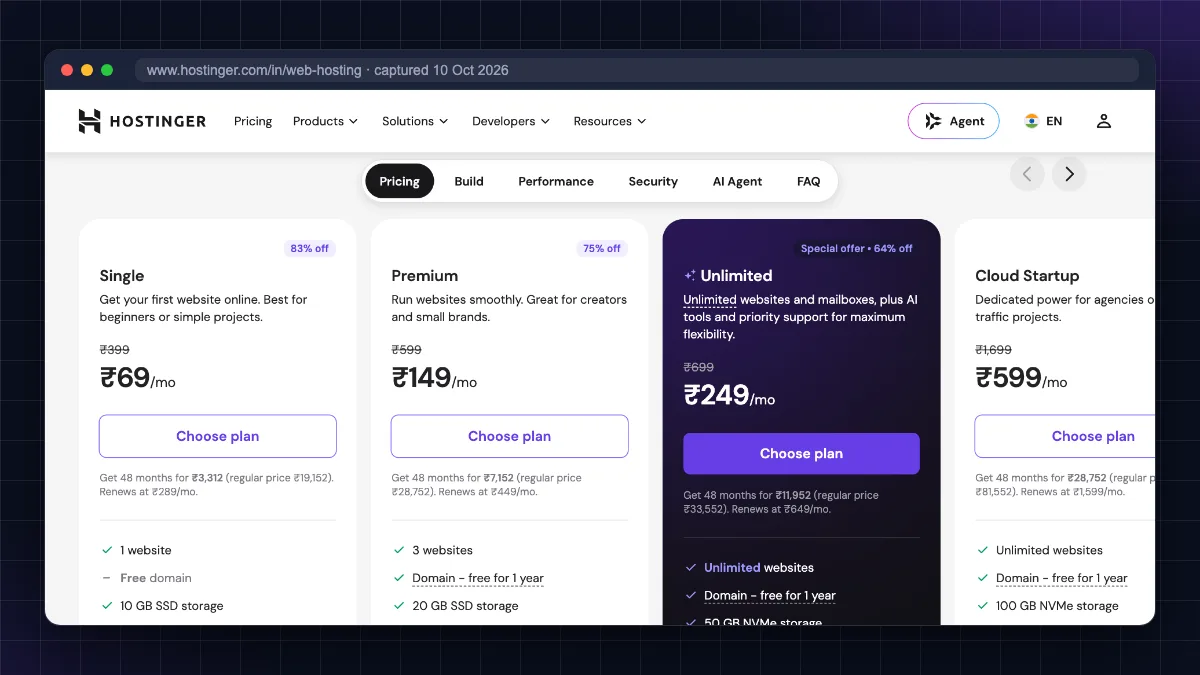
| Hostinger Single (48-month) | Shared | ₹69/mo | ₹289/mo | 1 website, 10 GB SSD, free weekly backups |
| Hostinger Premium (48-month) | Shared | ₹139/mo | ₹449/mo | 3 websites, 20 GB SSD |
| Hostinger Cloud Startup (48-month) | Managed cloud | ₹599/mo | ₹1,599/mo | Unlimited websites, 100 GB NVMe, daily backups |
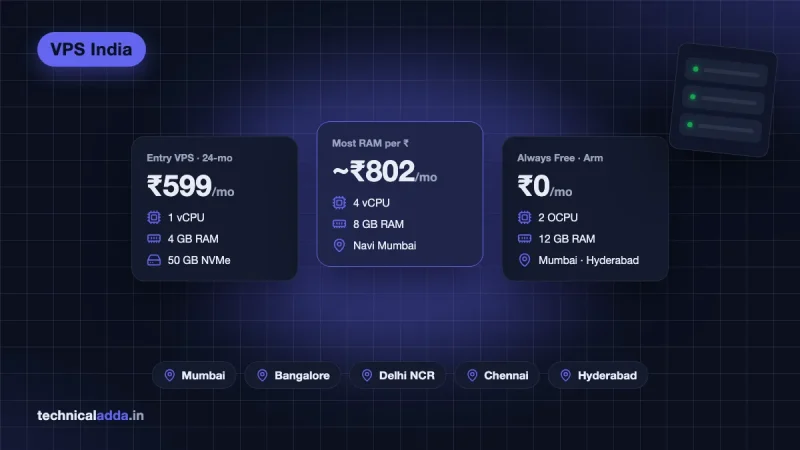
| Hostinger KVM 1 (24-month) | Unmanaged VPS | ₹599/mo | ₹999/mo | 1 vCPU, 4 GB RAM, 50 GB NVMe, 4 TB bandwidth |
| DigitalOcean Basic droplet | Unmanaged VPS | $6/mo (~₹580) | Same | 1 vCPU, 1 GB RAM, 25 GB SSD, 1 TB transfer |
| MilesWeb DS 6C (official page (opens in new tab)) | Dedicated (India) | ₹5,499/mo | ₹6,499/mo | 6 cores AMD EPYC, 32 GB RAM, 480 GB NVMe, 5 TB bandwidth |
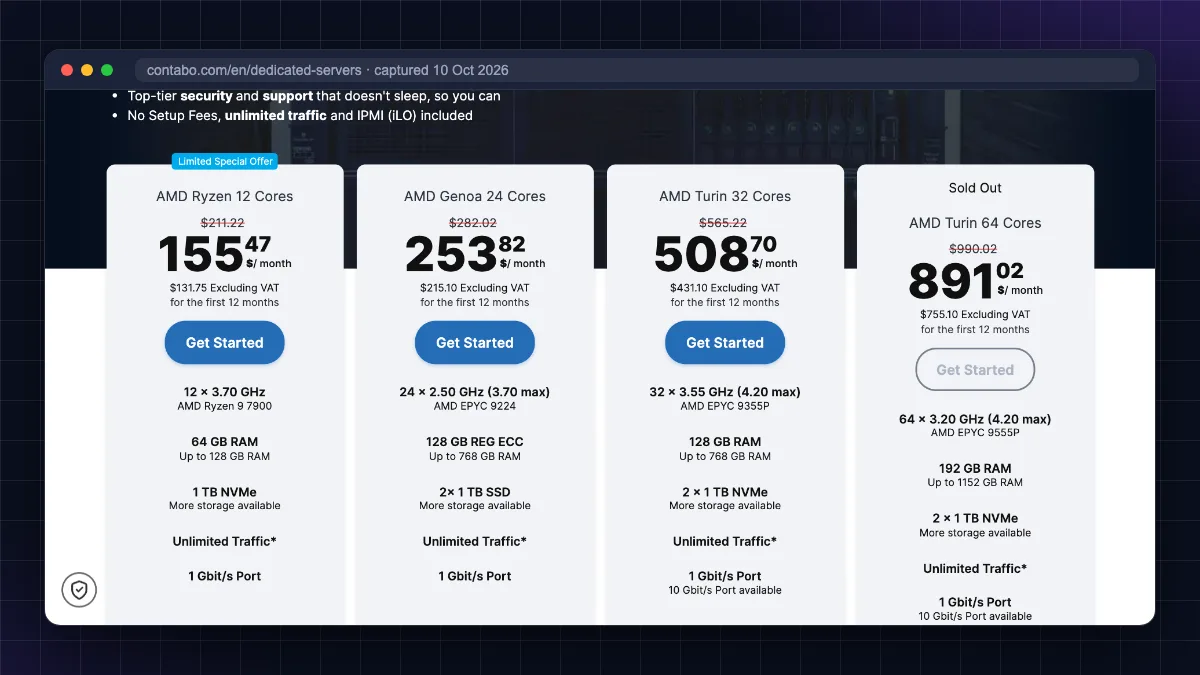
| Contabo AMD Ryzen 12-core (official page (opens in new tab)) | Dedicated | First-year offer price; varies by currency and location (see official page) | Higher list price after the offer | 12 cores, 64 GB RAM, 1 TB NVMe |
DigitalOcean figures are from the official droplet pricing page (opens in new tab); the dollar price is converted at about ₹97/$. Contabo shows prices in your local currency and changes its offers often, so check the live page. Add 18% GST to everything for a true comparison.
The real cost lesson: a ₹69 shared plan that renews at ₹289, paid for four years, is still far cheaper than any VPS. If shared hosting meets your needs, the extra ₹500 to ₹900 a month for a VPS is better spent on content or marketing.
For ranked picks, see our best web hosting in India list for shared plans and the best VPS hosting in India comparison for VPS plans.
When to upgrade: traffic rules of thumb
These are rules of thumb, not guarantees. Real capacity depends on caching, theme, plugins, how many visitors arrive at the same moment, and your host. A fully cached blog can handle far more than an uncached WooCommerce store.
| Site type | Shared hosting is usually fine up to | Consider VPS or cloud when |
|---|---|---|
| Cached WordPress blog | ~1,000 to 3,000 visits/day (rough guide) | Regular spikes above that, CPU limit warnings, slow admin |
| Small business website | Brochure site with contact form: almost always fine | You add booking, payments or a client portal |
| WooCommerce store | ~50 to 100 orders/day on a strong shared/cloud plan (rough guide) | Checkout slows during sales, PHP worker limits hit |
| Custom web app (Node.js, Python, Docker) | Not suitable | From day one: use a VPS |
| Several client sites (agency) | 2 to 5 small sites on higher shared plans | Many sites, staging needs, resource isolation |
Signs you have outgrown shared hosting (more reliable than visitor counts):
- Your host emails you about CPU, memory or entry-process limits.
- You see "508 Resource Limit Reached" or frequent 503 errors.
- The WordPress dashboard is slow even when traffic is low.
- Page load time jumps during traffic peaks but is fine at night.
- You need software the host does not allow (Node.js versions, Redis, Docker, n8n, cron every minute).
If you see two or more of these, move up. First try your host's higher shared or cloud plan. It is often an easier migration than a VPS.
Which should you pick? Blog, business or app
New blog or personal website
Pick: shared hosting. It is cheap, managed, includes email and handles thousands of monthly visitors easily. Use the money you save on a good domain and content. or read our Hostinger review first.
Growing blog earning from AdSense or affiliates
Pick: higher shared plan or managed cloud first, VPS later. When traffic regularly hits limits, move to managed cloud hosting if you want no server work, or a VPS if you are comfortable with Linux. Make the switch before a big festival season or sale, not during it.
Small business website
Pick: shared hosting, with professional email. Most business sites are brochure sites with a contact form. Move to cloud or VPS only when you add bookings, payments, a customer portal or significant ad traffic.
Online store (WooCommerce)
Pick: managed cloud hosting or a managed VPS for a store doing regular orders. Checkout pages cannot be cached, so they need real CPU. if you want a managed server without touching the command line.
Web app, API, bot or automation (Node.js, Python, Docker, n8n)
Pick: VPS from day one. Shared hosting is not built for long-running processes. A budget VPS with 4 to 8 GB RAM gives plenty of room; Contabo offers the most RAM for the money () and Hostinger offers Indian billing and an India location.
Large platform, heavy database, compliance needs
Pick: dedicated server or a scaled cloud setup, usually with a sysadmin or managed service.
Managed VPS vs shared hosting
A managed VPS (or managed cloud) sits in the middle: you get isolated, guaranteed resources like a VPS, but the provider handles setup, security patches, backups and support like shared hosting. It costs more than both shared and unmanaged VPS, but it is the safest upgrade for non-technical owners whose sites earn money.
| Shared | Managed VPS / cloud | Unmanaged VPS | |
|---|---|---|---|
| Monthly cost | Lowest | Highest | Middle |
| Your time each month | Minimal | Minimal | 1 to 3 hours+ |
| Performance ceiling | Low to medium | High | High |
| Risk if you make a mistake | Low | Low | High |
What to weigh before you leave shared hosting
- Shared vs VPS hosting comes down to three switches: shared or guaranteed resources, panel or root access, host-managed or self-managed.
- Shared hosting is the right start for most new blogs and small business websites in India.
- A VPS is better for growing sites, multiple sites, WooCommerce under load and any custom app, if you can manage it or pay for management.
- Read any "cloud" plan closely: it is either managed premium hosting or a bare cloud server. Dedicated servers suit only large or specialised workloads.
- Upgrade based on real signals (resource-limit warnings, slow checkout, 508/503 errors), not just visitor counts.
- Compare renewal prices (Hostinger Single goes from ₹69 to ₹289 a month) and add 18% GST before deciding.
So should you start on shared or jump to a VPS?
Start on shared hosting unless you already run a custom app. The shared vs VPS hosting choice then comes down to three questions: how much traffic and load you really have, how much control you need, and whether you (or someone) can manage a server. For a new blog or business site, that means shared hosting; move to managed cloud or a VPS when real warning signs appear, and save dedicated servers for large platforms. Ready to choose? Compare plans in our best web hosting in India and best VPS hosting in India guides, or explore more in Web Hosting & Servers.
FAQ
Frequently Asked Questions
What is the main difference between shared and VPS hosting?
Shared hosting puts many websites on one server where they share CPU, RAM and disk, and the host manages everything. VPS hosting gives you a virtual server with guaranteed resources, your own operating system and root access, but you usually manage it yourself. Shared is cheaper and easier; VPS is faster under load and far more flexible.
Is VPS better than shared hosting?
A VPS is better for performance, control and isolation, but it is not better for everyone. It costs more and needs Linux skills unless you pay for management. For a new blog or small business site, good shared hosting is usually the smarter choice. Upgrade to a VPS when you hit resource limits or need custom software.
Is VPS hosting faster than shared hosting?
Usually yes, because a VPS has dedicated RAM and CPU that other customers cannot use, and you can tune caching and PHP yourself. However, a small or badly configured VPS can be slower than well-optimised shared hosting with LiteSpeed caching. Speed depends on resources, caching, theme and plugins, not just the hosting type.
When should I move from shared hosting to a VPS?
Move when your host warns about CPU or entry-process limits, you see 508 or 503 errors, the dashboard is slow, pages slow down during traffic peaks, or you need software like Node.js, Docker or n8n. As a rough rule of thumb, many cached WordPress blogs start needing more than shared hosting at a few thousand visits a day.
What is the difference between VPS and cloud hosting?
A traditional VPS is a fixed-size virtual machine on one physical server. Cloud hosting runs on a pool of servers, so resources can be resized or scaled more quickly and failures can be handled by moving workloads. In India, "cloud hosting" also often means managed premium hosting plans with isolated resources and a control panel.
What is the difference between VPS and a dedicated server?
A VPS is a virtual slice of a physical server shared with other VPS customers, while a dedicated server is an entire physical machine rented only to you. Dedicated servers offer the highest, most predictable performance and full hardware control, but cost many times more. Most websites never need one; a larger VPS or cloud setup is enough.
Can I host multiple websites on shared hosting?
Yes, most shared plans except the cheapest allow several websites. For example, Hostinger's Premium shared plan allows 3 websites and its higher plans allow more. All the sites share the same plan resources, so one busy site can slow the others. Agencies with many busy client sites usually move to cloud hosting or a VPS.
Is shared hosting safe for a business website?
Yes, reputable shared hosting is safe for most small business websites. The host patches the server, isolates accounts and usually provides free SSL, malware scanning and backups. You still need strong passwords, updated plugins and your own backups. Businesses that handle sensitive customer data or high-value transactions should consider isolated cloud or VPS hosting.
Do I need technical skills for VPS hosting?
For an unmanaged VPS, yes. You should know how to connect over SSH, use basic Linux commands, install a web server and database, set up a firewall and SSL, and keep the system updated. If you do not have these skills, choose a managed VPS, managed cloud hosting or a control panel like CloudPanel that simplifies the work.
Which hosting is best for a WordPress blog in India?
For a new WordPress blog, shared hosting from a reputable host with an Indian or nearby server location is the best value. As traffic grows, move to a higher shared plan, managed cloud hosting or a VPS in an Indian data centre. Compare renewal prices, GST, backups and support quality, not just the first-year price.
Where to buy
-
Visit official site (opens in new tab)
Pick: shared hosting.
-
Visit official site (opens in new tab)
Cloudways
-
Visit official site (opens in new tab)
Pick: VPS from day one.