What Is cPanel? Uses, Login and the $32.99 Licence Hike in December 2026
Web Hosting & Servers 12 min read By David Johnson
In this articleTable of contents12
Last updated: 10 October 2026
When you buy web hosting, your host gives you a "control panel" login. With many Indian hosts that panel is cPanel; with Hostinger it is hPanel; on some servers it is Plesk. If you are wondering what is cpanel, what it is used for, and whether it matters which panel your host uses, this guide answers it in plain language. You will learn what cPanel does, a tour of its main sections, how to log in, how its licence prices have changed, how it compares with hPanel, Plesk, DirectAdmin and CloudPanel, and which hosting companies in India use which panel.
Quick answer: cPanel is a web-based control panel for Linux web hosting. It lets you manage your website without commands: upload files, create email accounts, set up MySQL databases, install WordPress, add domains, enable free SSL and take backups. Hosts install it on their servers; you log in at yourdomain.com:2083 or yourdomain.com/cpanel.
What is cPanel?
cPanel is a control panel for Linux web hosting servers. Think of it as the "settings app" for your hosting account. Instead of typing Linux commands on a server, you click buttons in a browser to do common jobs like creating an email address or uploading a website.
A few basics:
- It was first released in the 1990s and is now one of the most widely used hosting panels in the world, especially on shared hosting.
- It is owned by WebPros, the same group that owns Plesk and WHMCS.
- It runs only on Linux servers (cPanel's system requirements (opens in new tab) list AlmaLinux OS, CloudLinux, Rocky Linux and Ubuntu as supported), not on Windows servers.
- It comes in two parts: cPanel for website owners and WHM (WebHost Manager) for server administrators and resellers.
Hosting companies pay cPanel a licence fee and give you access as part of your hosting plan. You never buy cPanel directly unless you run your own VPS or server.
What is cPanel used for?
Here is what most website owners use cPanel for:
- Managing files: upload, edit and delete website files with File Manager, or connect by FTP.
- Email: create email accounts like
[email protected], set forwarders and autoresponders, and read mail in webmail. - Databases: create MySQL/MariaDB databases and users, and manage them in phpMyAdmin.
- Installing apps: one-click install WordPress, Joomla, Moodle and others (via Softaculous or WP Toolkit, depending on the host).
- Domains: add extra domains, subdomains and redirects, and edit DNS records.
- SSL: enable free AutoSSL certificates so your site runs on HTTPS.
- Backups: download full or partial backups and restore them.
- Monitoring: check disk usage, bandwidth, visitors and error logs.
- Developer tools: choose PHP version, set cron jobs, use Git, and, on some hosts, a browser terminal or Node.js/Python app manager.
In short: cPanel is used to run a website and its email without needing server knowledge.
Main sections of cPanel explained
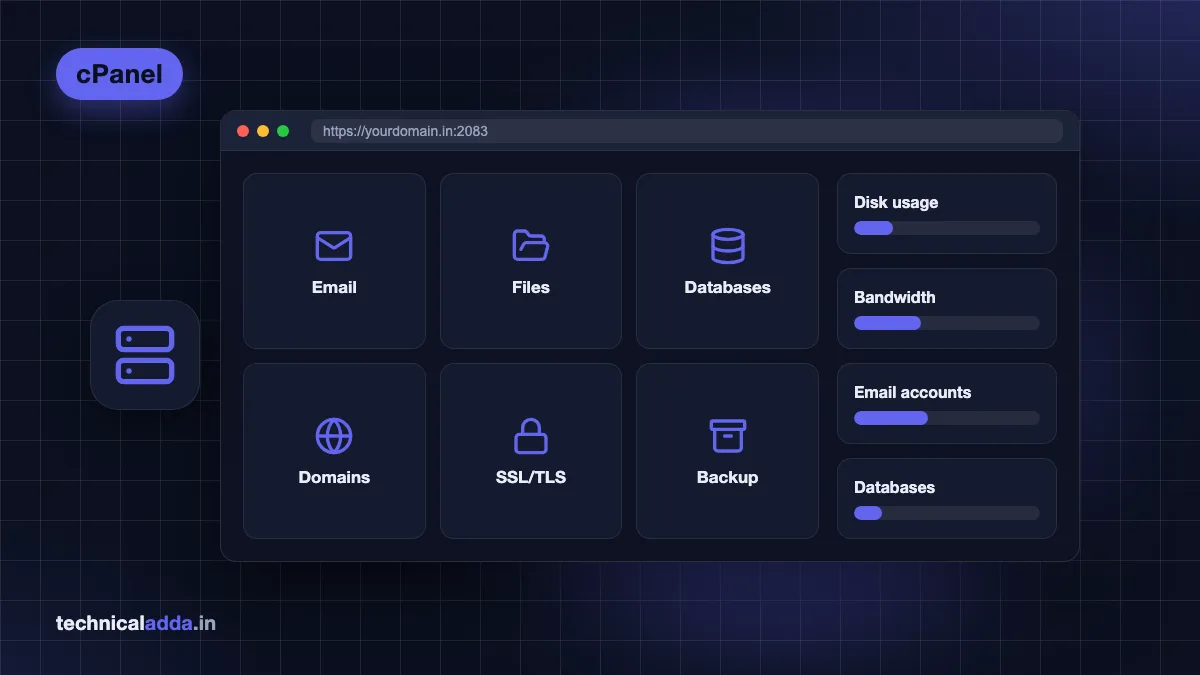
The current cPanel interface (the "Jupiter" theme) groups tools into sections. Names can vary slightly by host, because hosts can hide or add tools.
| Section | Key tools | What you do there |
|---|---|---|
| Email Accounts, Forwarders, Autoresponders, Spam Filters, Email Deliverability | Create mailboxes, fix SPF/DKIM, filter spam | |
| Files | File Manager, Disk Usage, FTP Accounts, Backup, Backup Wizard, Git Version Control | Upload and manage files, take backups |
| Databases | MySQL Databases, Database Wizard, phpMyAdmin, Remote MySQL | Create databases and users for WordPress/apps |
| Domains | Domains, Redirects, Zone Editor, Dynamic DNS | Add domains/subdomains, edit DNS records |
| Metrics | Visitors, Errors, Bandwidth, Raw Access, Awstats, Resource Usage | See traffic, find errors, check limits |
| Security | SSL/TLS, SSL/TLS Status (AutoSSL), IP Blocker, Hotlink Protection, Two-Factor Authentication | Enable HTTPS, block IPs, secure login |
| Software | MultiPHP Manager, Select PHP Version, Softaculous, WP Toolkit | Change PHP version, install apps |
| Advanced | Cron Jobs, Terminal, Error Pages, MIME Types, Indexes | Schedule tasks, use the command line |
| Preferences | Password & Security, Contact Information, User Manager | Change password, set alert email |
The official cPanel documentation (opens in new tab) explains every tool in detail.
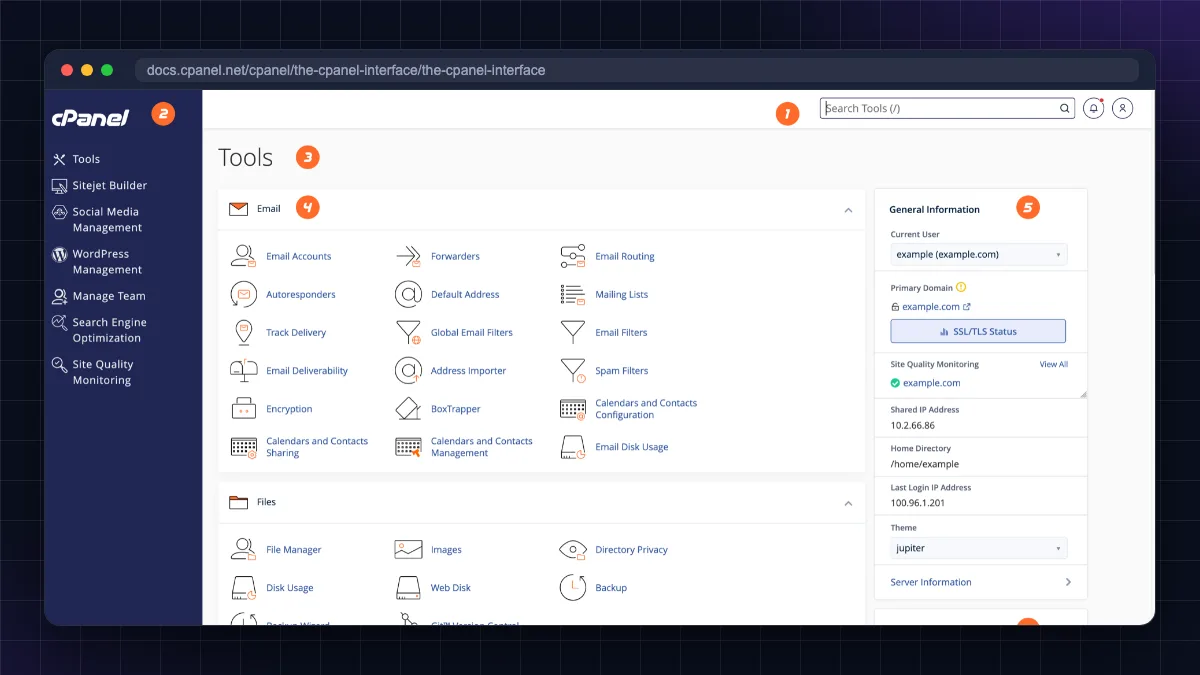
Tools beginners use most
- File Manager: edit
.htaccess, upload a ZIP and extract it, fix file permissions (644 for files, 755 for folders). - Email Accounts: create
[email protected]in under a minute. - WP Toolkit or Softaculous: install WordPress without creating a database manually.
- SSL/TLS Status: run AutoSSL if your site shows "Not secure". See our free SSL certificate guide.
- Backup: download a full backup before big changes.
How to log in to cPanel
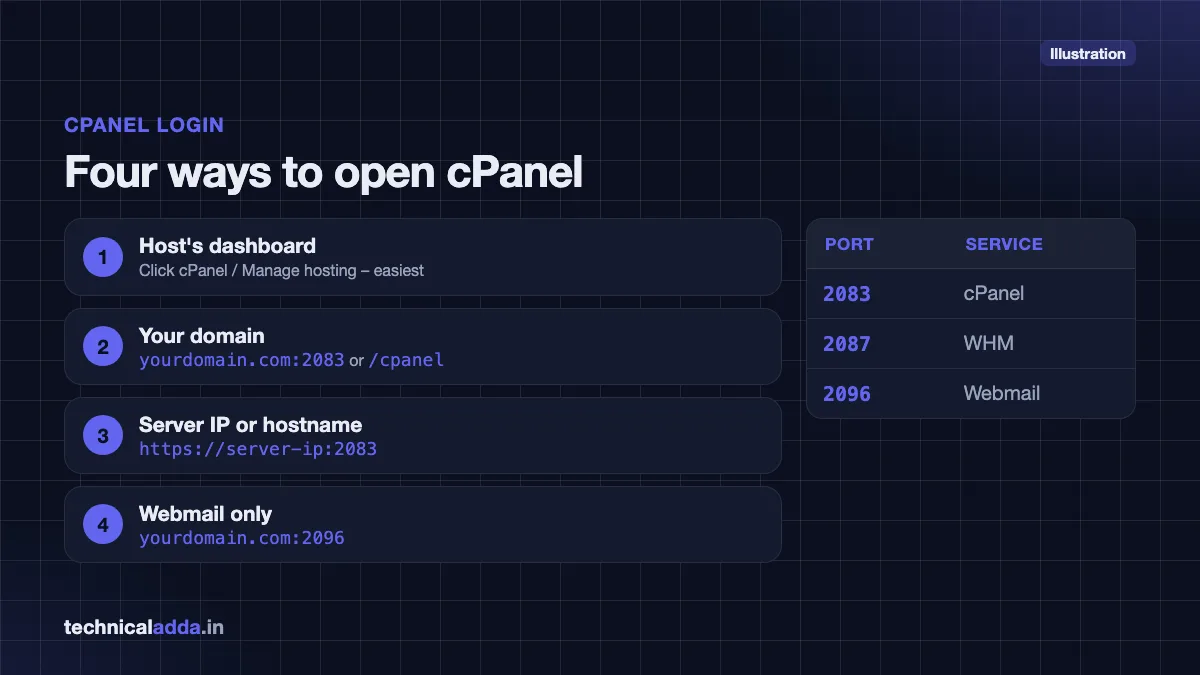
There are four common ways to open cPanel:
- From your host's dashboard: Log in to your hosting account (BigRock, GoDaddy, MilesWeb, etc.) and click cPanel or Manage hosting. This is the easiest and avoids password confusion.
- Using your domain: Open
https://yourdomain.com:2083orhttps://yourdomain.com/cpanelin a browser. - Using the server IP or hostname: If the domain is not pointing to the server yet, use
https://server-ip:2083or the server hostname your host emailed you. - Webmail: For email only, open
https://yourdomain.com:2096oryourdomain.com/webmail.
Enter the cPanel username and password from your hosting welcome email.
| Port | Service |
|---|---|
| 2083 | cPanel (secure) |
| 2087 | WHM (secure) |
| 2096 | Webmail (secure) |
cPanel login not working? Common reasons:
- Your office or college network blocks ports 2083/2087. Try mobile data or the host's dashboard login.
- You are using the hosting account password instead of the cPanel password (or vice versa).
- Your IP was blocked after too many wrong attempts. Contact your host.
- The domain is not pointing to the server yet. Use the server IP or hostname.
Security tip: Turn on Two-Factor Authentication in cPanel (Security section) and never share cPanel logins over WhatsApp. If someone gets your cPanel, they control your website and email.
What is WHM in cPanel?
WHM (WebHost Manager) is the administrator side of cPanel. It is used by people who own the whole server: a VPS owner, a dedicated server owner or a reseller.
- In WHM, you create and suspend cPanel accounts, set packages (disk, bandwidth limits), manage DNS for all domains, update the server and configure security.
- In cPanel, each customer manages only their own website.
On normal shared hosting you only get cPanel, not WHM. On reseller hosting you get a limited WHM to create cPanel accounts for your clients. On a VPS with a cPanel licence, you get full WHM.
cPanel licence price and why hosting got costlier
You do not pay cPanel directly on shared hosting; your host does. But cPanel's pricing affects what you pay.
In 2019 cPanel switched from a flat per-server price to per-account pricing, and it has raised prices almost every year since. Hosts passed these costs on, which is one reason some hosts (like Hostinger) built their own panels.
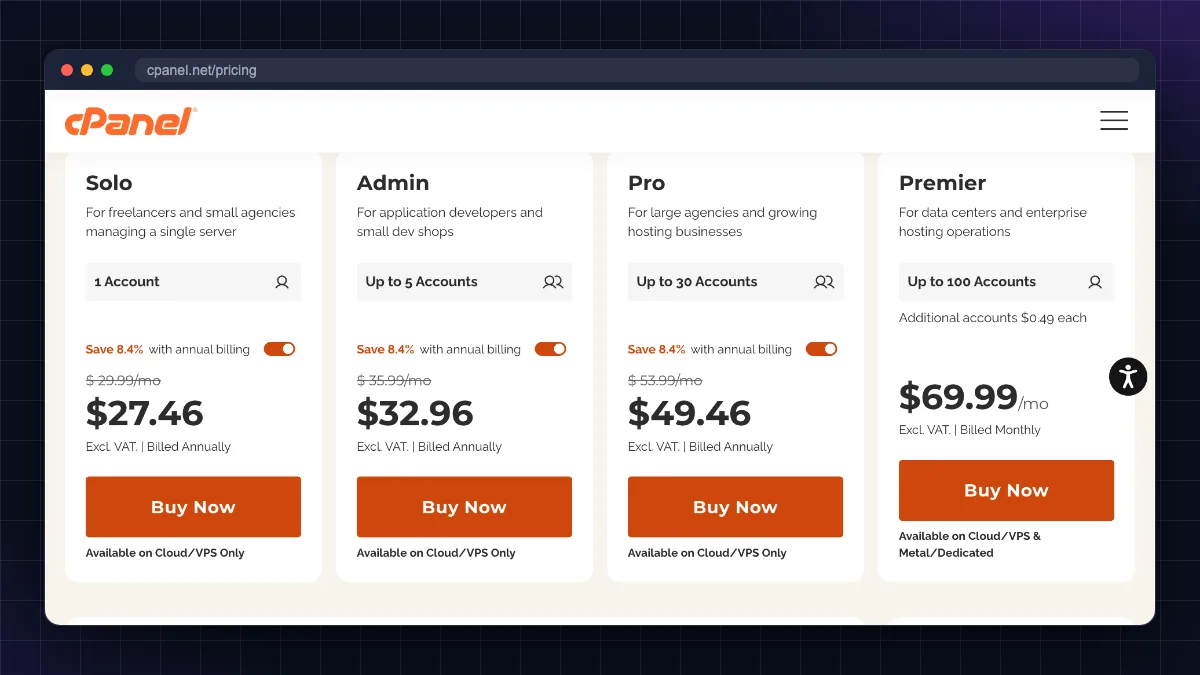
cPanel's official store prices (monthly, excluding taxes), as listed on cPanel's pricing page (opens in new tab) as of October 2026:
| Licence | Accounts included | Monthly price | Annual billing (per month) |
|---|---|---|---|
| Solo (VPS/cloud) | 1 | US$29.99 | US$27.46 |
| Admin (VPS/cloud) | Up to 5 | US$35.99 | US$32.96 |
| Pro (VPS/cloud) | Up to 30 | US$53.99 | US$49.46 |
| Premier | Up to 100, then US$0.49 per extra account | US$69.99 | Not listed |
These prices took effect on 16 December 2025 for new orders (1 January 2026 for existing licences). cPanel has already announced the next increase: its official 2027 Store Licensing Guide (opens in new tab) sets Solo at US$32.99, Admin at US$38.99, Pro at US$58.99 and Premier at US$76.99 per month (extra accounts US$0.55 each), valid from 16 December 2026. Hosts and VPS providers buy through partner programmes at lower wholesale rates, so the add-on price on your VPS may differ.
What this means for you:
- On shared hosting, the licence is included in your plan, but it is one reason renewals keep rising.
- On a VPS, adding cPanel can cost more than the VPS itself. For a single website, a free panel (CloudPanel, HestiaCP) or a managed platform may make more sense.
cPanel vs hPanel vs Plesk vs DirectAdmin vs CloudPanel
| Panel | Who makes it | Where you see it | Cost to you | Best for | Limits |
|---|---|---|---|---|---|
| cPanel | WebPros | Many shared/reseller hosts; VPS add-on | Included in shared plans; VPS from US$29.99/month (1 account) | Familiar, full-featured hosting with email | Expensive on VPS; Linux only |
| hPanel | Hostinger | Hostinger plans only | Included | Beginners; clean, simple UI | Only on Hostinger; cannot be installed elsewhere |
| Plesk | WebPros | Some hosts; Windows and Linux VPS | VPS licences US$16.99 (Web Admin), US$29.99 (Web Pro) and US$62.99 (Web Host) per month, per Plesk's 2026 licensing guide | Windows/ASP.NET hosting, agencies, WordPress Toolkit | Paid; slightly heavier |
| DirectAdmin | JBMC Software | Budget hosts, VPS | From US$5/month (Personal Plus, 2 accounts); US$29/month unlimited | Lightweight, cheap cPanel alternative | Fewer integrations; plainer UI |
| CloudPanel | CloudPanel | Self-installed on VPS | Free | Fast PHP/WordPress, Node.js, Python sites on a VPS | No built-in email hosting; supports Ubuntu 26.04/24.04/22.04 and Debian 13/12 |
cPanel vs hPanel: which is easier?
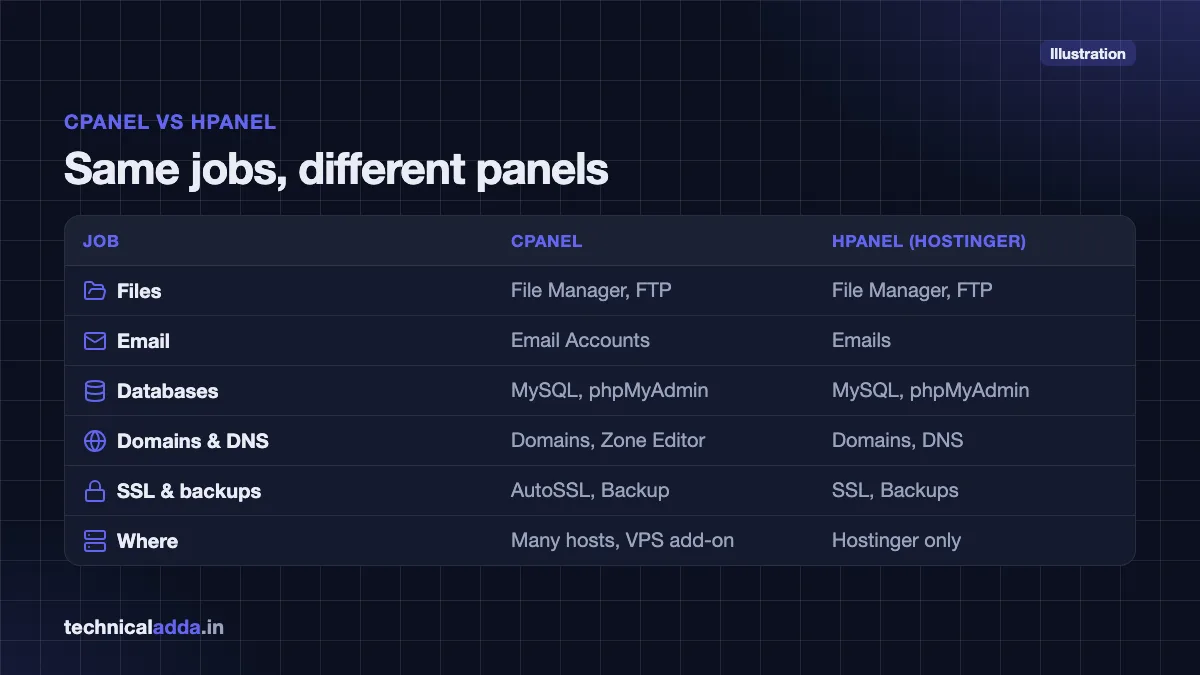
hPanel is Hostinger's own panel. It does the same jobs as cPanel (files, email, databases, WordPress, DNS, SSL, backups) with a more modern, search-friendly design. Many beginners find hPanel easier because it shows fewer options. cPanel is more standard: once you learn it, you can use almost any cPanel host. For a deeper look at Hostinger, read our Hostinger review..
cPanel vs Plesk
Plesk runs on both Windows and Linux, so it is common for ASP.NET or MS SQL hosting. cPanel is Linux-only. Plesk has a strong WordPress Toolkit and Docker/Git extensions; cPanel is more common on Indian shared hosting.
Free alternatives on a VPS
If you run your own VPS, free panels can replace cPanel:
- CloudPanel: free, very fast for PHP/WordPress and supports Node.js and Python apps. Its official site (opens in new tab) lists Ubuntu 26.04, 24.04 and 22.04 and Debian 13 and 12 support. No email server, so use Zoho Mail or Google Workspace for email.
- HestiaCP: free, includes email and DNS, more like a lightweight cPanel.
Learn the basics of servers first in our what is VPS hosting guide.
Which hosting companies in India use cPanel?
Panels change over time, so check the plan page before buying. As of October 2026:
| Host | Panel on shared hosting | Notes |
|---|---|---|
| Hostinger | hPanel (own) | No cPanel on shared plans |
| BigRock | cPanel (Linux), Plesk (Windows) | Founded in India; absorbed HostGator India in July 2025 |
| HostGator India | None | Merged into BigRock in July 2025; hostgator.in now redirects new customers to BigRock and existing accounts were migrated there |
| GoDaddy | cPanel on Linux shared hosting | Check the plan page if you need Windows hosting |
| MilesWeb | mPanel on its main web hosting plans; cPanel on separate cPanel Hosting plans | Indian host; also sells reseller hosting with WHM |
| Cloudways | Own platform | Managed cloud; no cPanel |
| Contabo VPS | None by default | Sells cPanel VPS and Plesk VPS options at extra cost |
| Oracle Cloud free tier | None | Install CloudPanel or manage via SSH |
If you are choosing a host, compare panels, renewal prices and support in our best web hosting in India guide.
Should you choose hosting based on cPanel?
The panel matters less than reliability, speed, support and renewal price. But here is a quick guide:
Choose a cPanel host if:
- You already know cPanel or follow tutorials written for it.
- You want to move easily between hosts, since cPanel backups restore on any other cPanel host.
- You need reseller hosting for clients (WHM).
: Indian support and UPI payments; compare renewal prices carefully.
hPanel or another custom panel is fine if:
- You are a beginner building one or two WordPress sites.
- You value a simple interface and the host's built-in tools.
Skip cPanel and go for a VPS with a free panel or managed cloud if:
- You want more performance for less money and are comfortable learning basics.
- You run one high-traffic site where a cPanel licence would cost more than the server.
for cheap raw resources (see our Contabo VPS review), or for managed cloud hosting without server work. Cloudways costs more than shared hosting and has no email hosting; Contabo needs you to manage the server yourself.
Not sure whether you need shared hosting or a VPS? Read shared vs VPS hosting.
What to remember about cPanel before you pick a host
- cPanel is a browser-based control panel for Linux hosting that lets you manage files, email, databases, domains, SSL and backups without commands.
- Log in at
yourdomain.com:2083or/cpanel; WHM uses port 2087 and webmail 2096. - WHM is the admin side for server owners and resellers; normal shared hosting gives only cPanel.
- The Solo VPS licence is US$29.99/month in October 2026 and rises to US$32.99 from 16 December 2026, so a cPanel VPS keeps getting costlier.
- Hostinger uses its own hPanel and MilesWeb its own mPanel (with separate cPanel plans); BigRock and many other Indian hosts use cPanel.
- On a VPS, free panels such as CloudPanel or HestiaCP can replace cPanel.
Do you need a cPanel host? Our verdict
If you came here asking what is cPanel, here is the short answer: it is the browser-based control room for Linux hosting, where you run files, email, databases, domains, SSL and backups without touching the command line. Pick a host for speed, support and renewal price first; the panel (cPanel, hPanel or Plesk) comes second. Learning cPanel still pays off, because it makes you comfortable on almost any host. Next, compare hosts and panels in our best web hosting in India guide, or explore more guides in our Web Hosting & Servers section.
FAQ
Frequently Asked Questions
What is cPanel used for?
cPanel is used to manage a website hosting account through a browser instead of commands. With it you can upload files, create email accounts, make MySQL databases, install WordPress, add domains and subdomains, edit DNS, enable free SSL, set cron jobs and take backups. It is mainly found on Linux shared, reseller and VPS hosting.
What is cPanel hosting?
cPanel hosting is any web hosting plan where the hosting company gives you cPanel as the control panel. Most often it is Linux shared hosting, where many websites share one server and each customer gets their own cPanel account. Because cPanel is standard, you can move a full backup from one cPanel host to another easily.
What is the difference between cPanel and hPanel?
cPanel is a commercial control panel used by many hosting companies, while hPanel is Hostinger's own custom panel available only on Hostinger plans. Both handle files, email, databases, WordPress, domains, SSL and backups. hPanel has a simpler, modern design for beginners; cPanel is more standard, so skills and backups move easily between hosts.
What is WHM in cPanel?
WHM, or WebHost Manager, is the administrator interface that comes with cPanel. Server owners and resellers use WHM to create and manage multiple cPanel accounts, set resource limits, manage DNS zones, update the server and configure security. Regular shared hosting customers do not get WHM; they only access their own cPanel account.
How do I log in to cPanel?
You can log in to cPanel from your hosting company's dashboard, or by visiting https://yourdomain.com:2083 or https://yourdomain.com/cpanel in a browser. Enter the cPanel username and password from your hosting welcome email. If your domain does not point to the server yet, use the server IP or hostname with port 2083.
Is cPanel free?
No, cPanel is not free. Hosting companies pay a licence fee and include it in shared hosting plans, so you do not pay separately there. On your own VPS, cPanel's store price as of October 2026 starts at US$29.99 per month for one account (US$32.99 from 16 December 2026). Free alternatives include CloudPanel and HestiaCP.
Does Hostinger use cPanel?
No. Hostinger uses its own control panel called hPanel on its shared, cloud and WordPress hosting plans. hPanel offers the same core features as cPanel, including file manager, email, databases, WordPress installer, DNS editor, free SSL and backups. If you specifically need cPanel, choose a host such as BigRock, or MilesWeb's separate cPanel Hosting plans.
Is cPanel safe to use?
cPanel is safe when you keep it updated and protect your login. Use a strong unique password, turn on two-factor authentication in the Security section, never share credentials over chat, and keep WordPress and plugins updated. Most hacked cPanel accounts are caused by weak passwords or outdated website software, not cPanel itself.
Can I install cPanel on my own VPS?
Yes, you can install cPanel and WHM on a supported Linux VPS, but you need a paid licence after the trial period. Many VPS providers, including Contabo, offer cPanel as a paid add-on. For a single website, a free panel like CloudPanel or a managed platform is often more cost-effective than a cPanel licence.
Why did cPanel hosting become more expensive?
cPanel hosting became more expensive mainly because cPanel moved to per-account licence pricing in 2019 and has raised prices nearly every year since. Hosts with many small accounts pay more, and they pass part of the cost to customers through higher plan and renewal prices. This also pushed some hosts to build their own panels.