How to Buy a Domain Name in India: That ₹1 .in Domain Renews at ₹899
Web Hosting & Servers 13 min read By David Johnson
In this articleTable of contents11
Last updated: 10 October 2026
Your domain name is your address on the internet, like technicaladda.in. A blog, a business website, a portfolio and a professional email address all start with one, so it is the first thing to buy. This guide explains how to buy domain name in India step by step: choosing a good name, picking the right extension (.in, .com, .co.in and others), comparing registrars, paying with UPI, the first-year-cheap renewal trap, free domain offers with hosting, and connecting your domain to hosting and email. By the end you will be able to buy a domain safely in about 10 minutes.
Quick answer: To buy a domain name in India, choose a short, easy name, search it on a registrar such as Hostinger, BigRock, GoDaddy or Namecheap, pick an extension (.in for Indian audiences, .com for global), check the renewal price, add it to cart, pay by UPI or card (18% GST applies), turn on auto-renew, and point its DNS to your hosting.
What you actually buy when you buy a domain
You do not "own" a domain forever. You rent the right to use it for 1 to 10 years at a time, and you must renew it before it expires.
Three parties are involved:
- Registry: runs the extension. For example, NIXI's .IN Registry (opens in new tab) manages .in domains, and Verisign manages .com.
- Registrar: the shop you buy from, such as Hostinger, BigRock, GoDaddy or Namecheap.
- Registrant: you, the person or business whose name is on the domain.
A domain alone does not give you a website. You also need hosting (where your website files live) or a website builder. If this is confusing, read our explainer on the difference between domain and hosting.
How to buy domain name in India: step by step
Step 1: Choose a good domain name
A good domain name is:
- Short and easy to spell: ideally under 15 characters. Say it aloud on a phone call; if you have to spell it twice, change it.
- Without hyphens and numbers:
bestmobiles.inbeatsbest-mobiles-4u.in. - Brandable: a unique name (like "Zepto" or "Meesho") is easier to remember and protect than a generic keyword.
- Free of trademarks: avoid names like
flipkartdeals.in. Brands can take such domains from you, and you could face legal action.
Tip: check that the same name is available on Instagram, YouTube and X (Twitter) so your brand is consistent.
Step 2: Pick the right extension
| Extension | Best for | Notes |
|---|---|---|
.in |
Indian businesses, blogs, local services | Signals an Indian audience; anyone can register; usually cheap to renew |
.com |
Global audience, startups, SaaS | Most trusted and recognised worldwide; renewal is higher than .in |
.co.in |
Indian companies (alternative to .in) | Good if your .in is taken |
.org / .org.in |
NGOs, trusts, communities | Not restricted, but people associate it with non-profits |
.online, .store, .site, .xyz |
Short-term projects | Often ₹50 to ₹150 first year but renewals can be very high |
.ai, .io |
Tech and AI startups | Expensive; .ai renewals cost several thousand rupees |
For most Indian blogs and small businesses, .in or .com is the right choice. If both are available, many people buy both and redirect one to the other.
Step 3: Search availability on a registrar
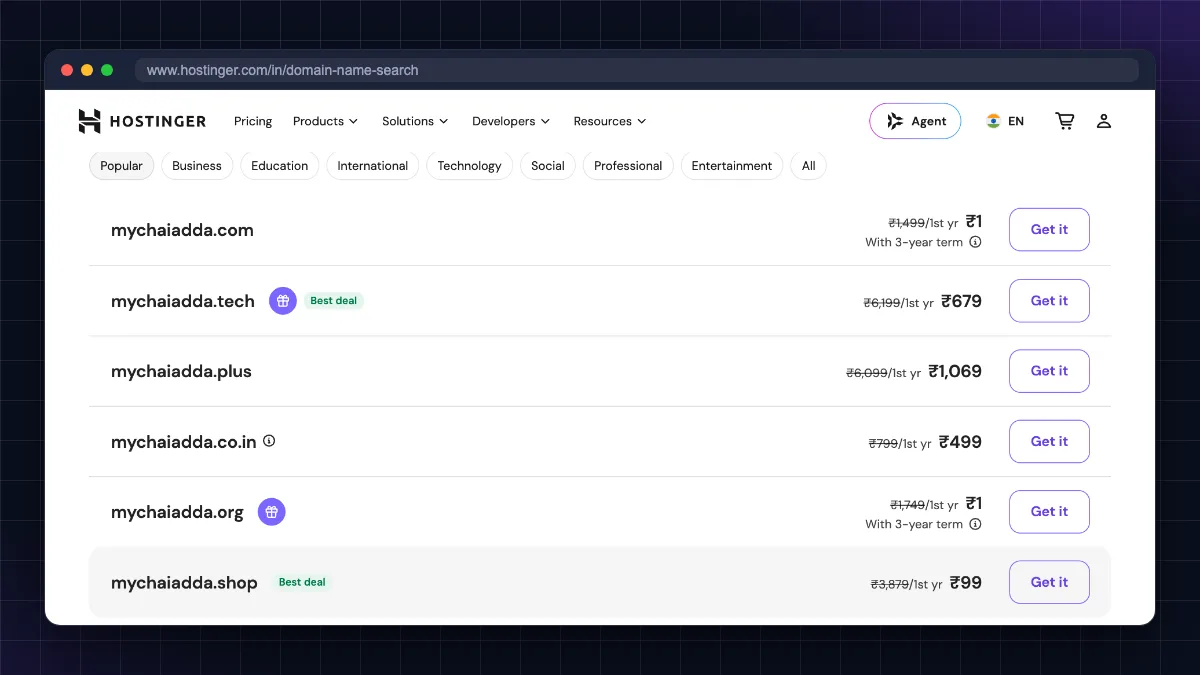
Open your chosen registrar's domain search page, type the name and see which extensions are available. If your first choice is taken:
- Add a word:
get,try,my,hq, or your city. - Try a different extension (.co.in instead of .in).
- Do not buy from "premium domain" listings unless you really need that exact name, because they can cost lakhs.
Step 4: Check the renewal price before adding to cart
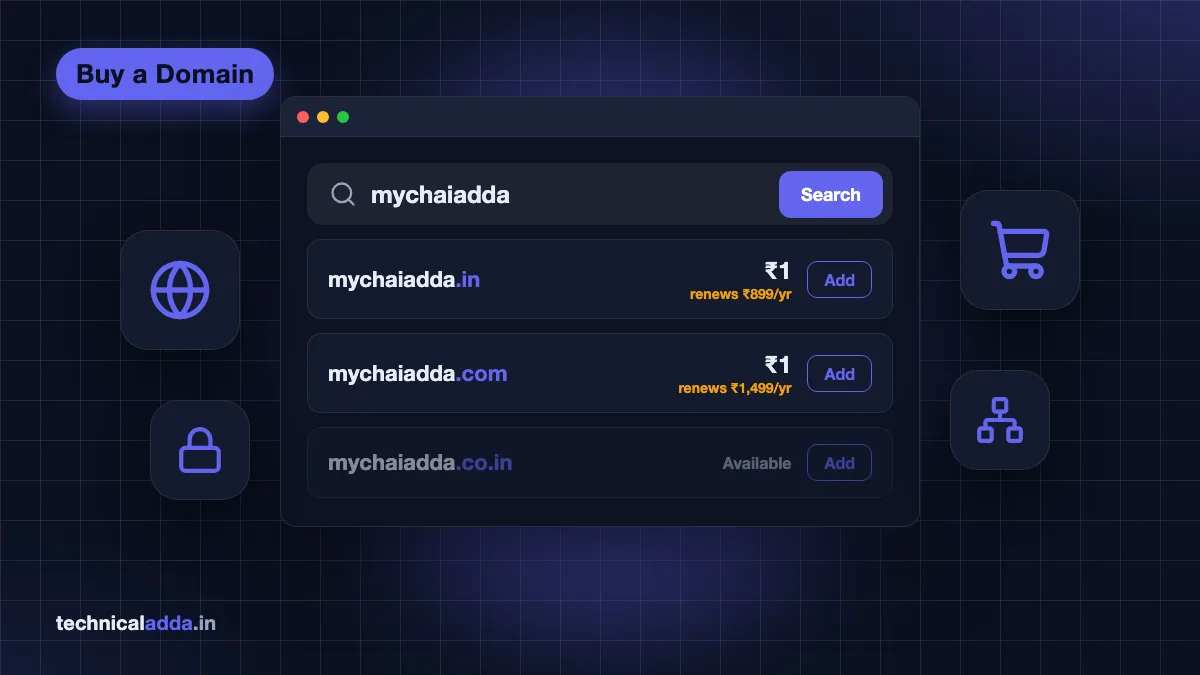
This is where most beginners lose money. A domain might show ₹1 or ₹99 for the first year and renew at ₹899 to ₹1,500 or more. Look for "renews at" in small text, or check the registrar's pricing page. Our domain name price in India guide compares first-year and renewal prices across registrars.
Step 5: Choose the registration period
You can register for 1 to 10 years. Paying for 2 to 3 years upfront at a discounted rate can save money and protect you from price increases. For a serious business, a longer term also avoids accidental expiry.
Step 6: Skip unnecessary add-ons
At checkout, registrars push extras. Here is what you actually need:
- Domain privacy (WHOIS privacy): Useful for .com and most global extensions, and many registrars include it free. Note that the .in registry (NIXI) does not permit privacy or proxy services, and KYC verification of the registrant is mandatory, so give real details. Public .in WHOIS still redacts your name, street address, phone and email (only your state and country are shown), so you do not need to buy a privacy add-on for .in.
- SSL certificate: Usually not needed, since most hosting plans include a free SSL. See our free SSL certificate guide.
- Email: Do not buy email bundles blindly. You can set up Zoho Mail free with your own domain or compare Google Workspace price in India.
- Website builder, SEO tools, "domain protection" bundles: Skip unless you know you need them.
Step 7: Create an account with correct details
Use your real name, a working email and phone number. The registrant email is used to verify the domain (you must click a verification link, usually within 15 days, or the domain may be suspended) and to receive renewal reminders. For .in domains, the registry may ask for identity verification. Use an email you will keep for years, not a college or office email.
Step 8: Pay with UPI, card or netbanking
Registrars that bill in rupees usually offer Indian payment options. Hostinger India, for example, lists UPI and debit/credit cards (including RuPay) in its payment methods help page. Check your registrar's checkout page for UPI before you start. 18% GST is added at checkout. If you have a business, enter your GSTIN to claim input tax credit. Some international registrars bill in US dollars, so your card may add a foreign currency markup.
Step 9: Turn on auto-renew and registrar lock
After purchase:
- Turn on auto-renew (and keep a valid payment method saved).
- Make sure registrar lock / transfer lock is on. It stops someone from transferring your domain without your approval.
- Turn on two-factor authentication for your registrar account. If someone hijacks your account, they own your domain.
Which registrar should you buy from?
All accredited registrars give you the same domain: a .in from one registrar works exactly like a .in from another. The differences are price (especially renewal), payment options, support and the control panel.
| Registrar | Strengths | Watch out for | UPI / ₹ billing |
|---|---|---|---|
| Hostinger | Low first-year prices, free privacy on supported extensions, free domain with yearly Premium/Business hosting, simple hPanel | Renewals much higher than first year | Yes (UPI listed for India) |
| BigRock | Founded in India (now part of Newfold Digital), long-standing .in registrar | Frequent upsells at checkout; compare renewal rates | ₹ billing; confirm UPI at checkout |
| GoDaddy | Huge brand, wide extension choice | Heavy add-on upselling; renewal prices can be high | ₹ billing on GoDaddy India; confirm UPI at checkout |
| Namecheap | Free WHOIS privacy, clean checkout | Bills in USD; .com renewal higher than its sale price | No UPI; cards, PayPal or crypto (account funds) |
| Cloudflare Registrar | Sells at wholesale cost with no markup | Requires Cloudflare DNS; does not sell .in or .co.in (as of October 2026) | Card/PayPal |
Our suggestion for beginners: if you are also buying hosting, buy the domain from the same company (or get it free with hosting) so DNS setup is automatic.. If you prefer a long-standing India-focused registrar,. If you want free privacy at a registrar that is separate from your host and do not mind USD billing,.
Who should not use a hosting company as registrar: if you plan to change hosts often, keeping the domain at a neutral registrar (Namecheap or Cloudflare) makes moving easier.
For a full hosting comparison, see our best web hosting in India guide and our detailed Hostinger review.
The first-year price vs renewal price trap
Registrars make their money on renewals. The first year is a loss leader.
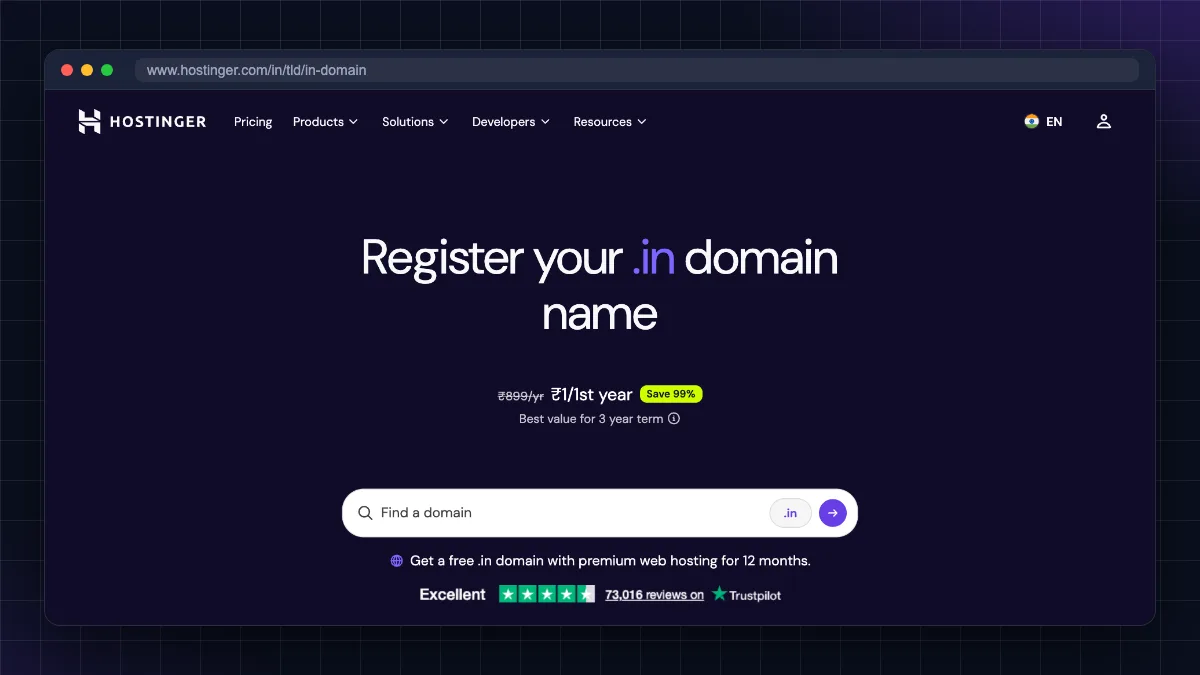
Example from Hostinger India's own .in page (as of October 2026): .in costs ₹1 for the first year and renews at ₹899/year. Its .com page shows ₹1 for the first year and ₹1,499/year on renewal, plus a ₹17.44 ICANN fee. Prices exclude 18% GST.
| What you see | What it really means |
|---|---|
| ".com ₹1" | First year only, often with conditions; renewal is the real price |
| ".online ₹99" | Renewal can be many times higher; check before buying |
| "Free domain" with hosting | Free for the first year only; you pay renewal from year two |
| "Save 90%" | Saved against an inflated "regular" price |
Prices also rise at the wholesale level. Verisign, which runs .com, announced that the .com wholesale fee goes up from US$10.26 to US$10.97 per year from 1 November 2026, and registrars usually pass this on. So it is smart to:
- Compare 3-year total cost, not first-year price.
- Renew for multiple years when there is a good renewal discount.
- Avoid cheap "novelty" extensions for long-term brands.
How to get a free domain name with hosting
A truly free, permanent domain (.com or .in) does not exist. Old free-domain services shut down years ago. Your realistic "free" options are:
- Free domain with hosting: Many hosts include a free domain for the first year with annual plans. Hostinger, for example, gives a free domain for one year with eligible Premium or Business hosting plans of 12 months or longer. You pay normal renewal from the second year.
- Free subdomains: Platforms like GitHub Pages (
yourname.github.io), Netlify, Vercel and Blogger (yourname.blogspot.com) give free subdomains. Fine for learning and portfolios, not for a business. See our guide on how to host a website for free. - Student packs: The GitHub Student Developer Pack (opens in new tab) currently includes a free .me domain for one year from Namecheap, one free .TECH domain for one year, and a free domain from Name.com on selected extensions (such as .live, .studio, .app and .dev). Once the free period ends, you pay the normal renewal price.
Can you buy a domain name permanently?
No. You cannot buy a domain name permanently or "for lifetime". The maximum registration period is 10 years, and you can keep renewing it forever as long as you pay. Any website selling a "lifetime domain" is either misleading or will quietly renew it for you only while it stays in business.
To keep a domain safe for the long term:
- Register or renew for the maximum years you can afford.
- Keep auto-renew on and update your card or UPI mandate.
- Keep your registrant email active, because renewal reminders go there.
If you miss the expiry date, you usually get a short grace period to renew, followed by a redemption period in which restoring the domain costs an extra fee. For .com, ICANN rules guarantee a 30-day redemption period after the registrar deletes an expired domain, but how long you can renew at the normal price before that is set by each registrar. The .in registry also leaves grace periods to registrars. GoDaddy, for example, says a .in not renewed by the 17th day after expiry must be redeemed, possibly for a fee. After redemption ends, anyone can register your domain, so check your registrar's renewal policy and never rely on the grace period.
How to connect your domain to hosting and email
After buying, you point the domain to the services you use through DNS. There are two ways.
Option 1: Change nameservers (easiest)
Your host gives you two nameservers, like ns1.examplehost.com and ns2.examplehost.com. In your registrar's panel, open Domain > Nameservers > Change, paste them and save. Your host now manages all DNS records.
Option 2: Add DNS records yourself
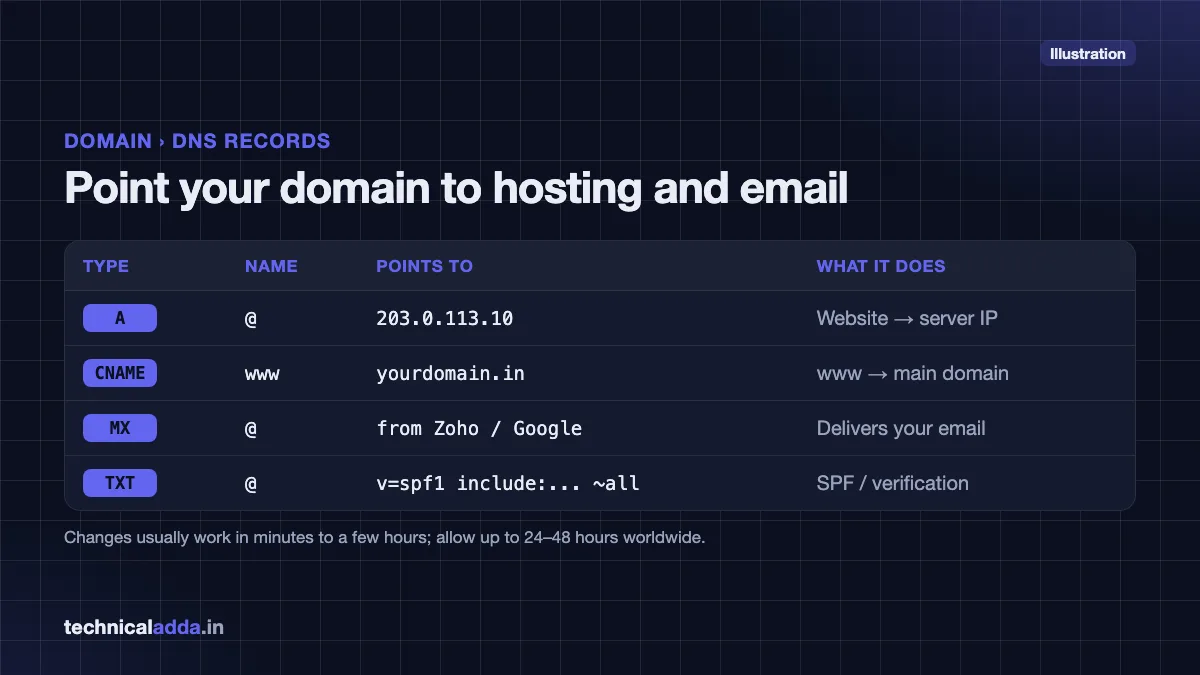
Keep the registrar's nameservers and add records:
| Record | What it does | Example value |
|---|---|---|
| A | Points the domain to a server's IPv4 address | @ → 203.0.113.10 |
| CNAME | Points a subdomain to another name | www → yourdomain.in |
| MX | Sends email to your mail provider | Values from Zoho Mail or Google Workspace |
| TXT | Verifies ownership, SPF/DKIM email security | v=spf1 include:... ~all |
DNS changes usually start working within minutes to a few hours, but can take up to 24 to 48 hours worldwide. You can check the public registration record of any domain on ICANN Lookup (opens in new tab).
If you are setting up a VPS instead of shared hosting, point an A record to your server IP and then follow our Ubuntu VPS initial server setup guide.
Mistakes to avoid when buying a domain
- Judging by the first-year price. Always check the renewal price and total 3-year cost.
- Registering in someone else's name. Never let a web designer or agency register your business domain in their name or account. Ask for the domain in your registrant name and your email.
- Using a temporary email. If you lose access to the registrant email, recovering the domain is painful.
- Letting it expire. Expired domains of active businesses are snapped up by domain resellers and scammers.
- Buying trademarked names. You can lose the domain through a dispute and money spent on branding.
- Buying too many add-ons. SSL, email and builders are often free or cheaper elsewhere.
- Ignoring account security. Turn on two-factor authentication on your registrar account.
- Choosing a cheap novelty extension for a long-term brand. Renewal costs and trust issues add up.
Also note that under ICANN's current Transfer Policy, a registrar can refuse to transfer a .com or other generic domain within 60 days of registration or of a previous transfer. ICANN's policy review has recommended standardising this lock at 30 days, but until that change is implemented, plan for 60 days. Choose your registrar carefully the first time. ICANN's information for domain registrants (opens in new tab) explains your rights for transfers, renewals and disputes.
Domain buying checklist before you pay
- You rent a domain for 1 to 10 years at a time; you cannot buy it permanently, but you can renew forever.
- For Indian audiences, .in or .com are the best choices; avoid hyphens, numbers and trademarks.
- Read the renewal line, not the headline: Hostinger's ₹1 .in renews at ₹899/year (October 2026).
- Rupee-billing registrars such as Hostinger India accept UPI; 18% GST is added at checkout.
- Turn on auto-renew, registrar lock and two-factor authentication right after buying.
- Connect your domain by changing nameservers to your host or adding A, CNAME and MX records.
Ready to buy your domain? Start with the renewal price
The smart way to buy a domain name in India is simple: choose a short, brandable name, pick .in or .com, compare renewal prices instead of first-year offers, pay in rupees, and lock the domain with auto-renew and two-factor authentication on day one. That is how to buy domain name without a surprise bill in year two. Next, compare exact costs in our domain name price in India guide, then pick a host from our best web hosting in India list, or browse more guides in our Web Hosting & Servers section.
FAQ
Frequently Asked Questions
How do I buy a domain name in India?
To buy a domain name in India, choose a short name, search it on a registrar like Hostinger, BigRock, GoDaddy or Namecheap, pick .in or .com, check the renewal price, and add it to the cart. Skip unnecessary add-ons, pay by UPI, card or netbanking with 18% GST, verify your email, and turn on auto-renew and registrar lock.
How much does a domain name cost in India?
A .in domain can cost as little as ₹1 in the first year on offers, but the renewal is the real price: Hostinger, for example, renews .in at ₹899 a year and .com at ₹1,499 a year (October 2026), plus 18% GST. Other registrars charge different rates, and prices change often. See our domain name price in India guide for a registrar-by-registrar comparison.
Can I buy a domain name permanently?
No, you cannot buy a domain name permanently or for a lifetime. Domains are registered for 1 to 10 years at a time, and you keep them by renewing before expiry. If you keep paying the renewal, you can hold a domain for decades. Be wary of any offer that promises a "lifetime" domain.
How can I get a domain name for free?
You can get a domain free for the first year with many annual hosting plans, such as Hostinger's eligible Premium or Business plans. After that you pay the normal renewal. For learning or portfolios, free subdomains from GitHub Pages, Netlify, Vercel or Blogger cost nothing, but they are not suitable for a serious business.
Which is better for India, .in or .com?
Choose .in if your audience is mainly in India, such as a local business, service or Indian blog; it signals an Indian presence and usually renews cheaper. Choose .com if you target a global audience or plan to expand abroad. If both are available and affordable, buy both and redirect one to the other to protect your brand.
Can I buy a domain without hosting?
Yes. You can buy only a domain and connect hosting later, use it just for professional email with Zoho Mail or Google Workspace, or point it to a website builder. Many people buy the domain first to reserve the name. When you are ready, you connect it by changing nameservers or adding DNS records.
Can I pay for a domain using UPI?
Yes, at many registrars that bill in rupees. Hostinger India, for example, lists UPI alongside debit and credit cards, including RuPay; check the checkout page at other registrars. International registrars that bill in US dollars may accept only cards or PayPal, and your bank may add a foreign currency markup. GST at 18% is added to Indian invoices.
What happens if my domain expires?
When a domain expires, your website and email stop working. Most registrars give a grace period to renew at the normal price, followed by a redemption period where recovery costs a high penalty fee. If you still do not renew, the domain is released and anyone, including scammers, can register it. Keep auto-renew on to avoid this.
Is domain privacy protection necessary?
Domain privacy is useful for .com and other global extensions because it hides your name, phone and email from public WHOIS, reducing spam calls and scam emails. Many registrars now include it free. For .in domains, proxy privacy is not allowed, but personal contact details are generally redacted in public WHOIS, so you usually do not need to buy privacy for .in.
How long does it take for a new domain to work?
A newly registered domain usually becomes active within minutes to a few hours. After you connect it to hosting by changing nameservers or adding DNS records, it can take up to 24 to 48 hours to work everywhere because of DNS propagation, although in practice it often works much sooner. Also verify your email when the registrar asks.
Where to buy
-
Visit official site (opens in new tab)
Our suggestion for beginners:
-
Visit official site (opens in new tab)
Our suggestion for beginners:
-
Visit official site (opens in new tab)
Our suggestion for beginners: