Best VPS Hosting in India 2026: 4 GB RAM From ₹599 and 7 Rivals Compared
Web Hosting & Servers 13 min read By Sanjeev Pratap Singh
In this articleTable of contents16
Last updated: 10 October 2026
Your WordPress site has outgrown shared hosting, or you want to run a Node.js app, n8n, a bot or a game server. Now you need a VPS, but which one? Searching for the best VPS hosting India options throws up dozens of names, fake "unlimited" claims and prices that look cheap until GST and renewal kick in. This guide compares eight serious providers with Indian data centres (or a free tier), using prices checked on their official pages in October 2026. You get a clear comparison table in rupees, honest cons for each, and a "best for" pick so you can decide in ten minutes.
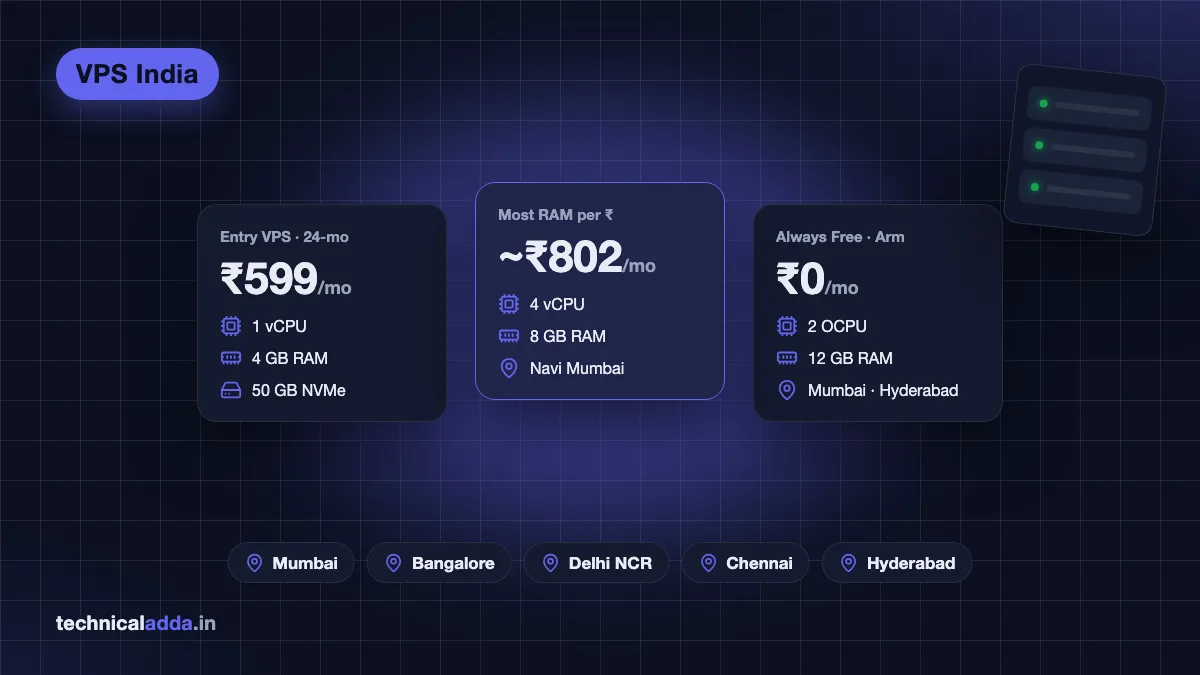
Quick answer: For most Indian beginners, Hostinger KVM VPS is the best value (Mumbai location, INR billing, UPI, 4 GB RAM from ₹599/month on a 24-month term). Contabo gives the most RAM per rupee, DigitalOcean and Vultr suit developers, AWS Lightsail suits AWS users, Cloudways is the managed pick, and Oracle Cloud is the best free VPS.
How we chose the best VPS hosting in India
A VPS (virtual private server) gives you your own slice of a physical server with guaranteed RAM, CPU and root access. If that is new to you, read what is VPS hosting first. We judged providers on what actually matters to Indian buyers:
- India data centre. A server in Mumbai, Bangalore, Delhi NCR, Chennai or Hyderabad usually gives lower latency for Indian visitors than Singapore or Europe. For an India-focused site or app, this matters more than an extra CPU core.
- NVMe/SSD storage. All eight use SSDs; NVMe is faster for databases. Check the exact disk type on the plan you pick.
- Bandwidth. Monthly transfer allowance and what happens if you exceed it (overage charges, throttling or fair-use limits).
- Managed vs unmanaged. Unmanaged means you handle the operating system, security and updates. Managed means the host does it for a higher price.
- INR billing, UPI and GST. Paying in rupees by UPI avoids international card failures and forex fees. Indian customers pay 18% GST on hosting; businesses with a GSTIN can claim input credit if the invoice supports it.
- Support. Live chat at 3 a.m. versus ticket-only email.
- Real price. The promo price, the renewal price, the term you must commit to, and GST on top.
Important: prices below are starting prices as of 10 October 2026, excluding GST unless stated. USD and EUR prices are converted at about ₹95 per US dollar and ₹107 per euro (open.er-api.com, 20 October 2026), so your card statement may differ slightly. Always confirm on the provider's checkout page.
Best VPS hosting India: comparison table
| Provider | Entry plan (Oct 2026) | Approx. ₹/month | India data centre | Billing | Managed? | Best for |
|---|---|---|---|---|---|---|
| Hostinger KVM 1 | 1 vCPU, 4 GB RAM, 50 GB NVMe, 4 TB | ₹599 (24-mo term), renews ₹999 | Yes (India/Mumbai) | INR, UPI, RuPay | Self-managed + AI help | Beginners, WordPress, n8n |
| Contabo Cloud VPS 4 | 4 vCPU, 8 GB RAM, 100 GB SSD, 200 Mbit/s | ~₹470 (€4.40, 24-mo term) + India location fee | Yes (Navi Mumbai) | EUR/USD | Unmanaged | Max RAM on a budget |
| DigitalOcean Basic | 1 vCPU, 1 GB, 25 GB SSD, 1 TB | ~₹570 ($6) | Yes (Bangalore) | USD + 18% GST | Unmanaged | Developers, hourly billing |
| AWS Lightsail | 2 vCPU, 512 MB, 20 GB SSD (IPv4) | ~₹475 ($5) | Yes (Mumbai) | USD/INR via AWS India | Unmanaged | AWS users |
| Vultr Cloud Compute | 1 vCPU, 1 GB, 25 GB, 1 TB | ~₹475 ($5) | Yes (Mumbai, Bangalore, Delhi NCR) | USD | Unmanaged | Multiple Indian cities |
| Akamai Cloud (Linode) Nanode | 1 vCPU, 1 GB, 25 GB, 1 TB | ~₹475 ($5) | Yes (Mumbai, Chennai) | USD | Unmanaged | Simple, predictable pricing |
| Cloudways (on DigitalOcean) | Smallest DigitalOcean server | Roughly 2x a droplet (check live price) | Yes (DO Bangalore) | USD | Fully managed | No server admin |
| Oracle Cloud Always Free | Arm: up to 2 OCPU, 12 GB RAM total | ₹0 | Yes (Mumbai, Hyderabad) | Card for verification | Unmanaged | Learning, side projects |
1. Hostinger VPS: best value for beginners
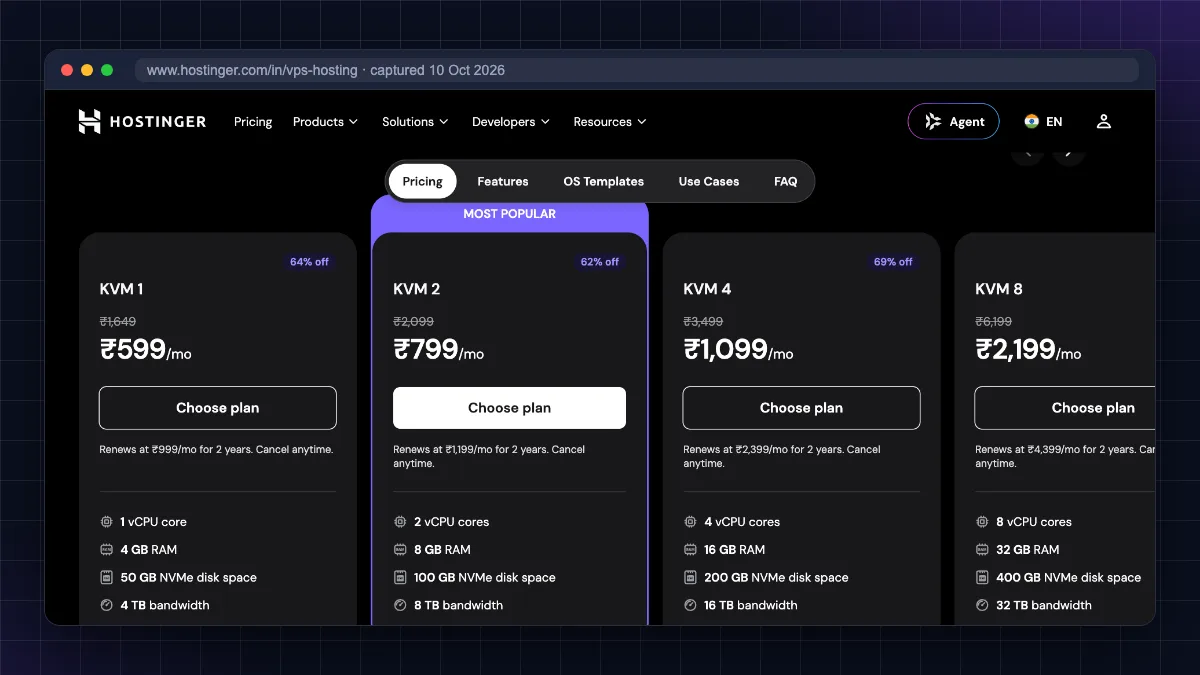
Hostinger is the easiest VPS for most Indian buyers because it bills in rupees, accepts UPI and RuPay (per Hostinger's payment-methods support page), and offers an India server location for VPS.
Plans (hostinger.com/in, 10 October 2026, excluding GST):
| Plan | vCPU | RAM | NVMe | Bandwidth | Promo price | Renewal |
|---|---|---|---|---|---|---|
| KVM 1 | 1 | 4 GB | 50 GB | 4 TB | ₹599/mo | ₹999/mo |
| KVM 2 | 2 | 8 GB | 100 GB | 8 TB | ₹779/mo | ₹1,199/mo |
| KVM 4 | 4 | 16 GB | 200 GB | 16 TB | ₹1,099/mo | ₹2,399/mo |
| KVM 8 | 8 | 32 GB | 400 GB | 32 TB | ₹2,199/mo | ₹4,399/mo |
Promo prices need a 24-month upfront payment.
Pros
- INR billing with UPI; GST invoice.
- AMD EPYC CPUs, NVMe storage and free weekly backups.
- One-click OS templates, including Ubuntu with WordPress (via CloudPanel) and other ready-made app templates.
- Built-in firewall manager, browser terminal and an AI assistant for server commands.
- 30-day money-back guarantee.
Cons
- Self-managed: Hostinger support helps with the platform, but you manage the server software.
- Big jump at renewal (KVM 1 goes from ₹599 to ₹999 a month).
- Lowest price only on long terms; monthly billing costs more.
Who should skip it: anyone who wants fully managed hosting or month-to-month flexibility at the lowest price. Read our full Hostinger review for details.
2. Contabo: most RAM for the money
Contabo, a German provider, is famous for giving far more CPU and RAM per euro than anyone else. It has a data centre in Navi Mumbai.
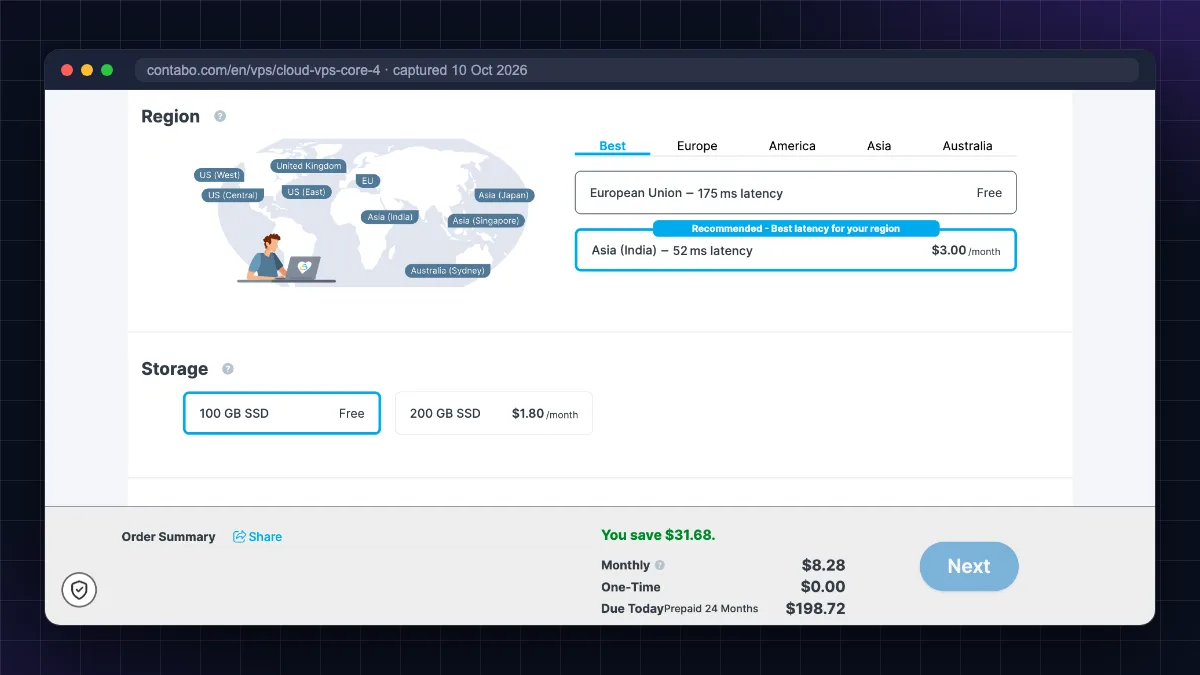
Entry plan (contabo.com, 10 October 2026): Cloud VPS 4 with 4 vCPU, 8 GB RAM, 100 GB SSD, a 200 Mbit/s port and "unlimited" traffic under a fair-use policy, listed at €4.40/month as the effective rate on a 24-month term (about ₹470). Contabo can also show prices in US dollars. Choosing the India region adds a monthly location fee (the configurator showed $3.00/month on 10 October 2026, see the screenshot below), so compare the final checkout total (plus 18% GST) rather than the headline price.
Pros
- Huge resources per rupee: great for Docker stacks, n8n, databases and staging servers.
- Mumbai location for Indian visitors.
- Predictable flat monthly pricing.
Cons
- Slower CPU and disk performance per core than premium cloud providers; the network port is capped (200 Mbit/s on the entry plan).
- Billing in EUR or USD. Indian cards need international usage enabled.
- Support is ticket-based and slower; setup is not always instant.
- Not ideal where every millisecond counts.
Who should skip it: high-traffic business sites that need top single-core speed, or beginners who want hand-holding. See our detailed Contabo VPS review.
3. DigitalOcean: best developer experience
DigitalOcean popularised simple "droplets" with clean dashboards, excellent tutorials and hourly billing. It has a Bangalore (BLR1) region.
Entry plans (DigitalOcean droplet pricing (opens in new tab), October 2026): $4/month (512 MiB RAM, 10 GiB SSD, 500 GiB transfer) and $6/month (1 GiB RAM, 25 GiB SSD, 1,000 GiB transfer). Indian customers are charged 18% GST unless they add a valid GSTIN.
Pros
- Best-in-class docs and community tutorials.
- Hourly billing with a monthly cap, perfect for testing.
- Managed databases, Kubernetes, load balancers and object storage when you grow.
- Bangalore region.
Cons
- Less RAM per rupee than Hostinger or Contabo.
- USD billing; Indian cards must be enabled for international transactions, and UPI is not listed as a payment method.
- Backups and extra bandwidth cost extra.
- Unmanaged.
Who should skip it: non-technical users who just want WordPress running.
4. AWS Lightsail: best if you already use AWS
Lightsail is Amazon's simplified VPS product with fixed monthly bundles. It runs in the AWS Mumbai region.
Entry plans (Lightsail pricing (opens in new tab), October 2026): $5/month for 512 MB RAM, 2 vCPU, 20 GB SSD and 1 TB transfer with a public IPv4 address; $7/month for 1 GB RAM; IPv6-only bundles start at $3.50. AWS says plans in the Mumbai region include half the listed data transfer allowance. AWS says you can "get started with Amazon Lightsail for free" as part of the AWS Free Tier, but the pricing page no longer lists specific free months or bundles. Under the current AWS Free Tier (opens in new tab), new accounts get $100 in credits at sign-up (up to $200 by completing onboarding tasks), usable for up to 6 months on the Free plan, so check the Free Tier FAQs (opens in new tab) for how credits apply to Lightsail before you launch.
Pros
- Amazon's reliability and Mumbai region.
- Easy upgrade path to EC2, RDS and S3.
- Indian customers can be billed by AWS's Indian entity in INR.
- Ready-made WordPress and LAMP blueprints.
Cons
- Small RAM on cheap bundles; WordPress needs at least the 1 GB plan.
- Halved transfer in Mumbai.
- The wider AWS console and billing can confuse beginners.
Who should skip it: anyone wanting the most resources for the money.
5. Vultr: most Indian locations
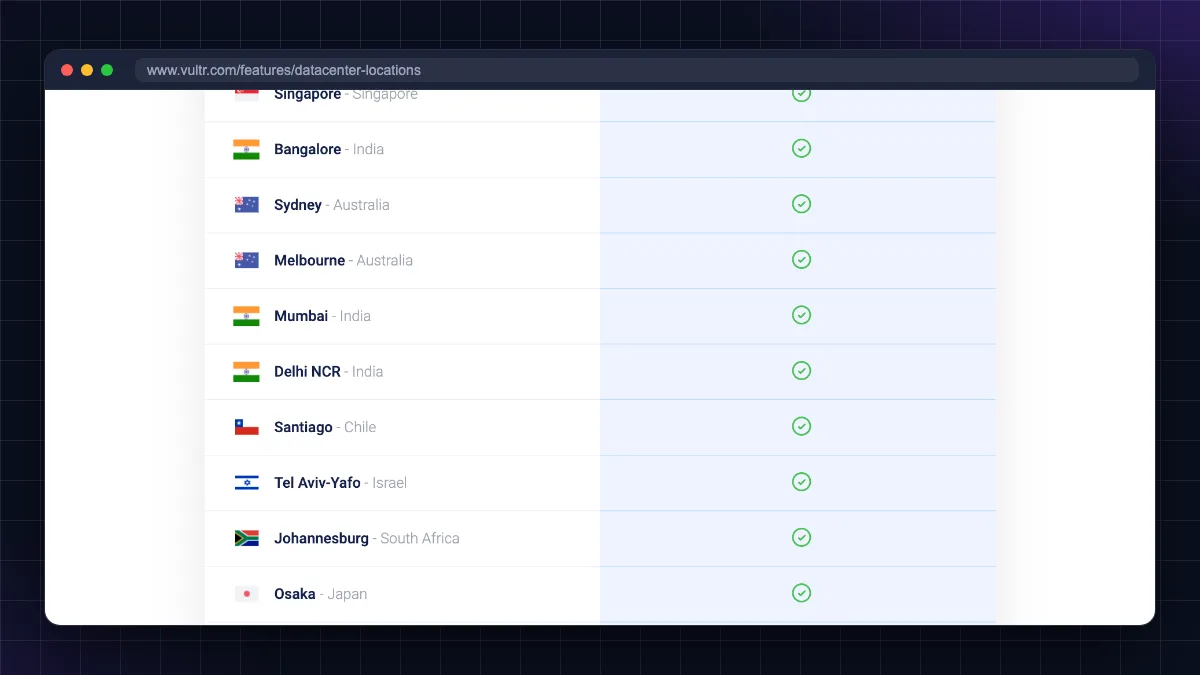
Vultr has three Indian locations (Mumbai, Bangalore and Delhi NCR), the widest choice in this list.
Entry plan (Vultr public plans API, October 2026): Cloud Compute with 1 vCPU, 1 GB RAM, 25 GB SSD and 1 TB bandwidth at $5/month, available in all three Indian cities. Vultr's cheaper $2.50 and $3.50 plans are not offered in Indian locations.
Pros
- Choose the city closest to your users (Delhi NCR is useful for North India).
- Hourly billing, fast deployment, many OS images and marketplace apps.
- High-frequency and dedicated CPU plans for heavier workloads.
Cons
- USD billing.
- Support is ticket-based.
- Backups cost extra.
Who should skip it: beginners who want INR billing and phone-style support.
6. Akamai Cloud (Linode): simple and predictable
Linode, now part of Akamai, is a veteran VPS provider with clear pricing and good documentation. It has Mumbai (two locations) and Chennai regions.
Entry plan (Akamai/Linode public API, October 2026): Nanode 1 GB: 1 vCPU, 1 GB RAM, 25 GB storage and 1 TB transfer for $5/month. India regions are billed at the standard price (some other regions such as Jakarta and São Paulo cost more).
Pros
- Mumbai and Chennai. Chennai helps South India and Sri Lanka traffic.
- Long track record and stable platform.
- Simple, flat pricing; backups add-on at $2/month on the Nanode.
Cons
- USD billing.
- Fewer beginner tools than Hostinger.
- Unmanaged.
7. Cloudways: best managed VPS
Cloudways (owned by DigitalOcean) is not a VPS provider itself; it runs managed servers on top of cloud providers like DigitalOcean, Vultr, Linode, AWS and Google Cloud. You get a VPS's power without touching the command line: the platform handles server setup, security patches, backups, caching and SSL.
Price: Cloudways bills per server, and its smallest DigitalOcean server costs roughly twice an equivalent unmanaged droplet. Cloudways has changed its entry price more than once, so check the live pricing page for the current figure; taxes such as GST are added on top. A 3-day free trial needs no card, and DigitalOcean Bangalore is available as a location.
Pros
- Fully managed, ideal for WordPress, WooCommerce and agencies.
- 24/7 support, staging sites, one-click backups and restore.
- Indian location via DigitalOcean Bangalore.
Cons
- About double the price of an equivalent unmanaged VPS.
- Email hosting is a paid add-on; no root access.
- USD billing.
Who should skip it: developers who need root access, Docker or custom software.
8. Oracle Cloud Always Free: best free VPS
Oracle's Always Free tier is the only free VPS worth using long-term, with regions in Mumbai and Hyderabad. According to Oracle's Always Free documentation (opens in new tab), you get Arm (Ampere A1) instances equal to 2 OCPUs and 12 GB RAM in total, two small AMD VMs with 1 GB RAM each, 200 GB of block storage and 10 TB of outbound data per month.
Pros: truly free, generous RAM, Indian regions.
Cons: card verification needed; Arm capacity often unavailable; idle instances can be reclaimed; no support; Oracle's console is complex.
Follow our Oracle Cloud free tier guide to set it up.
Best for: quick picks
| If you want… | Pick | Why |
|---|---|---|
| Cheapest good VPS with UPI and INR | Hostinger KVM 1 or KVM 2 | 4 to 8 GB RAM, India location, rupee billing |
| Maximum RAM/CPU for Docker or n8n | Contabo | Most resources per rupee |
| Best docs and hourly billing | DigitalOcean | Bangalore region, great tutorials |
| AWS ecosystem | AWS Lightsail | Mumbai region, easy path to EC2 |
| Server in Delhi NCR | Vultr | Only one here with Delhi NCR |
| Server in Chennai | Akamai (Linode) | Chennai region |
| No server management | Cloudways | Fully managed with 24/7 support |
| Free, for learning | Oracle Cloud Always Free | 12 GB RAM Arm free |
Managed vs unmanaged VPS
This is the biggest decision after price.
- Unmanaged (Hostinger, Contabo, DigitalOcean, Lightsail, Vultr, Akamai, Oracle): you get root access and a fresh Linux install. You install the web server, database, SSL and security tools yourself, and apply updates. Cheaper and more flexible, but your time is the cost. Our guide to connect to a VPS using SSH and our tutorial to install WordPress on a VPS cover the basics.
- Managed (Cloudways, managed plans from hosts): the provider sets up and secures the server, handles updates and backups and helps when something breaks. Costs roughly double, but you can focus on your website.
Rule of thumb: if you cannot spare a couple of hours a month for server maintenance, or downtime directly loses you money and you have no technical person, choose managed. If you are a developer or want to learn, unmanaged gives far more value.
Still not sure whether you need a VPS at all? Read shared vs VPS hosting. Many blogs under a few thousand daily visitors run fine on good shared hosting, compared in our best web hosting in India guide.
Mistakes to avoid when buying a VPS in India
- Comparing only promo prices. Look at renewal prices and the required term. A ₹599 plan that renews at ₹999 costs much more over four years.
- Forgetting GST. Add 18% to every price for an honest comparison.
- Ignoring the location. A Singapore or US server can feel slow to Indian visitors on mobile networks. Pick an Indian region when your audience is in India.
- Buying too little RAM. WordPress with a page builder or WooCommerce wants 2 GB+; Docker stacks and n8n want 4 GB+.
- No backup plan. Free weekly backups (Hostinger) are a bonus, but keep your own off-server copy too.
- Skipping security. A new VPS gets SSH login attempts within minutes. Use SSH keys, a firewall and fail2ban from day one.
- Picking unmanaged when you need managed. Be honest about your skills and time.
The VPS shortlist in six lines
- The best VPS hosting India choice for most beginners is Hostinger: India location, INR/UPI billing and 4 GB RAM from ₹599/month on a 24-month term (renews higher).
- Contabo offers the most RAM per rupee but with slower support and capped network ports.
- DigitalOcean, Vultr and Akamai (Linode) cost about $5 to $6/month for 1 GB RAM and suit developers; Vultr covers Mumbai, Bangalore and Delhi NCR.
- Cloudways is the managed pick if you never want to touch a terminal.
- Oracle Cloud Always Free is the best free VPS for learning and side projects.
- Always compare renewal price, GST, location and RAM, not just the headline price.
So which VPS should you buy first?
The best VPS hosting India pick depends on what you run and how much server work you want to do. Pick Hostinger for value with rupee billing and an India location, Contabo for the most resources, DigitalOcean, Vultr or Akamai for developer tools, Lightsail for AWS users, Cloudways for managed hosting and Oracle Cloud to learn for free. Compare renewal prices and GST, choose an Indian region, and secure the server from day one. Once you have a server, follow our guide to install WordPress on a VPS, or browse more guides in Web Hosting & Servers.
FAQ
Frequently Asked Questions
Which is the best VPS hosting in India?
For most beginners, Hostinger VPS is the best overall because it offers an Indian server location, rupee billing with UPI, NVMe storage and 4 GB RAM from ₹599 a month on a 24-month term. Developers may prefer DigitalOcean or Vultr for their tools, Contabo for raw resources, and Cloudways if they want a fully managed server.
Which is the cheapest VPS in India?
Oracle Cloud's Always Free tier is the cheapest because it costs nothing, though capacity is limited. Among paid options in October 2026, entry plans from DigitalOcean ($4), AWS Lightsail ($5), Vultr ($5) and Akamai ($5) cost about ₹380 to ₹475 a month plus GST. Hostinger and Contabo give far more RAM for a similar price on long terms.
Is a VPS with an Indian data centre really faster?
For visitors in India, usually yes. A server in Mumbai, Bangalore, Delhi NCR, Chennai or Hyderabad has lower network latency than one in Singapore, Europe or the US, so pages start loading sooner, especially on mobile networks. A CDN can reduce the gap for static files, but dynamic pages and APIs still benefit from a nearby server.
Can I pay for a VPS with UPI in India?
Yes, with some providers. Hostinger's India site lists UPI, RuPay and Indian cards as payment options. Most international providers such as DigitalOcean, Vultr and Contabo bill in US dollars or euros and need a credit or debit card enabled for international transactions. AWS customers in India can be billed in rupees through AWS's Indian entity.
Is GST charged on VPS hosting in India?
Yes. Hosting is a taxable service and Indian customers pay 18% GST. Indian providers and Hostinger India show prices excluding GST and add it at checkout. Foreign providers like DigitalOcean also charge 18% GST to customers with an Indian tax location unless a business adds a valid GSTIN and pays tax under reverse charge.
What is the difference between managed and unmanaged VPS?
An unmanaged VPS gives you root access and a blank operating system; you install, secure and update everything yourself. A managed VPS, such as Cloudways, includes server setup, security patches, backups and expert support. Managed costs roughly twice as much but saves time and reduces the risk of mistakes if you are not technical.
How much RAM do I need on a VPS?
A small WordPress blog runs on 1 to 2 GB RAM. WooCommerce stores, page builders or several sites need 4 GB. Docker stacks, n8n with many workflows, or databases need 4 to 8 GB or more. Start smaller and upgrade, since most providers let you resize plans. Adding swap space helps small servers survive traffic spikes.
Is Contabo good for Indian users?
Contabo is good for Indian users who want lots of RAM and CPU cheaply, such as for Docker, n8n, staging or development servers, and it has a Mumbai data centre. Its trade-offs are slower per-core performance, a capped network port, EUR/USD billing and slower support. For a business-critical site, a premium provider may be more reliable.
Is Oracle Cloud free VPS good for a website?
It can host a small website or app for free with generous resources, and it has Mumbai and Hyderabad regions. However, Arm capacity is often unavailable, idle servers can be reclaimed, there is no support, and you manage everything yourself. It is excellent for learning and side projects but risky for a business that depends on uptime.
When should I upgrade from shared hosting to a VPS?
Upgrade when your site is regularly slow during traffic peaks, you hit CPU or process limits, you need custom software like Node.js, Docker or n8n, or you run several busy sites. As a rough guide, many WordPress blogs move to a VPS somewhere between a few thousand and tens of thousands of daily visitors, depending on caching and plugins.
Where to buy
-
Visit official site (opens in new tab)
Who should skip it:
-
Visit official site (opens in new tab)
Who should skip it:
-
Visit official site (opens in new tab)
Cloudways