How to Host a Website for Free: 7 Options Where You Only Pay for the Domain
Web Hosting & Servers 16 min read By David Johnson
In this articleTable of contents15
Last updated: 10 October 2026
Want to put a portfolio, college project, resume site or small blog online without paying a rupee? This guide shows how to host website for free the right way. The best free option depends on what kind of site you have: a simple HTML/CSS site, a React or Next.js app, a WordPress blog, or something that needs a real server. We compare the seven free hosts that actually work in 2026 and beyond, show you how to connect your own domain, explain the honest limits of each, and tell you exactly when it makes sense to move to cheap paid hosting.
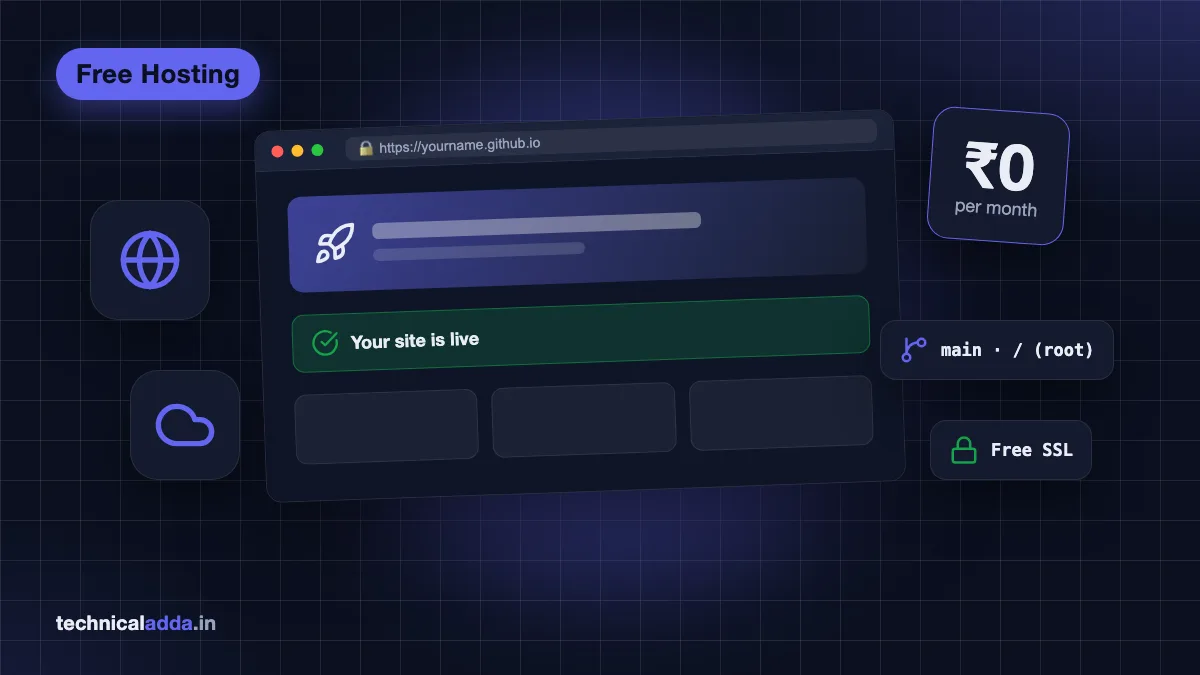
Quick answer: To host a website for free, use GitHub Pages, Cloudflare Pages, Netlify or Vercel for static sites (HTML, CSS, JavaScript, React). For WordPress, free hosts like InfinityFree work for learning but are slow and limited. For full control, Oracle Cloud's Always Free VPS gives you a real Linux server. You only pay for a custom domain.
First, know what type of website you have
Free hosting is not one product. Each free host is built for a specific kind of website, and picking the wrong one is the main reason people get stuck. Ask yourself one question: does my site need a server-side language and a database?
- Static site: plain HTML, CSS and JavaScript files, or output from tools like Hugo, Jekyll, Astro, React (Vite) or a static Next.js export. No database. Portfolios, resumes, landing pages, documentation and college projects usually fall here. Static sites are the easiest and most reliable thing to host for free.
- Frontend app with small serverless functions: a Next.js, Nuxt or SvelteKit app that needs a few API routes (contact form, newsletter signup). Vercel, Netlify and Cloudflare handle this on free plans within limits.
- WordPress or PHP site: needs PHP and a MySQL/MariaDB database. Free options exist, but they come with tight limits.
- Anything custom: a Node.js or Python backend, a bot, n8n automation, a database, or several sites on one machine. For this you need a VPS (virtual private server), and Oracle Cloud's Always Free tier is the only realistic long-term free option.
If you are not sure what a server or hosting even is, read our explainer on domain vs hosting first. It takes five minutes and makes everything below easier.
Free website hosting options compared
Here is the summary. Limits are from each provider's official pages as of October 2026 and can change, so check the linked docs before you rely on a number.
| Host | Best for | Custom domain | Free SSL | Key free limits (Oct 2026) | Commercial use |
|---|---|---|---|---|---|
| GitHub Pages | Static sites, portfolios, docs | Yes | Yes | 1 GB site size, ~100 GB/month bandwidth (soft), 10 builds/hour (soft) | Not for online shops, SaaS or transactions |
| Cloudflare Pages | Static sites and JAMstack apps | Yes (100 per project) | Yes | 500 builds/month, 20,000 files, 25 MiB per file | Allowed |
| Netlify | Static sites, forms, small functions | Yes | Yes | 300 credits shared across bandwidth, deploys and functions | Allowed within credits |
| Vercel (Hobby) | Next.js and React apps | Yes | Yes | 100 GB data transfer/month, 1M function invocations | Personal, non-commercial only |
| InfinityFree | Learning WordPress/PHP | Yes | Yes | 5 GB disk, hidden CPU/hits/inode limits | Allowed, but not reliable |
| Oracle Cloud Always Free | Full Linux server (VPS) | Yes | Yes (Let's Encrypt) | Arm: 2 OCPU + 12 GB RAM total; 200 GB storage; 10 TB/month outbound | Allowed |
| Website builders (Google Sites etc.) | Non-technical users | Varies | Yes | Builder branding, few features | Limited |
Simple rule: static site → Cloudflare Pages or GitHub Pages; Next.js app → Vercel (personal) or Netlify/Cloudflare (commercial); WordPress → cheap paid hosting if it matters, free host only for practice; custom apps → Oracle Cloud Always Free.
Option 1: GitHub Pages
GitHub Pages turns a GitHub repository into a live website. It is the classic answer to "how to host website for free on GitHub", and it is perfect for portfolios, resumes and project documentation.
Official limits (from GitHub's Pages limits page (opens in new tab), October 2026): published site up to 1 GB, a soft bandwidth limit of 100 GB per month, and a soft limit of 10 builds per hour. GitHub also says Pages is not meant to be a free host for online businesses, e-commerce or SaaS, and you must not use it to collect passwords or card details.
How to host a website on GitHub Pages
- Create a free account on GitHub and click New repository.
- Name it
yourusername.github.iofor a personal site (or any name for a project site). Keep it Public on the free plan. - Upload your
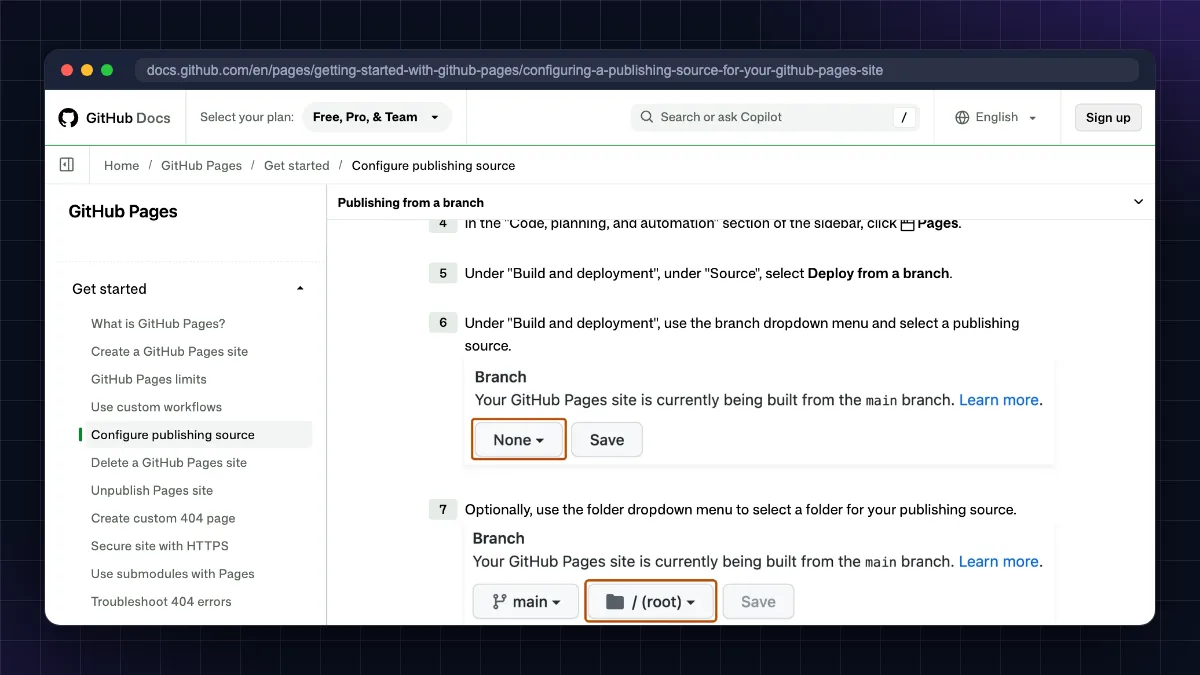
index.html, CSS, JS and image files using Add file > Upload files, then commit. - Go to Settings > Pages. Under Build and deployment, choose Deploy from a branch, select
mainand/ (root), and save. - Wait one to two minutes. Your site will be live at
https://yourusername.github.io/.
Pros: truly free, very stable, version history of every change, free HTTPS, good for showing recruiters your code.
Cons: static only (no PHP, no database), one user site per account, not meant for business sites, and the repository is public on the free plan.
Option 2: Cloudflare Pages
Cloudflare Pages is our top pick for most people who want to host a static website for free with their own domain. It runs on Cloudflare's global network, which has data centres in several Indian cities, so pages load fast for Indian visitors.
Free plan limits (from Cloudflare's Pages limits docs (opens in new tab), October 2026): 500 builds per month, up to 20,000 files per site, 25 MiB maximum per file, and up to 100 custom domains per project. Cloudflare does not list a bandwidth cap for static assets on the free plan.
How to host website for free on Cloudflare
- Sign up for a free Cloudflare account.
- Open Workers & Pages, click Create application and pick the Pages option (Get started).
- Either connect your GitHub/GitLab repository (Cloudflare rebuilds on every push) or choose Drag and drop your files and drop in a folder or ZIP of your site.
- Give the project a name. Your site goes live at
projectname.pages.dev. - Open Custom domains in the project to add your own domain. If your domain's DNS is already on Cloudflare, it connects in a few clicks.
Pros: generous free limits, commercial use allowed, very fast CDN, free SSL, easy custom domains, unlimited static requests.
Cons: server-side code must be written as Cloudflare Workers/Functions (which have their own free request limits), and the dashboard has many products, which can confuse beginners.
Option 3: Netlify
Netlify made "drag-and-drop hosting" popular. You can literally drop a folder on the dashboard and get a live URL. It also includes form handling, which is handy for a contact form on a static site.
Free plan (from Netlify's pricing page, October 2026): Netlify now uses a credit system. The free plan gives a 300-credit limit, and bandwidth, deploys and functions all draw from it (bandwidth is listed at 20 credits per GB). Each production deploy costs 15 credits (deploy previews, branch deploys and failed deploys cost nothing), so 20 production deploys alone would use the whole month's allowance. Custom domains and SSL are included. The free plan is a hard limit: when the 300 credits are used up, Netlify pauses all your sites and visitors see a "Site not available" page until credits reset at the start of the next billing cycle, unless you upgrade to a paid plan (how credits work (opens in new tab)).
How to host website for free on Netlify
- Sign up with GitHub, GitLab or email.
- On your team's Projects page, drag your site folder onto the drop zone at the bottom (or use Netlify Drop at app.netlify.com/drop), or import a Git repository.
- Your site is live at
randomname.netlify.app. You can change that subdomain later in the project settings. - Add a custom domain under Domain management.
Pros: easiest beginner experience, built-in forms, deploy previews for every change, good docs.
Cons: the credit system makes it harder to predict how much traffic the free plan covers; a site that suddenly goes viral can hit the limit. Keep large videos and downloads off Netlify.
Option 4: Vercel
Vercel is made by the team behind Next.js, so it is the smoothest place to host a Next.js or React app for free. Push to GitHub and it builds and deploys automatically, with a preview URL for every branch.
Hobby plan (from Vercel's pricing page (opens in new tab), October 2026): 100 GB of fast data transfer per month and 1 million function invocations per month. Important: Vercel says the Hobby plan is for personal, non-commercial use only, and Hobby accounts cannot buy extra usage beyond the caps.
How to host website for free on Vercel
- Sign up with your GitHub account.
- Click Add New > Project and import your repository.
- Vercel detects the framework (Next.js, Vite, Astro and others) and sets build settings. Click Deploy.
- Your app goes live at
projectname.vercel.app. Add a custom domain under Settings > Domains.
Pros: best Next.js support, instant previews, serverless functions included, very easy.
Cons: non-commercial restriction on the free plan. A client website, a shop or an ad-supported business site should use the paid Pro plan or another host.
Option 5: Free WordPress hosting (InfinityFree and similar)
Many beginners search for free WordPress hosting because they want a blog. Free PHP hosts such as InfinityFree do let you install WordPress with a one-click installer, a database and a free SSL certificate. As of October 2026, InfinityFree's homepage lists 5 GB disk space, "unlimited" bandwidth, MySQL databases, PHP 8.4, free SSL and no ads on your site.
The honest limits: free PHP hosts enforce CPU, "entry process", daily hits and file (inode) limits that are not published in full. If your site uses too much, it is throttled and can be suspended for a day. Outgoing email (SMTP) is usually blocked, so WordPress contact forms and password-reset emails may not work. Speed is often poor, and some plugins (page builders, security scanners, backup plugins) can push you over the limits.
Use free WordPress hosting for: learning WordPress, testing themes, a college assignment or a demo.
Do not use it for: a blog you plan to monetise with AdSense, a business website, or anything where downtime costs you money. Google can see slow, unreliable sites, and moving later is extra work.
For a real WordPress blog, budget shared hosting in India starts at under ₹100 a month on long promotional terms (Hostinger India listed ₹69/month on a 48-month term in October 2026, renewing at ₹289). We explain the trade-offs in our best web hosting in India guide, and our Hostinger review covers one of the cheapest options in detail.
Option 6: Oracle Cloud Always Free VPS
If you want a real Linux server (to run WordPress with full control, a Node.js or Python app, a Telegram/Discord bot, n8n automations or several small sites), Oracle Cloud's Always Free tier is the most generous free VPS available. It has data centres in Mumbai and Hyderabad.
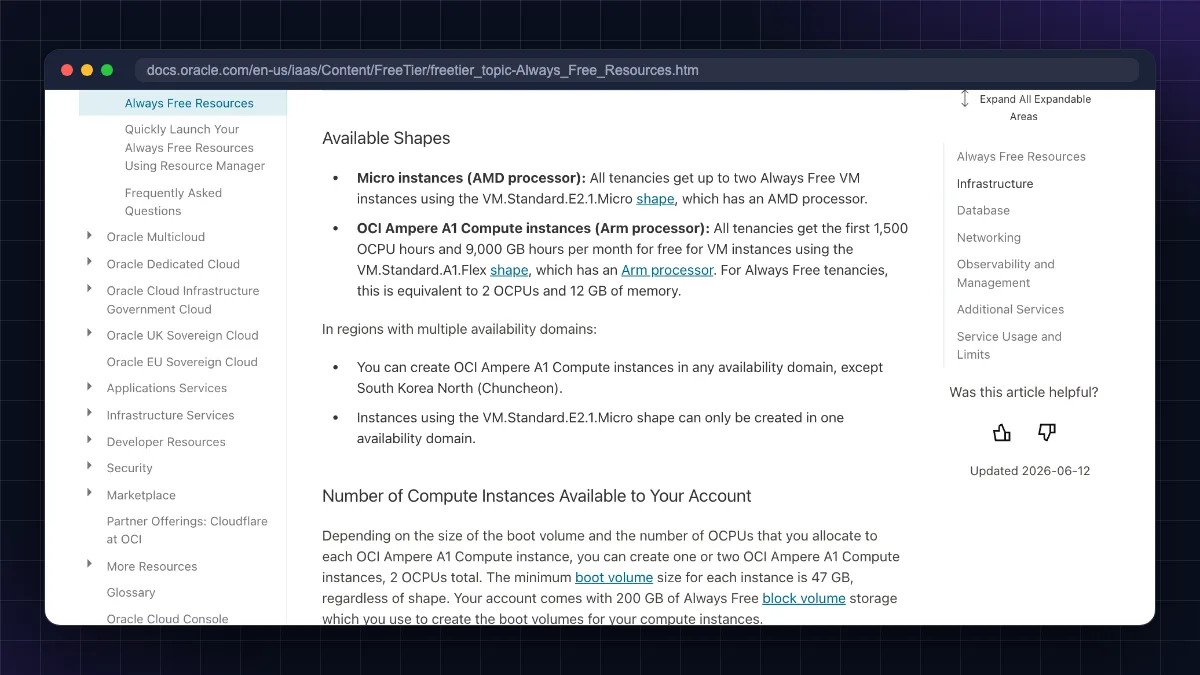
Always Free resources (from Oracle's Always Free docs (opens in new tab), October 2026):
- Arm (Ampere A1) instances: 1,500 OCPU hours and 9,000 GB hours per month, which Oracle says equals 2 OCPUs and 12 GB RAM running all month (one VM, or split into two).
- AMD micro instances: up to two VMs with 1/8 OCPU and 1 GB RAM each.
- Storage: 200 GB total block and boot volume storage.
- Outbound data: 10 TB per month.
Catches to know: you need a debit/credit card for verification; Arm capacity is often "out of host capacity" in popular regions; Oracle can reclaim Always Free instances it considers idle (CPU, network and memory all under 20% over 7 days); and you manage everything yourself: security updates, firewall and backups.
We have a complete walkthrough in our Oracle Cloud free tier guide. Once your server is up, follow our tutorial to install WordPress on a VPS with nginx, PHP and a free SSL certificate.
Option 7: Website builders with a free plan
If you do not want to touch code at all, free website builders are the fastest way to get online. Google Sites is completely free with a Google account and is good for a simple school, club or personal page. Builders such as Wix and others have free plans too, but they show the builder's branding and usually use a sub-domain like yourname.wixsite.com. Connecting your own domain normally needs a paid plan.
Good for: a quick personal page, event page or class project.
Not good for: SEO-focused blogs, AdSense, or anything you want to move later, because exporting from a builder is difficult.
How to host website for free with your own domain
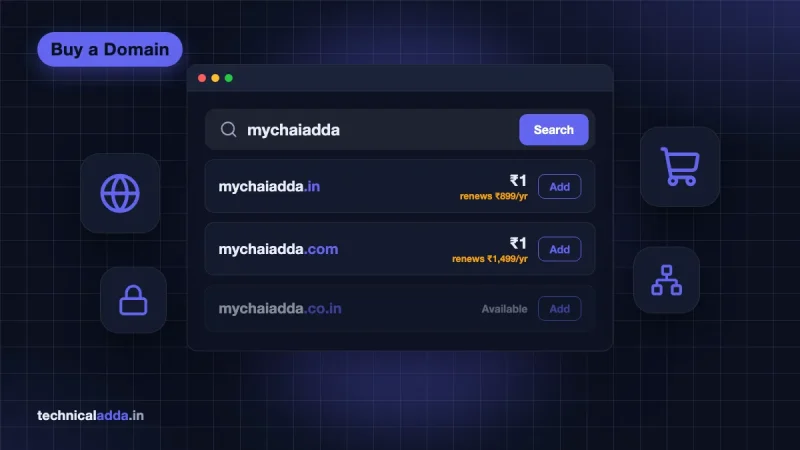
Free hosting gives you a sub-domain such as name.github.io, name.pages.dev or name.netlify.app. That works, but a custom domain like yourname.in looks more professional and builds trust. The domain is the only part you really pay for. A .in or .com costs a few hundred rupees in the first year, plus GST; see our domain name price in India guide for current rates.
Step 1: Buy a domain
Buy from a registrar you trust. Compare first-year and renewal prices, and make sure WHOIS privacy and DNS management are included. or. New to this? Our step-by-step guide on how to buy a domain name covers it.
Step 2: Add the domain in your free host
Open your project's Custom domain setting (GitHub: Settings > Pages; Cloudflare: Custom domains; Netlify: Domain management; Vercel: Settings > Domains) and enter yourdomain.in and www.yourdomain.in.
Step 3: Point DNS records
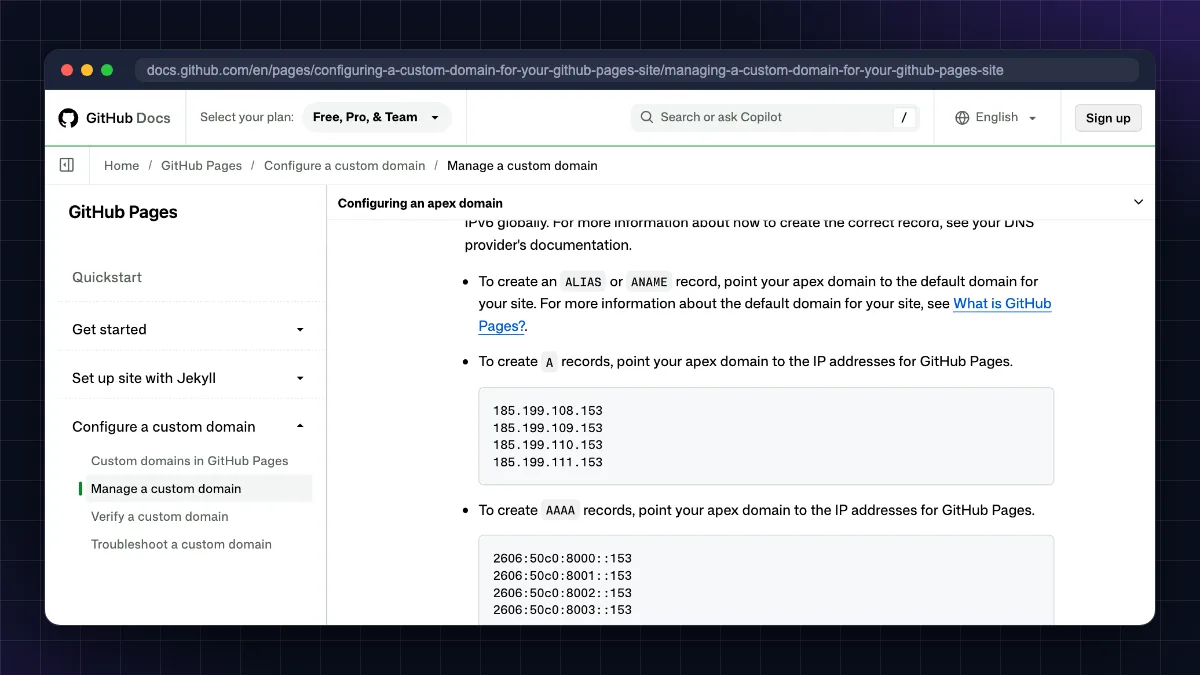
The host shows the exact records to create. For GitHub Pages, GitHub's custom domain documentation gives these values:
| Record type | Name/Host | Value |
|---|---|---|
| A | @ | 185.199.108.153 |
| A | @ | 185.199.109.153 |
| A | @ | 185.199.110.153 |
| A | @ | 185.199.111.153 |
| CNAME | www | yourusername.github.io |
For Cloudflare Pages, Netlify and Vercel, copy the CNAME or A record shown in their dashboard. Do not copy values from old blog posts, because they change.
Step 4: Turn on HTTPS
Wait for DNS to update (from a few minutes to 24 hours), then enable Enforce HTTPS or the equivalent. All four static hosts issue a free SSL certificate automatically. Learn more in our guide to a free SSL certificate for your website.
Hidden limits of free hosting
Free hosting is genuinely useful, but go in with clear eyes:
- Fair-use and soft limits. "Unlimited" usually means "until we decide you are using too much". A viral post can get your site paused.
- No business use on some plans. GitHub Pages and Vercel Hobby are not meant for commercial sites.
- No email hosting. None of these give you
[email protected]mailboxes. Use a separate service such as Zoho Mail's free plan with your own domain. - No support. Free plans rely on community forums. If something breaks at midnight, you fix it.
- Free VPS = you are the sysadmin. Security updates, firewall, backups and SSL renewals are your job.
- Terms can change. Free plans get trimmed over time. Keep a copy of your site (Git repository or backup) so you can move in an hour.
- Avoid "free hosting" sites that inject ads or ask you to keep their links in your footer. They hurt trust and SEO.
When to move to paid hosting
Stay on free hosting while your site is a hobby, portfolio or learning project. Move to paid hosting when any of these is true:
- You are earning or plan to earn: AdSense, affiliate links, client work or an online shop. Reliability now directly affects income, and some free plans forbid commercial use.
- You need WordPress for a serious blog. A shared plan at roughly ₹69 to ₹199 a month (Hostinger India promo prices on a 48-month term; renewals are higher) is far faster and more stable than free PHP hosting.
- You keep hitting limits: suspended for CPU, bandwidth warnings, credits running out.
- You need professional email and support for a business.
- Your app outgrows the free VPS or you cannot get Oracle Arm capacity.
The usual upgrade path is: free static host → shared hosting (for WordPress) → VPS (for apps or high traffic). Not sure which one fits? Read shared vs VPS hosting and our list of the best VPS hosting in India.
| Your situation | Best free option | When to upgrade | Upgrade to |
|---|---|---|---|
| Portfolio / resume | GitHub Pages or Cloudflare Pages | Rarely needed | Stay free; buy a domain |
| Business landing page | Cloudflare Pages or Netlify | Need email, forms at scale | Static host + paid email |
| Next.js side project | Vercel Hobby | Any commercial use | Vercel Pro or Cloudflare/Netlify |
| WordPress blog | InfinityFree (practice only) | Before you publish seriously | Shared hosting |
| Bot, API, n8n, many sites | Oracle Cloud Always Free | No capacity, need support | Budget VPS |
What to remember before you pick a free host
- The right free host depends on your site type: static, frontend app, WordPress or custom server.
- Cloudflare Pages and GitHub Pages are the best ways to host a static website for free; Vercel is best for personal Next.js projects.
- Free WordPress hosting is fine for learning but not for a blog you want to grow or monetise.
- Oracle Cloud Always Free gives a real VPS (2 OCPU, 12 GB RAM on Arm) but you manage everything.
- You can use your own domain on almost every free host; the domain is the only thing you pay for.
- Move to paid hosting as soon as the site earns money, needs WordPress reliability or keeps hitting limits.
Which free host should you start with?
Start with your site type, because that decides how to host website for free without hitting a wall later. Static portfolios and landing pages belong on Cloudflare Pages or GitHub Pages; personal Next.js projects fit Vercel; free WordPress hosts are for practice; and Oracle Cloud's Always Free VPS is for people ready to manage a real server. Spend your money only on a good domain, keep a backup, and upgrade when the site starts earning. Ready to set up your own server? Start with our guide to Oracle Cloud's free tier VPS, or browse more guides in our Web Hosting & Servers section.
FAQ
Frequently Asked Questions
Can I really host a website for free forever?
Yes, for static websites. GitHub Pages and Cloudflare Pages have hosted free sites for years with no time limit, as long as you stay within their usage rules. Free PHP and VPS options are also "always free", but providers can change terms, suspend inactive or heavy accounts, or reclaim idle servers. Always keep a backup so you can move quickly.
What is the best free website hosting in India?
For static sites, Cloudflare Pages is the best free option for Indian visitors because of its fast global network, generous limits and commercial use. GitHub Pages is a close second for portfolios. For a full server, Oracle Cloud's Always Free tier with Mumbai and Hyderabad regions is the strongest choice. For WordPress, cheap paid shared hosting is better than free hosts.
How can I host a website for free with my own domain?
Buy a domain from a registrar, add it in your free host's custom domain setting, and create the DNS records the host shows (usually A records for the root domain and a CNAME for www). After DNS updates, enable HTTPS. GitHub Pages, Cloudflare Pages, Netlify and Vercel all support custom domains with free SSL on their free plans.
Can I host a WordPress website for free?
Yes. Free PHP hosts such as InfinityFree let you install WordPress with a database and free SSL. However, they have hidden CPU, process and hits limits, often block outgoing email, and can be slow. They are fine for learning or testing. For a blog you want to monetise, low-cost shared hosting or a self-managed VPS is far more reliable.
Is GitHub Pages free for commercial websites?
Not really. GitHub says Pages is not intended as a free host for online businesses, e-commerce sites or software-as-a-service. A simple personal portfolio or project documentation is fine, even if it helps you get work. For a business website, use Cloudflare Pages or Netlify, which allow commercial use, or move to paid hosting.
Is Vercel free hosting allowed for business use?
No. Vercel's Hobby plan is for personal, non-commercial use only, and Hobby accounts cannot buy extra usage. If your Next.js site is for a client, a company or makes money, you need the Pro plan (listed at $20 per month as of October 2026) or a host whose free plan allows commercial use, such as Cloudflare Pages.
Which is better for free hosting: Netlify or Cloudflare Pages?
For most static sites, Cloudflare Pages offers more predictable free limits, including 500 builds a month and no listed bandwidth cap for static files. Netlify is slightly easier for beginners and has built-in forms, but its free plan now uses a 300-credit system that bandwidth and deploys draw from. Both support custom domains and free SSL.
Do free hosting sites give a free domain?
Free hosts give you a free sub-domain such as name.github.io, name.pages.dev or name.netlify.app, not a real domain like name.in. Some paid shared hosting plans include a free domain for the first year. Be careful with sites offering totally free domains; they often have poor reputation, odd extensions or renewal traps.
Is Oracle Cloud free tier really free?
Yes, Always Free resources are free with no time limit, including Arm VMs worth 2 OCPUs and 12 GB RAM, 200 GB storage and 10 TB monthly outbound data. You need a card for verification. Oracle may reclaim idle instances, Arm capacity can be hard to get, and anything outside Always Free limits is charged if you upgrade your account.
How much traffic can a free hosted website handle?
A static site on Cloudflare Pages or GitHub Pages can handle thousands of daily visitors easily, because pages are served from a CDN. GitHub's soft limit is 100 GB of bandwidth a month and Vercel Hobby includes 100 GB. Free WordPress hosts struggle much earlier because PHP and database requests hit CPU and process limits.
Where to buy
-
Visit official site (opens in new tab)
Hostinger
-
Visit official site (opens in new tab)
Step 1: Buy a domain
-
Visit official site (opens in new tab)
Step 1: Buy a domain