Best Laptop for Programming in India 2026: 16GB RAM Picks From ₹30k to ₹1 Lakh
Smartphones & Gadgets 16 min read By Pragya Singh
In this articleTable of contents10
Last updated: 20 October 2026
Choosing the best laptop for programming is confusing because shops push gaming laptops, "AI PCs" and fancy screens, while what actually matters for coding is RAM, a decent processor, a fast SSD and a comfortable keyboard. This guide explains which specs matter, how much RAM you really need for web development, Android, data science/AI and game development, and gives example laptops at ₹30,000, ₹50,000, ₹70,000 and ₹1 lakh. It also covers MacBook vs Windows vs Linux and why a refurbished ThinkPad can be the smartest buy for students in India.
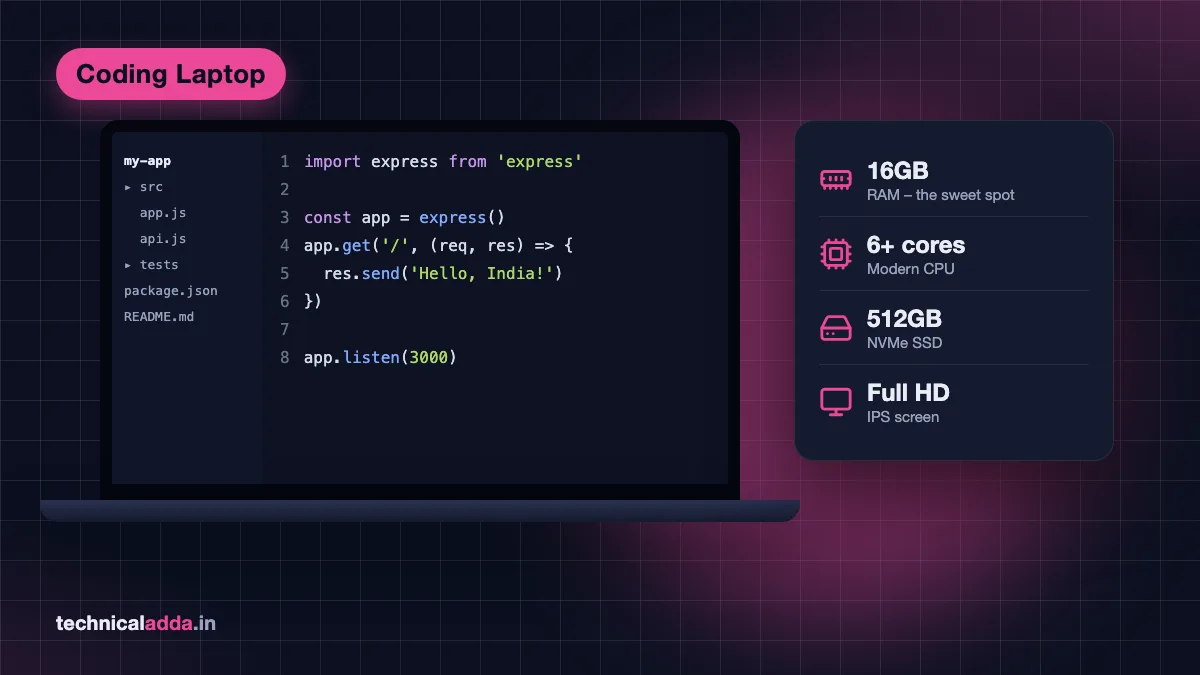
Quick answer: The best laptop for programming has at least 16GB RAM, a 6-core or better modern CPU (Ryzen 5 7530U/Intel Core i5 12th gen or newer, or Apple M-series), a 512GB SSD and a Full HD IPS screen. Under ₹50,000, pick a 16GB Ryzen 5 laptop; at ₹1 lakh, a MacBook Air or a 16GB+ Windows laptop with an RTX GPU for AI or game development.
Laptop prices in India right now: why they went up
Before the recommendations, one important note. Through 2026, a global memory (RAM and SSD) shortage, driven by AI data centres buying huge volumes of chips, has pushed laptop prices up in India. Industry analysts quoted in Indian media said entry-level laptops that used to cost ₹30,000 to ₹35,000 were moving closer to ₹45,000, and Apple raised Mac prices in India in June 2026 (the MacBook Neo went from ₹69,900 to ₹79,900, and the 13-inch MacBook Air M5 from ₹1,19,900 to ₹1,49,900 on Apple's store).
What this means for you:
- 16GB RAM laptops cost more than they did in 2025, so the specs per rupee in this guide may look lower than older articles.
- Retailer prices (Amazon, Flipkart, Croma, Vijay Sales) often stay below the brand's MRP, especially during sales and with bank offers.
- Prices below are approximate, as of October 2026. Always check the live price and the exact model number before buying.
What specs matter in a laptop for programming
Processor (CPU)
Compiling code, running a local server, Docker containers and test suites all use the CPU. Look for:
- Minimum: AMD Ryzen 5 7530U or Intel Core i5 12th gen (6 or more cores).
- Better: Ryzen 5/7 7535HS or 8000-series, Ryzen AI 5/7, Intel Core Ultra 5/7, or Apple M-series chips.
- Avoid: Celeron, Pentium, Athlon, Intel N100/N200 and very old (8th gen and earlier) chips on new laptops.
Watch out for model names. AMD's "7520U" is an older 4-core design, while the "7530U" has 6 cores, a big difference for the same price. Read the full processor name, not just "Ryzen 5".
Windows on ARM (Snapdragon X): These laptops have great battery life, but some developer tools still have gaps. Google's Android Studio install page (opens in new tab) says ARM-based Windows machines are not currently supported. If you need Android development, choose Intel or AMD on Windows.
RAM (memory)
RAM is the single most important spec for programmers. Your code editor, browser with documentation tabs, local server, database and maybe an emulator all run at once. 16GB is the sweet spot; see the detailed section below.
Also check whether RAM is soldered or upgradeable. A laptop with 8GB soldered RAM can never be upgraded, while one with a free SO-DIMM slot can go from 8GB to 16GB or more. Memory is expensive right now, though: a 16GB DDR4 laptop stick cost ₹12,900 to ₹14,700 on Amazon.in on 20 October 2026, so buying 16GB built in is usually cheaper.
Storage (SSD)
- 512GB NVMe SSD minimum. Projects,
node_modules, Docker images, Android SDKs and virtual machines fill up 256GB quickly. - Never buy a laptop with a hard disk (HDD) as the main drive in 2026.
- Check for a spare M.2 slot if you may need more storage later.
Display
You will stare at code for hours, so:
- Full HD (1920×1080) or higher, IPS or OLED. Avoid 1366×768 "HD" and TN panels.
- 14 inches is the best balance for carrying to college or office; 15.6 to 16 inches gives more space for side-by-side code.
- 300 nits or more brightness if you work near windows.
Keyboard, battery, ports and build
- A comfortable keyboard with good key travel matters more than RGB lights.
- 6+ hours of real battery life helps in classes, coworking spaces and during power cuts.
- USB-C charging, at least one USB-A port, and HDMI for an external monitor are useful.
- A dedicated GPU (NVIDIA RTX) is only needed for game development, CUDA/AI work or Android emulators on heavy projects.
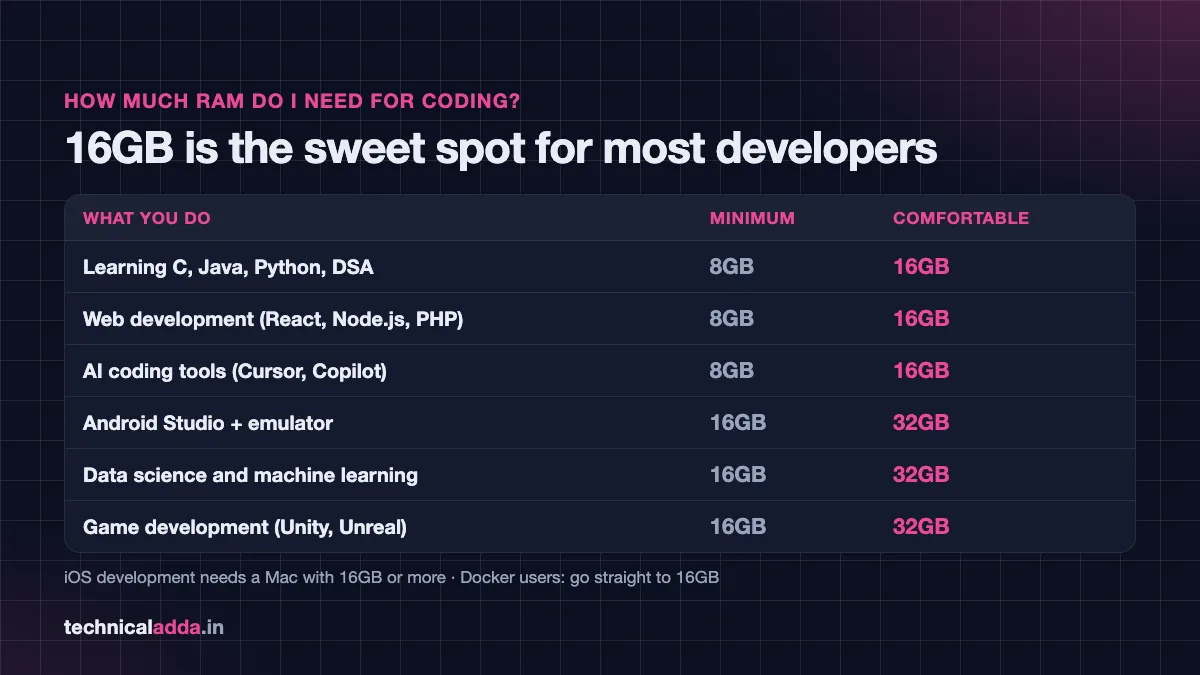
How much RAM do I need for coding?
This is one of the most searched questions, and the honest answer depends on what you build.
| What you do | Minimum RAM | Comfortable RAM | Notes |
|---|---|---|---|
| Learning C, C++, Java, Python basics, DSA | 8GB | 16GB | 8GB works with a light editor; Chrome tabs eat RAM fast |
| Web development (HTML/CSS/JS, React, Node.js, PHP) | 8GB | 16GB | 16GB if you use Docker or run several services |
| Android app development (Android Studio + emulator) | 16GB | 32GB | Google lists 8GB for Studio alone, 16GB with emulator, 32GB recommended |
| iOS app development (Xcode) | 16GB | 16 to 24GB | Requires a Mac |
| Data science and machine learning (Jupyter, pandas, scikit-learn) | 16GB | 32GB | Large datasets need more RAM; GPU helps for deep learning |
| Running local AI models (LLMs) | 16GB | 32GB+ / 8GB+ VRAM | Model size is limited by RAM/VRAM |
| Game development (Unity, Unreal, Godot) | 16GB | 32GB | Needs a dedicated GPU; Unreal is very heavy |
| AI coding tools (Cursor, Copilot, Claude Code) | 8GB | 16GB | The AI runs in the cloud; your editor and project use the RAM |
How much RAM for web development?
For HTML, CSS, JavaScript, React and Node.js, 8GB is the minimum and 16GB is comfortable. VS Code, a browser with 20 tabs, a dev server and a database together can easily use 10 to 12GB. If you plan to use Docker, go straight to 16GB.
How much RAM for Android development?
According to Google's official Android Studio system requirements, Studio alone needs 8GB, Studio with the emulator needs 16GB, and 32GB is recommended. Google also recommends a modern CPU with virtualization support. If you only have 8GB, test on a real Android phone over USB instead of the emulator.
How much RAM for data science and AI?
For learning Python, pandas and scikit-learn, 16GB is enough. For bigger datasets, deep learning or running local LLMs, 32GB RAM and an NVIDIA GPU with 8GB VRAM make a real difference. If you want to try AI models on your own machine, see our guide on how to run an LLM locally on a laptop.
How much RAM for game development?
Unity and Godot projects run on 16GB, but Unreal Engine and large 3D scenes are happier with 32GB plus a dedicated RTX GPU.
How much RAM for vibe coding and AI coding tools?
AI coding assistants such as Cursor, GitHub Copilot and Claude Code do the heavy AI work on remote servers, so they do not need a powerful laptop. 8GB works and 16GB is comfortable, because your editor, browser and the app you are building still use memory. Learn more in what is vibe coding and our list of best free AI coding tools.
Best laptop for programming by budget
These are example models that fit each budget as of October 2026. Laptop configurations change often, and the same name can come with different processors and RAM, so match the exact model number and specs before buying. Prices below are what Amazon.in, Flipkart and Apple's India store showed on 20 October 2026. Because of the memory shortage, several picks now cost more than their budget heading, and we say so where that happens.
| Budget | Example laptops | Key specs to insist on | Best for |
|---|---|---|---|
| ~₹30,000 | Refurbished Lenovo ThinkPad T480s / T490; Acer Aspire Lite (Ryzen 3 5400U, 8GB) | 16GB RAM (or 8GB with a free slot), SSD, Full HD | Students learning to code, web basics |
| ~₹50,000 | MSI Modern 14 (Ryzen 5 7530U, 16GB); Lenovo IdeaPad Slim 3 (Core i5-1235U, 16GB); Acer Aspire 3 (Core i5-1334U, 16GB) | 16GB RAM, 6-core CPU, 512GB SSD | College projects, web and backend dev |
| ~₹70,000 | ASUS Vivobook 14 (Ryzen AI 5 330, 16GB); Apple MacBook Neo; budget RTX 3050 laptop (Acer ALG / Aspire 7 class) | 16GB, good screen, or RTX GPU | Professional web dev, light Android, learning ML |
| ~₹1 lakh | Apple MacBook Air M5 (16GB, now about ₹1.4 lakh); Lenovo ThinkPad E14 Gen 7 (Ryzen 7 250, 16GB); Acer Aspire 7 (RTX 4050) | 16GB+, premium build or RTX 4050+ | Full-time developers, iOS, AI/ML, game dev |
Best laptop for programming under ₹30,000
New 16GB laptops at ₹30,000 have become rare because of the memory shortage. Two realistic routes:
1. Refurbished Lenovo ThinkPad T480s or T490 (Core i7 8th gen, 8GB, 256GB SSD)
A refurbished T490 (Core i7 8th gen, 8GB, 256GB SSD) from a third-party seller was listed at ₹28,300 on Amazon.in on 20 October 2026. Most come with 8GB; both models have soldered memory plus one SO-DIMM slot, so ask the seller whether the slot is empty. An 8GB DDR4-3200 stick (Crucial Basics) was ₹6,066 on Amazon.in, so 16GB takes the total to about ₹34,400.
- Pros: legendary keyboard, business-grade build, upgradeable RAM and SSD (on most configurations), excellent Linux support.
- Cons: older CPU, weaker battery on used units, heavier than new thin laptops.
- Not for: Android emulator-heavy work or gaming.
2. Acer Aspire Lite (Ryzen 3 5400U, 8GB, 512GB SSD)
₹44,990 on Amazon.in on 20 October 2026 (₹37,980 for the 256GB version). New 16GB laptops no longer sell near ₹30,000; the most affordable 16GB, 6-core pick in this guide is the MSI Modern 14 below, at about ₹43,000.
- Pros: new, warranty, Full HD screen, 512GB SSD.
- Cons: only 8GB RAM and an older 4-core CPU. Fine for learning C, Python and web basics, not for Docker or Android Studio.
Best laptop for programming under ₹50,000
This is the most popular budget for students and freshers, and also the most searched ("best laptop for programming and coding under 50000"). Insist on 16GB RAM and a 6-core CPU. For a broader student view, see our best laptop for students under ₹50,000.
1. MSI Modern 14 (Ryzen 5 7530U, 16GB, 512GB SSD, C7M-062IN)
₹43,219 on Flipkart on 20 October 2026.
- Pros: 16GB at a low price, 6-core Zen 3 CPU, light 14-inch body.
- Cons: basic 60Hz display, plastic build; an 8GB version is sold under the same name, so match the model code C7M-062IN.
2. Lenovo IdeaPad Slim 3 (Core i5-1235U, 16GB, 512GB SSD, 82RK0085IN)
₹59,499 on Amazon.in on 20 October 2026, so above this budget unless a sale or bank offer brings it down.
- Pros: reliable, slim, good service network in India; 10-core 12th-gen Core i5.
- Cons: some 16GB Ryzen 5 versions use the weaker 4-core Ryzen 5 7520U, so check the processor name before buying.
3. Acer Aspire 3 (Core i5-1334U, 16GB, 512GB SSD, A324-53)
₹61,700 on Amazon.in on 20 October 2026, well above this budget, so wait for a sale or pick the MSI Modern 14 above.
- Pros: 16GB already included, 10-core 13th-gen Core i5, 14-inch and light.
- Cons: plastic build, average screen and battery.
(for upgrading an older 8GB laptop; 16GB DDR4 sticks cost ₹12,900 to ₹14,700 on Amazon.in on 20 October 2026, so confirm your laptop's RAM type, speed and free slot first)
Best laptop for programming under ₹70,000
1. ASUS Vivobook 14 (Ryzen AI 5 330, 16GB, 512GB SSD, M1407KA)
This exact model was not in stock on Amazon.in or Flipkart when we checked on 20 October 2026, so check the live price before you count on it fitting this budget.
- Pros: modern Zen 5 Ryzen AI CPU, 16GB, 14-inch 16:10 screen, light.
- Cons: check the listing before assuming the RAM can be upgraded. Buy the RAM you need on day one.
2. Apple MacBook Neo (A18 Pro, 8GB, 256GB)
₹79,900 on Apple's India store (₹89,900 for 512GB) after the June 2026 increase. Amazon.in listed the 256GB model from ₹67,990 on 20 October 2026, and Apple's education pricing also lowers it. Details on Apple's MacBook Neo page (opens in new tab).
- Pros: excellent battery life, sharp 13-inch display, macOS for iOS/web development, silent.
- Cons: 8GB RAM cannot be upgraded and 256GB fills fast. Fine for web development, Python and learning Swift; not ideal for Docker-heavy work, Android emulator or data science.
- Who should not buy: Android developers and anyone running many containers.
3. Budget RTX laptop (Acer ALG / Acer Aspire 7 class with Core 5 210H, RTX 3050 4GB, 16GB)
₹85,500 for the Acer ALG on Amazon.in and ₹79,990 for the Aspire 7 (RTX 3050 4GB) on Flipkart on 20 October 2026, so this tier now sits above ₹70,000.
- Pros: NVIDIA GPU for CUDA, local AI models, Unity and Android emulator acceleration.
- Cons: only 4GB VRAM on this tier, heavy, loud, 3 to 5 hours battery.
Best laptop for programming under ₹1 lakh
1. Apple MacBook Air 13-inch M5 (16GB, 512GB)
Apple's India store lists it at ₹1,49,900 after the June 2026 increase. Flipkart listed the 16GB/512GB model at ₹1,39,900 on 20 October 2026 (Amazon.in only had the 1TB version, at ₹1,72,490), so it is now well above ₹1 lakh even before bank offers. See Apple's MacBook Air page (opens in new tab).
- Pros: superb battery (all-day), silent fanless design, 16GB base RAM, best laptop for iOS development, great resale value.
- Cons: about ₹40,000 over this budget, RAM and SSD not upgradeable, not for CUDA or Windows-only tools.
2. Lenovo ThinkPad E14 Gen 7 (Ryzen 7 250, 16GB, 512GB SSD)
₹95,990 on Amazon.in on 20 October 2026.
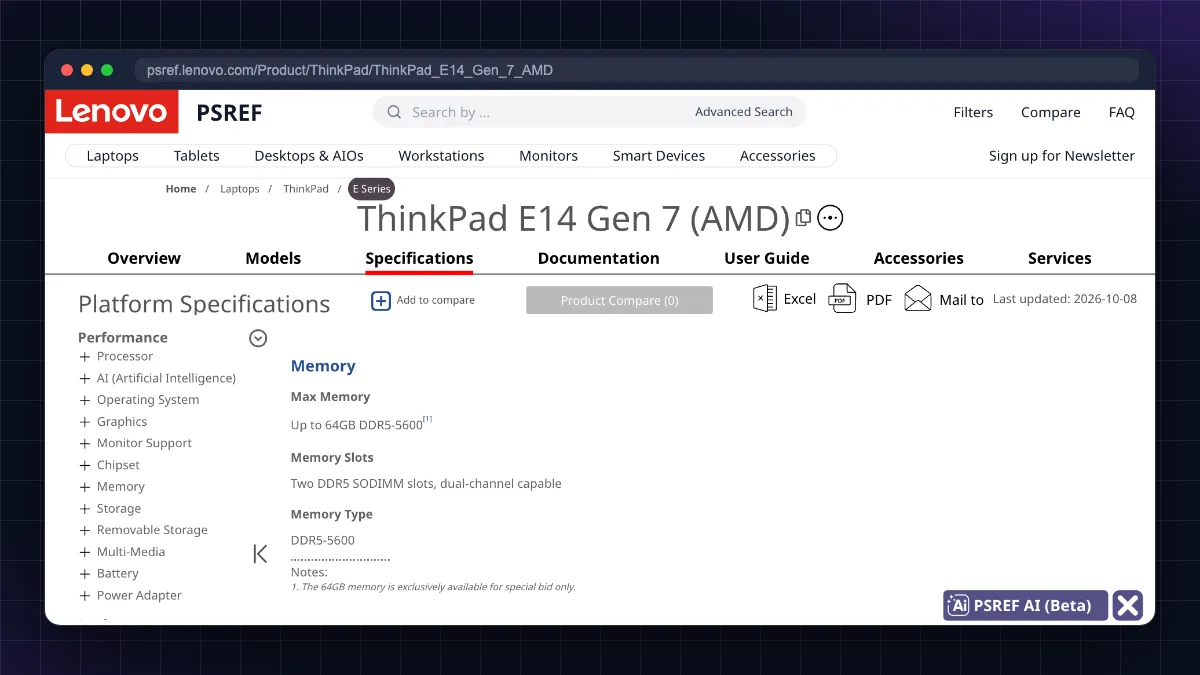
- Pros: 8-core Ryzen 7 250, ThinkPad keyboard; Lenovo's spec sheet lists two DDR5 SO-DIMM slots and two M.2 SSD slots, so RAM and storage can grow later. Great for Docker, VMs and data work.
- Cons: 16GB out of the box, integrated graphics only.
3. Acer Aspire 7 with RTX 4050 (Core 5 210H, 16GB, 512GB SSD)
About ₹1,01,500 on Amazon.in on 20 October 2026, just over the ₹1 lakh line.
- Pros: RTX 4050 6GB VRAM for deep learning, local LLMs and game engines.
- Cons: heavy, short battery, fan noise; check RAM upgradeability on the exact model.
- Who should not buy: web developers who carry their laptop daily, since a thin laptop is a better fit.
MacBook vs Windows vs Linux for programming
| Factor | MacBook (macOS) | Windows laptop | Linux (on a Windows/ThinkPad laptop) |
|---|---|---|---|
| iOS/macOS app development | Yes (only option) | No | No |
| Android development | Yes | Yes (Intel/AMD) | Yes |
| Web and backend development | Excellent (Unix terminal) | Excellent with WSL | Excellent (same as servers) |
| .NET, Windows apps, some college software | Limited | Best | Limited |
| CUDA / NVIDIA AI work | No | Yes (RTX laptops) | Yes |
| Battery life | Best in class | Varies | Varies; often lower |
| Price in India | High; RAM/SSD upgrades costly | Widest range | Free OS; works on most laptops |
| Upgradeability | None | Often RAM/SSD | Same as hardware |
Our view:
- Choose a MacBook if you want iOS development, long battery life and a great Unix terminal, and you can afford 16GB.
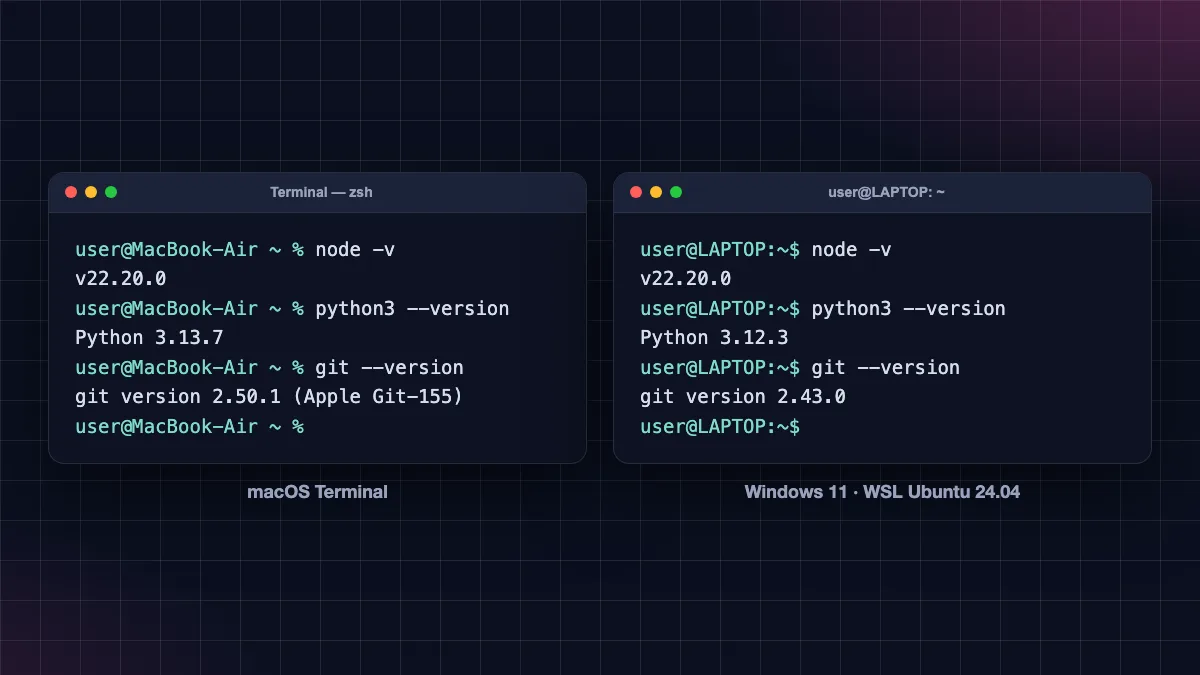
- Choose Windows if your college uses Windows-only software, you need an NVIDIA GPU, or you want the most specs per rupee. Install WSL to get a real Ubuntu terminal. Microsoft's WSL install guide (opens in new tab) shows the one-line setup.
- Choose Linux (dual-boot or full install) if you are into backend, DevOps or servers. ThinkPads and most Intel/AMD laptops run Ubuntu well.
If your Windows laptop feels slow while coding, our Windows 11 slow laptop fix guide covers startup apps, storage and RAM.
Refurbished ThinkPads: the student's secret
Companies replace business laptops every three to four years, and these come back to the market as refurbished units. For programming, a refurbished business laptop often beats a new budget consumer laptop.
Why ThinkPads (and Dell Latitude, HP EliteBook) work well:
- Excellent keyboards and strong build.
- Upgradeable RAM and SSD on many models (T480 and T14 Gen 1 commonly support 16GB to 32GB).
- Very good Linux compatibility.
- Spare parts and batteries are easy to find in India.
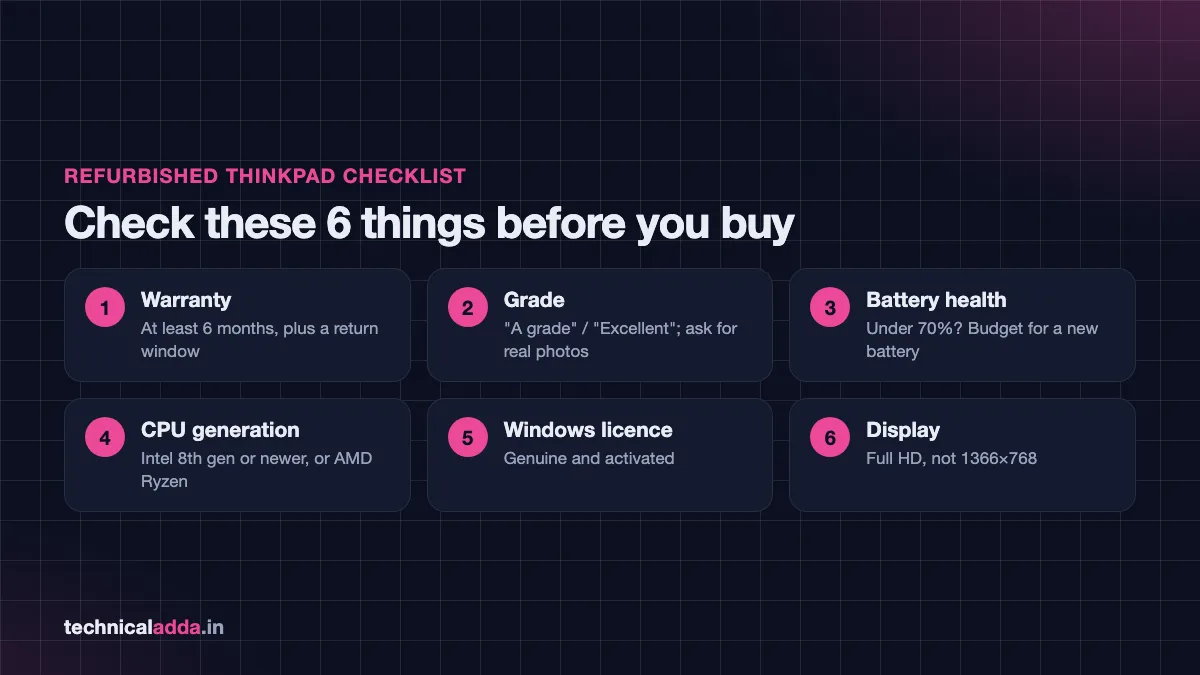
What to check before buying refurbished:
- Seller and warranty: Buy from Amazon Renewed or an established refurbisher with at least 6 months' warranty and a return window.
- Grade: "A grade" or "Excellent" means minimal scratches. Ask for real photos.
- Battery health: Ask for battery health percentage; budget for a replacement if under 70%.
- CPU generation: Prefer Intel 8th gen or newer (or AMD Ryzen); avoid older models.
- Windows licence: Check that Windows is genuine and activated.
- Display: Confirm Full HD; some cheap units have 1366×768 screens.
Who should not buy refurbished: If you need long battery life, a modern GPU or a warranty longer than a year, buy new.
Mistakes to avoid when buying a coding laptop
- Buying 8GB soldered RAM to save a little money. You cannot upgrade it later.
- Buying a gaming laptop just for coding. It is heavy, noisy and has poor battery. Buy a GPU only if you need CUDA, game engines or local AI models.
- Ignoring the exact processor model. "Ryzen 5" or "Core i5" can mean very different generations.
- Choosing 256GB storage for development work.
- Falling for "AI PC" marketing. The NPU does not speed up most programming work today; RAM and CPU matter more.
- Skipping the screen check. A dim 1366×768 TN panel will strain your eyes during long coding sessions.
- Not using student or bank offers. Apple's education store, Amazon/Flipkart bank offers and festive sales can cut several thousand rupees off the price.
AI coding assistants also change what you need: with tools like Claude Code or Cursor, the heavy lifting happens in the cloud, so a reliable 16GB laptop is enough for most developers.
Programming laptop checklist for Indian buyers
- The best laptop for programming has 16GB RAM, a modern 6-core CPU, a 512GB SSD and a Full HD IPS screen.
- RAM needs: 8GB minimum for basics and web, 16GB for most developers, 32GB for Android emulator, data science, local AI and Unreal.
- A 2026 memory shortage pushed laptop prices up in India, so check the live price and exact model number before paying.
- Under ₹50,000, a 16GB Ryzen 5 7530U laptop is the best value; refurbished ThinkPads are excellent at around ₹30,000.
- Buy a MacBook for iOS development and battery life, Windows for GPU/CUDA and value, Linux for server-style work.
- Avoid soldered 8GB RAM, 256GB storage and gaming laptops unless you need a GPU.
Which coding laptop should you buy? Our pick by budget
The best laptop for programming is not the most expensive one. It is the one with enough RAM (16GB), a modern CPU, a 512GB SSD and a screen you can stare at all day, chosen for the kind of code you write. Our short list: a refurbished ThinkPad T490 with an extra 8GB stick if you have about ₹35,000, the MSI Modern 14 under ₹50,000, the MacBook Neo for web and Python work near ₹70,000, and the ThinkPad E14 Gen 7 at about ₹1 lakh (or the MacBook Air M5 if you build iOS apps). Set your budget, match the RAM to your work using the table above, check live prices because 2026 memory costs keep shifting, and consider a refurbished ThinkPad if money is tight. Once your laptop is ready, set up your tools with our list of best free AI coding tools, or browse more buying guides in our Smartphones & Gadgets section.
FAQ
Frequently Asked Questions
Which laptop is best for programming in India?
The best laptop for programming in India depends on your budget, but it should have 16GB RAM, a modern 6-core CPU, a 512GB SSD and a Full HD screen. Under ₹50,000, a 16GB Ryzen 5 7530U laptop like the MSI Modern 14 is good value. Around ₹1 lakh, a ThinkPad E14 Gen 7 with upgradeable RAM is ideal; the MacBook Air M5 is the pick for iOS work if you can stretch to about ₹1.4 lakh.
How much RAM do I need for coding?
For basic coding and web development, 8GB is the minimum and 16GB is comfortable. Android development with the emulator needs 16GB, with 32GB recommended by Google. Data science, local AI models and Unreal Engine game development work best with 32GB. For most students and developers, 16GB is the right choice in 2026.
Is 8GB RAM enough for programming?
Yes, 8GB RAM is enough for learning languages like C, Java and Python and for basic web development with a light editor. However, it struggles when you run VS Code, many browser tabs, Docker or an Android emulator together. If you buy a new laptop, choose 16GB, or make sure the 8GB model has a free slot to upgrade.
Is a MacBook good for programming?
Yes, MacBooks are very good for programming thanks to a Unix-based terminal, long battery life and strong performance. They are the only option for iOS and macOS app development. The downsides are a higher price in India, no RAM or SSD upgrades, and no NVIDIA CUDA support. Choose at least 16GB unified memory for serious development.
Do I need a graphics card for programming?
No, most programming, including web, backend, mobile and general Python work, does not need a dedicated graphics card. You need an NVIDIA GPU only for deep learning with CUDA, running larger local AI models, game development in Unity or Unreal, or heavy Android emulator use. Otherwise, spend the money on more RAM and a better screen.
Which is the best laptop for programming under ₹50,000?
Under ₹50,000, look for a laptop with 16GB RAM, an AMD Ryzen 5 7530U or Intel Core i5 12th gen or newer, and a 512GB SSD. The MSI Modern 14 (Ryzen 5 7530U, 16GB) was about ₹43,000 in October 2026. Other 16GB Core i5 models, such as the Lenovo IdeaPad Slim 3 (Core i5-1235U), cost more than ₹50,000 then, so watch for sales and check the exact processor and RAM.
Is a refurbished laptop good for programming?
Yes, a refurbished business laptop such as a Lenovo ThinkPad T14 or T480 with 16GB RAM can be excellent for programming, especially on a budget of around ₹30,000 to ₹35,000. You get a great keyboard, strong build and upgradeable parts. Buy from Amazon Renewed or an established refurbisher with a warranty, and check battery health, display resolution and CPU generation.
Is an i5 or Ryzen 5 enough for coding?
Yes, a recent Intel Core i5 (12th gen or newer) or AMD Ryzen 5 (7530U or newer) is enough for nearly all coding tasks, including web, backend, Android and data science learning. The generation matters more than the label: an old i7 can be slower than a new Ryzen 5. Pair the processor with 16GB RAM for smooth performance.
Which is better for coding, Windows or Linux?
Both work well. Windows offers the widest software support, NVIDIA GPU options and, with WSL, a real Ubuntu terminal for development. Linux matches the servers most code runs on and is lighter and free, making it great for backend and DevOps work. Many developers use Windows with WSL or dual-boot Ubuntu to get both.
How much storage do I need for programming?
A 512GB SSD is the practical minimum for programming. Code projects, dependency folders like node_modules, Docker images, Android SDKs, virtual machines and datasets quickly fill a 256GB drive. If you work with data science, game engines or multiple VMs, choose 1TB or a laptop with a spare M.2 slot for adding another SSD later.
Where to buy
-
Check price on Amazon (opens in new tab)
refurbished ThinkPad T480s/T490
-
Check price on Amazon (opens in new tab)
Acer Aspire Lite Ryzen 3 8GB
-
Check price on Amazon (opens in new tab)
MSI Modern 14 Ryzen 5 7530U 16GB
-
Check price on Amazon (opens in new tab)
Lenovo IdeaPad Slim 3 Core i5 16GB
-
Check price on Amazon (opens in new tab)
Acer Aspire 3 Core i5 16GB
-
Check price on Amazon (opens in new tab)
Crucial 16GB DDR4 laptop RAM
-
Check price on Amazon (opens in new tab)
ASUS Vivobook 14 Ryzen AI 5 16GB
-
Check price on Amazon (opens in new tab)
Apple MacBook Neo
-
Check price on Amazon (opens in new tab)
Acer ALG RTX 3050 16GB
-
Check price on Amazon (opens in new tab)
MacBook Air M5 16GB
-
Check price on Amazon (opens in new tab)
Lenovo ThinkPad E14 Gen 7 Ryzen 7 16GB
-
Check price on Amazon (opens in new tab)
Acer Aspire 7 RTX 4050