Free SSL Certificate for Website: Same Encryption as Paid DV, 4 Ways to Get It
Web Hosting & Servers 13 min read By Xavio Thomas
In this articleTable of contents15
Last updated: 10 October 2026
If Chrome shows "Not secure" next to your website, visitors leave, forms look risky and Google treats the page as less trustworthy. The fix is an SSL certificate, and in most cases you do not need to pay for one. A free SSL certificate for website use is available from Let's Encrypt, Cloudflare, ZeroSSL and almost every hosting company in India. This guide explains what SSL/TLS actually does, compares the free options, and gives exact steps for cPanel, Hostinger hPanel, a VPS running Nginx or Apache, and GoDaddy domains. It also covers auto-renewal, fixing mixed content and when a paid certificate is worth it.
Quick answer: You can get a free SSL certificate from Let's Encrypt (via Certbot on a VPS), your host's AutoSSL or "free SSL" feature in cPanel/hPanel, Cloudflare Universal SSL, or ZeroSSL's free plan. All give the same encryption as paid DV certificates. Turn it on, force HTTPS, fix mixed content and make sure renewal is automatic.
What is an SSL certificate?
SSL (Secure Sockets Layer) is the old name. Today the technology is TLS (Transport Layer Security), but everyone still says "SSL certificate". It does two jobs:
- Encryption: data between the visitor's browser and your server (passwords, form entries, UPI or card details on checkout pages) is scrambled, so nobody on the same Wi-Fi or network can read it.
- Identity: a trusted Certificate Authority (CA) confirms the certificate was issued for your domain, so the browser knows it is talking to the real site.
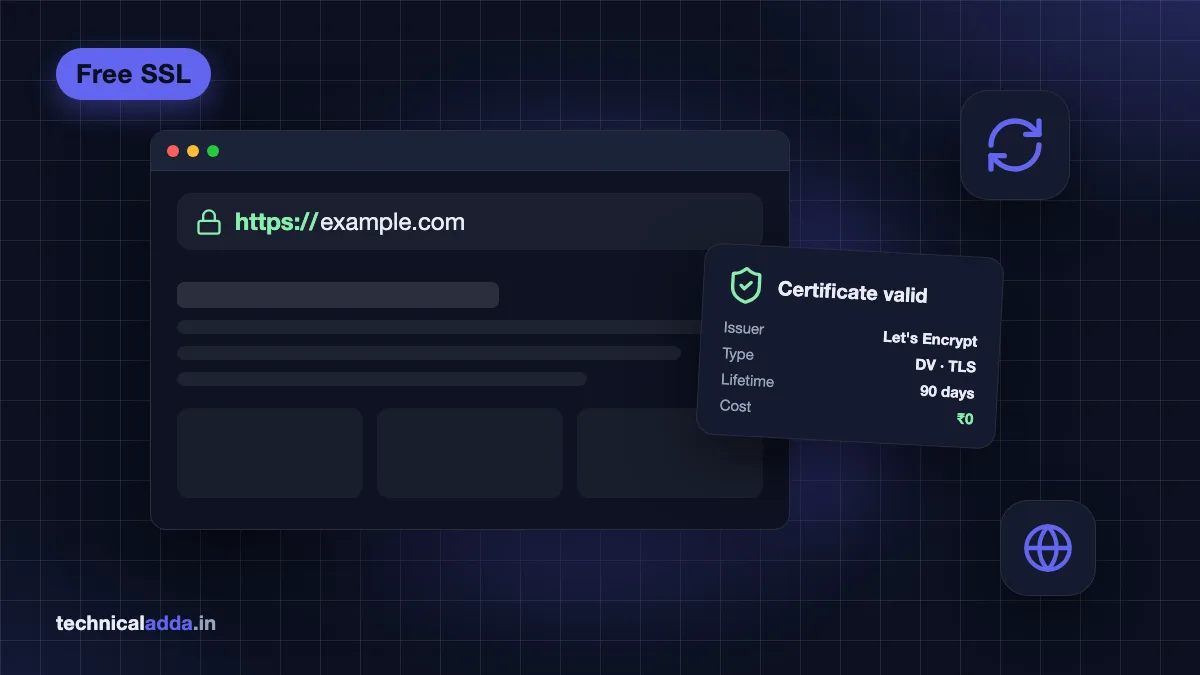
When a valid certificate is installed, your address starts with https:// and browsers stop showing the "Not secure" warning. HTTPS is also a light Google ranking signal and is required for many modern browser features.
Free SSL certificate options compared
All the options below are publicly trusted by Chrome, Firefox, Safari and Edge. Details are as of October 2026.
| Option | Type | Validity | Auto-renewal | Wildcard | Best for |
|---|---|---|---|---|---|
| Let's Encrypt (Certbot) | DV | 90 days (shorter lifetimes being phased in) | Yes, with Certbot timer | Yes (DNS challenge) | VPS and cloud servers |
| Hosting AutoSSL / free SSL | DV (Let's Encrypt, Sectigo etc.) | 90 days or similar | Yes, by host | Depends on host | Shared hosting users |
| Cloudflare Universal SSL | DV (edge certificate) | Managed by Cloudflare | Yes | Covers root + first-level subdomains | Any site using Cloudflare DNS |
| ZeroSSL free plan | DV | 90 days | Manual in web UI; ACME clients can automate | Via ACME | Quick manual certificates |
Simple rule: on shared hosting, use your host's free SSL. On a VPS, use Let's Encrypt with Certbot. If you already use Cloudflare, enable Universal SSL and still keep a valid certificate on your server.
Before you start: three checks
Every free SSL method needs these to work:
- Your domain points to the right server. The A record (and
wwwCNAME or A record) must point to your hosting or VPS IP. DNS changes can take a few minutes to a few hours. - Port 80 and 443 are open. Validation over HTTP needs port 80 reachable; HTTPS needs 443.
- No CAA record blocks the CA. If your DNS has a CAA record, it must allow the CA you use (for example
letsencrypt.org).
Not sure where your DNS is managed? Check where your nameservers point (your registrar, your host or Cloudflare). If you have not bought a domain yet, our domain name price in India guide compares registrars.
Free SSL in cPanel with AutoSSL
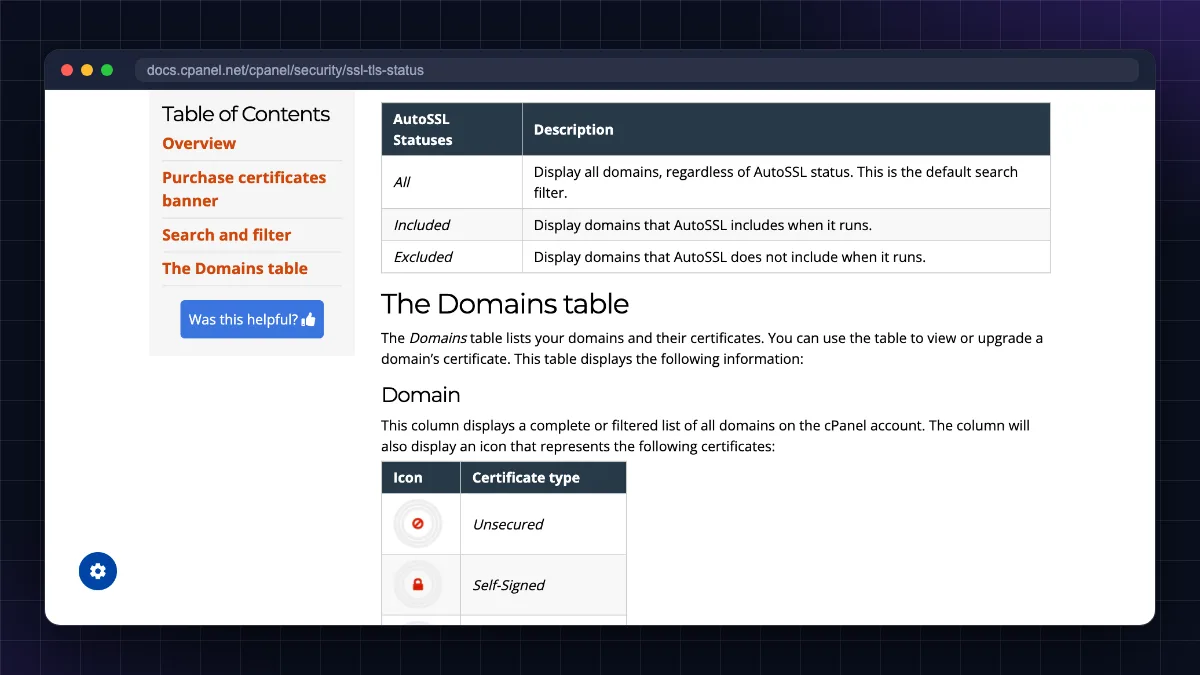
Most Indian shared hosts use cPanel. Its AutoSSL feature issues and renews free certificates automatically.
- Log in to cPanel.
- Go to Security → SSL/TLS Status.
- Tick the domains (include
wwwandmailif listed). - Click Run AutoSSL. Wait a few minutes and refresh.
- A green padlock icon next to each domain means it worked.
- Go to Domains → Domains and turn on Force HTTPS Redirect for your site.
If AutoSSL fails, the message usually says why: DNS not pointing to the server, or a domain blocked by a .htaccess rule. New to the panel? Read what is cPanel.
Free SSL in Hostinger hPanel
Hostinger includes free SSL on its web hosting plans and usually installs it automatically when you add a website.
- Log in to hPanel and go to Websites.
- Click Dashboard next to your domain or subdomain.
- In the sidebar open Security → SSL.
- If the status is not "Active", click Install SSL. If there is no Install SSL button, a certificate is probably already installed.
- Hostinger forces HTTPS by default once the certificate is active. If your site still opens over
http://, choose Force HTTPS on the same SSL page (Hostinger HTTPS guide (opens in new tab)).
Installation can take a few minutes. For subdomains, create the subdomain first, then install SSL on it. This path (Websites → Dashboard → Security → SSL) matches Hostinger's Lifetime SSL installation guide (opens in new tab) as of October 2026. See our Hostinger review for what else is included. If you are still choosing a host,. Free SSL is included on its web hosting plans, though prices rise at renewal, so compare the renewal rate before paying for a long term.
Free SSL certificate on a VPS with Certbot (Nginx and Apache)
On a VPS, you install the certificate yourself using Certbot, the official Let's Encrypt client maintained by EFF. The steps below are for Ubuntu 24.04 LTS and follow the Certbot instructions (opens in new tab). You need to be logged in to the server over SSH first.
Step 1: Make sure the web server serves your domain
Your Nginx server block (or Apache VirtualHost) must have the correct server_name example.com www.example.com; (or ServerName/ServerAlias for Apache). Certbot uses this to find where to install the certificate.
Step 2: Open the firewall
sudo ufw allow 'Nginx Full'
This allows both HTTP (80) and HTTPS (443) for Nginx. For Apache use sudo ufw allow 'Apache Full'.
Step 3: Install Certbot (snap is the recommended method)
sudo apt remove certbot
This removes any old apt version so it does not conflict (skip if not installed).
sudo snap install --classic certbot
This installs the latest Certbot from the Snap Store; snapd is preinstalled on Ubuntu Server.
sudo ln -s /snap/bin/certbot /usr/local/bin/certbot
This makes the certbot command available everywhere.
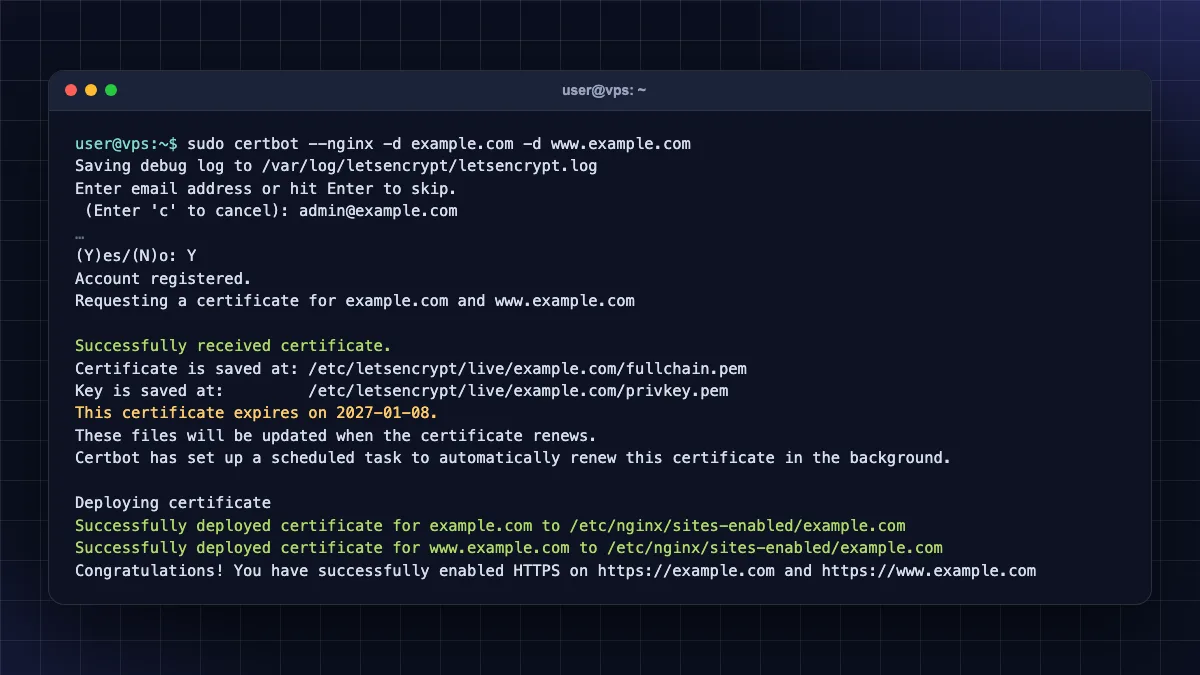
Step 4: Get and install the certificate
For Nginx:
sudo certbot --nginx -d example.com -d www.example.com
This gets a certificate for both names, edits your Nginx config and reloads it.
For Apache:
sudo certbot --apache -d example.com -d www.example.com
This does the same for Apache.
Certbot asks for an email (optional but useful for important notices) and agreement to the terms. When it finishes, open https://example.com and check the padlock.
Step 5: Test auto-renewal
sudo certbot renew --dry-run
This simulates a renewal without changing anything; it should say all renewals succeeded.
systemctl list-timers | grep -i certbot
This confirms the Certbot renewal timer is scheduled.
Wildcard certificates
A wildcard like *.example.com needs a DNS challenge, where you prove ownership by adding a TXT record. Manual DNS challenges do not renew automatically, so use a Certbot DNS plugin for your DNS provider (Cloudflare has one) if you want automation.
Security tip: never share or upload the private key (privkey.pem). If you think it leaked, revoke and reissue the certificate.
Running WordPress on the server? Our install WordPress on VPS guide includes the SSL step in context. Do not have a VPS yet? for budget servers where Certbot works the same way.
Windows servers (IIS)
On Windows Server with IIS, use a Let's Encrypt client for Windows such as win-acme instead of Certbot. It installs the certificate in IIS and creates a scheduled renewal task.
Free SSL with Cloudflare
Cloudflare gives Universal SSL free on all plans, including the Free plan, for any domain whose DNS is active on Cloudflare. According to Cloudflare's Universal SSL documentation (opens in new tab), it covers your root domain and first-level subdomains like www.example.com.
- Create a free Cloudflare account and add your site.
- Change your domain's nameservers at your registrar (GoDaddy, BigRock, Hostinger, Namecheap) to the two Cloudflare nameservers shown.
- Once the domain is active, Universal SSL is issued automatically.
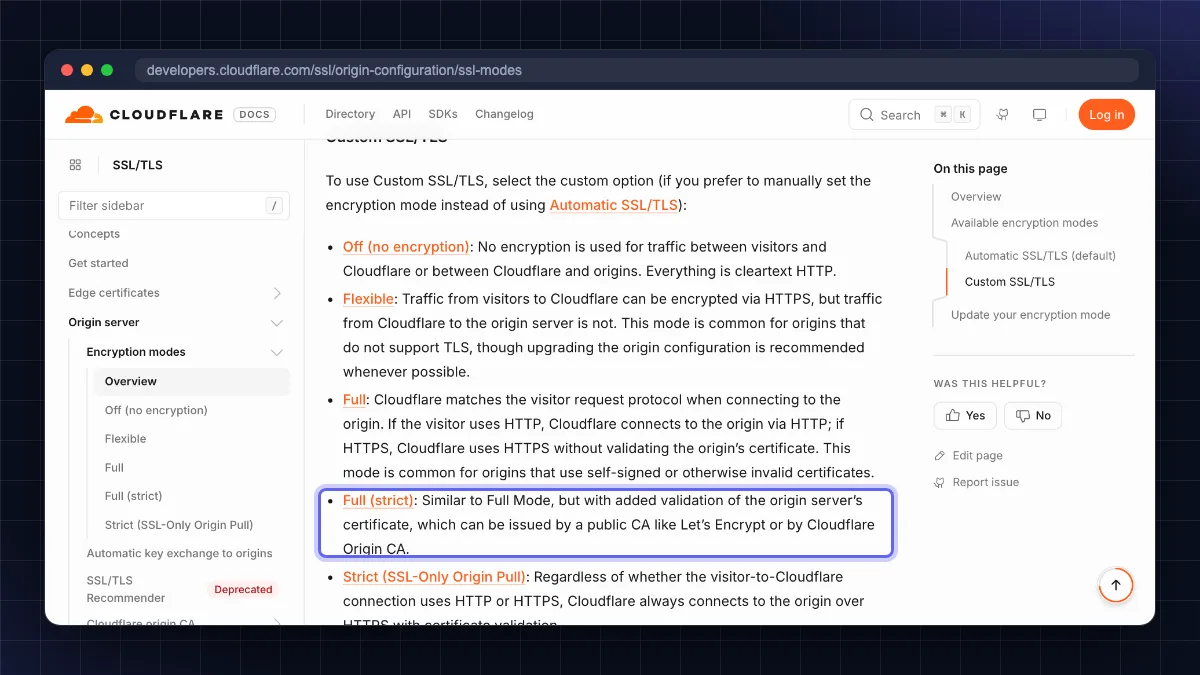
- Go to SSL/TLS → Overview and choose Full (strict).
- Under SSL/TLS → Edge Certificates, turn on Always Use HTTPS.
Important: avoid the Flexible mode. It encrypts only between the visitor and Cloudflare; traffic from Cloudflare to your server stays unencrypted, and it often causes redirect loops. Full (strict) requires a valid certificate on your server too: use your host's free SSL, Let's Encrypt, or a free Cloudflare Origin CA certificate (trusted only by Cloudflare, so do not use it if you ever turn the proxy off).
Free SSL certificate for a GoDaddy domain
A very common search is "free SSL certificate for GoDaddy domain". The key point: SSL is installed where your website is hosted, not where the domain is registered. A domain from GoDaddy works with any free SSL method.
- Website hosted elsewhere (Hostinger, a VPS, etc.): in GoDaddy's DNS settings, point the A record to your host's IP, then enable free SSL at your host as shown above.
- Want Cloudflare: change the nameservers in GoDaddy to Cloudflare's and follow the Cloudflare steps.
- Website hosted on GoDaddy: as of October 2026, GoDaddy India's Web Hosting page (opens in new tab) lists no free SSL on the Starter plan, a free SSL certificate for 1 year on Economy, and free, unlimited SSL for all sites on Deluxe and Ultimate. Check your plan's inclusions (and what happens after year one on Economy) before buying a separate certificate.
- GoDaddy Website Builder sites usually get SSL automatically.
You do not need to buy GoDaddy's paid SSL just because your domain is registered there.
ZeroSSL and other free options
- ZeroSSL: its free plan (opens in new tab) includes three 90-day certificates through the web dashboard. You validate by email, DNS record or file upload, then install the certificate manually. The ACME client acme.sh can automate ZeroSSL certificates on servers.
- Free 1-year SSL: search results promise "free SSL certificate 1 year", but industry rules have been reducing certificate lifetimes (a 200-day maximum for publicly trusted certificates since March 2026, dropping further in later years). Free certificates are short-lived by design and depend on automation.
- Local and intranet sites: public CAs only issue for real public domains. For a site on
localhostor a private network, use a tool like mkcert or an internal CA, or use a DNS challenge if the internal name is under a public domain you own.
Renewal: why "lifetime free SSL" really means auto-renewal
No certificate lasts forever. "Lifetime SSL" on hosting plans means the host renews the free certificate automatically as long as you stay with them.
Things to know about renewal (as of October 2026):
- Let's Encrypt certificates are 90 days by default today. Per Let's Encrypt's announcement (opens in new tab), the default profile drops to 64 days on 10 February 2027 and to 45 days on 16 February 2028 (an opt-in
tlsserverprofile already issues 45-day certificates since 13 May 2026). Automated renewal handles this, but avoid scripts or cron jobs that renew on a fixed 60-day schedule. - Let's Encrypt stopped sending expiry reminder emails in June 2025, so you will not get a warning if renewal breaks. Use a free uptime/certificate monitor or check
sudo certbot renew --dry-runafter server changes. - Renewal fails most often when DNS moves, port 80 gets blocked, or a firewall/CDN change breaks validation.
Fix mixed content after installing SSL
Mixed content means your page loads over HTTPS, but some images, scripts or CSS still load over http://. The browser may show a broken padlock or block those files.
For WordPress
- Go to Settings → General and change both WordPress Address and Site Address to
https://. - Replace old
http://yourdomainlinks in the database with a search-and-replace plugin (take a backup first). - Clear your caching plugin and CDN cache.
- Update hard-coded
http://URLs in theme files, widgets and page-builder settings.
For any website
- Open Chrome DevTools (F12) → Console to see each blocked
http://file, then update its URL. - Add a permanent 301 redirect from HTTP to HTTPS (hosting "Force HTTPS" toggle, Certbot's redirect option, or Cloudflare "Always Use HTTPS").
- Optionally add the header
Content-Security-Policy: upgrade-insecure-requeststo make browsers fetch old links over HTTPS. - In Google Search Console, make sure the
https://version is the one you monitor and that your sitemap uses HTTPS URLs.
Free vs paid SSL: DV, OV and EV
There are three validation levels:
| Type | What is verified | Free option? | Typical use |
|---|---|---|---|
| DV (Domain Validated) | You control the domain | Yes (Let's Encrypt, Cloudflare, ZeroSSL, hosts) | Blogs, business sites, most online stores |
| OV (Organisation Validated) | Domain + company is real | No | Corporate sites, some B2B portals |
| EV (Extended Validation) | Domain + detailed legal checks | No | Banks, large enterprises with policy needs |
The encryption is the same. A free DV certificate encrypts data exactly as strongly as a paid one. Paid certificates add company verification, a warranty (insurance paid to the visitor in rare mis-issuance cases) and vendor support. Modern browsers no longer show the company name in the address bar for EV, so the visible benefit is small.
Buy paid SSL only if: a client, bank or compliance rule requires OV/EV, or you need support from a commercial CA. For blogs, small business websites and most WooCommerce stores in India, free DV SSL is enough. Looking for a host that includes it? Our best web hosting in India guide lists plans with free SSL.
Your free SSL checklist, by hosting type
- A free DV SSL certificate gives the same encryption as a paid DV certificate.
- Shared hosting: use cPanel AutoSSL or hPanel's free SSL and turn on Force HTTPS.
- VPS: install Certbot via snap and run
certbot --nginxorcertbot --apache; test withcertbot renew --dry-run. - Cloudflare Universal SSL is free; use Full (strict), never Flexible.
- GoDaddy domains do not need GoDaddy's paid SSL; SSL lives where the site is hosted.
- After installing, fix mixed content and monitor renewals, since Let's Encrypt no longer emails expiry warnings.
Turn on free SSL today, then lock down the server
Getting a free SSL certificate for website use takes a few minutes on almost any platform: one click in cPanel or hPanel, a single Certbot command on a VPS, or a nameserver change to Cloudflare. Paid certificates add verification and warranties, not stronger encryption, so most Indian blogs and businesses never need one. After enabling HTTPS, fix mixed content and keep an eye on renewals. Next, protect the server itself with our guide on how to secure a Linux VPS server, or browse more guides in Web Hosting & Servers.
FAQ
Frequently Asked Questions
How can I get a free SSL certificate for my website?
You can get a free SSL certificate from your hosting provider's free SSL or AutoSSL feature, from Let's Encrypt using Certbot on a VPS, from Cloudflare Universal SSL by moving your DNS to Cloudflare, or from ZeroSSL's free plan. On shared hosting, simply enable it in cPanel or hPanel and turn on Force HTTPS.
Is free SSL safe for websites?
Yes. Free SSL certificates from Let's Encrypt, Cloudflare and ZeroSSL use the same TLS encryption strength as paid certificates and are trusted by all major browsers. The difference is validation level and extras: free certificates verify only domain control, while paid OV and EV certificates verify the organisation and include a warranty and support.
Is there a free SSL certificate for lifetime?
No certificate is valid for a lifetime. Free certificates are short-lived, typically 90 days or less, and publicly trusted certificates are getting shorter every year. "Lifetime free SSL" offered by hosts means they automatically renew the free certificate for as long as you keep your hosting plan, so you never pay or renew manually.
How do I get free SSL for a GoDaddy domain?
SSL is installed where your website is hosted, not at the domain registrar. Point your GoDaddy domain's A record to your hosting server and enable your host's free SSL, or change the nameservers to Cloudflare and use free Universal SSL. If your site is hosted with GoDaddy, check whether your plan already includes an SSL certificate.
How long does Let's Encrypt SSL last?
Let's Encrypt certificates have been valid for 90 days, and Let's Encrypt has announced shorter default lifetimes rolling out over 2027 and 2028, eventually 45 days. Recent Certbot versions renew automatically through a systemd timer when about a third of the lifetime remains. Run "sudo certbot renew –dry-run" to confirm renewal works on your server.
Does SSL improve Google ranking?
HTTPS is a lightweight Google ranking signal, so it helps slightly but will not push a weak page to the top. The bigger benefits are trust and conversions: browsers label HTTP pages "Not secure", which scares visitors away from forms and checkouts. HTTPS is also required for many modern browser features and for HTTP/2 in browsers.
Why does my site still show "Not secure" after installing SSL?
Usually it is mixed content: some images, scripts or stylesheets still load over http://. Check the browser console for blocked files and update their URLs. Other causes include the certificate not covering the www version, an HTTP-to-HTTPS redirect missing, an expired certificate, or Cloudflare set to Flexible mode with a misconfigured server.
What is the difference between Cloudflare Flexible and Full (strict) SSL?
Flexible encrypts traffic only between the visitor and Cloudflare, while traffic from Cloudflare to your server stays unencrypted. Full (strict) encrypts both legs and requires a valid certificate on your server, such as Let's Encrypt or a Cloudflare Origin CA certificate. Always use Full (strict) for real security and to avoid redirect loops.
Can I use a free SSL certificate for an e-commerce website?
Yes. A free DV certificate properly encrypts checkout pages, logins and personal data, and payment gateways like Razorpay and PayU host card and UPI entry on their own secure pages anyway. Consider a paid OV certificate only if a bank, partner or compliance requirement specifically asks for organisation validation.
Do I need a separate SSL certificate for subdomains?
Not always. You can include several names like example.com, www.example.com (opens in new tab) and shop.example.com in one certificate, or use a wildcard certificate for *.example.com through a DNS challenge. Cloudflare Universal SSL covers the root domain and first-level subdomains. Hosting AutoSSL usually adds each subdomain automatically.
Where to buy
-
Visit official site (opens in new tab)
Hostinger
-
Visit official site (opens in new tab)
Wildcard certificates