What Is VPS Hosting? Your Own Server Slice From About ₹400 a Month in India
Web Hosting & Servers 12 min read By David Johnson
In this articleTable of contents13
Last updated: 10 October 2026
You have probably seen "VPS" on hosting websites, in n8n automation tutorials, or in forex trading groups that say "run MT5 on a VPS". But what is VPS hosting exactly, and do you actually need one? In simple words, a VPS is your own private slice of a powerful server, with guaranteed resources and full control. This guide explains it without jargon: how it works behind the scenes, what people in India use it for, managed vs unmanaged, how much it costs in rupees, and a simple checklist to pick the right plan without overpaying.
Quick answer: VPS hosting (Virtual Private Server) splits one physical server into several isolated virtual servers using software called a hypervisor, usually KVM. Each VPS gets its own fixed share of CPU, RAM and storage, its own operating system and full root access. It costs more than shared hosting but is faster, more flexible and more private.
VPS full form and meaning
VPS stands for Virtual Private Server. Each word matters:
- Virtual: it is not a separate physical machine. It is created by software on a bigger server.
- Private: your resources and files are isolated from other customers. Nobody else can use your RAM or see your data.
- Server: it behaves like a complete computer that is always on and connected to the internet, usually running Linux (Ubuntu, Debian, AlmaLinux) or sometimes Windows.
So VPS hosting meaning, in one line: you rent a private, always-on virtual computer in a data centre and control it fully. (If you saw "VPS" on a bank statement or in trading chats, the trading meaning is the same thing: a remote server that runs your trading platform 24×7.)
An easy analogy: hostel, flat and bungalow
Think of hosting like places to live:
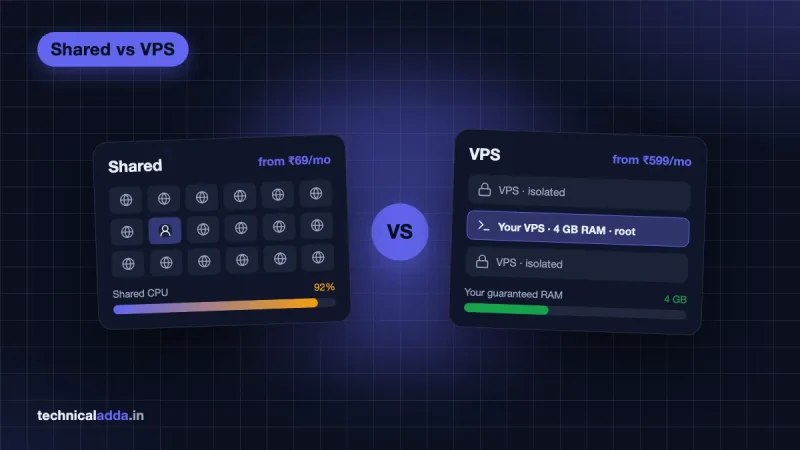
- Shared hosting is a hostel. It is cheap, but you share the kitchen and bathroom with many people. If one roommate takes a 40-minute shower, everyone waits. You also cannot change the rules of the building.
- A VPS is a flat in an apartment building. The building (physical server) is shared, but your flat has its own lock, kitchen and electricity meter. Your neighbour's party does not empty your water tank. You can paint the walls and arrange furniture however you like.
- A dedicated server is a bungalow. The whole building is yours: maximum space and privacy, but maximum cost and maintenance.
Most growing websites, automation projects and developers find the "flat" is the sweet spot.
How does VPS hosting work?
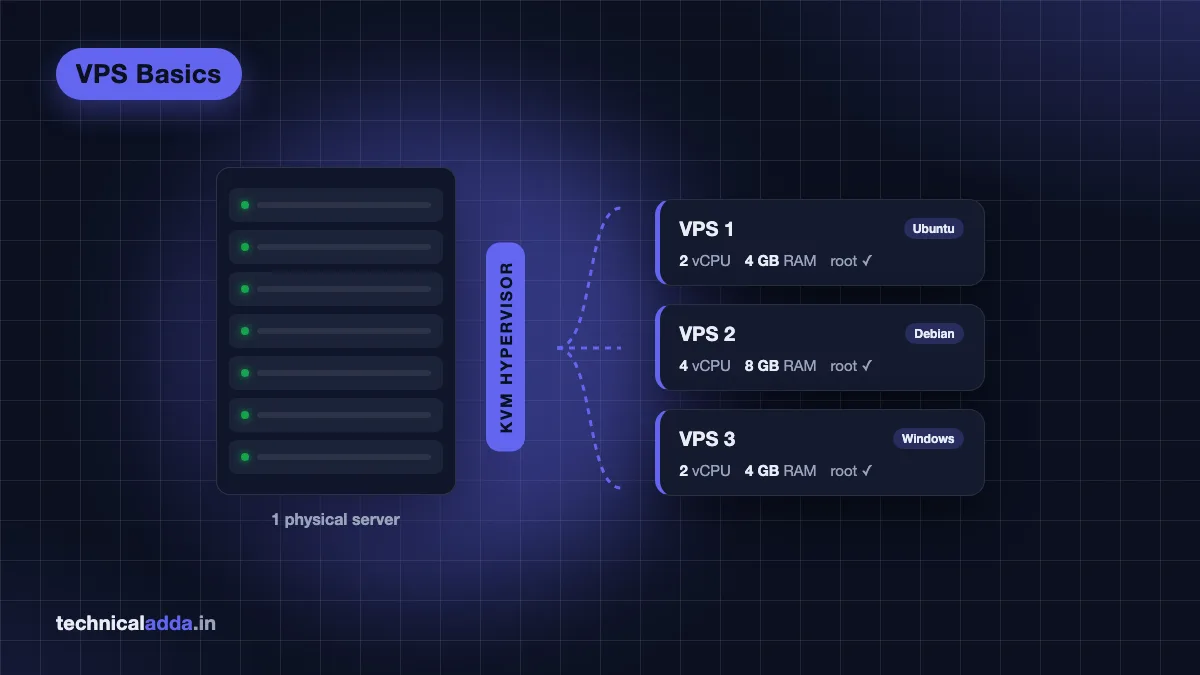
A data centre has racks of powerful physical servers, often with dozens of CPU cores and hundreds of GB of RAM. Special software called a hypervisor runs on this machine and divides it into many virtual machines.
KVM: the technology behind most VPS plans
Most modern VPS plans use KVM (Kernel-based Virtual Machine). According to the KVM project (opens in new tab), it is built into the Linux kernel and turns Linux itself into a hypervisor, using hardware virtualisation features in Intel and AMD processors (Intel VT-x and AMD-V).
What this means for you:
- Each VPS runs its own kernel and operating system. You can install Ubuntu, Debian, AlmaLinux or even Windows (on providers that allow it).
- Your RAM is reserved for you. Another customer's busy website cannot take it.
- You get root access: full administrator control to install software, change firewall rules and run background services.
- If another VPS on the same machine crashes, yours keeps running.
Older container-based VPS
Some very cheap VPS plans use container technology such as OpenVZ or LXC. These share the host's kernel, which makes them lighter but less flexible. You may not be able to run Docker properly, load kernel modules or install a custom OS. When comparing cheap plans, look for "KVM" in the specs.
Where the resources come from
| Resource | What it means | Typical entry VPS |
|---|---|---|
| vCPU | Virtual CPU cores (a share of physical cores) | 1 to 4 vCPU |
| RAM | Memory reserved for your server | 1 to 8 GB |
| Storage | NVMe or SSD disk space | 20 to 100 GB |
| Bandwidth | Monthly data transfer allowance | 1 to 8 TB or "unlimited" (fair use) |
| IP address | Dedicated public IPv4 (and often IPv6) | 1 IPv4 |
One honest note: vCPUs are usually shared at the physical level, so performance can vary between providers even when the numbers look the same. RAM is the most reliable spec to compare.
What is VPS hosting used for?
Here are the most common uses we see from Indian readers, from simple to advanced.
1. Websites that outgrew shared hosting
A WordPress or WooCommerce site getting thousands of visitors a day, slow admin dashboards, or "resource limit reached" errors on shared hosting are classic signs you need a VPS. A VPS lets you tune PHP, caching and the database for that traffic.
2. Automation tools like n8n
n8n, Node-RED and similar tools need to run 24×7 to trigger workflows, receive webhooks and call AI APIs. A 2 to 4 GB RAM VPS runs self-hosted n8n comfortably for a small business. See how to install n8n on a VPS.
3. Trading platforms (MT4/MT5) and bots
Forex and algo traders run MetaTrader or Python bots on a VPS so trades continue even when their laptop is off or the internet at home drops. MT5 is a Windows application, so you need either a Windows VPS or a Linux VPS with extra setup. Location matters here: choose a data centre close to your broker's server. Trading involves financial risk; a VPS only keeps the software running, it does not make strategies safer.
4. Game servers
Minecraft, Valheim or Counter-Strike servers for friends need steady CPU and RAM. A Mumbai or Singapore VPS gives lower ping for players in India.
5. Personal VPN
Developers run WireGuard or OpenVPN on a VPS to get their own private VPN, for example to secure public Wi-Fi at airports and cafes. It is not anonymous like a commercial VPN, because the IP is linked to you.
6. Development, testing and learning
Students practise Linux, Docker, databases and DevOps on a cheap VPS. It is also perfect for hosting APIs, Telegram/WhatsApp bots, cron jobs and side projects.
7. Email, file storage and self-hosted apps
Nextcloud, Uptime Kuma, Plausible analytics, Vaultwarden and many other open-source apps run nicely on a small VPS. (Running your own mail server is possible but hard. Most people should use a hosted email service.)
VPS hosting vs shared hosting vs dedicated server
| Feature | Shared hosting | VPS hosting | Dedicated server |
|---|---|---|---|
| Resources | Shared with hundreds of sites | Reserved share of a server | Whole physical server |
| Root access | No | Yes | Yes |
| Performance | Can slow down due to neighbours | Consistent | Highest |
| Technical skill | Very low | Low (managed) to medium (unmanaged) | High |
| Custom software (Docker, n8n, Node.js) | Limited | Yes | Yes |
| Typical price in India (as of Oct 2026) | ₹70 to ₹400/month | ₹400 to ₹3,000/month | ₹6,000+/month |
| Best for | Blogs, small business sites | Growing sites, apps, automation | Large, high-traffic platforms |
For a detailed side-by-side, read our shared vs VPS hosting comparison.
Managed vs unmanaged VPS
This decision matters more than the CPU count.
Unmanaged VPS (self-managed)
You get a bare server with an operating system. Everything else is your job: updates, security, firewall, web server, backups and fixing problems.
- Pros: cheapest, full control, great for learning.
- Cons: you must know basic Linux and SSH. If it gets hacked or breaks at 2 am, you fix it.
- Examples: Contabo, Hostinger KVM VPS, DigitalOcean, Hetzner, AWS Lightsail.
Managed VPS
The provider or a platform handles server setup, security patches, monitoring and often backups. You manage your website or app through a dashboard.
- Pros: less technical work, support helps with server issues, safer for business sites.
- Cons: costs more for the same resources, and you have less freedom to install custom software.
- Examples: Cloudways (managed cloud on top of DigitalOcean, AWS, Google Cloud), managed VPS plans from Indian hosts.
Semi-managed: control panels
Many providers offer a panel such as CyberPanel, CloudPanel, HestiaCP or cPanel on a VPS. It gives you a GUI for websites, databases and SSL, but you are still responsible for the server. cPanel is the best-known of these panels.
| Unmanaged | Managed | |
|---|---|---|
| Who updates and secures the server | You | Provider |
| Skill needed | Linux, SSH | Basic dashboard use |
| Typical extra cost | None | 1.5x to 3x the raw server price |
| Good for | Developers, learners, automation | Business websites, agencies, non-technical owners |
VPS hosting price in India
Prices below are approximate starting prices as of October 2026 and change often. Promotional prices usually need a 12 to 48 month upfront payment, and renewals are higher. Add 18% GST for Indian billing where applicable.
| Type | Typical spec | Approx. price per month |
|---|---|---|
| Budget unmanaged VPS | 1 vCPU, 2 to 4 GB RAM | ₹400 to ₹1,000 |
| Mid-range unmanaged VPS | 2 to 4 vCPU, 8 GB RAM | ₹800 to ₹2,500 |
| Managed cloud VPS | 1 to 2 GB RAM | ₹1,000 to ₹2,800 |
| Windows VPS (for MT5 etc.) | 2 vCPU, 4 GB RAM | ₹1,000 to ₹3,000 (including the Windows licence, which most providers charge as a monthly add-on) |
| High-performance VPS | 8+ vCPU, 32 GB RAM | ₹2,500 to ₹6,000+ |
Some real examples checked on official pages in October 2026:
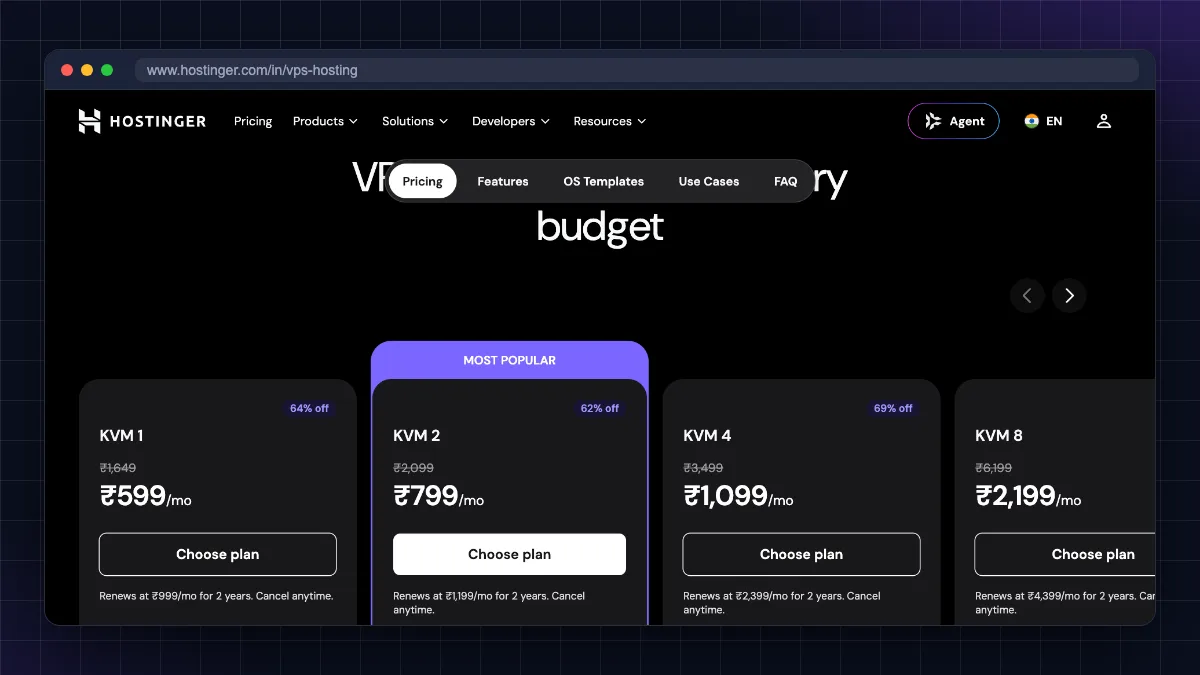
- Hostinger KVM 1 (1 vCPU, 4 GB RAM, 50 GB NVMe): ₹599/month promo, renews at ₹999/month. KVM 2 (2 vCPU, 8 GB RAM, 100 GB NVMe): ₹779/month promo, renews at ₹1,199/month. Source: Hostinger VPS hosting page (opens in new tab).
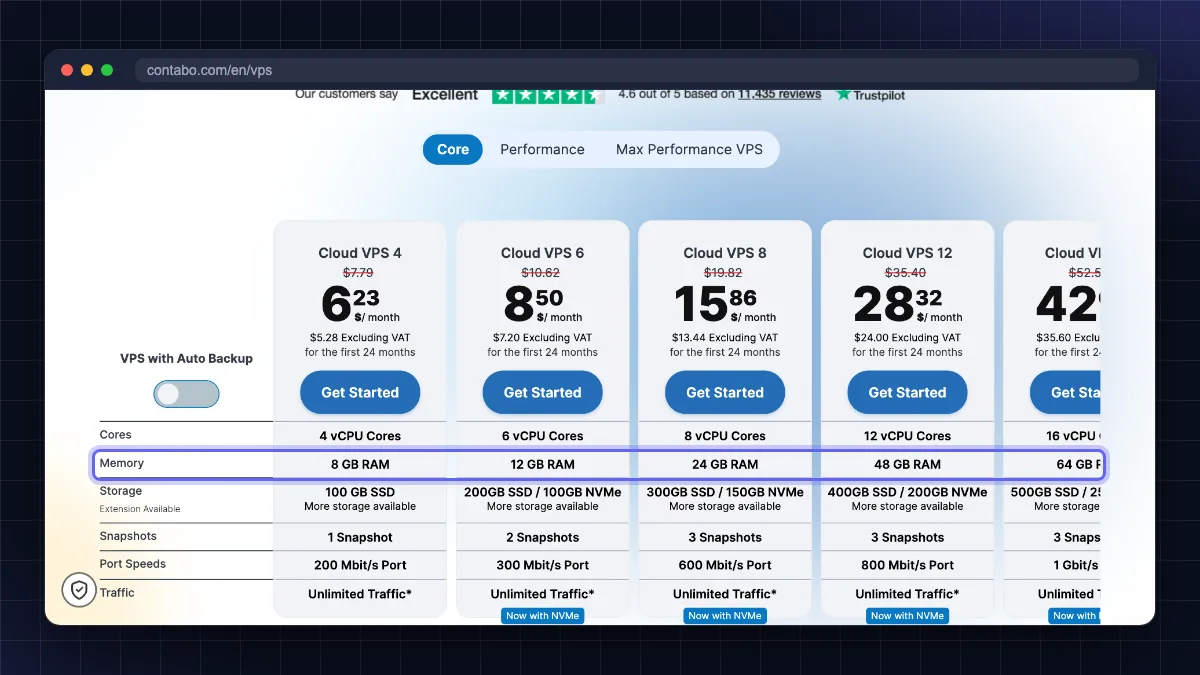
- Contabo Cloud VPS 4 (4 vCPU, 8 GB RAM, 100 GB SSD): €4.40/month for the first 24 months on a 24-month term (about ₹478 at ₹108.55 per euro). Choosing the India (Mumbai) location adds a monthly surcharge, and 18% GST applies on top; the configurator shows both before you pay. Contabo bills in USD, EUR or GBP, not rupees, so your card or PayPal does the conversion. Source: Contabo Cloud VPS 4 (opens in new tab).
- Cloudways managed plans on DigitalOcean are billed hourly in US dollars, and the entry 1 GB server costs more per month than an unmanaged VPS with several times the RAM. Check the current rate on the Cloudways pricing page (opens in new tab).
Want the full shortlist with pros and cons? See our best VPS hosting in India guide.
How to choose a VPS: 8-point checklist
- Start with RAM. 1 GB for a tiny site or bot, 2 to 4 GB for WordPress or n8n, 8 GB+ for several sites or Docker stacks.
- Pick a nearby data centre. For Indian visitors, Mumbai is ideal; Singapore is the next best. Lower latency means faster pages.
- Check it is KVM with NVMe or SSD storage.
- Compare renewal prices, not just the first-term deal. A ₹599 plan that renews at ₹999 costs much more over three years.
- Look for snapshots and backups. Are they included, or extra? Snapshots save you when an update breaks something.
- Decide managed or unmanaged honestly based on your Linux comfort.
- Check payment options. UPI, Indian cards and GST invoices matter for small businesses. As of October 2026, Hostinger's India store accepts UPI and RuPay cards (payment methods (opens in new tab)); Contabo takes credit cards and PayPal (plus bank transfer in EUR) but not UPI (Contabo currencies and payments (opens in new tab)); Cloudways bills in US dollars.
- Read the support and refund policy. A 30-day money-back window lets you test performance safely.
Our honest picks by need
- Beginner who wants an easy panel and Indian billing:. Good dashboard, AI assistant, frequent discounts. Con: best prices need long terms; renewals are noticeably higher. Read our Hostinger review.
- Most RAM and storage per rupee:. Huge specs for the price, India region available. Con: support is slower and setup can take longer; not for people who need hand-holding. Details in our Contabo VPS review.
- Business site without server work:. Managed security, backups and staging. Con: costs more per GB of RAM and has no email hosting included.
Who should not buy a VPS
A VPS is not always the right answer. Skip it if:
- You run a small blog or a 5-page business site with low traffic. Shared hosting is cheaper and easier.
- You are not willing to learn basic Linux and do not want to pay for managed hosting.
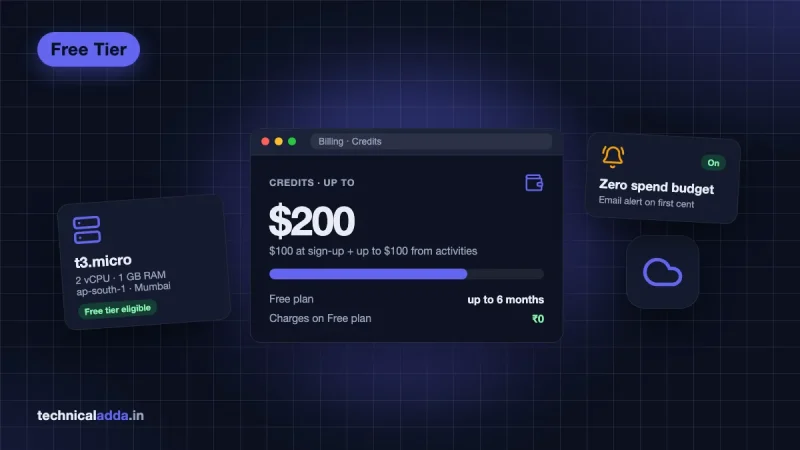
- You only want to learn cloud for free. Try the AWS free tier or Oracle's always-free option first.
- You need business email. Use a dedicated email service instead of running a mail server.
What to do after you buy a VPS
Your first hour on a new VPS decides how safe it will be. In order:
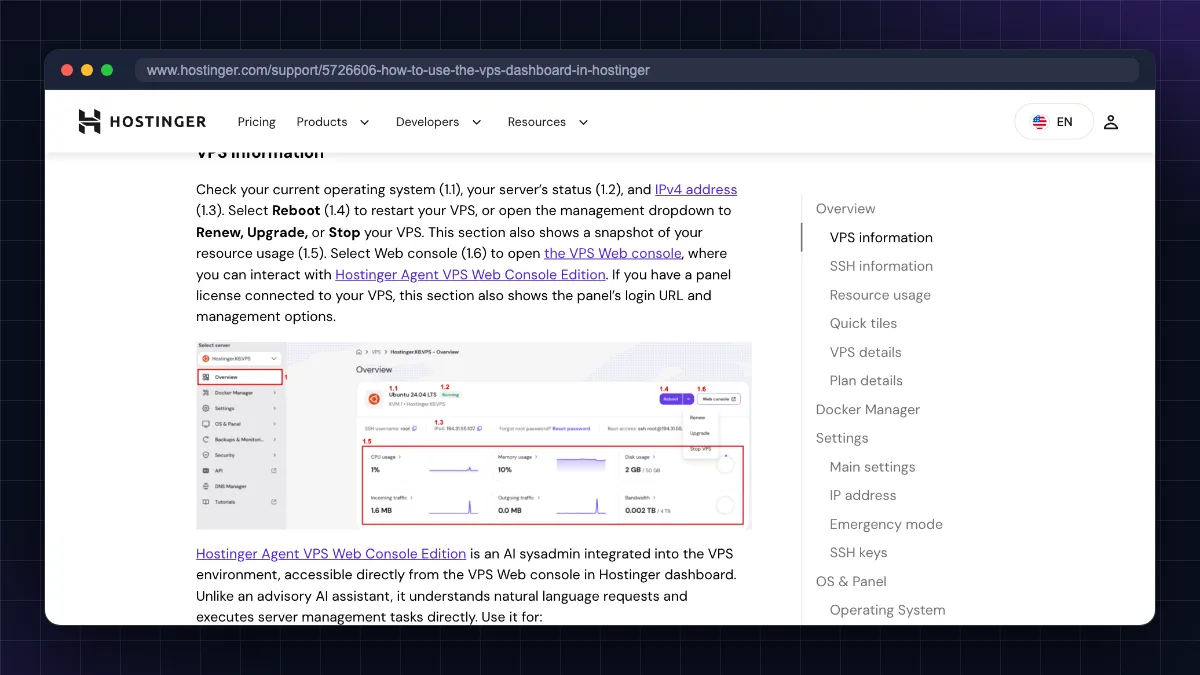
- Connect with SSH. See how to connect to a VPS using SSH.
- Update the system, create a non-root user and set up SSH keys. Follow our Ubuntu VPS initial server setup walkthrough.
- Harden it: disable password login, enable a firewall and Fail2ban, as covered in how to secure a Linux VPS server.
- Point your domain and add a free SSL certificate.
VPS hosting in six points before you rent one
- VPS hosting gives you a private, isolated virtual server with reserved RAM, CPU and storage on a shared physical machine.
- KVM is the standard virtualisation technology; it gives each VPS its own kernel and full root access.
- Common uses: growing websites, n8n automation, MT5 trading, game servers, personal VPN and development.
- Unmanaged VPS is cheapest but you handle security; managed VPS costs more but saves time.
- In India, entry VPS plans start around ₹400 to ₹1,000 per month (as of October 2026); always compare renewal prices.
- Choose by RAM, data centre location, backups, renewal price and support.
Do you need a VPS, or is shared hosting still enough?
If your site is a small blog on shared hosting and loads fine, stay there; move to a VPS when you hit resource limits or need to run software like n8n, Docker or MT5. So, what is VPS hosting in one line? It is the middle path between cheap shared hosting and an expensive dedicated server: your own private virtual machine with reserved resources and full control, at a price most Indian freelancers, startups and developers can afford. Choose by RAM and location, compare renewal prices, and be honest about whether you want to manage the server yourself. Ready to pick one? Start with our best VPS hosting in India shortlist, or explore more guides in Web Hosting & Servers.
FAQ
Frequently Asked Questions
What is VPS hosting in simple words?
VPS hosting is renting your own private virtual computer inside a powerful physical server in a data centre. The server is split into several virtual machines, and each gets its own reserved RAM, CPU and storage. You get full control and root access, so you can install any software, unlike shared hosting where everything is fixed.
What is the full form of VPS?
VPS stands for Virtual Private Server. It is virtual because it is created by software on a larger physical machine, private because its resources and data are isolated from other customers, and a server because it runs 24×7 connected to the internet. The term means the same thing in web hosting and in trading.
What is VPS hosting used for?
People use VPS hosting for websites that have outgrown shared hosting, WooCommerce stores, n8n and other automation tools, MT4/MT5 trading platforms, game servers, personal VPNs, Telegram bots, APIs and learning Linux or Docker. Any app that must run 24×7 with custom software is a good fit for a VPS.
How does VPS hosting work?
A hypervisor such as KVM runs on a physical server and divides its CPU, RAM and storage into separate virtual machines. Each virtual machine runs its own operating system and kernel, so it behaves like an independent computer. Your resources are reserved, and problems on another customer's VPS do not affect yours.
Is VPS better than shared hosting?
VPS is better for performance, control and isolation, but not always better for you. Shared hosting is cheaper and easier for small blogs and simple business sites. Move to a VPS when your site slows down, hits resource limits, or you need software like Node.js, Docker or n8n that shared hosting does not allow.
How much does VPS hosting cost in India?
As of October 2026, budget unmanaged VPS plans in India start around ₹400 to ₹1,000 per month, mid-range plans with 8 GB RAM cost about ₹800 to ₹2,500, and managed cloud VPS starts around ₹1,000 per month. Promotional prices need long upfront terms, renewals are higher, and 18% GST is usually added.
What is the difference between managed and unmanaged VPS?
With an unmanaged VPS, you handle updates, security, firewall, backups and software yourself through SSH. With a managed VPS, the provider handles server maintenance and security while you manage your website or app. Unmanaged is cheaper and flexible; managed is safer for non-technical owners and business websites.
How much RAM do I need on a VPS?
For a single small website or bot, 1 to 2 GB RAM is enough. WordPress with moderate traffic or self-hosted n8n works well with 2 to 4 GB. Several websites, WooCommerce, Docker stacks or databases need 8 GB or more. RAM is usually the first limit you hit, so prioritise it over vCPU count.
Is VPS hosting safe?
A VPS is safe when configured properly, because your environment is isolated from other customers. However, on an unmanaged VPS, security is your responsibility. Use SSH keys, disable root password login, enable a firewall and Fail2ban, keep the system updated and take regular backups. Managed VPS providers handle most of this for you.
Can I host multiple websites on one VPS?
Yes. A single VPS can host many websites using a web server like Nginx or Apache with separate virtual hosts, or a control panel like CloudPanel, CyberPanel or cPanel. The limit is your RAM, CPU and storage. Keep important sites on separate servers if one site's traffic spikes could slow the others.
Where to buy
-
Visit official site (opens in new tab)
Beginner who wants an easy panel and Indian billing:
-
Visit official site (opens in new tab)
Most RAM and storage per rupee:
-
Visit official site (opens in new tab)
Cloudways