Vercel vs Netlify: Vercel’s Free Plan Bars Ads and Paid Work, Netlify’s Doesn’t
Web Hosting & Servers 15 min read By Sanjeev Pratap Singh
In this articleTable of contents13
Last updated: 3 November 2026
In the Vercel vs Netlify choice, pick Vercel for Next.js apps and anything with server code that Indian users hit often, because it can run functions in Mumbai. Pick Netlify for static sites, portfolios and small business pages, because its free plan allows commercial use and includes forms. If your site shows AdSense ads or affiliate links, Vercel's free Hobby plan is off the table.
Both platforms changed their pricing in the last two years, and most comparisons online still quote the old numbers. Below are the current limits from the official pages (checked 20 October 2026), worked out for Indian projects: what the free tiers really give you, where the hidden costs sit, and which one to deploy on today.
Quick answer: Vercel is better for Next.js and full-stack apps: generous free limits (100 GB transfer), a Mumbai function region and the best Next.js support, but its Hobby plan is non-commercial only. Netlify is better for static and commercial hobby sites: free commercial use and built-in forms, but its free plan is a tight 300 credits a month.
Vercel vs Netlify at a glance
Vercel and Netlify are both "push to deploy" platforms. You connect a GitHub, GitLab or Bitbucket repo, every push builds your site, and the result goes out on a global CDN with free HTTPS. Each pull request gets its own preview URL.
The difference is focus. Vercel builds Next.js and shapes the platform around it: server rendering, functions and caching are tuned for that framework first. Netlify is framework-neutral and bundles extras that small sites need, like form handling, without extra code.
| Point | Vercel | Netlify |
|---|---|---|
| Free plan | Hobby, $0 | Free, $0 |
| Commercial use on free plan | Not allowed | Allowed (no ban in its terms) |
| Free plan model | Fixed monthly allotments | 300 credits a month, hard limit |
| Cheapest paid plan | Pro, $20 per developer seat a month | Personal, $9 a month |
| Team plan | Pro, $20 per seat | Pro, $20 a month, unlimited members |
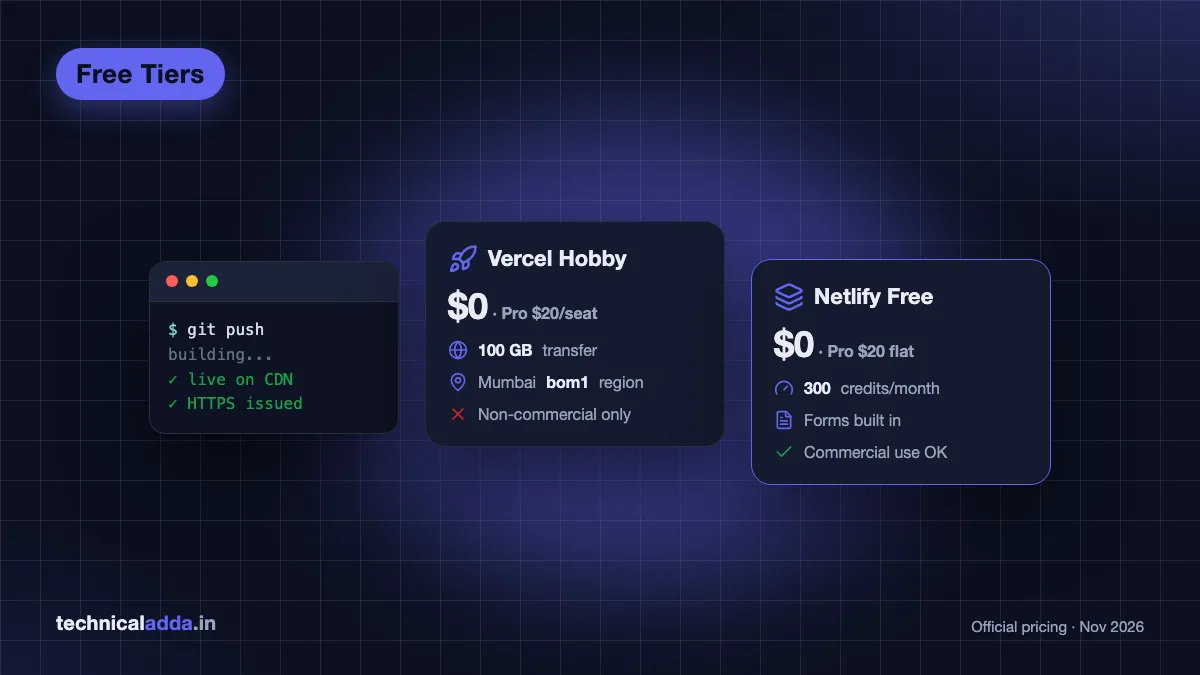
| Function region in India | Yes, Mumbai (bom1) |
No, nearest is Singapore |
| Best at | Next.js, full-stack apps, AI apps | Static sites, Jamstack, forms |
| Built-in forms | No | Yes, free on credit plans |
Prices are in US dollars, from Vercel pricing (opens in new tab) and Netlify pricing (opens in new tab), checked 20 October 2026.
What is the cost in Indian rupees? Neither has a rupee price list, so at ₹95 per dollar: Vercel Pro is about ₹1,900 per developer seat a month, Netlify Personal about ₹855 and Netlify Pro about ₹1,900 for the whole team. Both charge your international card in dollars, so add your bank's forex markup and any GST shown at checkout.

Both platforms deploy straight from a Git push; the real choice is whether you ship a dynamic Next.js app or a simple static site.
Free tier limits compared
Vercel's free plan gives you far more raw capacity. Netlify's free plan is smaller but resets every month in a simpler way: one pool of credits that everything draws from.
Vercel Hobby limits
Per Vercel's limits (opens in new tab) and fair use pages, a Hobby account gets each month:
- 100 GB Fast Data Transfer (bandwidth to visitors)
- 1 million edge requests and 1 million function invocations
- 4 hours of Active CPU and 360 GB-hours of provisioned memory for functions
- 5,000 image optimisation transformations
- 100 deployments a day, one build at a time, 45 minutes max per build
- Functions in a single region, up to 300 seconds per run
Hobby accounts can't buy extra usage. Sustained use past the limits can get a deployment paused, and paused projects don't resume on their own; you unpause them from the dashboard after cutting usage or upgrading.
Netlify Free credits
Netlify moved new accounts to credit-based pricing on 4 September 2025. The Free plan has a hard limit of 300 credits a month, and Netlify's credits documentation (opens in new tab) lists what each thing costs:
| Usage | Credits |
|---|---|
| Production deploy | 15 per deploy (failed deploys and rollbacks are free) |
| Bandwidth | 20 per GB |
| Web requests | 2 per 10,000 requests |
| Compute (functions) | 10 per GB-hour |
| Deploy previews and branch deploys | Free |
| Form submissions | Free |
Here is what 300 credits buys in practice. Ten production deploys use 150 credits. That leaves 150 credits, which is 7.5 GB of bandwidth if nothing else runs. A portfolio with a few hundred visits a day fits. A blog that deploys every day does not: 20 production deploys alone eat all 300 credits.
When the credits run out, Netlify pauses every site on the account and visitors see a "Site not available" page until the next cycle. The Free plan can't buy extra credits.
If you opened your Netlify account before 4 September 2025, you are on a legacy plan with the old limits (100 GB bandwidth and 300 build minutes a month) and nothing changes unless you switch.
The commercial use rule most Indian bloggers miss
Vercel's Hobby plan is for personal, non-commercial use only. Its fair use guidelines define commercial use broadly, and these all count:
- Taking payments from visitors
- Advertising a product or service you sell
- Getting paid to build or host the site (freelance client work)
- A site whose main purpose is affiliate links
- Showing ads, including Google AdSense
Donation buttons are allowed. Everything else on that list needs Vercel Pro.
This matters in India because a large share of side projects are AdSense blogs, affiliate review sites and freelance sites for local businesses. All three break Vercel's Hobby terms, even with ten visitors a day.
Netlify's subscription agreement has no clause banning commercial use on the Free tier. It does say the free tier is offered at Netlify's discretion with no service-level commitment, so treat it as fine for a small business site, not for anything where downtime costs you money.
Paid plans and real monthly cost in rupees
Both platforms bill in US dollars, so you need an international debit or credit card, and your bank may add a forex markup. Vercel's pricing page says prices exclude GST, which is added to the invoice where the law requires it.
| Plan | Price | What's included |
|---|---|---|
| Vercel Pro | $20 per developer seat a month | $20 usage credit, 1 TB data transfer, 10 million edge requests, functions in up to 5 regions |
| Vercel overage | Usage-based | From $0.15 per GB transfer, $0.60 per million invocations, $2 per million requests |
| Netlify Personal | $9 a month | 1,000 credits, 1-day observability, smart secret detection |
| Netlify Pro | $20 a month | 3,000 credits, unlimited members, 3+ concurrent builds, 30-day analytics |
| Netlify top-ups | Auto recharge | 500 credits for $5 (Personal), 1,500 credits for $10 (Pro) |
What is the cost in Indian rupees? At ₹95 per dollar, Vercel Pro is about ₹1,900 per seat a month, Netlify Personal about ₹855 and Netlify Pro about ₹1,900. Netlify top-ups are about ₹475 (Personal) and ₹950 (Pro). Your bank's forex markup and any GST come on top.
The seat model is the big difference for teams. Four developers on Vercel Pro cost $80 a month before usage. Four developers on Netlify Pro cost $20, because members are unlimited. A solo developer pays the same $20 on both.
For a solo freelancer, Netlify Personal at $9 is the cheapest legal way to host client sites on either platform. Vercel also gives new teams a default on-demand budget of $200 that you can lower, so set it to something you're comfortable losing on day one.
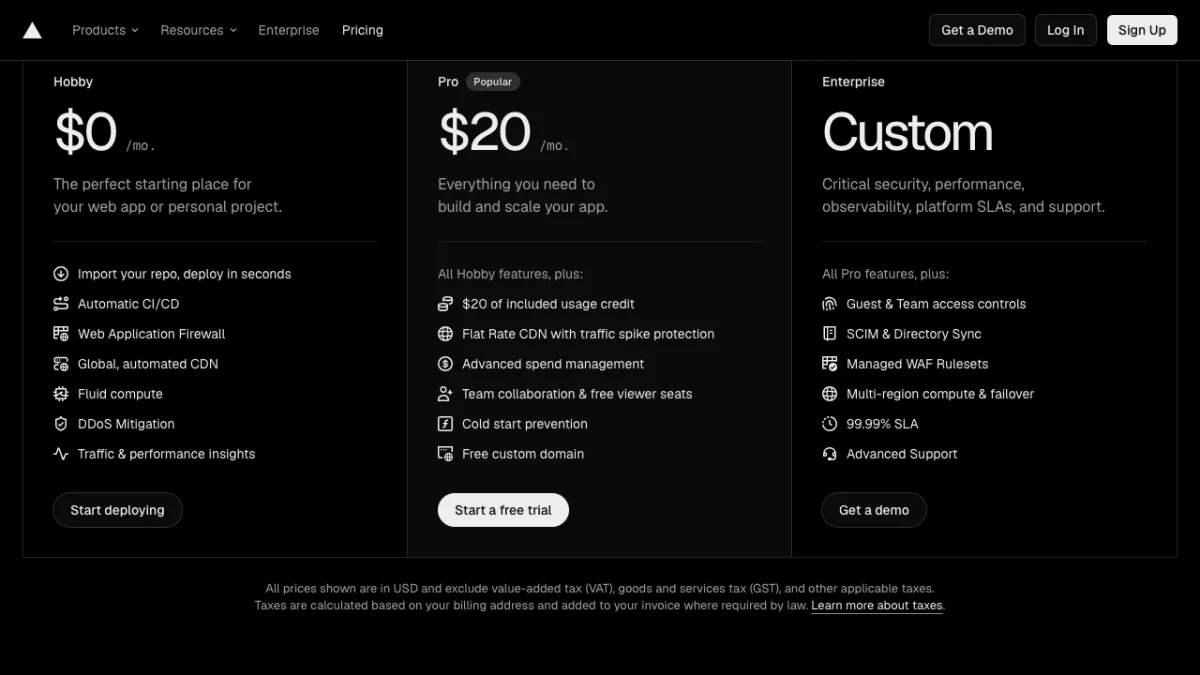
Vercel's pricing page on 20 October 2026: Pro is $20 a month and includes $20 of usage credit, and the note below the cards says GST is added on top.
What is the cost in Indian rupees? At ₹95 per dollar, Vercel Pro is about ₹1,900 a month per developer seat, before GST and forex markup. Hobby stays ₹0.
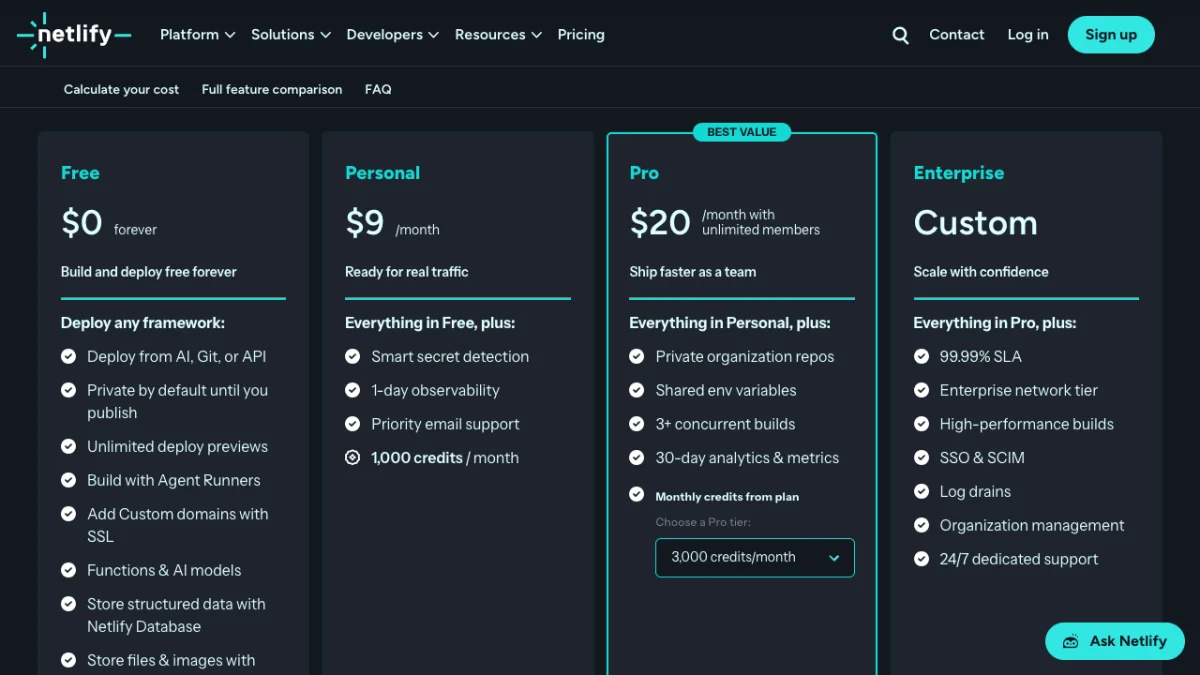
Netlify's pricing page on 20 October 2026: Personal at $9 is the cheapest paid plan, and Pro's $20 covers unlimited team members.
What is the cost in Indian rupees? At ₹95 per dollar, Netlify Personal is about ₹855 a month and Pro about ₹1,900 a month for the whole team, billed in dollars. Free stays ₹0.

Netlify's credit plans work like a jar that every deploy and every GB of traffic drains, and the site pauses when it runs dry.
Speed for Indian visitors
For static pages, both are fast in India because both serve cached files from CDN edges near the visitor. Vercel says its CDN has over 126 points of presence; static HTML, CSS and images load quickly on Jio and Airtel either way.
The gap shows up with server code. Every API route, server-rendered page or form handler runs in one function region, and the round trip from Delhi or Chennai to that region adds delay to every request.
- Vercel lists Mumbai (
bom1, AWS ap-south-1) among its 19 compute regions (opens in new tab). New projects default to Washington, D.C. (iad1), but even Hobby users can change the single function region in project settings or with"regions": ["bom1"]invercel.json. - Netlify functions default to US East (Ohio). The self-serve regions list has no Indian option; Singapore is the closest. Changing the region is a Pro and Enterprise feature.
So an Indian Next.js app with a database in Mumbai runs entirely in-country on Vercel, even on the free plan. On Netlify the same app sends each dynamic request to Ohio unless you pay for Pro and pick Singapore.
One India-specific quirk: some developers have reported on community forums that free platform subdomains such as *.vercel.app didn't load on certain Jio connections. There's no official explanation. Using your own custom domain sidesteps the problem, and our guide on how to buy a domain name covers that in ten minutes.

Server code that runs in Mumbai answers Indian visitors faster than code that has to cross the sea to Singapore.
Next.js, frameworks and backend features
Vercel is the reference platform for Next.js. Server components, incremental static regeneration, image optimisation and middleware work there on day one of each Next.js release, because the same company ships both.
Netlify runs Next.js through its own adapter and supports the main App Router features, but you're one step removed from the framework's makers. For Astro, SvelteKit, Nuxt, Remix, Eleventy, Hugo or plain HTML, both platforms work well and the framework argument mostly disappears.
Backend limits that matter for real apps:
| Feature | Vercel | Netlify |
|---|---|---|
| Function max duration | 300 seconds on Hobby, up to 800 seconds on Pro | 60 seconds synchronous, 15 minutes background |
| Scheduled jobs | Cron jobs, up to 100 per project | Scheduled functions (30 seconds per run) |
| Forms | Bring your own (API route or a form service) | Built in: add data-netlify="true" to the form tag |
| Image optimisation | Built in, 5,000 transformations free | Built in (Netlify Image CDN) |
| Persistent servers or WebSockets | No, functions only | No, functions only |
Netlify Forms is the feature that wins small business sites. A contact form on a static site needs one HTML attribute, and submissions show up in the dashboard. On Vercel you write an API route or plug in a third-party form tool.
Neither platform runs a long-lived Node.js server, a Python worker that stays up, or a database. If your backend needs those, see our guide to deploy a Node.js app on a server instead.
Developer experience and deploy workflow
Both take about five minutes from repo to live URL, and the steps are nearly identical:
- Sign up with GitHub and allow access to your repo.
- Import the project. Both detect the framework and fill in the build command and output folder.
- Add environment variables (API keys, database URLs) in project settings.
- Click deploy. Every later push to the main branch updates production.
- Add your custom domain and point DNS as shown. HTTPS is issued automatically, so you don't need a separate free SSL certificate.
A few honest differences from daily use:
- Logs. Vercel Hobby keeps runtime logs for 1 hour, which makes debugging a bug a user reported yesterday painful. Netlify Personal keeps 1 day of observability; Pro gets 30-day analytics and metrics.
- Preview cost. On Netlify, deploy previews and branch deploys cost zero credits, so push branches freely and only merge to production when ready.
- Build queue. Vercel Hobby builds one deployment at a time; a second push waits.
- Vibe-coded apps. Most AI app builders export React or Next.js projects that deploy to Vercel in one click. If you build that way, our Lovable vs Bolt comparison covers which builder exports cleaner code.
Security and reliability in 2026
Vercel disclosed a security incident in April 2026. Per its official bulletin (opens in new tab), attackers got in through a third-party AI tool used by an employee, and a limited set of customers had environment variables that were not marked "sensitive" exposed. Vercel now recommends the sensitive flag so secret values can't be read back later.
The lesson applies to both platforms:
- Mark every API key and database password as sensitive or secret in project settings.
- Rotate keys after any incident notice, and use separate keys for preview and production.
- Never commit
.envfiles. Neither free tier comes with an uptime guarantee, so pay for a plan if downtime costs you money.
Vercel or Netlify, which is better for your project
Here is our pick by project type.
| Your project | Pick | Why |
|---|---|---|
| Next.js app with API routes, Indian users | Vercel | Mumbai function region, best Next.js support |
| Personal portfolio or resume site | Either, Netlify slightly | Both free; Netlify has forms for a contact page |
| AdSense blog or affiliate site | Netlify Free, or Vercel Pro | Vercel Hobby bans ads and affiliate-led sites |
| Freelance site for a local business | Netlify Personal ($9) | Cheapest commercial plan, built-in forms |
| Team of 3+ developers | Netlify Pro | Flat $20 with unlimited members vs $20 per seat |
| AI chatbot or app calling LLM APIs | Vercel | Longer function duration, AI SDK, streaming |
| Backend with WebSockets or a database | Neither | Use a VPS or a container host |
What is the cost in Indian rupees? At ₹95 per dollar, Netlify Personal is about ₹855 a month, and Netlify Pro or one Vercel Pro seat is about ₹1,900 a month.
Our default for a student learning web development is Vercel Hobby, because it's free with room to spare and teaches the deploy flow most companies use. The moment the site carries ads or a client pays you, move to Netlify or upgrade to Vercel Pro.
Vercel alternatives: Render, Railway and a VPS
Sometimes the right answer to "Vercel vs Netlify" is neither, especially when you need a server that stays running.
Vercel vs Render. Render runs full web services, background workers and Postgres. Its free web services (opens in new tab) spin down after 15 minutes without traffic (the next visitor waits for a cold start) and share 750 instance hours a month. Free Postgres databases expire after 30 days. Good for a demo backend, not for production.
Vercel vs Railway. Railway runs containers and databases on usage-based pricing: a one-time $5 trial credit, a Free plan with $1 of usage a month, and a Hobby plan at $5 a month that includes $5 of usage. It suits small Node.js or Python backends that need to stay up.
A VPS. For about the price of one Vercel seat, you can run several sites, a database and background jobs on your own server. Tools like Coolify give you a Vercel-style dashboard on it; see our Coolify install guide. bills in INR with UPI if you want to skip dollar payments.
If you only need a free static site and want more options, our guide to host a website for free compares GitHub Pages and others too.
What to weigh before you pick a platform
- Vercel wins for Next.js and dynamic apps serving India, because its Mumbai (
bom1) function region works even on the free plan. - Vercel Hobby is non-commercial only. AdSense, affiliate-led sites, payments and paid client work all need Pro.
- Netlify Free allows commercial use but caps you at 300 credits a month; 15 credits per production deploy and 20 per GB of bandwidth add up fast.
- Teams save on Netlify Pro ($20 flat, unlimited members) versus Vercel Pro ($20 per developer seat).
- Both bill in dollars: $20 a month is about ₹1,900 at ₹95 per dollar, plus any forex markup and GST.
- Need a server that stays up or a database? Look at Railway, Render's paid tiers or a VPS.
So should you deploy on Vercel or Netlify?
Your Vercel vs Netlify pick comes down to two questions: does your site make money, and does it run server code for Indian users? Dynamic Next.js app, non-commercial: Vercel Hobby with the Mumbai region. Commercial site on a zero budget: Netlify Free, and watch your credits. Paying team: compare $20 per seat against Netlify's flat $20.
Next, read our guide to host a website for free for more zero-cost options, or browse every guide in our hosting section.
FAQ
Frequently Asked Questions
Is Vercel or Netlify better for beginners?
Vercel is slightly better for beginners learning React or Next.js because its free plan has more room (100 GB transfer, 1 million function invocations) and most tutorials use it. Netlify is just as easy for plain HTML or static site generators, and its built-in forms help with a first portfolio. Both deploy from GitHub in about five minutes.
Can I use Vercel's free plan for a commercial website?
No. Vercel's Hobby plan is for personal, non-commercial use only. Its fair use guidelines count payments, product ads, paid client work, affiliate-focused sites and ads such as Google AdSense as commercial use. Donation links are allowed. Any commercial site needs Vercel Pro at $20 per developer seat a month.
Is Netlify free plan good enough for a small business site?
Yes, for a simple static site with modest traffic. Netlify's terms don't ban commercial use on the Free plan, and forms are free. The catch is the 300 credit monthly limit: about 15 GB of bandwidth if nothing else runs, minus 15 credits per production deploy. If credits run out, the site is paused until the next cycle.
Which is faster in India, Vercel or Netlify?
For static pages, both are fast because both serve files from CDN edges near Indian visitors. For server-side code, Vercel is faster in India because you can run functions in Mumbai (bom1), even on the free plan. Netlify's nearest function region is Singapore, and choosing it needs the Pro plan.
How much does Vercel Pro cost in India?
Vercel Pro costs $20 per developer seat per month and includes $20 of usage credit, 1 TB of data transfer and 10 million edge requests. It's billed in US dollars on an international card. At ₹95 per dollar that's about ₹1,900 a month per seat, plus GST and any forex markup your bank adds.
What happens when Netlify free credits run out?
All projects on the account are paused and visitors see a "Site not available" page until your next monthly cycle. Free plans can't buy extra credits or use auto recharge. To keep a site online, upgrade to Personal ($9 a month, 1,000 credits) or cut deploys and bandwidth, since deploy previews and form submissions cost no credits.
Can I host a Next.js app on Netlify?
Yes. Netlify supports Next.js through its own adapter, including App Router, server rendering and incremental static regeneration. Most apps deploy without changes. New Next.js features tend to work on Vercel first because Vercel builds the framework, so pick Vercel if you rely on the newest releases or edge features.
Is Vercel better than Render or Railway?
For frontends and Next.js, yes. Vercel's CDN and preview deployments are better than Render's or Railway's. For long-running backends, databases, WebSockets or background workers, Render and Railway are better because Vercel only runs short functions. Many developers host the frontend on Vercel and the API on Railway or a VPS.