Self Hosted LLM on a VPS: What $8.79 a Month Runs, When You Need a GPU (2026)
AI Coding 16 min read By Sanjeev Pratap Singh
In this articleTable of contents13
Last updated: 30 October 2026
A self hosted LLM is worth it when you need privacy or a fixed monthly bill, and the cheapest setup that feels usable is Ollama plus Open WebUI on a VPS with 8 GB RAM running a 3B or 4B model. For ChatGPT-like speed with 8B to 20B models, rent a GPU by the hour instead of buying a bigger CPU server.
Most guides on this topic are written by hosting companies and skip the uncomfortable part: CPU servers are slow. Below you get real speed numbers, a RAM and VRAM sizing table, the exact setup commands, how to lock it down with HTTPS, and what it costs in US dollars (with the rupee figure) as of October 2026.
Quick answer: To self host an LLM, rent an Ubuntu 24.04 VPS with at least 8 GB RAM, install Ollama with
curl -fsSL https://ollama.com/install.sh | sh, pull a small model such asqwen3:4b, and run Open WebUI in Docker for a ChatGPT-style interface. Put it behind HTTPS with Caddy. For 8B+ models at chat speed, use a GPU server.
What a self hosted LLM is, and when it makes sense
A self hosted LLM is an open-weight language model (Llama, Qwen, Gemma, gpt-oss and others) that runs on a machine you control, so prompts and replies never go to OpenAI, Google or Anthropic. You download the model file once and serve it through a chat interface or an API.
It makes sense in a few clear cases:
- Client or company data. Contracts, medical notes or source code you are not allowed to paste into a public chatbot.
- Background jobs. Summarising tickets overnight, tagging thousands of product descriptions, or classifying emails, where speed matters less than a fixed cost.
- Learning. Students and developers who want to understand how models, context windows and APIs work under the hood.
- Your own apps. An internal tool or MCP server that calls an OpenAI-style endpoint without per-token billing.
It is a poor fit if you just want the smartest answers for daily work. Paid frontier models still beat anything that fits on a $13 a month server. If that is you, our ChatGPT vs Gemini vs Claude comparison is the better read.
Only want to try models on your own computer first? Start with our guide to run an LLM locally on your laptop. This article picks up where that one stops: a server that stays on, that you and your team can reach from anywhere.

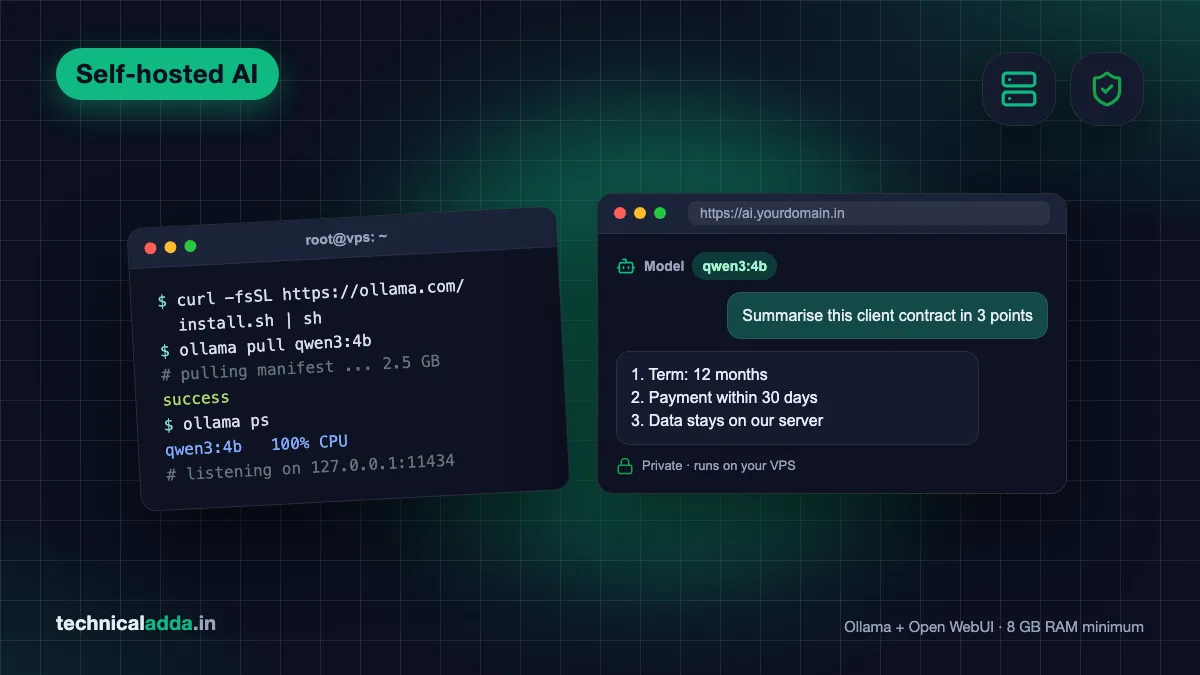
With a self hosted LLM the model and every chat live on hardware you control, so prompts never leave your server.
Where to run it: laptop, VPS or GPU cloud
You have three realistic places to host a model. The right one depends on how fast replies need to be and how many people will use it.
| Option | Example and price (Oct 2026) | Speed with an 8B model | Best for |
|---|---|---|---|
| Your own PC or old laptop | Free if you own it; electricity and a static IP or tunnel | Depends on your GPU | Home lab, learning |
| Oracle Cloud Always Free | Arm VM, 2 OCPU and 12 GB RAM, $0 | Slow, CPU only | Trying 3B to 4B models for free |
| CPU VPS, 8 GB RAM | Hostinger KVM 2: 2 vCPU, 8 GB, $8.79/month promo, renews $14.99 | Around 3 tokens/sec (similar 4 vCPU box) | Small models, background jobs |
| CPU VPS, 16 to 32 GB RAM | Hostinger KVM 4: 4 vCPU, 16 GB, $12.99/month promo; KVM 8: 8 vCPU, 32 GB, $25.99/month promo | Around 5 to 7 tokens/sec | 8B to 14B models, a patient user |
| GPU cloud by the hour | DigitalOcean RTX 4000 Ada 20 GB at $0.76/hour | Around 63 tokens/sec | Chat speed, small teams |
| Indian GPU cloud | E2E Networks L4 24 GB at $0.57/hour | Fast | Teams that want an Indian provider |
Hostinger prices are from its Ollama VPS page (opens in new tab); they are introductory rates paid upfront, and renewals cost more. DigitalOcean rates are from its GPU Droplet pricing (opens in new tab). E2E's L4 rate is from its pricing page (opens in new tab) and excludes tax. All checked on 20 October 2026.
What is the cost in Indian rupees? On hostinger.in, KVM 2 is ₹779 a month promo (renews ₹1,199), KVM 4 is ₹1,099 and KVM 8 is ₹2,199, plus 18% GST. The DigitalOcean RTX 4000 Ada is about ₹72 an hour at ₹95 per dollar, plus GST and forex markup. The E2E L4 works out to about ₹54 an hour at ₹95 per dollar, plus GST. Oracle's free VM stays ₹0.
The speed column comes from published benchmarks on DigitalOcean servers in August 2026 (learnwithhasan.com (opens in new tab)): llama3.1:8b managed 2.8 tokens per second on a 4 vCPU, 8 GB shared box and 6.8 on 8 dedicated vCPUs, against 63.2 on the RTX 4000 Ada. A token is roughly three quarters of an English word.
Our take: 3 tokens per second feels like watching someone type with one finger. It's fine for jobs that run while you sleep. For a chat window people use all day, either stick to a 3B or 4B model on CPU, or pay for GPU hours.
For more RAM per dollar, look at Contabo's Cloud VPS 8 (8 vCPU, 24 GB), which is priced for a 24-month term; check the current dollar price on its site before you compare. Our Contabo VPS review covers the India region fee and the catches. Comparing more providers? See best VPS hosting in India.
Self hosted LLM sizing: RAM and VRAM per model
The model has to fit in memory. On a CPU server that means system RAM; on a GPU it means video memory (VRAM). If an 8B model does not fit in VRAM, Ollama splits it between GPU and CPU, and speed drops sharply.
A rule of thumb that holds well for the 4-bit (Q4) versions Ollama downloads by default: memory needed = download size + 2 to 3 GB for the context window, the runtime and the operating system.
| Model (Ollama tag) | Download size | RAM for CPU use | VRAM to fit fully on GPU | Good for |
|---|---|---|---|---|
llama3.2:3b |
2.0 GB | 4 to 6 GB | 4 GB | Summaries, tagging, quick replies |
qwen3:4b |
2.5 GB | 6 GB | 4 GB | Best small all-rounder on CPU |
llama3.1:8b |
4.9 GB | 8 GB (6.2 GB peak measured) | 6 to 8 GB | General chat, English writing |
qwen3:8b |
5.2 GB | 8 GB | 8 GB | Coding help, reasoning |
qwen3:14b |
9.3 GB | 16 GB | 12 GB | Better answers, slower on CPU |
gpt-oss:20b |
14 GB | 16 GB minimum | 16 GB or more | Strong open model, Apache 2.0 |
qwen3:30b |
19 GB | 32 GB | 24 GB | Team server on a big GPU |
gpt-oss:120b |
65 GB | Not practical | One 80 GB GPU | Serious production use |
Sizes are from the Ollama model library (opens in new tab) in October 2026. The gpt-oss page on Ollama says the 20B model can run on systems with as little as 16 GB of memory, which leaves no room for anything else on a 16 GB server.
Two more things eat memory:
- Context length. Ollama's default context is 4,096 tokens. Raising it (for long PDFs or code files) increases memory use. Set it with
OLLAMA_CONTEXT_LENGTH. - Several loaded models. Ollama keeps a model in memory for 5 minutes after the last request, and on CPU it can hold up to 3 models at once. Two users asking two different models can push a small server into swap.
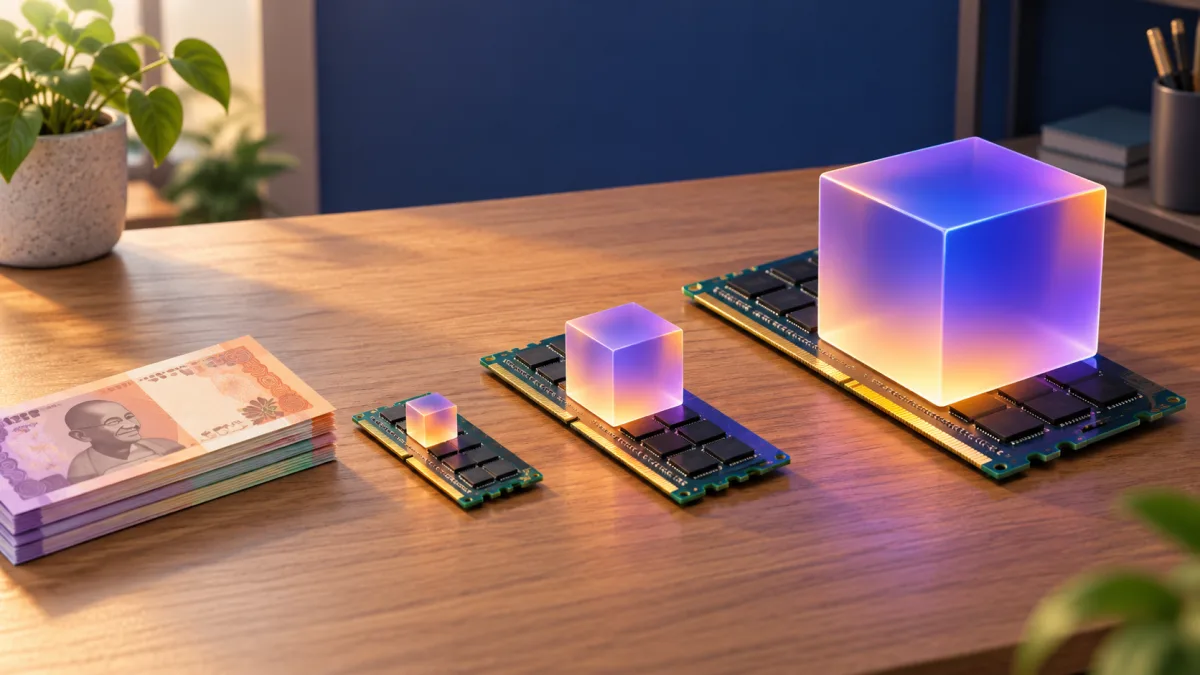
The model has to fit in memory: system RAM on a CPU server, or VRAM on a GPU, or replies slow to a crawl.
Ollama, Open WebUI, llama.cpp or vLLM
You need two pieces: an inference server that loads the model, and an interface people actually use. These are the four names you will keep seeing.
| Tool | What it does | Strength | Weakness |
|---|---|---|---|
| Ollama | Downloads and serves models, OpenAI-compatible API on port 11434 | Easiest setup, huge model library | Weaker under many parallel users |
| Open WebUI | ChatGPT-style web interface with users, chat history and document upload | Works with Ollama out of the box | Needs its own login and updates |
| llama.cpp | The engine underneath many local tools | Fine control over CPU settings | More manual work |
| vLLM | High-throughput server for NVIDIA and AMD GPUs, default port 8000 | Best for many users at once | GPU required in practice, harder setup |
Our pick for nearly everyone: Ollama plus Open WebUI. Move to vLLM only when you have a GPU and more than a handful of people sending requests at the same time. Ollama handles one request per model at a time by default (OLLAMA_NUM_PARALLEL changes that), and that is where vLLM pulls ahead.
How to set up a self hosted LLM on a VPS
These steps use a fresh Ubuntu 24.04 VPS with 8 GB RAM or more, Ollama installed directly on the server and Open WebUI in Docker. Run them as root or with sudo. If SSH is new to you, read how to connect to a VPS using SSH first.
Step 1: Update the server and add swap
apt update && apt upgrade -y
fallocate -l 4G /swapfile && chmod 600 /swapfile
mkswap /swapfile && swapon /swapfile
echo '/swapfile none swap sw 0 0' >> /etc/fstab
Swap stops the server from killing Ollama when a model and Open WebUI briefly need more RAM than you have. It is a safety net, not extra speed.
Step 2: Install Ollama
curl -fsSL https://ollama.com/install.sh | sh
systemctl status ollama
The official Linux install (opens in new tab) sets Ollama up as a systemd service that starts on boot. By default it listens only on 127.0.0.1:11434, which is what you want. Do not expose that port to the internet: Ollama has no login of its own.
Step 3: Pull a model and test it
ollama pull qwen3:4b
ollama run qwen3:4b --verbose
Ask it something, then read the eval rate line. That number is your tokens per second. Under 3 feels slow; 8 or more feels comfortable for chat. On an 8 GB server, try llama3.1:8b next and compare.
Step 4: Install Docker and start Open WebUI
curl -fsSL https://get.docker.com | sh
docker run -d --network=host \
  -v open-webui:/app/backend/data \
  -e OLLAMA_BASE_URL=http://127.0.0.1:11434 \
  --name open-webui --restart always \
  ghcr.io/open-webui/open-webui:main
This is the host-network command from the Open WebUI docs (opens in new tab). It lets the container reach Ollama on localhost without opening Ollama to the network. Open WebUI now listens on port 8080.
Step 5: Create the admin account at once
Open http://your-server-ip:8080 and sign up. The first account becomes the administrator, and sign-up then switches itself off. If you turn sign-ups back on, new accounts wait as pending until you approve them. Do this immediately: until you register, anyone who finds the page can claim it.
Step 6: Add a domain and HTTPS with Caddy
Point an A record such as ai.yourdomain.in at the server IP, then:
apt install -y caddy
cat > /etc/caddy/Caddyfile <<'EOF'
ai.yourdomain.in {
    reverse_proxy 127.0.0.1:8080
}
EOF
systemctl reload caddy
Caddy fetches a free Let's Encrypt certificate on its own. If the page shows a 502 error, the proxy cannot reach Open WebUI; our 502 Bad Gateway fix explains what to check.
Step 7: Close everything except 22, 80 and 443
In your provider's firewall panel, allow only SSH (22), HTTP (80) and HTTPS (443). Port 8080 and 11434 should not be reachable from outside. A cloud firewall is safer than ufw alone here, because Docker writes its own iptables rules.
Step 8: Call it from your own code
Ollama speaks the OpenAI API format at http://localhost:11434/v1/, per the Ollama compatibility docs (opens in new tab). Any OpenAI SDK works if you change the base URL and pass any placeholder key:
curl http://localhost:11434/v1/chat/completions \
  -H "Content-Type: application/json" \
  -d '{"model":"qwen3:4b","messages":[{"role":"user","content":"Summarise UPI Lite in two lines"}]}'
Apps on the same server can use this directly. For apps elsewhere, use the API keys Open WebUI generates per user instead of exposing Ollama. Deploying a Node.js backend next to it? Our deploy a Node.js app guide covers the rest.
Shortcut: the Hostinger Ollama template
Hostinger offers an Ubuntu 24.04 64bit with Ollama template that comes with Ollama, a Llama 3 model and Open WebUI already installed, according to its LLM hosting page (opens in new tab). That skips Steps 2 to 4.
Pick KVM 2 (8 GB) at minimum and KVM 4 (16 GB) if you want 8B models to run without swap. The promo prices are paid upfront for the whole term, and renewals cost noticeably more (KVM 2 renews at $14.99 a month), so compare the renewal figure before you pay.
You still need Steps 5 to 7. A preinstalled template does not register your admin account or close ports for you.
Running on a GPU server
On a GPU, Ollama works the same way and simply runs much faster. The extra step is NVIDIA's driver and, if you use Docker, the NVIDIA Container Toolkit. The Ollama Docker docs (opens in new tab) give this command once the toolkit is installed:
docker run -d --gpus=all -v ollama:/root/.ollama \
  -p 127.0.0.1:11434:11434 --name ollama ollama/ollama
(We added 127.0.0.1: so the port stays private.) Check that the model is fully on the GPU with ollama ps: the PROCESSOR column should say 100% GPU. Anything less means the model is too big for that card's VRAM.
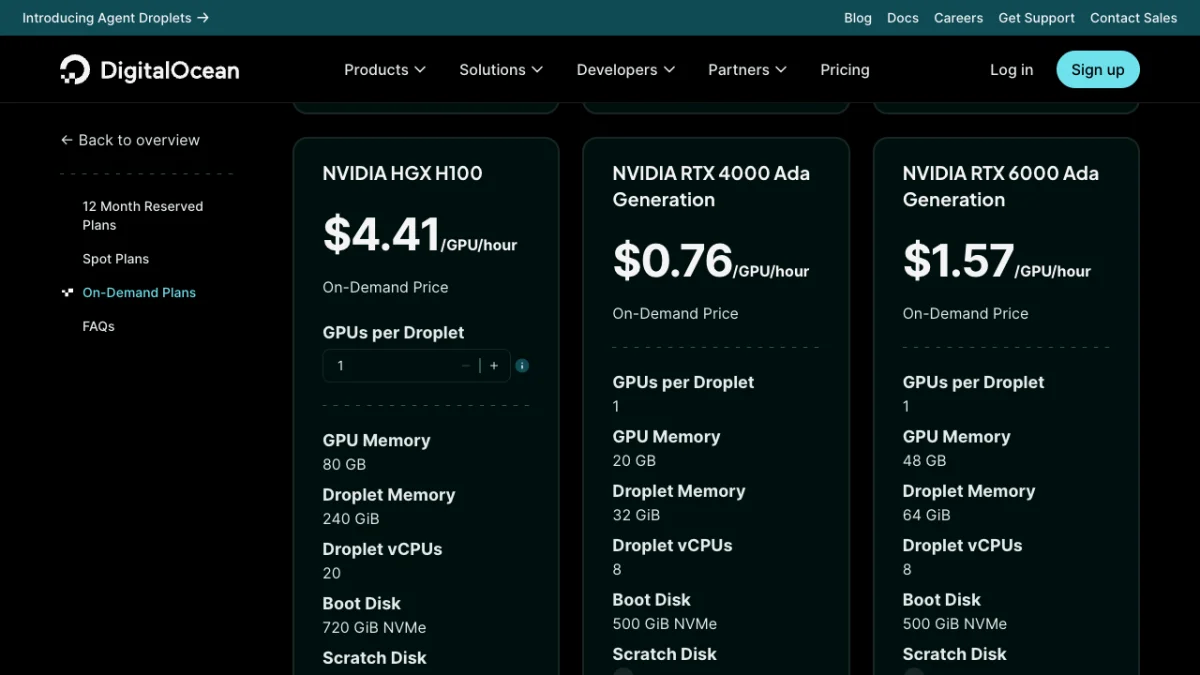
DigitalOcean's GPU pricing on 20 October 2026: the RTX 4000 Ada (20 GB VRAM) is the cheapest card that runs 8B to 14B models at chat speed.
What is the cost in Indian rupees? At ₹95 per dollar, $0.76 an hour is about ₹72 an hour, or about ₹52,700 a month if the Droplet runs 24×7. GST and your card's forex markup come on top.
Bill-saving tips for hourly GPUs:
- Destroy it when idle. An RTX 4000 Ada running 24×7 costs about $555 a month on DigitalOcean, and a powered-off Droplet is still billed. Running it 8 hours on weekdays cuts the bill to roughly a quarter.
- Snapshot your setup so you can recreate the GPU server in minutes without reinstalling.
- Indian provider. E2E Networks is an Indian cloud company, which helps if a client wants data kept in India. Confirm the data centre location for your GPU before you sign up.
When ten or more people use the server at once, switch the engine to vLLM (vllm serve <model>), which batches requests far better on the same GPU.
Self-hosting vs paying for an API
Self-hosting rarely wins on price per token. The same August 2026 benchmark worked out about $0.84 per million output tokens for an RTX 4000 Ada at full use, and $7 to $9 per million on CPU servers. Small paid API models are often cheaper than that, and you pay nothing when idle.
| Factor | Self hosted LLM | Paid API or chatbot |
|---|---|---|
| Data privacy | Prompts stay on your server | Sent to the provider |
| Monthly cost | Fixed: $8.79 to $25.99 VPS, or GPU hours | Grows with use |
| Answer quality | Good with 8B to 30B models | Best available models |
| Speed on a budget | Slow on CPU | Fast |
| Maintenance | You patch, back up and monitor | None |
What is the cost in Indian rupees? The same Hostinger VPS range costs ₹779 to ₹2,199 a month on hostinger.in, plus GST. An RTX 4000 Ada left on all month is about ₹52,700 at ₹95 per dollar.
Choose self-hosting for privacy, fixed costs and learning. Choose an API when quality and speed matter more. Many teams mix the two: sensitive documents go to the self hosted model, everything else to a paid one. If cost is the only worry, check whether you qualify for free plans like ChatGPT Go free in India before buying a server.
Security checklist
An open Ollama port is one of the most common mistakes in self hosted AI. Internet scanners look for port 11434 because it answers without a password.
- Ollama bound to
127.0.0.1(the default). Never setOLLAMA_HOST=0.0.0.0on a public server without a firewall in front. - Open WebUI admin account created immediately, with a long unique password.
- Sign-ups left off (Open WebUI turns them off once an admin exists), or set to pending approval if you enable them.
- Only ports 22, 80 and 443 open in the cloud firewall.
- SSH key login on, password login off.
- Open WebUI's data volume (
open-webui) backed up, since it holds every user's chat history. - Docker images updated monthly:
docker pull ghcr.io/open-webui/open-webui:main, then recreate the container.

Lock the server down before you share it: only HTTPS reaches Open WebUI, and Ollama's own port stays closed to the internet.
Common problems and fixes
Open WebUI shows no models. It cannot reach Ollama. Check curl http://127.0.0.1:11434 on the server (it should say "Ollama is running") and confirm the container uses --network=host with OLLAMA_BASE_URL=http://127.0.0.1:11434.
Replies are painfully slow. You are on CPU with a model too big for it. Drop to qwen3:4b or llama3.2:3b, or move to a GPU. Check ollama ps to see whether the model is on CPU or GPU.
Server freezes or Ollama restarts. RAM ran out. Add swap, load one model at a time, or set OLLAMA_MAX_LOADED_MODELS=1 with systemctl edit ollama, then restart the service.
"Out of capacity" on Oracle Cloud. Free Arm capacity in Mumbai and Hyderabad runs out often. Our Oracle Cloud free tier VPS guide explains the retry approach.
Model gives wrong or made-up answers. Small models invent facts more often. Give them the source text in the prompt, or upload documents in Open WebUI so answers come from your files.
Six things to settle before renting an LLM server
- Self-host for private data, a fixed bill, overnight jobs or learning. Not for the best possible answers.
- Memory needed is the download size plus 2 to 3 GB: about 8 GB RAM, or 6 to 8 GB VRAM, for an 8B model.
- With an 8B model, CPU servers manage about 3 to 7 tokens per second; an RTX 4000 Ada did about 63.
- Ollama plus Open WebUI is the easiest stack; switch to vLLM only for many users on a GPU.
- Keep Ollama on localhost, register the admin account at once, and expose only ports 22, 80 and 443.
- In India, a Hostinger KVM 2 at $8.79 a month (promo; ₹779 on hostinger.in) is the cheapest usable paid start; Oracle's free Arm VM is the free one.
Start on an 8 GB VPS, then decide on a GPU
A self hosted LLM is easy to start and easy to get wrong. Start with Ollama and Open WebUI on an 8 GB VPS, measure your tokens per second with a 4B model, and only then decide whether you need more RAM or a GPU. Keep Ollama on localhost and register the admin account the moment the page loads.
New to running models at all? Test them first with our guide to run an LLM locally on your laptop, then bring the one you like to a server. More developer guides live in our AI coding category.
FAQ
Frequently Asked Questions
What is a self hosted LLM?
A self hosted LLM is an open-weight AI language model, such as Llama, Qwen, Gemma or gpt-oss, that runs on a server or computer you control instead of a company's cloud. Your prompts and replies stay on your machine. You serve it with tools like Ollama and use it through a chat interface such as Open WebUI or an API.
How much RAM do I need to self host an LLM?
Plan for the model's download size plus 2 to 3 GB. A 3B or 4B model runs in 4 to 6 GB RAM, an 8B model needs about 8 GB, a 14B model 16 GB, and gpt-oss:20b at least 16 GB. On a GPU, the model should fit in VRAM: 8 GB of VRAM handles 8B models comfortably.
Can I run an LLM on a VPS without a GPU?
Yes, but expect slow replies. Published tests in 2026 measured about 2.8 tokens per second for an 8B model on a 4 vCPU, 8 GB VPS and 6.8 on 8 dedicated vCPUs. Smaller 3B or 4B models run two to three times faster. CPU servers suit background jobs and one patient user better than a team chat tool.
What is the cheapest way to self host an LLM in India?
Oracle Cloud's Always Free Arm VM with 2 OCPU and 12 GB RAM costs nothing and runs 3B to 8B models slowly. The cheapest paid option we found is Hostinger's KVM 2 with 8 GB RAM at $8.79 a month (₹779 on hostinger.in) on a 24-month promo, which also offers a ready-made Ollama template. Both use CPU only.
Is Ollama good for production?
Ollama is fine for small teams and internal tools, and it offers an OpenAI-compatible API. By default it handles one request per model at a time, which you can raise with OLLAMA_NUM_PARALLEL. For many simultaneous users on a GPU, vLLM gives much higher throughput. Never expose Ollama's port 11434 directly, because it has no built-in login.
Is self hosting an LLM cheaper than using the ChatGPT API?
Usually not per token. A 2026 benchmark put a well-used RTX 4000 Ada GPU at about $0.84 per million output tokens and CPU servers at $7 to $9, while small API models can cost less and nothing when idle. Self-hosting wins on privacy and a fixed monthly bill, not raw price.
What is Open WebUI?
Open WebUI is a free, self-hosted web interface that looks and works like ChatGPT. It connects to Ollama or any OpenAI-compatible server, supports multiple users with an admin account, keeps chat history and lets users upload documents. You run it as a Docker container, usually on port 3000 or 8080, behind HTTPS.
Which model is best for a self hosted LLM on a small server?
On an 8 GB CPU server, qwen3:4b is the best all-rounder in our view, with llama3.2:3b as a faster option for summaries. With 16 GB RAM, try llama3.1:8b or qwen3:8b. With a 16 GB or larger GPU, gpt-oss:20b gives noticeably better answers. Test two or three on your own prompts before choosing.
Can I use a self hosted LLM with my own apps?
Yes. Ollama exposes an OpenAI-compatible API at localhost:11434/v1, so any OpenAI SDK works if you change the base URL and pass a placeholder key. For apps on other servers, route requests through Open WebUI's per-user API keys or a reverse proxy with authentication instead of opening Ollama's port.
Where to buy
-
Visit official site (opens in new tab)
Hostinger